

On this page6 sections
Which control affects crawling?
Only robots.txt affects crawling. It is a plain-text file at the root of a host, for example https://example.com/robots.txt, that tells crawlers which URLs on that host they may request. Google describes its main purpose as avoiding overload from crawler requests and states plainly that it is not a mechanism for keeping a page out of Google. Its rules apply only to the host, protocol and port that served the file, so a store running its catalogue on shop.example.com needs a file there too. The orientation page explains why crawling, indexing and ranking are separate stages.
Google supports four fields: user-agent, allow, disallow and sitemap. The most specific rule by path length wins; where equally specific rules conflict, the least restrictive applies. The file is cached for up to 24 hours, content beyond 500 KiB is ignored, and not every crawler supports every rule or reads the syntax the same way. It is a request to well-behaved crawlers, not a lock. Google's reaction to the response for the file matters too.
- 200 with rules: the rules are applied to that host.
- 404, or any other 4xx except 429: treated as if no robots.txt exists, so everything may be crawled. A missing file is not a block.
- 5xx: treated as fully disallowed at first, then Google's documentation describes falling back to a cached copy while it retries, so a broken server on this one URL can pause crawling of the whole site.
- Redirect: at least five hops are followed, then the file is treated as a 404.
What a block does not do trips up most site owners. Google states that a page disallowed in robots.txt can still be indexed if other sites link to it; the result then shows the URL with no description, because the content was never fetched. That unmade fetch is also the one that would have revealed a noindex or a canonical, so a block hides every other control on the URL. Blocking suits crawl load, such as endless parameter combinations; it is the wrong tool for removing anything from search.

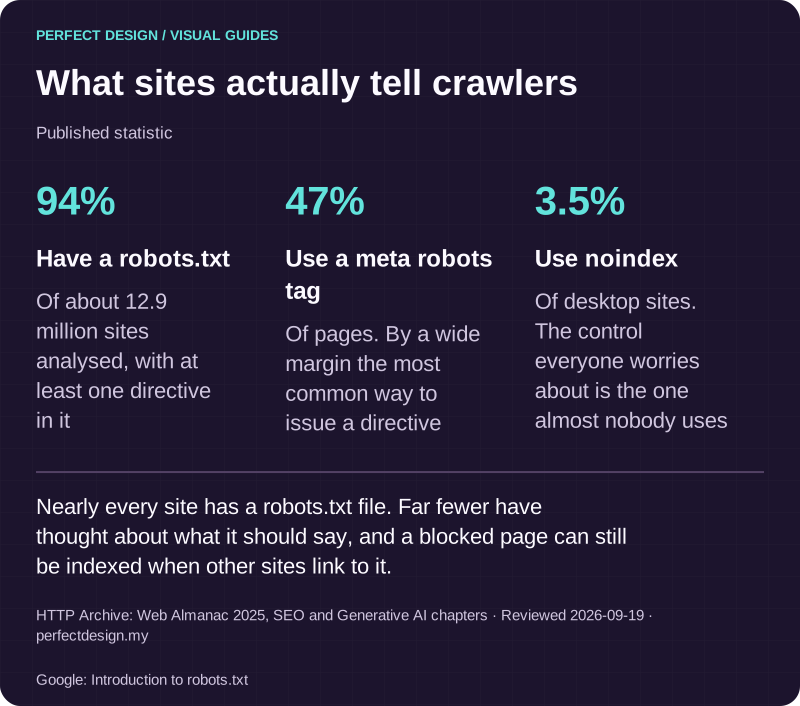
What sites actually tell crawlers
Published statistic. Nearly every site has a robots.txt file. Far fewer have thought about what it should say, and a blocked page can still be indexed when other sites link to it.
Source: HTTP Archive: Web Almanac 2025, SEO and Generative AI chapters. Reviewed .
Also: Google: Introduction to robots.txt.
Read the graphic as text
- Have a robots.txt: 94%. Of about 12.9 million sites analysed, with at least one directive in it
- Use a meta robots tag: 47%. Of pages. By a wide margin the most common way to issue a directive
- Use noindex: 3.5%. Of desktop sites. The control everyone worries about is the one almost nobody uses
Which control affects indexing?
noindex decides whether a crawled URL is kept in Google's index; a canonical decides which URL, out of a set of duplicates, represents the content there. Both are read only when Google fetches the URL, which is why neither works behind a robots.txt block.
A noindex rule lives in a robots meta tag in the HTML head or in an X-Robots-Tag HTTP response header, the only option for PDFs and images. Google's documentation is explicit: the page must not be blocked by robots.txt and must be otherwise accessible, or the crawler never sees the rule and the page can still appear in results when other pages link to it. The rule takes effect at the next crawl, which Google notes can be months away; a recrawl can be requested in the URL Inspection tool.
- Meta tag, in the head: <meta name="robots" content="noindex">
- HTTP header, any file type: X-Robots-Tag: noindex
Directives belong in the raw response, not in JavaScript that runs afterwards. Google indexes rendered HTML, but it also says that when it encounters a noindex tag it may skip rendering and JavaScript execution, so a script that removes a noindex may not work as expected. Injecting a canonical with JavaScript is possible but not recommended, and it must match the original HTML.
A canonical is a different kind of control. Canonicalization is Google's process of choosing one representative URL from a set of duplicates, which arise for ordinary reasons: HTTP and HTTPS versions, sort and filter parameters, mobile and desktop URLs, a demo copy left reachable. You state a preference with a rel="canonical" link element, a Link HTTP header for non-HTML files, a redirect, or the sitemap. Google calls redirects and rel="canonical" annotations strong signals and sitemap inclusion a weak one, and all of them are hints: it may choose a different canonical than you do, for various reasons.
- In the head: <link rel="canonical" href="https://example.com/shoes/running/">
- HTTP header, for a PDF: Link: <https://example.com/catalogue.pdf>; rel="canonical"
- Redirect: 301 Moved Permanently with Location: https://example.com/shoes/running/ is the strongest signal, but the old URL stops serving people too.
Google's own do's and don'ts are worth following literally. Use absolute URLs, put a self-referencing canonical on the preferred page, and link within the site to the canonical URL rather than a variant. Do not use robots.txt for canonicalization, because Google may still index disallowed URLs without their content; do not use the URL removal tool, which hides every version; and do not name different canonicals for one page through different techniques, such as the sitemap and the link element.

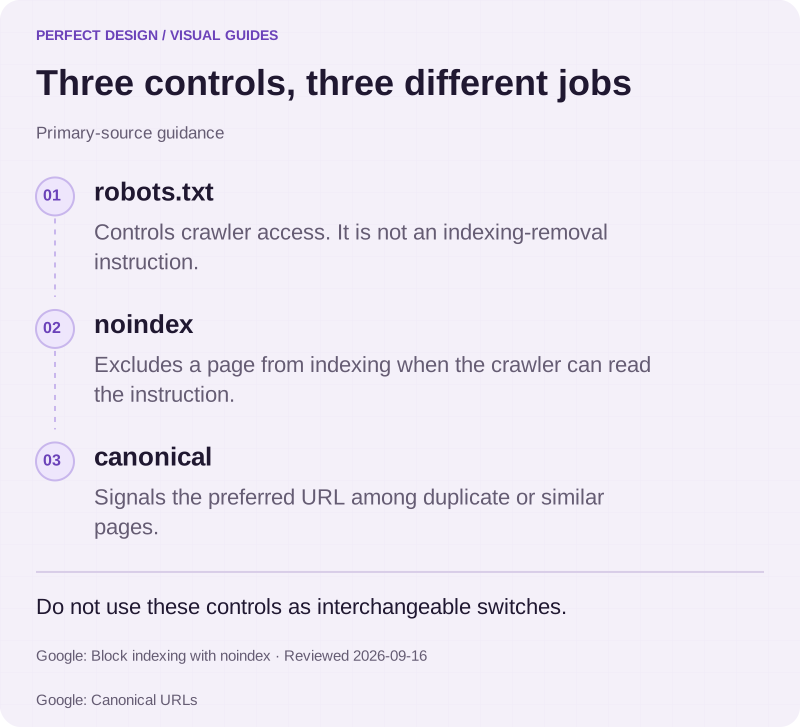
Three controls, three different jobs
Primary-source guidance. Do not use these controls as interchangeable switches.
Source: Google: Block indexing with noindex. Reviewed .
Also: Google: Canonical URLs.
Read the graphic as text
- robots.txt. Controls crawler access. It is not an indexing-removal instruction.
- noindex. Excludes a page from indexing when the crawler can read the instruction.
- canonical. Signals the preferred URL among duplicate or similar pages.
What happens when canonical and noindex conflict?
You get an instruction Google's guidance tells you not to give, and an outcome you cannot predict from the page alone. A noindex says this URL should not be in the index; a canonical pointing elsewhere says it is a duplicate whose signals belong to another URL that is. Google says it does not recommend using noindex to prevent selection of a canonical page within a single site, because it completely blocks the page from Search. The one effect you can count on is that the noindexed URL becomes a removal candidate; consolidation to the target is not promised anywhere in the documentation.
In our audits we treat the pair as a defect to resolve by asking what the URL is for. A duplicate of a page you want found: drop the noindex, keep the canonical, keep the URL crawlable so the hint is seen. A page that should not appear and has no equivalent: keep the noindex, remove the cross-URL canonical. Content that has moved: redirect, and neither of the others.
The other conflicts have documented outcomes. Between robots rules on one page, Google applies the more restrictive. Between two canonical techniques that disagree, Google's guidance is not to do it, and the Page indexing reason "Duplicate, Google chose different canonical than user" is the usual sign that Google chose for you. For Malaysian sites, a Bahasa Malaysia page and its English counterpart are different content for different readers, not duplicates, so neither should be canonicalised to the other.
Which control fits which URL state?
The matrix is the decision we work through for each URL pattern: what each control should say, the outcome to expect and what proves it.
Page you want found and ranked
- robots.txt
- Allowed
- noindex
- Absent
- canonical
- Self-referencing, absolute, in the sitemap
- Expected outcome
- Crawled, indexed, eligible to rank
- How to verify
- URL Inspection: "URL is on Google"; Google-selected canonical equals the URL
Sort or filter variant showing the same products
- robots.txt
- Allowed, so the hint is read
- noindex
- Absent
- canonical
- Points at the category URL
- Expected outcome
- Treated as a duplicate; the category page is shown
- How to verify
- Google-selected canonical is the category URL; reason "Alternate page with proper canonical tag"
Internal search, cart, checkout, account pages
- robots.txt
- Allowed
- noindex
- Present (meta tag or header)
- canonical
- None or self-referencing
- Expected outcome
- Dropped at the next crawl, kept out while the rule remains
- How to verify
- Indexing allowed shows No; reason "URL marked 'noindex'"
Thousands of low-value URLs that only cost crawl budget
- robots.txt
- Disallowed
- noindex
- Unread, so pointless
- canonical
- Unread
- Expected outcome
- Not fetched; may still be indexed without a description if linked
- How to verify
- Crawl allowed shows No; reason "URL blocked by robots.txt" or "Indexed, though blocked by robots.txt"
Page that has permanently moved
- robots.txt
- Allowed, so the redirect is followed
- noindex
- Not needed
- canonical
- Replaced by a 301 or 308 redirect
- Expected outcome
- Old URL not indexed; the target becomes canonical
- How to verify
- Reason "Page with redirect"; the new URL inspects as on Google
noindex plus a canonical to another URL (the conflict)
- robots.txt
- Allowed
- noindex
- Present
- canonical
- Points elsewhere
- Expected outcome
- Contradictory: removal likely, consolidation not promised
- How to verify
- Compare Indexing allowed with the Google-selected canonical; keep one control
robots.txt block plus noindex (the classic mistake)
- robots.txt
- Disallowed
- noindex
- Present but unread
- canonical
- Unread
- Expected outcome
- The block hides the directive; the URL can be indexed with no content
- How to verify
- Reason "Indexed, though blocked by robots.txt"; fix by removing the block
| Situation | robots.txt | noindex | canonical | Expected outcome | How to verify |
|---|---|---|---|---|---|
| Page you want found and ranked | Allowed | Absent | Self-referencing, absolute, in the sitemap | Crawled, indexed, eligible to rank | URL Inspection: "URL is on Google"; Google-selected canonical equals the URL |
| Sort or filter variant showing the same products | Allowed, so the hint is read | Absent | Points at the category URL | Treated as a duplicate; the category page is shown | Google-selected canonical is the category URL; reason "Alternate page with proper canonical tag" |
| Internal search, cart, checkout, account pages | Allowed | Present (meta tag or header) | None or self-referencing | Dropped at the next crawl, kept out while the rule remains | Indexing allowed shows No; reason "URL marked 'noindex'" |
| Thousands of low-value URLs that only cost crawl budget | Disallowed | Unread, so pointless | Unread | Not fetched; may still be indexed without a description if linked | Crawl allowed shows No; reason "URL blocked by robots.txt" or "Indexed, though blocked by robots.txt" |
| Page that has permanently moved | Allowed, so the redirect is followed | Not needed | Replaced by a 301 or 308 redirect | Old URL not indexed; the target becomes canonical | Reason "Page with redirect"; the new URL inspects as on Google |
| noindex plus a canonical to another URL (the conflict) | Allowed | Present | Points elsewhere | Contradictory: removal likely, consolidation not promised | Compare Indexing allowed with the Google-selected canonical; keep one control |
| robots.txt block plus noindex (the classic mistake) | Disallowed | Present but unread | Unread | The block hides the directive; the URL can be indexed with no content | Reason "Indexed, though blocked by robots.txt"; fix by removing the block |

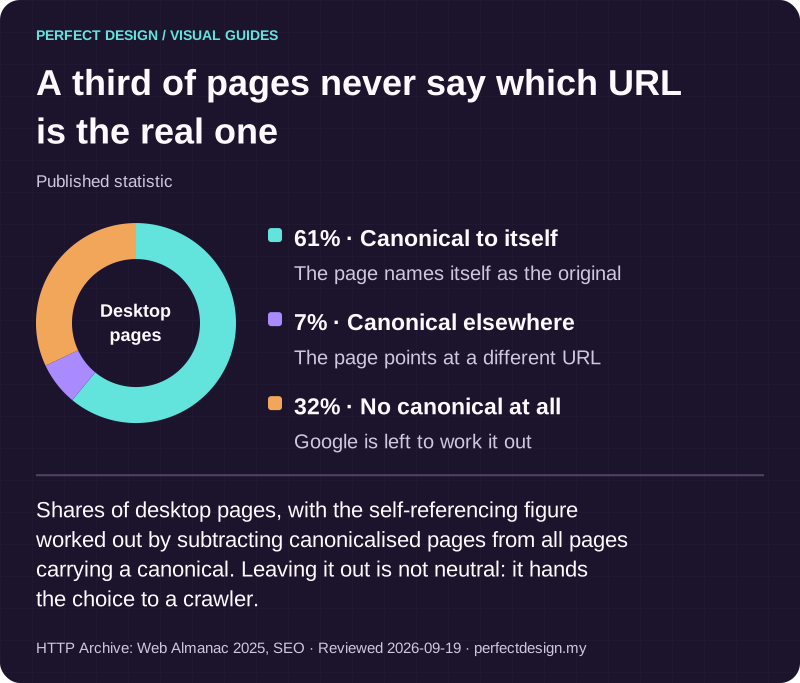
A third of pages never say which URL is the real one
Published statistic. Shares of desktop pages, with the self-referencing figure worked out by subtracting canonicalised pages from all pages carrying a canonical. Leaving it out is not neutral: it hands the choice to a crawler.
Source: HTTP Archive: Web Almanac 2025, SEO. Reviewed .
Read the graphic as text
Desktop pages
- Canonical to itself: 61%. The page names itself as the original
- Canonical elsewhere: 7%. The page points at a different URL
- No canonical at all: 32%. Google is left to work it out
How can the effective state be verified?
With Search Console: the URL Inspection tool shows what Google recorded for one URL, and the Page indexing report shows the pattern across the site. Inspecting a URL returns whether it is on Google, whether crawling was allowed or blocked by robots.txt, whether indexing was allowed or refused because a noindex was found, the canonical you declared and the canonical Google selected, and the last crawl date. If the two canonicals differ, Google overruled the hint.
The tool has two modes. The indexed result describes the most recently indexed version, which may be weeks old. The live test fetches the URL now, reports whether it can be crawled and whether a noindex is present, and can show the HTML Google received and the HTTP headers, which is how you confirm an X-Robots-Tag header that never appears in the page source. Google is clear about the limits: a positive live test is not a guarantee of appearing in Search, and it does not check whether the page is a duplicate, because canonical selection happens at indexing time.
The Page indexing reasons that map to the three controls:
- "URL blocked by robots.txt": the fetch was refused, so any noindex or canonical is unread.
- "Indexed, though blocked by robots.txt": in the index with no content, usually because a block hid the directive meant to keep it out.
- "URL marked 'noindex'": the directive was found and applied.
- "Duplicate without user-selected canonical" and "Duplicate, Google chose different canonical than user": Google chose for you, because you gave no hint or it overruled yours.
- "Crawled - currently not indexed" and "Discovered - currently not indexed": no directive is involved; Google notes these are not necessarily errors.
Before a change goes live, test the raw response: fetch robots.txt and confirm a 200 with the rule you expect; fetch the page's headers for any X-Robots-Tag; read the page source, not the rendered view, for the meta tag and canonical link; and check that the sitemap lists only canonical URLs. Hosted store platforms common in Malaysia set robots.txt and headers themselves, so check what is served, not what a settings page implies. The technical SEO audit checklist lists these checks, and the guide to reading Search Console covers the reports in depth.

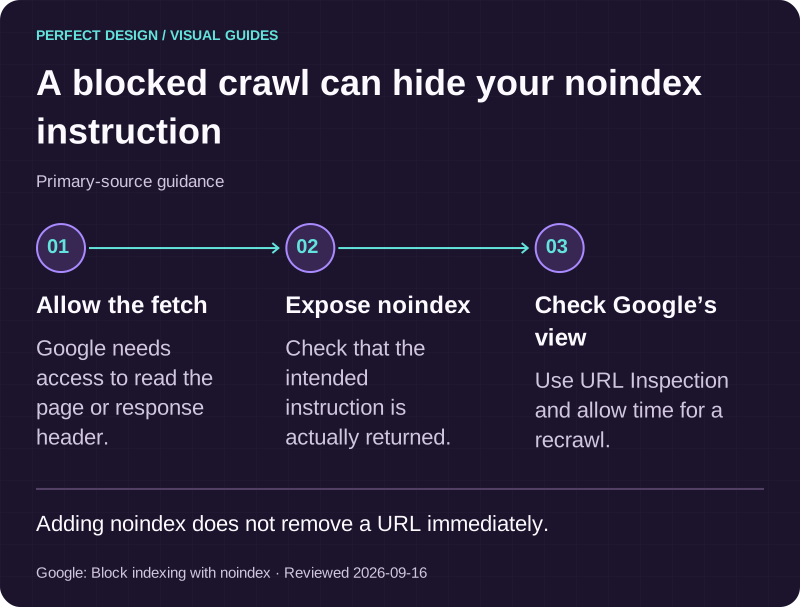
A blocked crawl can hide your noindex instruction
Primary-source guidance. Adding noindex does not remove a URL immediately.
Source: Google: Block indexing with noindex. Reviewed .
Read the graphic as text
- Allow the fetch. Google needs access to read the page or response header.
- Expose noindex. Check that the intended instruction is actually returned.
- Check Google’s view. Use URL Inspection and allow time for a recrawl.
What to do next
- Open the Page indexing report and sort the not-indexed reasons by count. Anything under "Indexed, though blocked by robots.txt" or "Duplicate, Google chose different canonical than user" is a control not doing what someone intended.
- List every URL pattern on the site (categories, filters, search, cart, PDFs) and give each a row of the matrix. A pattern that fits no row needs a decision before a directive.
- Fix one pattern at a time, inspect a sample URL after the next crawl, and record the date and the reading next to the change.
Where to go next
- How search visibility works →
The crawl, index and rank chain these controls act on, explained in order.
- Reading Search Console for SEO measurement →
The reports that show whether a control took effect, and how to read them without misreading them.
- Technical SEO audit checklist →
A printable pass over robots.txt, directives, canonicals and sitemaps for a whole site.
- Internal linking strategy guide →
Why links to variant URLs undo canonical work, and how to point them at the preferred URL.
Rather have this handled?
Talk to us about technical seo for your business, starting with the questions this guide helped you identify.
Sources and further reading
- Google Search Central — Introduction to robots.txt — read 15 September 2026
- Google Search Central — How Google interprets the robots.txt specification — read 15 September 2026
- Google Search Central — Block Search indexing with noindex — read 15 September 2026
- Google Search Central — Robots meta tag, data-nosnippet, and X-Robots-Tag specifications — read 15 September 2026
- Google Search Central — What is URL canonicalization — read 15 September 2026
- Google Search Central — How to specify a canonical URL with rel="canonical" and other methods — read 15 September 2026
- Google Search Central — Understand the JavaScript SEO basics — read 15 September 2026
- Search Console Help — URL Inspection tool — read 15 September 2026
- Search Console Help — Page indexing report — read 15 September 2026