

On this page7 sections
What makes an application mobile rather than mobile-friendly
A mobile-friendly website is still a web page. It is fetched when somebody opens it, it lives inside a browser, and the browser decides what it may reach. A mobile application is installed, sits among the other apps on the device, and runs inside the operating system's own rules about storage, background work and access to hardware. Treat that as a planning distinction rather than a hard technical boundary, because the categories overlap in practice.
The familiar labels describe different axes rather than four separate products. Native means built with one platform's own toolkit. Cross-platform means one codebase serving both Android and iOS. Hybrid usually means web technology running inside a native container. A progressive web app is a website a browser can install and run with some app-like behaviour, and what it can actually do depends on the browser and operating system in front of it. A single product can sit in more than one of these at once, so use them to frame a conversation, not to pick a technology.
Where the boundary becomes concrete is distribution. Apple's App Store Review Guidelines state that an app "should include features, content, and UI that elevate it beyond a repackaged website", and that if an app is not "particularly useful, unique, or 'app-like,' it doesn't belong on the App Store". Wrapping an existing website and submitting it is therefore a store-policy question as much as a technical one, and it is better answered before a build than during review.

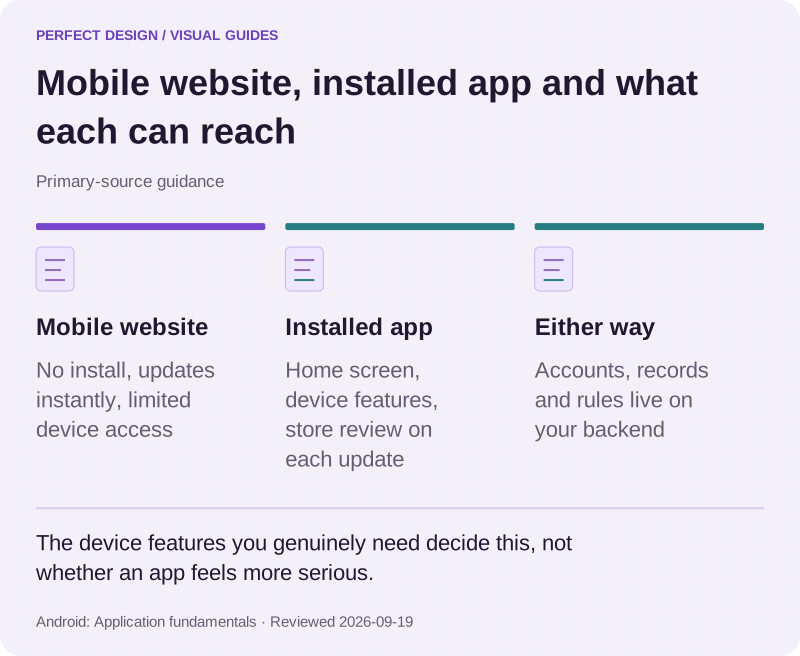
Mobile website, installed app and what each can reach
Primary-source guidance. The device features you genuinely need decide this, not whether an app feels more serious.
Source: Android: Application fundamentals. Reviewed .
Read the graphic as text
- Mobile website. No install, updates instantly, limited device access
- Installed app. Home screen, device features, store review on each update
- Either way. Accounts, records and rules live on your backend
How an app talks to its backend
A working app is best read as six layers, each with a different owner and a different way of failing.
- Interface: the screens a person touches, which have to respond whether or not the network does.
- Device services: camera, location, notifications, secure storage and the sensors the operating system guards.
- Local state: what has been cached, what the person has typed but not yet sent, and what the server has confirmed.
- Network client: the code that calls the backend, decides what to retry, and decides what to tell the person when a call fails.
- API boundary: the agreed request and response contract between app and server, including how the user is authenticated.
- Backend systems and shared data: the records several people rely on at once, and the business rules that decide what is allowed.
Drawing that line explicitly settles accountability. The device owns responsiveness and the capabilities only a phone has. The backend owns shared truth: the records many people read at the same time, and the decisions that must be identical for everyone. Android's documentation makes the device half concrete. An app is built from components such as activities, services, broadcast receivers and content providers, and its manifest declares those components alongside the permissions it needs and the hardware or software features it requires, for example a camera or Bluetooth. That is Android-specific packaging, but the responsibility split is the same everywhere.
Traced through a single request, one appointment looks like this: the screen collects a time, the network client sends it across the API boundary, the backend checks real availability and either records the booking or refuses it, and the app updates local state to match the answer it actually received. Everything interesting happens at the boundaries, which is why API contracts, authentication, monitoring and failure handling are ownership questions to settle early rather than details to leave until the end.
What happens when the connection drops
Weak or absent connectivity is normal rather than exceptional, so the real design question is what a person may see and do while the app does not yet know the answer. Four states are worth keeping apart: information cached earlier, work entered locally, state the server has confirmed, and state that is still unresolved. Showing all four identically is how an app ends up displaying a booking that was never sent.
A workable pattern is to show known local state, say plainly how recent it is, decide deliberately whether an action may remain pending, and reconcile only when a trusted response arrives. Android's WorkManager documentation describes platform support for the deferred half of that: work that is "required to run reliably even if the user navigates off a screen, the app exits, or the device restarts", stored in an internally managed database, rescheduled across device reboots, constrained to conditions such as an unmetered network, and retried under a configurable exponential backoff. That is a mechanism, not a promise that a queued action will eventually succeed, and it is scoped to Android.
Interruption is not only about the network. Android documents that the system "starts the process when any of the app's components need to be executed, and then shuts down the process when it's no longer needed or when the system must recover memory for other apps", so an app has to survive being killed and put the person back where they were. Notifications belong to the same subject, because they are how an app speaks to somebody who is no longer looking at it. On Android 13 and higher, sending them needs the runtime POST_NOTIFICATIONS permission, and if the person declines, notification channels are blocked apart from a few exempt roles.

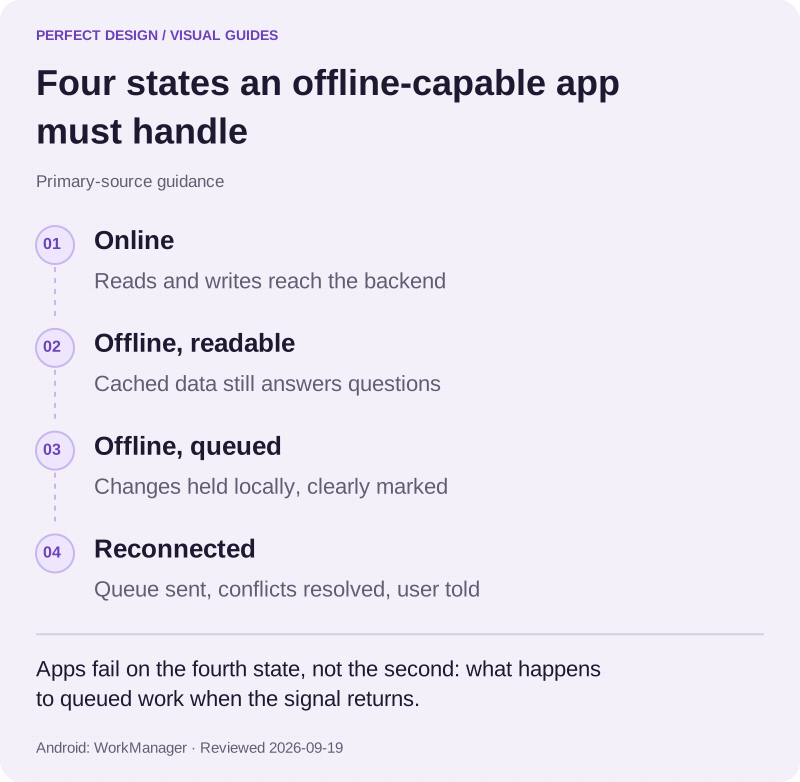
Four states an offline-capable app must handle
Primary-source guidance. Apps fail on the fourth state, not the second: what happens to queued work when the signal returns.
Source: Android: WorkManager. Reviewed .
Read the graphic as text
- Online. Reads and writes reach the backend
- Offline, readable. Cached data still answers questions
- Offline, queued. Changes held locally, clearly marked
- Reconnected. Queue sent, conflicts resolved, user told
Why apps ask for permissions
A permission is controlled access to a device capability or to protected data, and the operating system, not the app, decides whether it is granted. Android separates install-time permissions, granted when the app is installed, from runtime permissions, which the app must request while running before it can "access the restricted data or perform restricted actions". Restricted data covers things such as system state and contact information; restricted actions cover things such as connecting to a paired device or recording audio.
Both platforms then ask for least privilege. Android's guidance is that "when the user requests a particular action in your app, your app should request only the permissions that it needs to complete that action", and its quality guidance asks for runtime permissions to be requested when the functionality is requested rather than at startup. Apple's review guidelines require apps collecting user or usage data to "secure user consent for the collection", to "only request access to data relevant to the core functionality of the app", and not to "manipulate, trick, or force people to consent to unnecessary data access". These are platform rules that decide whether an app is allowed on a store at all, not Malaysian legal advice and not an answer to a sector's own compliance questions.
The design consequence is that every permission needs a fallback. If somebody refuses location, can they still choose an area by name? If they refuse notifications, does the reminder still appear inside the app? An app that becomes useless the moment a prompt is declined has quietly moved a design decision onto the customer.
How store releases and updates work
A release is a sequence with evidence at each stage, not an upload at the end.
Define the task and the support boundary
Decide which user task the release changes, which devices and operating-system versions are in scope, and what will not be supported.
Prepare the build and the store metadata
Signing, version numbers, screenshots, description and privacy disclosures are part of the submission itself, not paperwork that follows it.
Test on representative devices
Android's core app quality guidance asks for testing on hardware covering key form factors and against the latest Android version, and for checking that a resumed app returns the person to the exact state it was last used in.
Submit through the applicable route
Apple asks that submissions "should be final versions with all necessary metadata and fully functional URLs included" and that the app has been "tested on-device for bugs and stability before you submit it".
Release with monitoring
Watch crash reports and the specific journey that changed before exposure is widened, and keep the previous version recoverable.
Maintain what is live
Operating systems, devices and dependencies change underneath a shipped app, so compatibility work is part of owning one rather than an optional extra.
Two store rules shape the metadata itself. Apple requires that "all your app metadata, including privacy information, your app description, screenshots, and previews accurately reflect the app's core experience", and that screenshots "show the app in use, and not merely the title art, login page, or splash screen". Apple's app privacy details are the developer's own declaration, covering data collected by third-party code and SDKs added to the app, and Apple states that "you're responsible for keeping your responses accurate and up to date". Apple also requires that apps "may only use public APIs and must run on the currently shipping OS". Together these make a published app a commitment rather than a delivery.

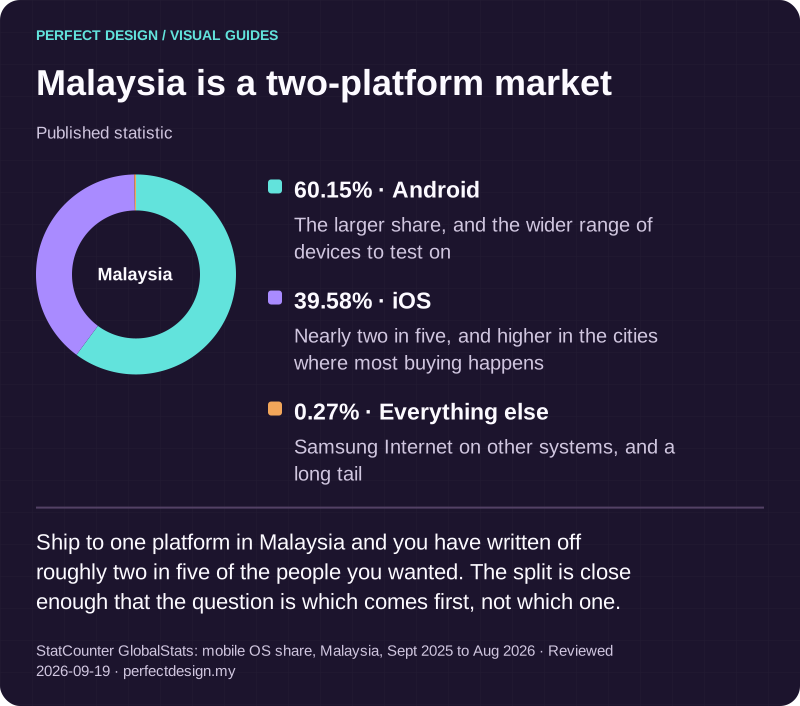
Malaysia is a two-platform market
Published statistic. Ship to one platform in Malaysia and you have written off roughly two in five of the people you wanted. The split is close enough that the question is which comes first, not which one.
Source: StatCounter GlobalStats: mobile OS share, Malaysia, Sept 2025 to Aug 2026. Reviewed .
Read the graphic as text
Malaysia
- Android: 60.15%. The larger share, and the wider range of devices to test on
- iOS: 39.58%. Nearly two in five, and higher in the cities where most buying happens
- Everything else: 0.27%. Samsung Internet on other systems, and a long tail
A worked example: a fictional appointment app
The scenario below is invented for teaching. It describes an unnamed Malaysian service business taking appointments through an app, with times shown in Malaysia time. Every actor, policy and system response is an assumption, and the final column lists evidence to collect, never a test that has already passed.
Open an available time
- Assumed actor
- App user
- Proposed system response
- The device shows a slot supplied by the backend, in the displayed timezone
- Exception
- Cached availability may be stale, so the slot shown may already be taken
- Acceptance evidence to collect
- Device and server time readings, the timezone displayed, and what the app does when the slot was taken first
Request a reminder
- Assumed actor
- App user
- Proposed system response
- The app requests the platform notification permission and stores the chosen reminder preference
- Exception
- A declined permission leaves the booking details usable inside the app
- Acceptance evidence to collect
- The operating-system prompt as shown, the stored preference, and the in-app fallback observed with notifications refused
Ship a corrected version
- Assumed actor
- App owner
- Proposed system response
- Test the agreed devices, then submit through the applicable release route
- Exception
- A failed test or a store decision leaves the release unresolved
- Acceptance evidence to collect
- Version number, the devices and operating-system versions tested, and the dated store status without assuming approval
| Workflow step | Assumed actor | Proposed system response | Exception | Acceptance evidence to collect |
|---|---|---|---|---|
| Open an available time | App user | The device shows a slot supplied by the backend, in the displayed timezone | Cached availability may be stale, so the slot shown may already be taken | Device and server time readings, the timezone displayed, and what the app does when the slot was taken first |
| Request a reminder | App user | The app requests the platform notification permission and stores the chosen reminder preference | A declined permission leaves the booking details usable inside the app | The operating-system prompt as shown, the stored preference, and the in-app fallback observed with notifications refused |
| Ship a corrected version | App owner | Test the agreed devices, then submit through the applicable release route | A failed test or a store decision leaves the release unresolved | Version number, the devices and operating-system versions tested, and the dated store status without assuming approval |
Read across the rows and a decision order appears. Name the job the app exists to do. Decide which parts genuinely need the device and which need the operating system's permission. Assign the records and rules that belong to the backend. Decide what the app shows while it is unsure and what it does when a permission is refused. Only then define the evidence a release has to produce.

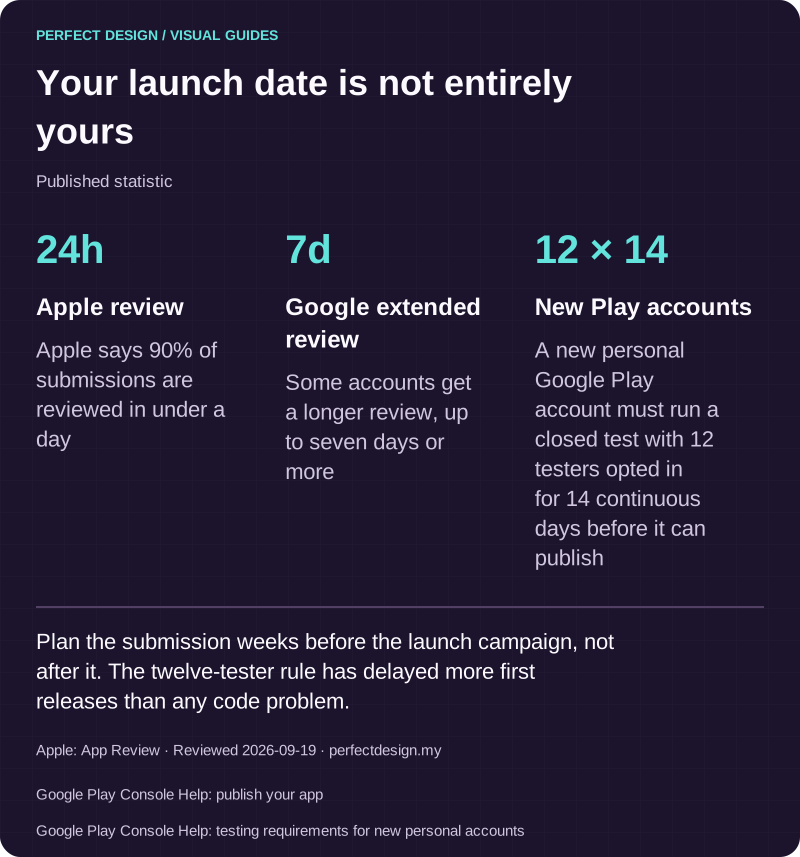
Your launch date is not entirely yours
Published statistic. Plan the submission weeks before the launch campaign, not after it. The twelve-tester rule has delayed more first releases than any code problem.
Source: Apple: App Review. Reviewed .
Also: Google Play Console Help: publish your app.
Also: Google Play Console Help: testing requirements for new personal accounts.
Read the graphic as text
- Apple review: 24h. Apple says 90% of submissions are reviewed in under a day
- Google extended review: 7d. Some accounts get a longer review, up to seven days or more
- New Play accounts: 12 × 14. A new personal Google Play account must run a closed test with 12 testers opted in for 14 continuous days before it can publish
What to do next
- Write down the one recurring task the app would carry and the moment in the day it happens. If it only ever happens at a desk, a browser may be the honest answer.
- List the device capabilities that task truly needs: camera, location, notifications, offline entry. Mark which ones it fails without and which are convenience.
- Decide which records must be shared between people, and therefore belong on a server, and which can live only on the device.
- Write the acceptance evidence for one journey before any code exists: the devices, the network conditions, the refused-permission path, and the state the app returns to after it is closed.
Where to go next
- Mobile app development →
Where the build side of an app project is covered: platforms, store accounts and maintenance after launch.
- Web app development →
The alternative surface when the task runs in a browser rather than in an installed app.
- Accounts and portals →
The signed-in account layer an app normally shares with the web side of the same product.
Rather have this handled?
Talk to us about mobile apps for your business, starting with the questions this guide helped you identify.
Sources and further reading
- Android Developers: Application fundamentals — read 19 September 2026
- Android Developers: Permissions on Android — read 19 September 2026
- Android Developers: Core app quality — read 19 September 2026
- Android Developers: Notification runtime permission — read 19 September 2026
- Android Developers: WorkManager — read 19 September 2026
- Apple Developer: App Store Review Guidelines — read 19 September 2026
- Apple Developer: App privacy details on the App Store — read 19 September 2026