

In this section8 sections
- 01What has to be settled before a booking app is designed
- 02Resources, staff, rooms and the rules that create a slot
- 03Two people, one slot
- 04One appointment app connected to one scheduling system
- 05Deposits, cancellation and rescheduling are policy before they are code
- 06Reminders, and the honest limit of them
- 07Which systems have to stay in step
- 08What to bring to a scoping conversation
What has to be settled before a booking app is designed
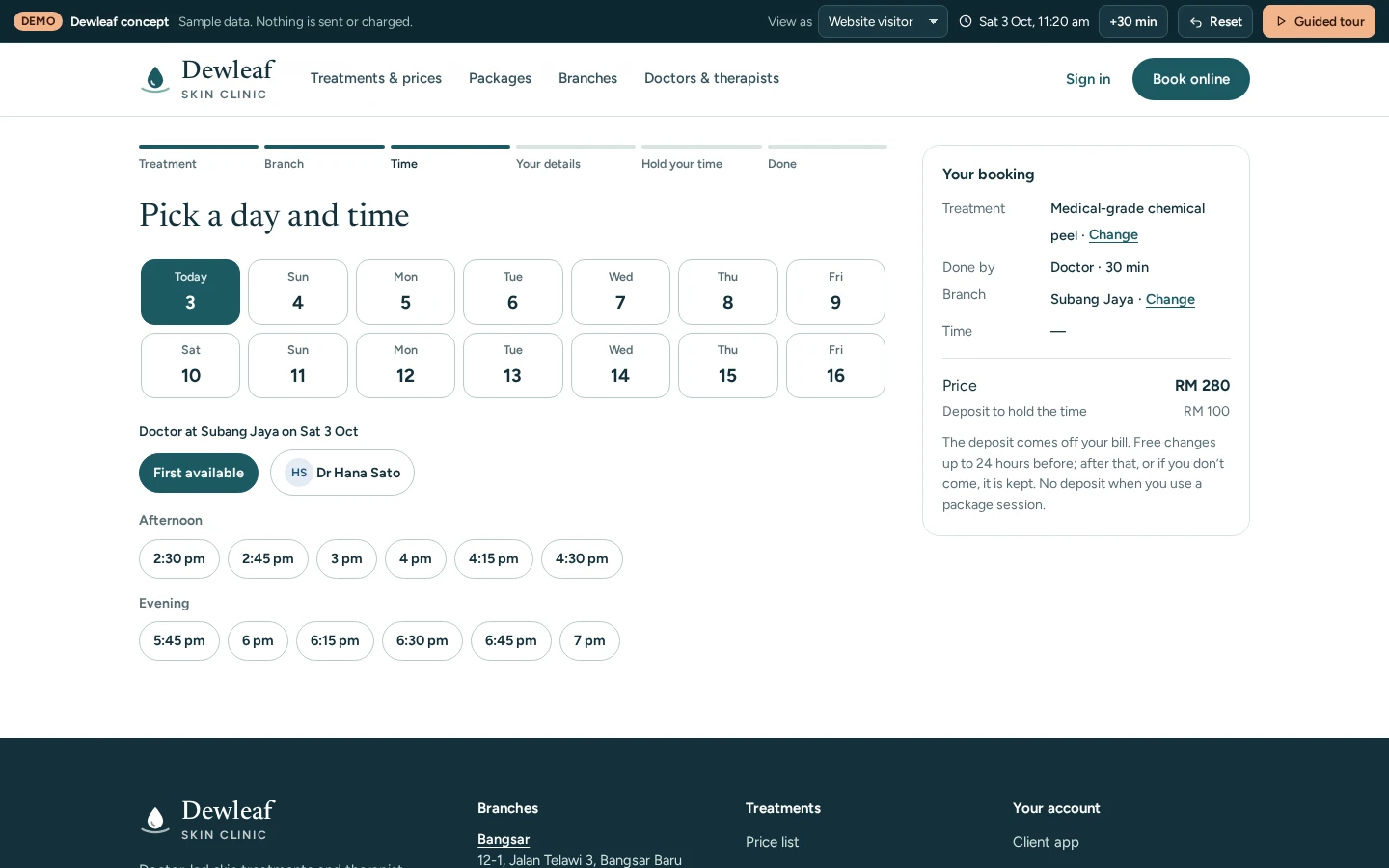
Start with the rules, not the screens. Four things have to be written down before anyone designs a screen: what can be booked, the rules that turn those resources into an available slot, the states a booking moves through from request to completion, and who is allowed to change it at each state. Get those wrong and no amount of interface work rescues it, because the app will confidently sell time that does not exist.
This page covers the mobile surface and the decisions immediately behind it. The scheduling system itself, the one holding the calendar and deciding whether a request is accepted, is a larger subject covered by booking and scheduling. Both are custom builds shaped around how you operate rather than a product we configure, which is why the questions below are about your rules rather than our features.

How Malaysians actually pay
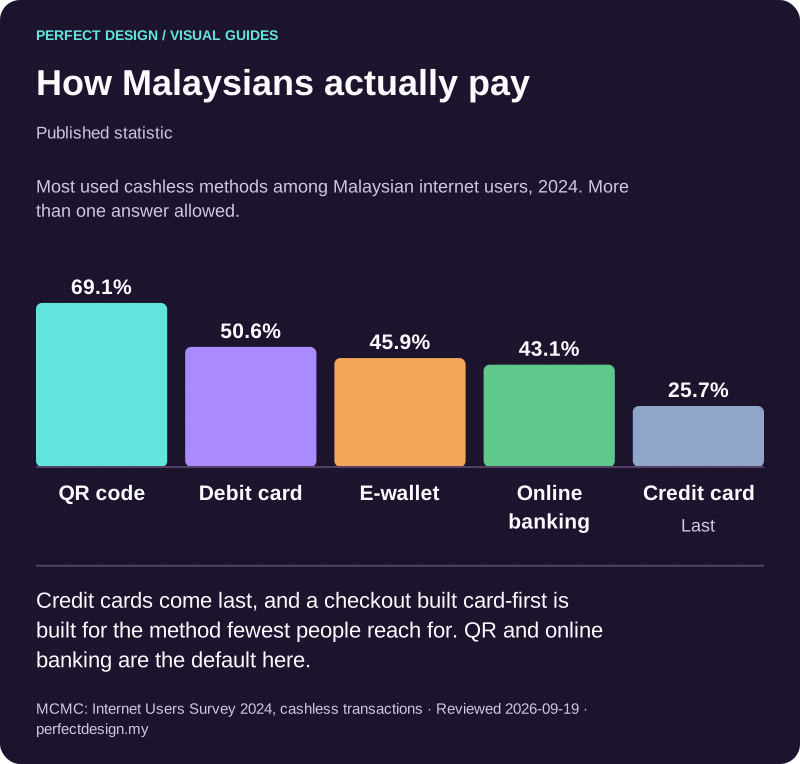
Published statistic. Credit cards come last, and a checkout built card-first is built for the method fewest people reach for. QR and online banking are the default here.
Source: MCMC: Internet Users Survey 2024, cashless transactions. Reviewed .
Read the graphic as text
- QR code: 69.1%.
- Debit card: 50.6%.
- E-wallet: 45.9%.
- Online banking: 43.1%.
- Credit card: 25.7%. Last
Chart scale: Most used cashless methods among Malaysian internet users, 2024. More than one answer allowed..
Resources, staff, rooms and the rules that create a slot
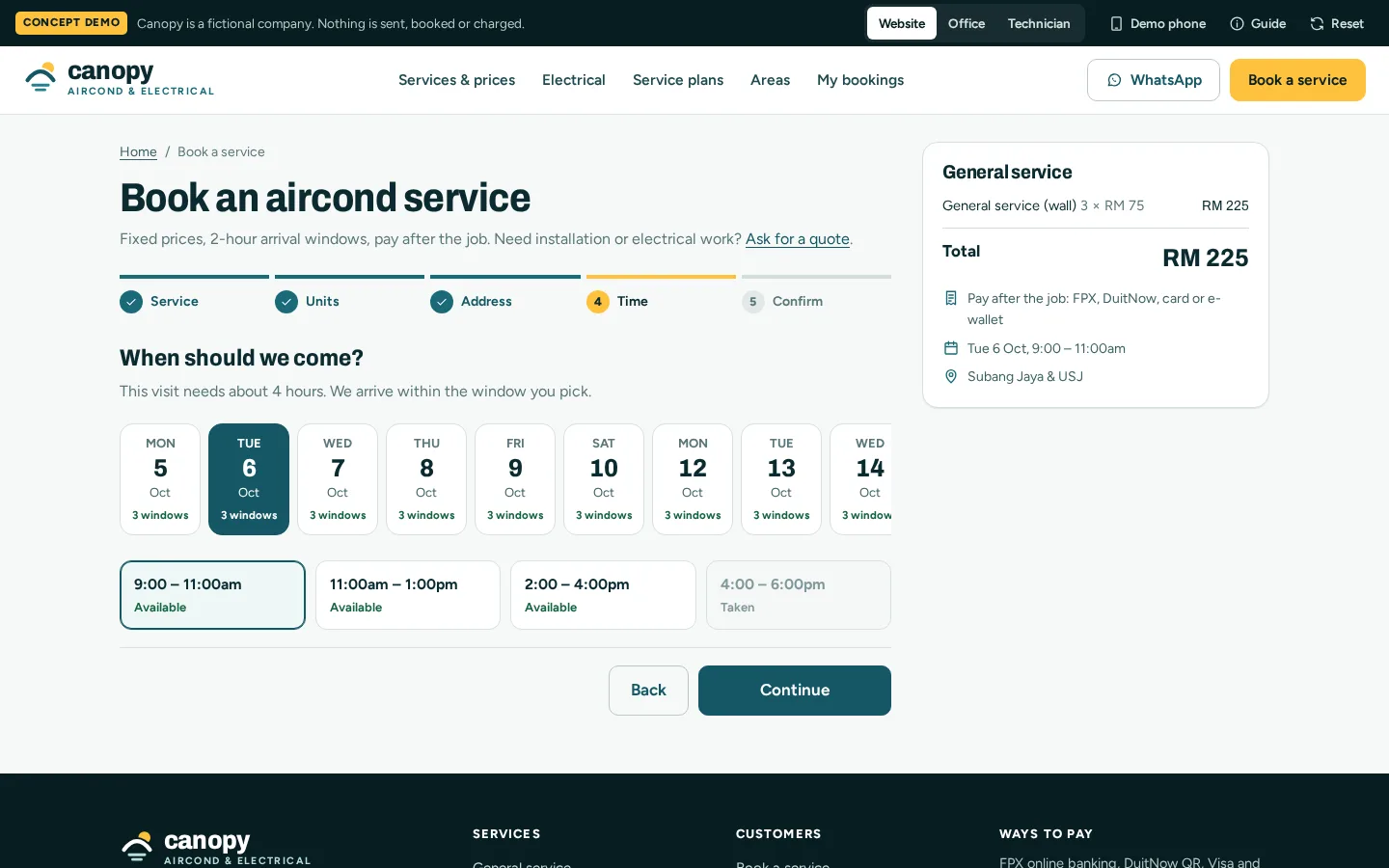
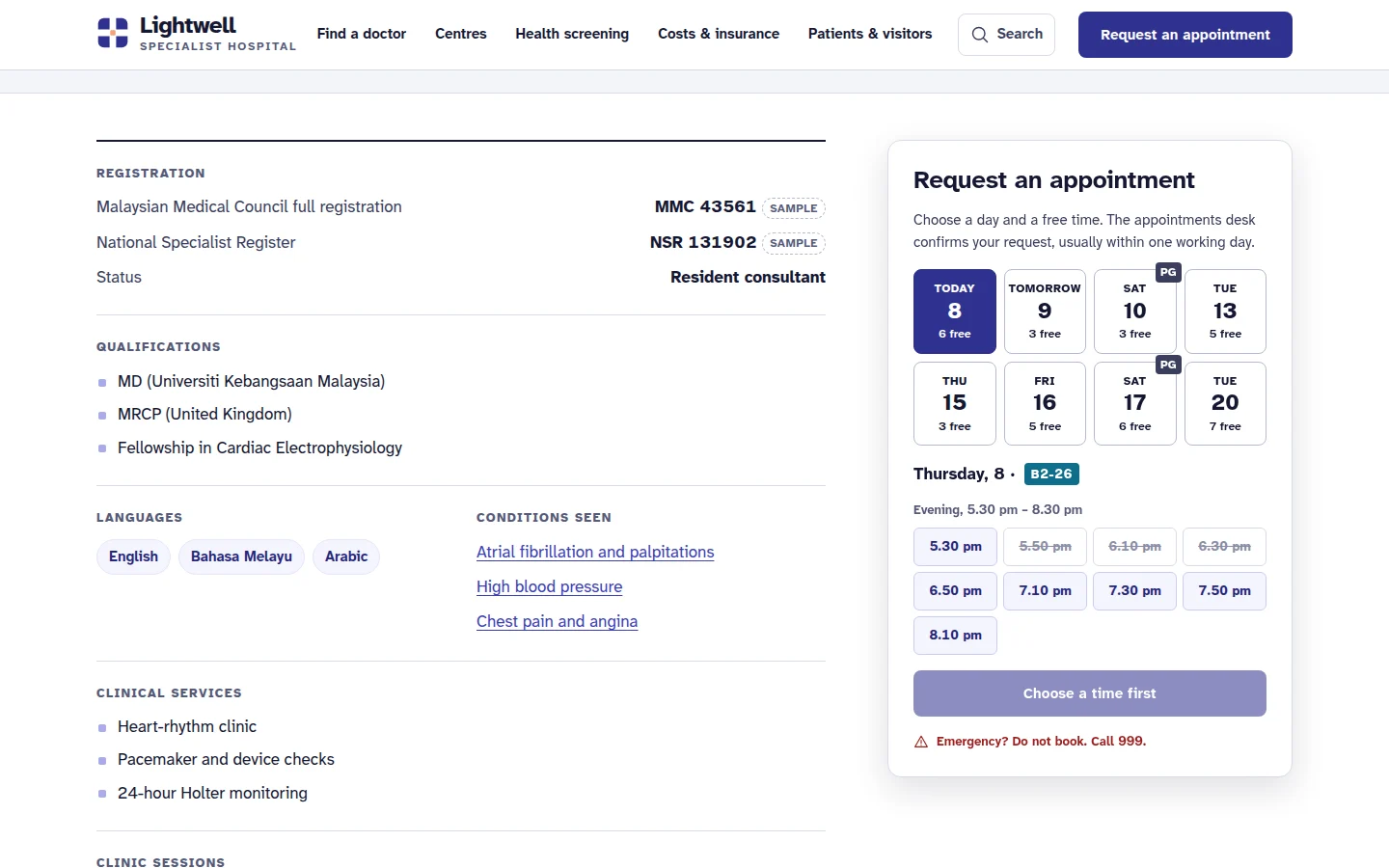
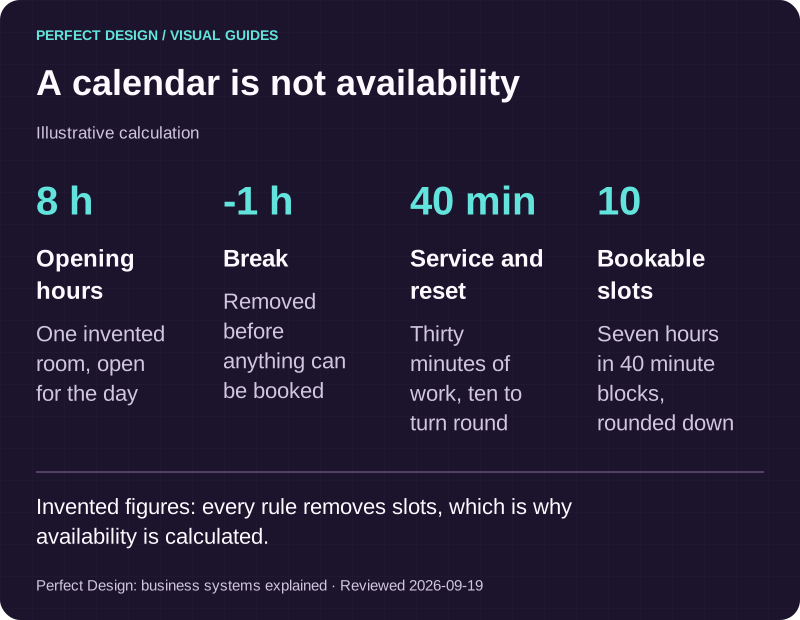
A resource is anything with finite capacity that a booking consumes: a person, a room, a chair, a bay, a table. Availability is not a calendar. It is what remains after your rules have been applied to that calendar. Service duration, the gap needed between appointments, preparation or cleaning time, opening hours per location, public holidays, individual leave, how far ahead somebody may book, how late they may book, and how many bookings one resource can hold at once. Every rule removes slots, and the combination is what the app is allowed to show.
Then decide what the customer chooses and what the system assigns. Letting someone pick a named member of staff is a feature when the relationship matters and a liability when it does not, because it fragments availability and leaves gaps nobody can fill. Many operations are better served by the customer choosing a time while the system chooses the resource, with a preference recorded rather than promised. Where several locations or time zones are involved, agree which one the app displays and label it on the screen, because a customer who books in the wrong hour blames the app and is right to.

A calendar is not availability
Illustrative calculation. Invented figures: every rule removes slots, which is why availability is calculated.
Basis: Perfect Design: business systems explained. Reviewed .
Read the graphic as text
- Opening hours: 8 h. One invented room, open for the day
- Break: -1 h. Removed before anything can be booked
- Service and reset: 40 min. Thirty minutes of work, ten to turn round
- Bookable slots: 10. Seven hours in 40 minute blocks, rounded down
Two people, one slot
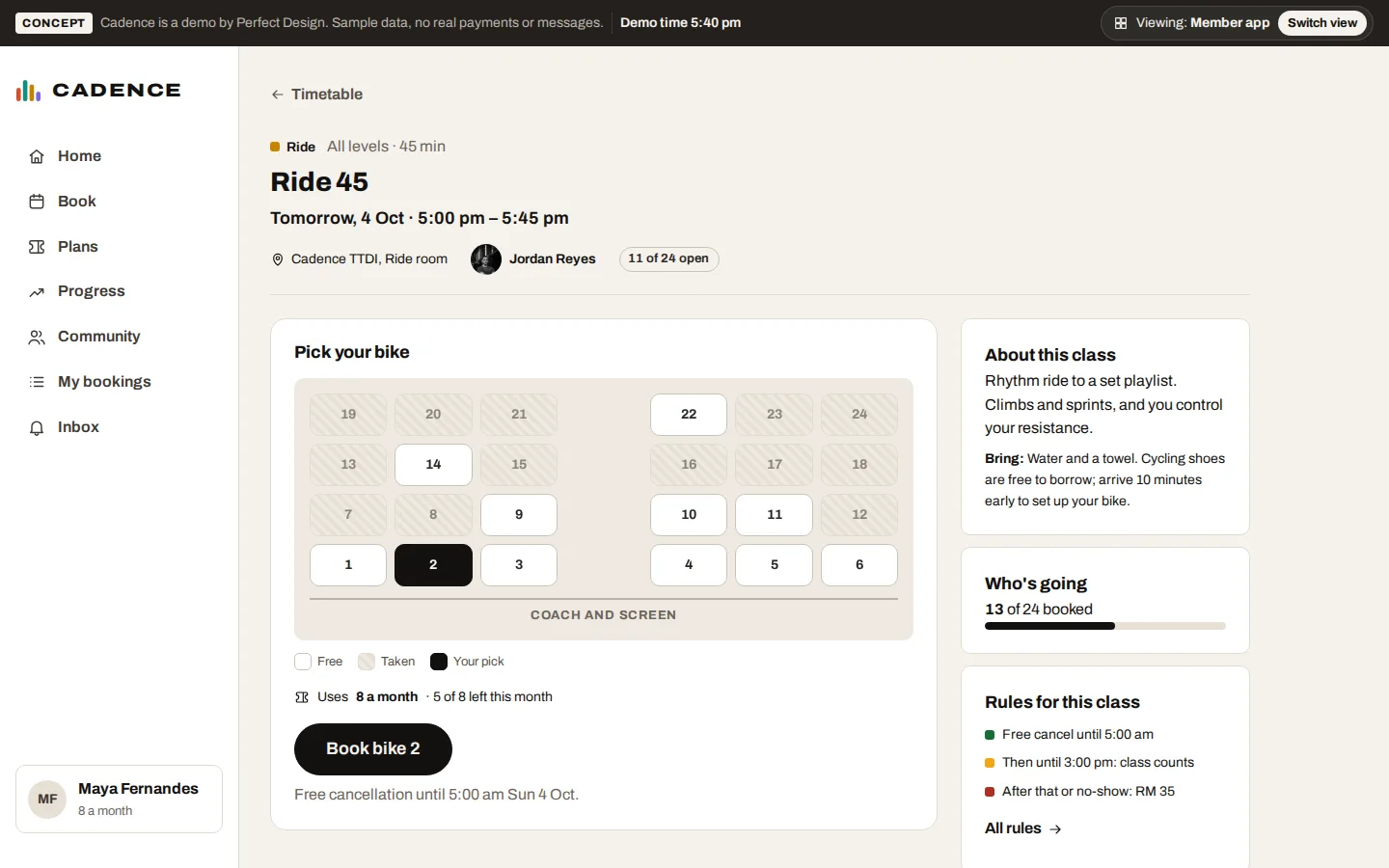
Double-booking is the defining failure of this category, and it is a design decision rather than an accident. Availability drawn on a phone starts ageing immediately: the customer may have opened the screen ten minutes ago, put the phone in a pocket and come back to it. So the display is never the authority. The moment a customer commits, the request goes to the scheduling system, which revalidates against the live calendar and answers with one of a small set of outcomes: accepted, rejected because the slot has gone, held for a short window while payment completes, or expired because that window passed.
That gives the app four states to design instead of one, and the rejected state decides whether a customer tries again or gives up. An error message is not enough. Show the nearest alternatives, keep whatever they had already entered, and make the retry a single tap. Behind it, record every transition with the person or process that caused it. A booking that changed hands twice, against a customer who insists they were confirmed, is an argument you can only settle from a history.
Our own PestaHub concept puts that problem on a live floor plan: merchants take a numbered lot, so two people reaching for the same one is settled by the system rather than by an organiser afterwards. It is a concept prototype rather than client work, and a web platform rather than a published app.
One appointment app connected to one scheduling system
The table works a fictional advisory practice through three steps of one appointment. The roles, policies and responses are assumptions made for illustration, and the last column lists evidence to collect before sign-off, meaning tests still to run.
Choose an appointment
- Assumed actor
- Assumed customer
- Proposed system response
- The app shows current availability with the displayed time zone labelled on the screen
- Exception
- A cached slot is out of date and has to be revalidated by the server before it can be taken
- Acceptance evidence to collect
- Time zone and stale-availability tests recording what the app displayed and what the calendar held
Confirm a booking
- Assumed actor
- Assumed customer
- Proposed system response
- A booking state is recorded, with reminders sent only through channels the customer has permitted
- Exception
- Push permission is refused, which must not remove the booking or the confirmation
- Acceptance evidence to collect
- Booking and reminder identifiers, plus a test of the refused-permission path end to end
Change an appointment
- Assumed actor
- Assumed customer and coordinator
- Proposed system response
- The agreed cancellation or rescheduling policy is applied to the booking and to any deposit taken
- Exception
- A late change, or a replacement slot already taken, needs an explicit decision by a named owner
- Acceptance evidence to collect
- Capacity checks and a change history reconciling the original booking, the replacement and the money
| Workflow step | Assumed actor | Proposed system response | Exception | Acceptance evidence to collect |
|---|---|---|---|---|
| Choose an appointment | Assumed customer | The app shows current availability with the displayed time zone labelled on the screen | A cached slot is out of date and has to be revalidated by the server before it can be taken | Time zone and stale-availability tests recording what the app displayed and what the calendar held |
| Confirm a booking | Assumed customer | A booking state is recorded, with reminders sent only through channels the customer has permitted | Push permission is refused, which must not remove the booking or the confirmation | Booking and reminder identifiers, plus a test of the refused-permission path end to end |
| Change an appointment | Assumed customer and coordinator | The agreed cancellation or rescheduling policy is applied to the booking and to any deposit taken | A late change, or a replacement slot already taken, needs an explicit decision by a named owner | Capacity checks and a change history reconciling the original booking, the replacement and the money |
Deposits, cancellation and rescheduling are policy before they are code
Money changes this workflow more than anything else, so answer the policy questions first. Do you take a deposit, the full fee or nothing at the point of booking. If a deposit, is it authorised now and captured later, or taken immediately. What is the cancellation window, and what happens to the money on each side of it. May a customer reschedule themselves, how often, and up to how long before the appointment. Does a reschedule carry the deposit across or start again. And what counts as a no-show, who records it, and what it costs.
Each answer becomes a state and a permission rather than a paragraph in your terms. Somebody has to be able to waive a fee and somebody else must not be, and a refund has to reach the same payment record the money came from, which is why this side belongs with payment and checkout rather than being bolted onto a booking screen. A deposit is the usual lever against casual no-shows, and it also turns away customers who would have come. That trade is yours to make rather than ours to assume.

The payment finishes in a banking app
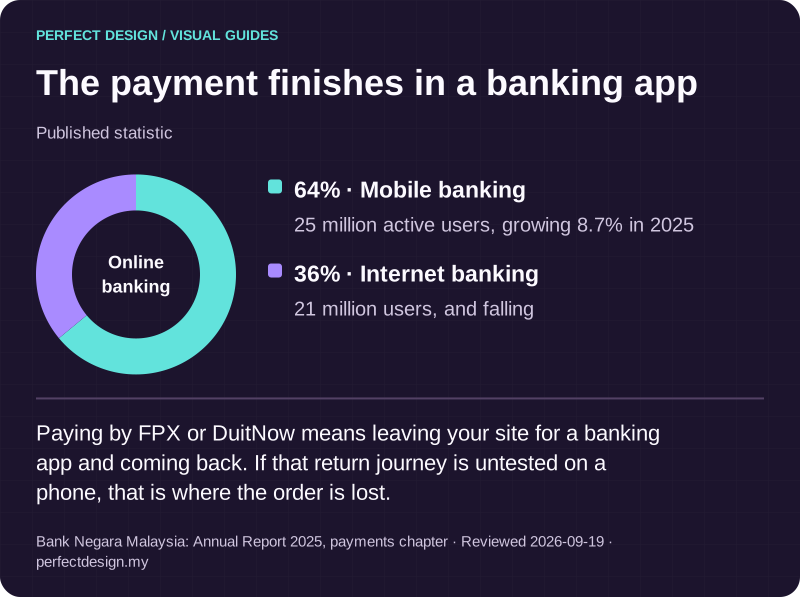
Published statistic. Paying by FPX or DuitNow means leaving your site for a banking app and coming back. If that return journey is untested on a phone, that is where the order is lost.
Source: Bank Negara Malaysia: Annual Report 2025, payments chapter. Reviewed .
Read the graphic as text
Online banking
- Mobile banking: 64%. 25 million active users, growing 8.7% in 2025
- Internet banking: 36%. 21 million users, and falling
Reminders, and the honest limit of them
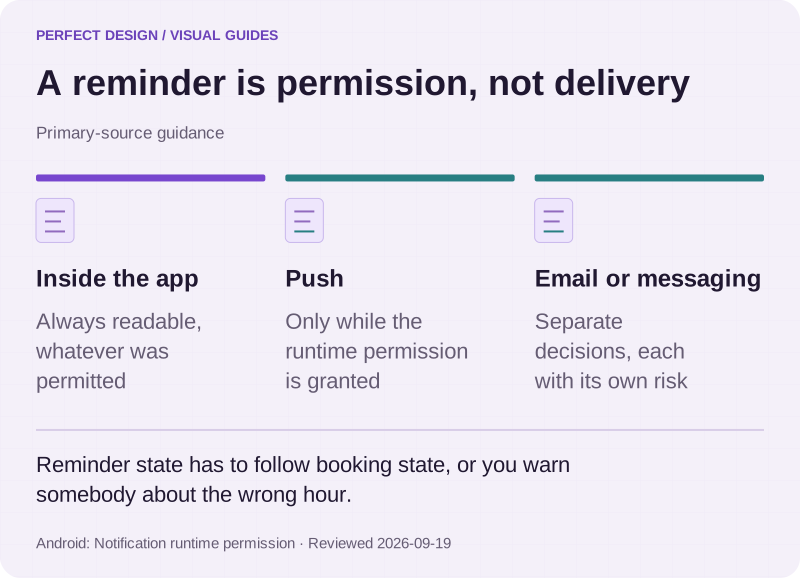
Reminders are the most requested feature here and the most misunderstood. A reminder is a message you are permitted to send, not a message that definitely arrives. Android's documentation, read on 18 September 2026, describes a runtime notification permission introduced in Android 13 and states that an app whose user declines it cannot send notifications unless it qualifies for an exemption. That is Android-specific guidance on the date we read it, and iOS differs. So the booking, the confirmation and the appointment details have to be readable in the app regardless, and email, SMS or a messaging service the customer already uses are separate decisions with their own delivery uncertainty.
Then agree the rules: how far ahead, how many, what they say, whether they carry a one-tap confirm or cancel, and what happens when the appointment moves. A reminder for an appointment rescheduled an hour earlier does more damage than no reminder at all, so reminder state has to follow booking state.

A reminder is permission, not delivery
Primary-source guidance. Reminder state has to follow booking state, or you warn somebody about the wrong hour.
Source: Android: Notification runtime permission. Reviewed .
Read the graphic as text
- Inside the app. Always readable, whatever was permitted
- Push. Only while the runtime permission is granted
- Email or messaging. Separate decisions, each with its own risk
Which systems have to stay in step
Six records usually exist in a booking operation and they are rarely in one place: the booking, the resource calendar, the staff view, the payment record, the reminder queue and whatever the business runs on afterwards. For each boundary, agree what is exchanged, in which direction, how quickly, and what happens when one side is unavailable. Where customers and staff both need to sign in and see different things, accounts and portals covers that layer. HORIZON 2026, also a concept prototype and also a web platform, carries the other end of it: a pass issued at purchase and scanned at a door against a live check-in console.

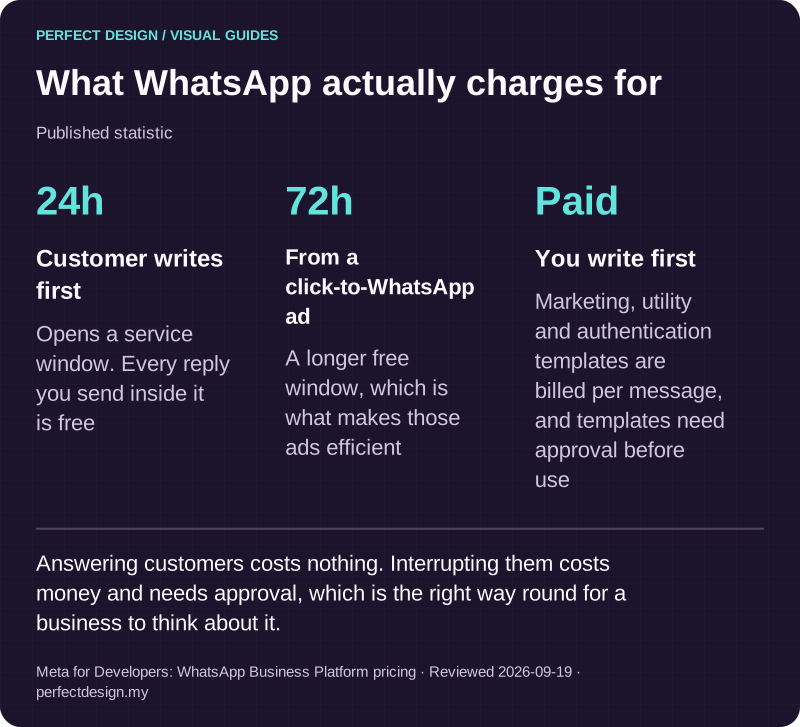
What WhatsApp actually charges for
Published statistic. Answering customers costs nothing. Interrupting them costs money and needs approval, which is the right way round for a business to think about it.
Source: Meta for Developers: WhatsApp Business Platform pricing. Reviewed .
Read the graphic as text
- Customer writes first: 24h. Opens a service window. Every reply you send inside it is free
- From a click-to-WhatsApp ad: 72h. A longer free window, which is what makes those ads efficient
- You write first: Paid. Marketing, utility and authentication templates are billed per message, and templates need approval before use
What to bring to a scoping conversation
Bring your rules rather than your feature ideas: what can be booked and by whom, the durations and the gaps between them, your deposit and cancellation policy exactly as you apply it today including the exceptions you make, the systems holding your calendar and your payments, and one recent booking that went wrong. That last item is usually the most useful in the room.
Mobile app development covers the decisions common to any app, the core systems we build covers what sits behind this one, and a scoped enquiry is the quickest route to an honest view of which parts are ready to build.