


In this section9 sections
- 01What you are actually replacing
- 02Map the process before you automate it
- 03Trigger, conditions, authorised action, record
- 04A worked example
- 05Exceptions are the system, not the edge
- 06Approvals, permissions and the audit trail
- 07Which systems, and whether they can genuinely talk
- 08How you will know it works
- 09What to bring
What you are actually replacing
The spreadsheet and the group chat are not foolish choices. They are fast, they cost nothing and they bend to whatever happened today. What they cannot do is tell you who changed a figure, prove an approval took place, stop the same job being started twice, or keep working when the person who understands the file is away.
So the useful question is not whether to automate. It is which parts of a process genuinely need to be controlled and which parts are fine as they are. A workflow worth building has a recognisable start, a recognisable end, an owner, an outcome that repeats, and at least one point where getting it wrong costs real money or real trust.

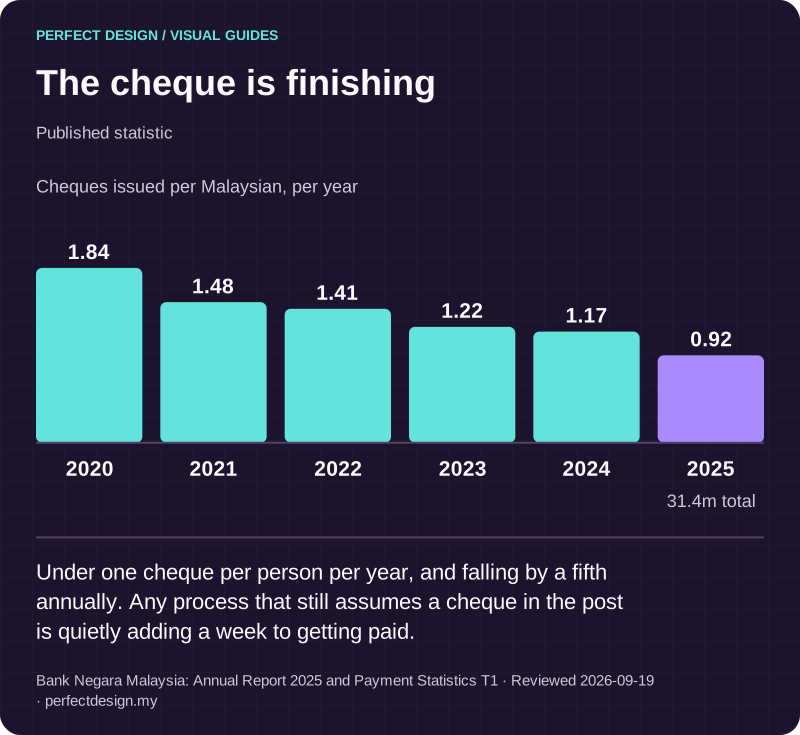
The cheque is finishing
Published statistic. Under one cheque per person per year, and falling by a fifth annually. Any process that still assumes a cheque in the post is quietly adding a week to getting paid.
Source: Bank Negara Malaysia: Annual Report 2025 and Payment Statistics T1. Reviewed .
Read the graphic as text
- 2020: 1.84.
- 2021: 1.48.
- 2022: 1.41.
- 2023: 1.22.
- 2024: 1.17.
- 2025: 0.92. 31.4m total
Chart scale: Cheques issued per Malaysian, per year.
Map the process before you automate it
Watch the process as it actually runs before writing a rule about it. Who performs each step. Which record changes, and where that record lives. Where a person applies judgement, and what they are weighing when they do. Which exceptions came up, and how often. What currently proves the work was finished.
That last one catches people out. In most manual processes the proof of completion is a message saying it is done. If you cannot say what would count as evidence today, the automation will not produce it either, and you will end up trusting the new system exactly as much as you trusted the chat thread.
Frequent work that is highly variable, has no clear owner, or runs on data nobody trusts is not ready. That is not a refusal, it is a sequence. Clarify the process, then decide whether a rule can carry part of it.
Trigger, conditions, authorised action, record
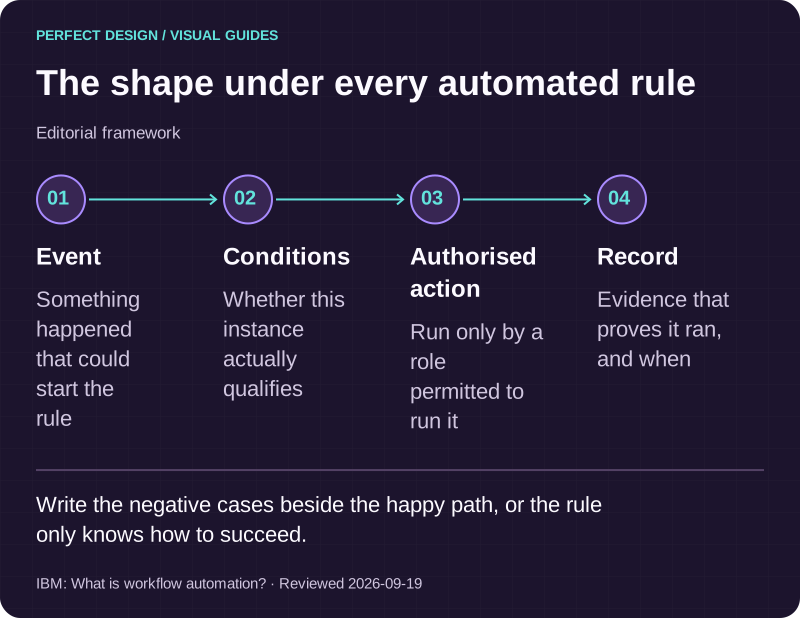
Every workflow has the same shape underneath. An event happens. Conditions decide whether this instance qualifies. An authorised action runs. A record is written that proves it did.
Take a service enquiry as a teaching example. The enquiry arriving is the event, but it is not yet a job. It becomes one when the required fields are present and somebody with the right role has marked it ready for review. Only then does the automation create the linked operational task and write the decision to the record. Odoo documents the same pattern for its own automation rules, where triggers and optional conditions decide whether predefined actions run, and notes that when several actions run in sequence the order matters because a later action may read data an earlier one changed. That is one product's documented behaviour rather than a universal rule, but the ordering trap is general.
Write the negative cases at the same time as the happy path. Incomplete input is flagged rather than processed. An unauthorised user is refused rather than quietly allowed through. A duplicate submission does not create a second operational record, because two jobs from one enquiry is the sort of error a customer discovers before you do.

The shape under every automated rule
Editorial framework. Write the negative cases beside the happy path, or the rule only knows how to succeed.
Basis: IBM: What is workflow automation?. Reviewed .
Read the graphic as text
- Event. Something happened that could start the rule
- Conditions. Whether this instance actually qualifies
- Authorised action. Run only by a role permitted to run it
- Record. Evidence that proves it ran, and when
A worked example
The company, roles, statuses and systems below are fictional teaching assumptions. Any numeric target stays as to agree until you set one, and the acceptance evidence describes tests to run rather than tests already passed.
Observe the manual intake
- Assumed actor
- Service coordinator
- Proposed system response
- Record the enquiry and assign it a unique reference
- Exception
- Required details are missing, or the request is a duplicate
- Acceptance evidence to collect
- Test that incomplete input is flagged and that a duplicate does not create a second operational record
Define trigger and conditions
- Assumed actor
- Process owner
- Proposed system response
- When the status becomes ready for review, verify the required fields and queue the approval
- Exception
- The status changes without the required evidence
- Acceptance evidence to collect
- Test that the action stays blocked and that the missing evidence is visible to whoever has to fix it
Authorised action
- Assumed actor
- Assumed approver
- Proposed system response
- Approve the handoff and create the linked operational task
- Exception
- The user lacks permission, or the request is rejected
- Acceptance evidence to collect
- Test authorised and unauthorised roles separately, and confirm the decision is recorded with its author and time
Retry and reconciliation
- Assumed actor
- System operator
- Proposed system response
- After a failed handoff, follow the agreed retry policy and compare the intended task with the destination record
- Exception
- Repeated delivery, a timeout, or records that do not match
- Acceptance evidence to collect
- Test that repeated input does not create an extra task, and that an unresolved mismatch lands in an owned queue
Monitoring
- Assumed actor
- Process owner
- Proposed system response
- Review completion and exception evidence on an agreed cadence
- Exception
- A case is stalled, or has no owner
- Acceptance evidence to collect
- Test that the case appears in the agreed review view and can be reassigned
| Workflow step | Assumed actor | Proposed system response | Exception | Acceptance evidence to collect |
|---|---|---|---|---|
| Observe the manual intake | Service coordinator | Record the enquiry and assign it a unique reference | Required details are missing, or the request is a duplicate | Test that incomplete input is flagged and that a duplicate does not create a second operational record |
| Define trigger and conditions | Process owner | When the status becomes ready for review, verify the required fields and queue the approval | The status changes without the required evidence | Test that the action stays blocked and that the missing evidence is visible to whoever has to fix it |
| Authorised action | Assumed approver | Approve the handoff and create the linked operational task | The user lacks permission, or the request is rejected | Test authorised and unauthorised roles separately, and confirm the decision is recorded with its author and time |
| Retry and reconciliation | System operator | After a failed handoff, follow the agreed retry policy and compare the intended task with the destination record | Repeated delivery, a timeout, or records that do not match | Test that repeated input does not create an extra task, and that an unresolved mismatch lands in an owned queue |
| Monitoring | Process owner | Review completion and exception evidence on an agreed cadence | A case is stalled, or has no owner | Test that the case appears in the agreed review view and can be reassigned |
Exceptions are the system, not the edge
Two different things get called failure and they need separate handling. A business exception is a legitimate outcome you did not want: a missing approval, a customer who withdraws, a request outside policy. A technical failure is a system that did not answer: a timeout, a rejected write, an event delivered twice.
Stripe's webhook documentation is a useful attributed example of why the technical side needs designing rather than assuming. It describes asynchronous delivery, events that are not guaranteed to arrive in order, duplicate events, retries, and the advice to acknowledge quickly and do the slower work afterwards. Those are that product's documented behaviours, not universal laws, but any integration receiving events from another system has to answer the same questions.
The controls that follow are few and none of them are optional. Make repeated input safe, so the same event arriving twice produces one outcome. Decide the retry policy deliberately, including when to stop trying. Reconcile what you intended against what the destination actually holds. And when something cannot be resolved, put it in front of a named person with enough evidence to investigate. A failure that disappears into a log is not handled, it is hidden.
Approvals, permissions and the audit trail
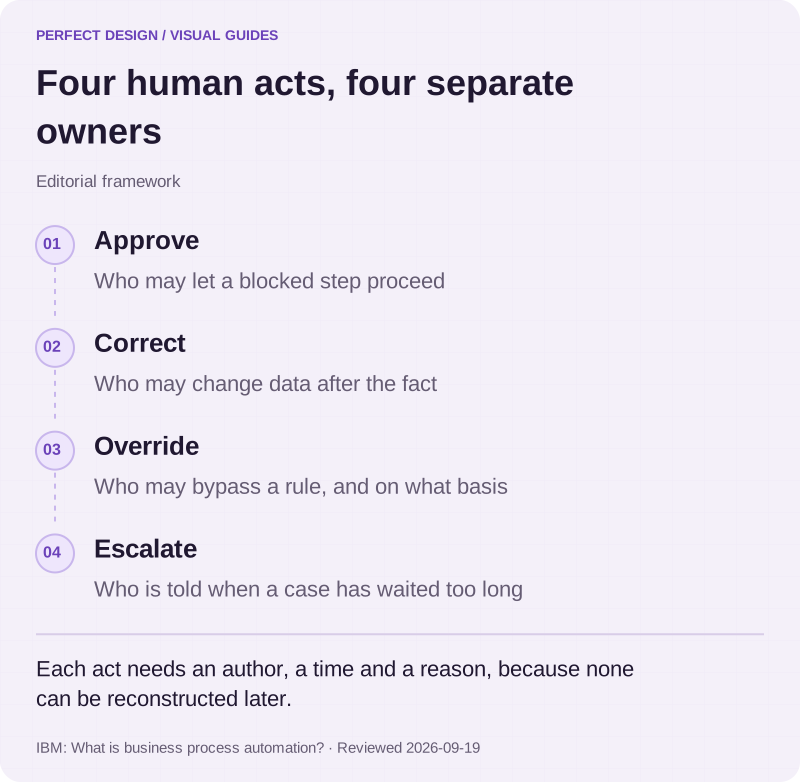
Approval, correction, override and escalation are four separate human actions and each needs its own owner. Who may approve a step. Who may correct data after the fact. Who may override a blocked action, and what that override requires. Who is told when a case has waited too long.
Each of those decisions should leave a record with an author, a time, and a reason where a reason matters. That is what turns an automated process into something you can defend in a dispute, and it is the feature people most regret leaving out, because it cannot be reconstructed afterwards.
Permission is also not the same thing as signing in. Authentication proves who somebody is; permission decides which records they may read, which fields they may change and which actions they may authorise. Both have to be designed, and the second is where the interesting mistakes live. Accounts and portals covers the sign-in and role layer underneath a workflow.

Four human acts, four separate owners
Editorial framework. Each act needs an author, a time and a reason, because none can be reconstructed later.
Basis: IBM: What is business process automation?. Reviewed .
Read the graphic as text
- Approve. Who may let a blocked step proceed
- Correct. Who may change data after the fact
- Override. Who may bypass a rule, and on what basis
- Escalate. Who is told when a case has waited too long
Which systems, and whether they can genuinely talk
Bring this list to scoping: the source system, the destination system, the identifier that links a record across both, the fields the rule reads, which system is the source of truth when they disagree, the read and write permissions available, the role that approves, and who maintains the whole thing afterwards.
An API existing does not establish feasibility. What matters is whether the permissions you need can actually be granted, whether the data is clean enough for a rule to trust, whether the supplier's terms allow what you intend, and who is accountable when the other system changes. We check that before promising a connection rather than after. That work is covered on CRM and integrations, and the screens your team watches while the workflow runs are covered on admin dashboards.

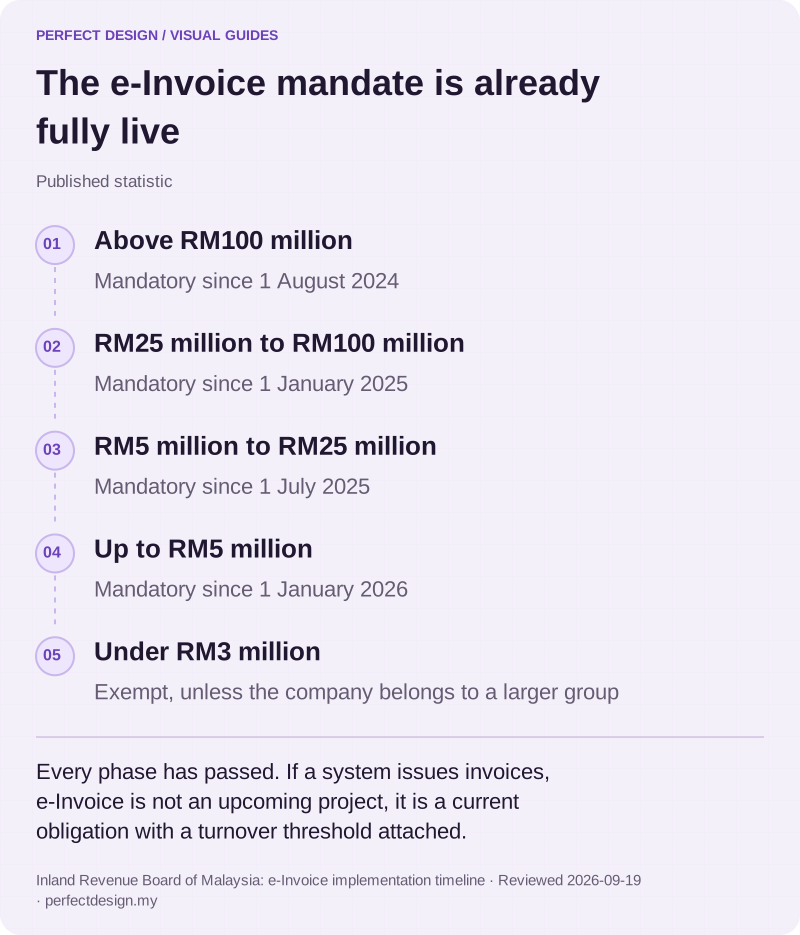
The e-Invoice mandate is already fully live
Published statistic. Every phase has passed. If a system issues invoices, e-Invoice is not an upcoming project, it is a current obligation with a turnover threshold attached.
Source: Inland Revenue Board of Malaysia: e-Invoice implementation timeline. Reviewed .
Read the graphic as text
- Above RM100 million. Mandatory since 1 August 2024
- RM25 million to RM100 million. Mandatory since 1 January 2025
- RM5 million to RM25 million. Mandatory since 1 July 2025
- Up to RM5 million. Mandatory since 1 January 2026
- Under RM3 million. Exempt, unless the company belongs to a larger group
How you will know it works
Acceptance evidence and ongoing measures do different jobs. Acceptance tests show that the agreed path and the exceptions behave as specified, and they run before release. Operational measures show what happens afterwards, and they only mean something with a denominator and a baseline behind them.
Useful categories, without inventing values for them: eligible cases, completed cases, failed actions, duplicate attempts, manual corrections, cycle time and unresolved exceptions. Set a target once you have watched the real numbers for a period, rather than writing one into a proposal.
Then assign the roles that outlive the build. Business ownership of the process. Technical maintenance of the automation. Exception review, which is a daily habit rather than a job title. And change approval, because the first request to alter a rule will arrive sooner than you expect. Those are frequently four different people.
What to bring
One workflow, not five. The people it affects, the tools it already touches, the exceptions you know about, the constraints that cannot move, and any real deadline or budget range. Tell us about the process and we will say whether it is ready to automate, what we would control first, and where clarifying the process would serve you better than building anything at all.