

In this section7 sections
Three things a membership system must keep apart
Most membership problems trace back to one design shortcut: treating the login, the subscription and the membership as the same object. It feels tidy at the start and it fails in every direction later. A member who pays by bank transfer has no subscription. A household membership has three logins and one membership. A member suspended by the committee still has a perfectly valid password.
- The membership is the relationship between your organisation and a member. It has a number, a category, a start date, a current period and a status that only your rules may change.
- The account is a credential a person uses to sign in. It may belong to a member, to a staff administrator, or to somebody whose membership ended last year and whose access should have ended with it.
- The payment state is what a bank or a gateway last told you. It is evidence towards a decision about membership, and on its own it is not the decision.
Keep them apart and the awkward cases stop being awkward. A failed renewal payment becomes a membership in grace with a task attached, rather than a member deleted by an automated job. A committee suspension becomes a status change with a reason and a date, rather than somebody quietly changing a password.

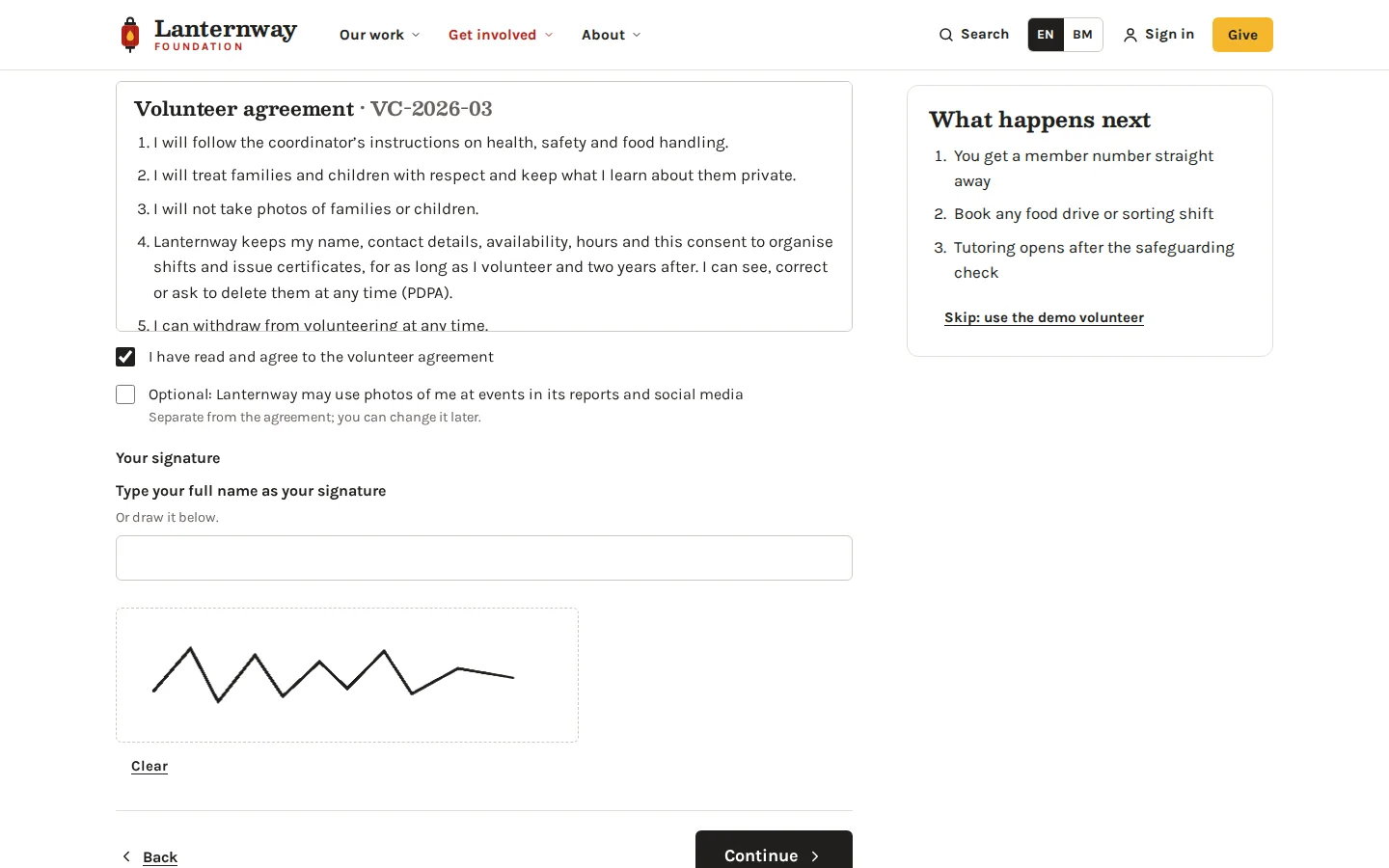
Membership, account and payment state
Editorial framework. Collapse the three and cancelling a card can quietly erase a twenty year member.
Basis: Perfect Design: business systems explained. Reviewed .
Read the graphic as text
- The membership. A number, a category, a period and a status
- The account. A credential somebody uses to sign in
- The payment state. What the gateway last told you, nothing more
What the member record has to hold
The record is the part people underestimate, because the first version always looks like a contact list. What separates a system from a spreadsheet is that it holds the history as well as the present: the category somebody joined under, every period they have held, the tier changes, the suspensions, who approved what and when. Those are the questions that arrive years later, usually from an auditor or a member disputing something.
Membership is also not always one person. Corporate, household, family and life memberships each need a holder and a set of people who inherit entitlement from it, with a rule for what happens when the holder leaves. Decide that early, because retrofitting a one-to-many relationship onto a record built for individuals is one of the more expensive corrections.
Members and logins are not the same thing
Approving a membership and granting an account are two steps, and the rule connecting them belongs to your organisation rather than to the software. Usually an approved membership entitles somebody to an account, access is granted against a verified email, and access can be revoked without touching the membership record. That separation is what lets you suspend access during a dispute, give a company secretary a login without making them a member, or keep a lapsed member's history intact while their access stops.
The messy cases are worth naming during scoping: two records for the same person, a shared inbox used as a login, a member who changes employer and expects their membership to follow, and accounts nobody can match to a current membership. Every one of those needs a decision and a reconciliation queue. Accounts and portals covers the sign-in layer underneath. How staff permissions are modelled is a separate topic again, and worth treating as one.
Tiers, entitlements and effective dates
A tier is a named set of terms: what it costs, what it includes, who may hold it. An entitlement is what a specific member has right now, for a period with a start and an end. Keeping the two separate means you can change next year's tier without rewriting what somebody is owed this year, and you can answer the only question that matters at the door, which is what this member is entitled to today.
The table below walks the lifecycle for a fictional club with an annual membership and separate portal accounts. The roles, policies and responses are assumptions used for illustration, and the last column describes evidence to collect at acceptance rather than tests anybody has passed.
Approve an application
- Assumed actor
- Membership coordinator
- Proposed system response
- Create the membership status and the agreed entitlement once the decision is recorded
- Exception
- A portal login on its own does not prove that a membership was ever approved
- Acceptance evidence to collect
- Application, decision and entitlement records for each approval route
Renew membership
- Assumed actor
- Member and billing owner
- Proposed system response
- Reconcile the renewal event with the next entitlement period
- Exception
- An unpaid or disputed renewal follows the agreed grace policy rather than stopping access immediately
- Acceptance evidence to collect
- Billing-status and membership-period tests across success, failure and late payment
Cancel membership
- Assumed actor
- Membership coordinator
- Proposed system response
- End the entitlement on the agreed policy date while retaining the permitted records
- Exception
- Shared or unmatched accounts need reconciling before access is removed
- Acceptance evidence to collect
- Status-transition and access-revocation observations, including the retained history
| Workflow step | Assumed actor | Proposed system response | Exception | Acceptance evidence to collect |
|---|---|---|---|---|
| Approve an application | Membership coordinator | Create the membership status and the agreed entitlement once the decision is recorded | A portal login on its own does not prove that a membership was ever approved | Application, decision and entitlement records for each approval route |
| Renew membership | Member and billing owner | Reconcile the renewal event with the next entitlement period | An unpaid or disputed renewal follows the agreed grace policy rather than stopping access immediately | Billing-status and membership-period tests across success, failure and late payment |
| Cancel membership | Membership coordinator | End the entitlement on the agreed policy date while retaining the permitted records | Shared or unmatched accounts need reconciling before access is removed | Status-transition and access-revocation observations, including the retained history |
Notice what the middle column does not say. It does not say the member was let in because a payment succeeded. Payment status, membership period, entitlement and account access are four separate facts, reconciled according to rules your organisation agrees, and the system should be able to show all four for any member on any date.

What Malaysians actually carry
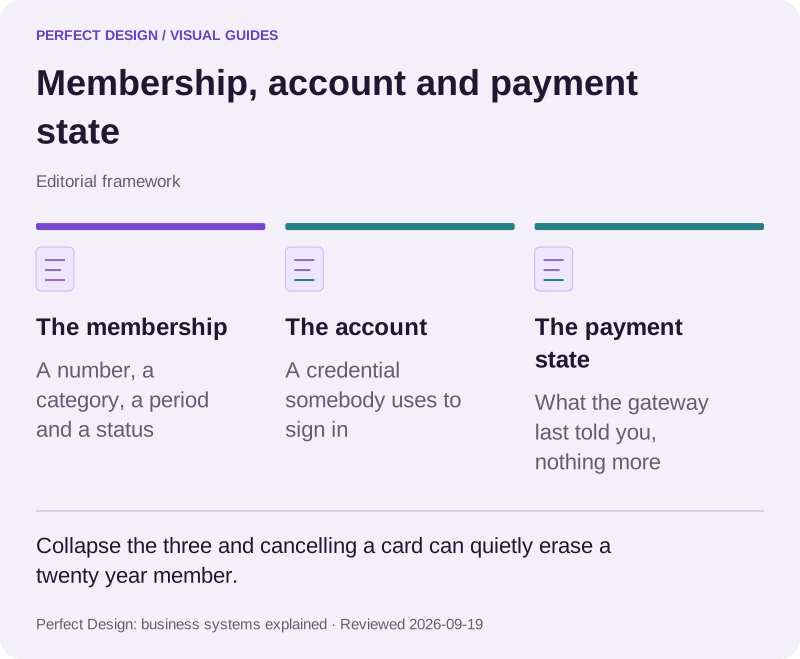
Published statistic. There are roughly five e-money accounts and two debit cards for every credit card in the country. A checkout designed around credit cards is designed around the smallest group.
Source: Bank Negara Malaysia: Payment Statistics, Table T2.2 Cards and Users, end-2025. Reviewed .
Read the graphic as text
- E-money accounts: 188m. Wallets, card and network based
- Debit cards: 55m.
- Credit cards: 12m.
Chart scale: In circulation at the end of 2025, in millions.
Renewal, lapsing and coming back
Renewal is a sequence rather than an event: a period approaches its end, a reminder goes out, a payment is attempted or a transfer arrives, the period is extended, the entitlement follows, and somebody is told. Each of those steps can fail independently. A renewal paid by cheque that nobody has banked, a card that fails on the third retry, a member who renews into a tier that no longer exists: these are normal, and a system that only models success will hand them all to a human anyway.
Lapsing and cancelling are different decisions and should look different in the record. A lapse is the passage of time with no renewal, usually after a grace period you set. A cancellation is somebody choosing to end the membership, with an effective date that may not be today. Reinstatement is the third rule people forget: when a lapsed member returns, do they rejoin at their old number with their history and joining date intact, or start again? Both are defensible. Only one can be true in the code.

Five states a membership moves through
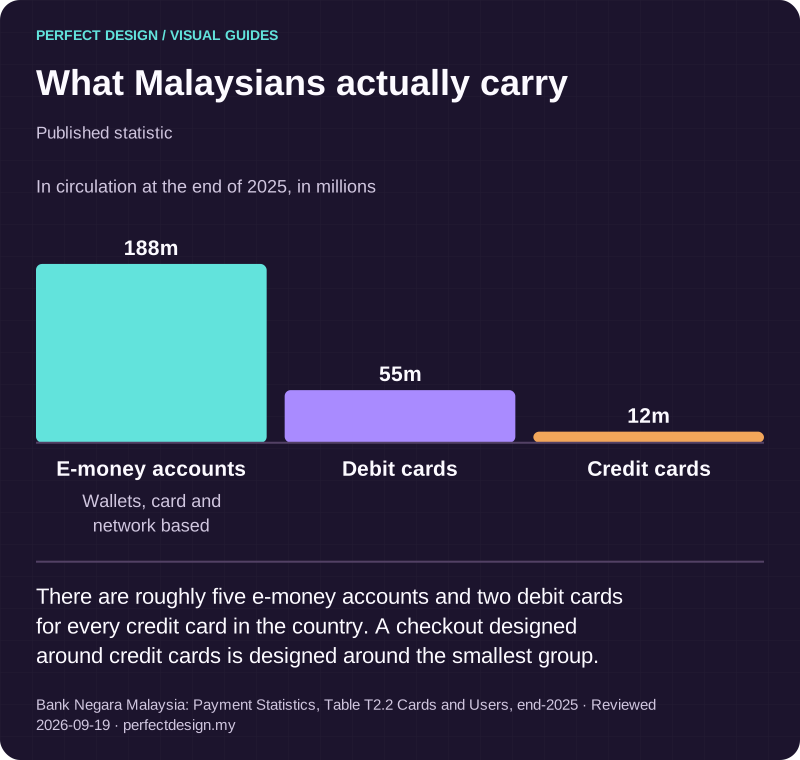
Editorial framework. Decide once whether a returning member keeps their history, because only one answer can be true in code.
Basis: Stripe: Subscriptions overview. Reviewed .
Read the graphic as text
- Active. A current period with an entitlement behind it
- In grace. Renewal unpaid, access under your own rule
- Lapsed. Time passed and no renewal was recorded
- Cancelled. Somebody chose to end it, from a stated date
- Reinstated. Back again, with the old number or a new one
Member-only access
Whatever membership entitles people to has to be enforced at the moment of use, and checked against the entitlement rather than against a label on the account. That applies to a members-only rate at checkout, a document library, an event booking, a directory listing or a physical door code. The check is the same question each time: does this person hold an active entitlement covering this thing, today?
Two practical notes. First, decide what a lapsed member keeps: usually their own records and receipts, rarely the benefits. Second, member pricing needs a rule for what happens when membership ends between booking and attending. Where benefits are bought or booked, the money side belongs with payment and checkout, which should read entitlement rather than duplicate it.
Records that survive a committee change
Associations and clubs change officers, often every year or two, and the outgoing treasurer takes their spreadsheet knowledge with them. The system is what remains, so it has to be readable by somebody who arrives with no history: statuses in plain language, a visible audit trail of who approved, renewed, suspended or cancelled what and why, and reports that answer the standing questions without anybody building them again. Current members by tier, periods expiring soon, failed renewals, unmatched accounts and open exceptions cover most of what a new committee asks for.

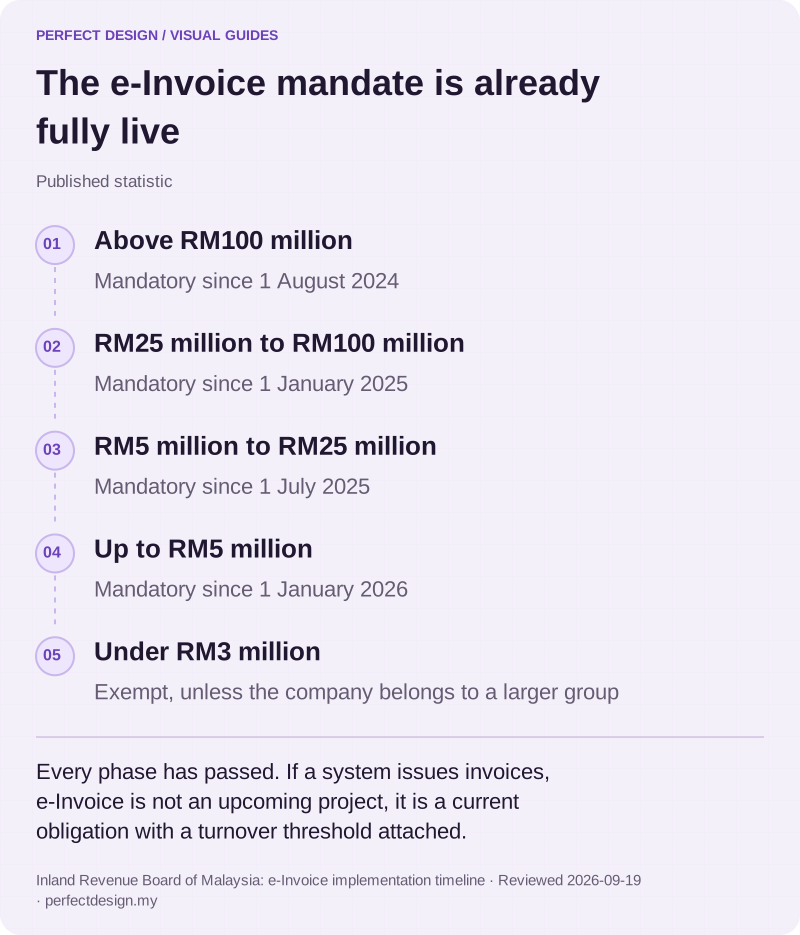
The e-Invoice mandate is already fully live
Published statistic. Every phase has passed. If a system issues invoices, e-Invoice is not an upcoming project, it is a current obligation with a turnover threshold attached.
Source: Inland Revenue Board of Malaysia: e-Invoice implementation timeline. Reviewed .
Read the graphic as text
- Above RM100 million. Mandatory since 1 August 2024
- RM25 million to RM100 million. Mandatory since 1 January 2025
- RM5 million to RM25 million. Mandatory since 1 July 2025
- Up to RM5 million. Mandatory since 1 January 2026
- Under RM3 million. Exempt, unless the company belongs to a larger group
What to bring to a scoping conversation
Bring your current member list and its condition, your categories and what each one includes, how people join and who approves them, your renewal and grace rules, what happens on lapse and reinstatement, what membership unlocks, who administers it, and the reports your committee actually reads. That is enough to size the work honestly and to say whether a product would serve you better than a build. If you would rather start from the current process, talk it through with us.