

In this section6 sections
- 01Shopify development starts with the store you have to operate
- 02Which requirements need custom work
- 03Catalogue, checkout and the surfaces you cannot restyle
- 04Apps, fees and what the store costs to run each month
- 05Worked example: verifying a small theme-based store
- 06What to verify before choosing an implementation partner
Shopify development starts with the store you have to operate
Shopify is a hosted platform: the software, the servers, the security patching and the payment plumbing are its responsibility rather than yours, and you pay for that in a subscription and in fees. What it does not do is make the rest of the decisions for you. A Shopify project still has to settle six things before anyone opens a theme: the customer journey from first product view to delivery message; who owns the catalogue and the content; what the checkout and payment arrangements have to do; which other systems the store exchanges data with; what gets proved before launch; and who holds every account afterwards. Those six are the scope. The theme is a consequence of them.
We build on Shopify, on WooCommerce and as custom stores, and when the decision is genuinely open we lean towards custom for the reasons set out on the e-commerce hub. That is a preference rather than a rule, and plenty of businesses are better served by Shopify than by anything we would write from scratch. We build on Shopify when it genuinely suits the business, and we will tell you when it does. Before committing to any partner, on Shopify or anywhere else, ask to see a live store and speak to the merchant running it.

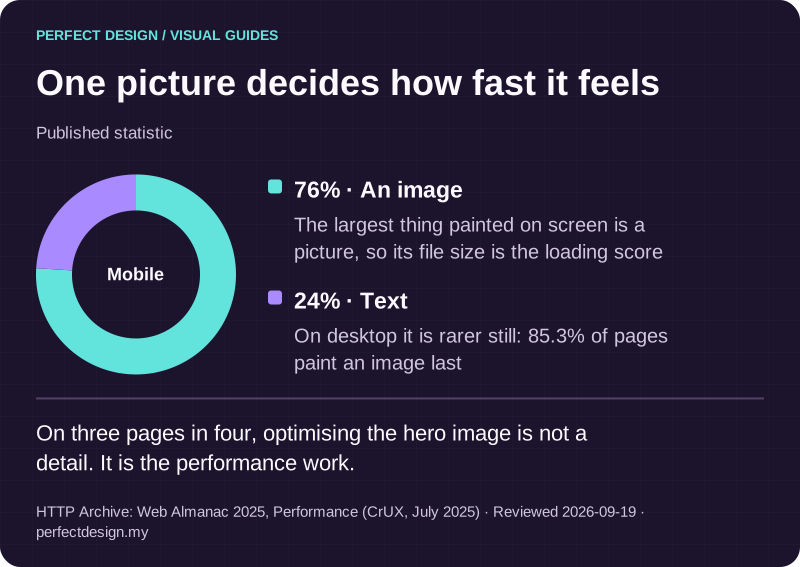
One picture decides how fast it feels
Published statistic. On three pages in four, optimising the hero image is not a detail. It is the performance work.
Source: HTTP Archive: Web Almanac 2025, Performance (CrUX, July 2025). Reviewed .
Read the graphic as text
Mobile
- An image: 76%. The largest thing painted on screen is a picture, so its file size is the loading score
- Text: 24%. On desktop it is rarer still: 85.3% of pages paint an image last
Which requirements need custom work
Shopify work separates into five layers, and knowing which layer a requirement lands in is most of the estimate. Shopify's theme documentation describes the structure behind that distinction: a theme is built from layouts, templates, sections, blocks, snippets and configuration files, and JSON templates act only as a wrapper for sections. Sections and blocks are the parts a merchant can add, remove and reorder; snippets stay invisible in the theme editor.
- Theme settings. Colours, typography, section order and content you change yourself in the theme editor.
- Theme code. Liquid templates, sections and snippets, edited when the storefront needs a layout the chosen theme cannot express.
- Catalogue and content. Products, variants, prices, stock, media and the metadata filtering depends on. Usually the longest task.
- Checkout and payments. A constrained surface with defined extension points rather than a page you rewrite.
- Exceptional requirements. Work needing an app, a custom extension, an integration with a system you already run, or a different platform.
The working order is: configure first, then code the theme, then consider an app, then consider building one, and only then reconsider the platform. Configuration carries no future maintenance, theme code is yours to maintain through theme updates, and an app is a monthly cost plus a dependency on somebody else's roadmap. A custom app fits a requirement no subscription covers. And if the requirement is the checkout itself, or a data model Shopify does not hold, that is where a custom build stops being an indulgence and becomes the cheaper option.
One decision inside that structure matters more than it looks: what your team will edit after launch. Content in sections and blocks can be rearranged by whoever runs the store, while content fixed inside a snippet needs a developer. Deciding that page by page separates a store your marketing person can run from one that generates a support request every time a promotion changes, and we approach client-editable content the same way on every platform.

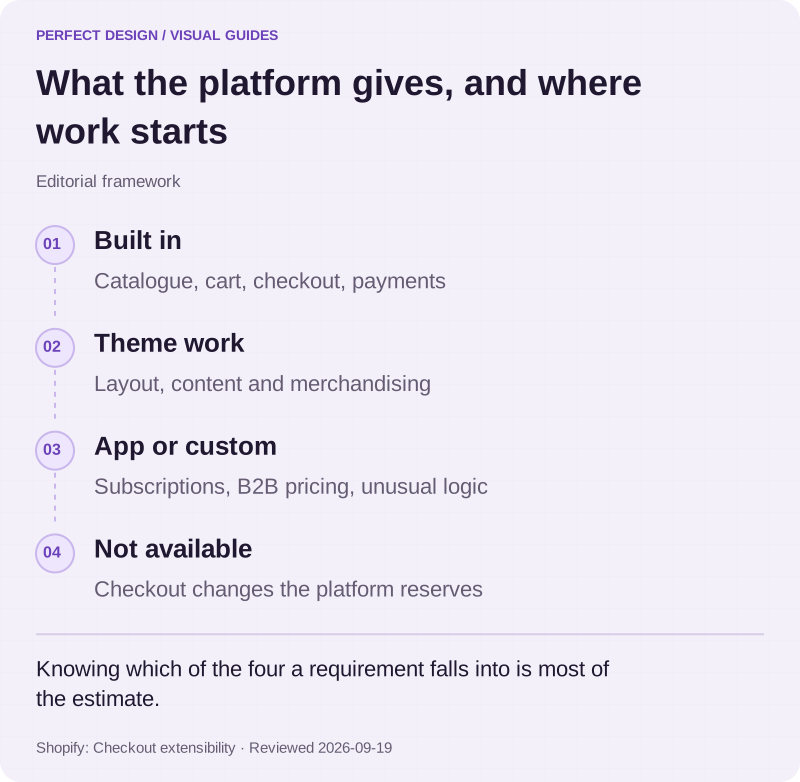
What the platform gives, and where work starts
Editorial framework. Knowing which of the four a requirement falls into is most of the estimate.
Basis: Shopify: Checkout extensibility. Reviewed .
Read the graphic as text
- Built in. Catalogue, cart, checkout, payments
- Theme work. Layout, content and merchandising
- App or custom. Subscriptions, B2B pricing, unusual logic
- Not available. Checkout changes the platform reserves
Catalogue, checkout and the surfaces you cannot restyle
Checkout is the least negotiable surface on Shopify, and that is the most useful thing to understand before you commit. Shopify's developer documentation states that apps extend checkout using extensions, and lists four kinds: UI extensions, Functions, web pixel extensions and payments extensions. It calls them upgrade-safe, meaning they keep working as Shopify ships new checkout features. The older route of editing checkout.liquid is being phased out, and the same page records script tags on the thank-you and order-status pages being sunset on 28 August 2025 for Plus stores and 26 August 2026 for everyone else.
Read practically, that means you can add to the checkout at defined points and change how it calculates things, but you cannot redesign it as a page. If your buying journey needs a step the checkout does not have, that is a scope decision to take before the build, and it is the most common honest reason to recommend a custom store instead. Everything before the checkout, the catalogue, the product page, the cart and the way people narrow a large range, is where a Shopify build earns its keep. Structure the product data first, because catalogue and search behaviour follows the data rather than the theme.

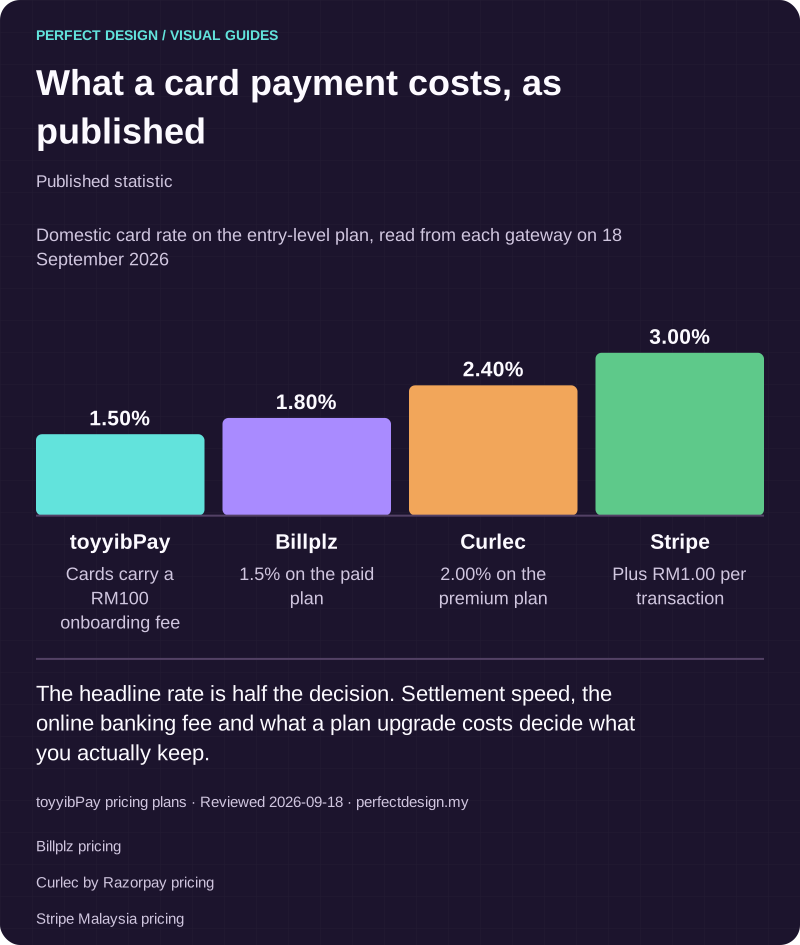
What a card payment costs, as published
Published statistic. The headline rate is half the decision. Settlement speed, the online banking fee and what a plan upgrade costs decide what you actually keep.
Source: toyyibPay pricing plans. Reviewed .
Also: Billplz pricing.
Also: Curlec by Razorpay pricing.
Also: Stripe Malaysia pricing.
Read the graphic as text
- toyyibPay: 1.50%. Cards carry a RM100 onboarding fee
- Billplz: 1.80%. 1.5% on the paid plan
- Curlec: 2.40%. 2.00% on the premium plan
- Stripe: 3.00%. Plus RM1.00 per transaction
Chart scale: Domestic card rate on the entry-level plan, read from each gateway on 18 September 2026.
Apps, fees and what the store costs to run each month
A Shopify store has four running costs: the subscription, the apps, the per-sale fees and ongoing care. The app layer is the one that creeps. Shopify's billing documentation records that app developers set their own charges, that these arrive as recurring fees, usage fees and one-time fees on your Shopify bill, and that billing questions about an app go to its developer rather than to Shopify. The practical defence is a register: every app, what it does, what it costs a month, and what breaks if it is removed. Review it at renewal, not at year three when six subscriptions are quietly restoring features you no longer use.
Payment fees deserve the same clarity. Shopify's billing documentation states that third-party transaction fees are charged when you use a third-party payment provider to accept customer payments, that those fees are in addition to the processing fees your provider charges, and that the rate varies depending on your pricing plan. Shopify’s Malaysian pricing page lists the rates: 2% on Basic, 1% on Grow, 0.6% on Advanced and 0.2% on Plus. It also records that Shopify Plus stores using Shopify Payments as their sole payment provider have those fees waived, and Shopify's page on third-party payment providers adds that they otherwise apply on all third-party and alternate gateways even when Shopify Payments is activated, with PayPal and manual payments excluded in that case.
For a Malaysian store that matters, because Shopify Payments is not offered in Malaysia: FPX, DuitNow QR and cards arrive through a local gateway, so every online order carries both fees. Model the gateway fee and the Shopify fee together rather than one or the other. What four Malaysian gateways publish is tabulated on the e-commerce hub, and our comparison of Shopify, WooCommerce and a custom store works both fees through for a small store and a growing one.

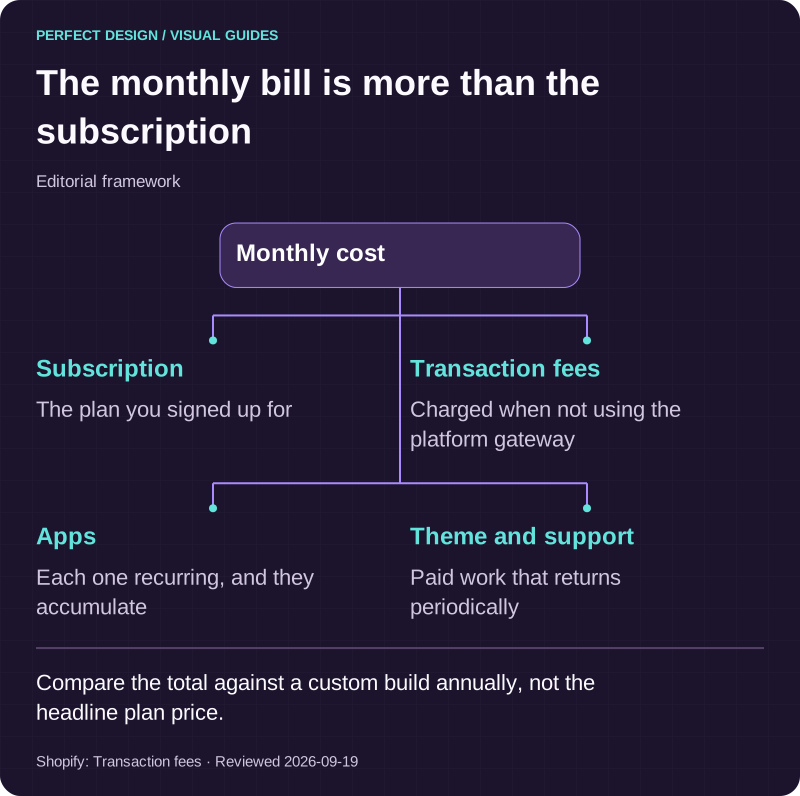
The monthly bill is more than the subscription
Editorial framework. Compare the total against a custom build annually, not the headline plan price.
Basis: Shopify: Transaction fees. Reviewed .
Read the graphic as text
Monthly cost
- Subscription. The plan you signed up for
- Transaction fees. Charged when not using the platform gateway
- Apps. Each one recurring, and they accumulate
- Theme and support. Paid work that returns periodically
Worked example: verifying a small theme-based store
The table below is a fictional teaching example: a small retailer selling physical products with variants on a configured theme. The actors and policies are assumed and would have to be agreed for your project. The right-hand column lists evidence to collect during testing, never results already achieved.
Choose a variant
- Assumed actor
- Customer
- Proposed system response
- Show the selected product details and the purchase options actually available
- Exception
- An unavailable or mismatched variant prevents the proposed order
- Acceptance evidence to collect
- Variant and catalogue test observations, including a deliberately out-of-stock option
Place a test order
- Assumed actor
- Store operator
- Proposed system response
- Exercise the agreed theme, checkout and payment configuration together
- Exception
- A checkout customisation the platform does not support becomes a scoped decision, not a promise
- Acceptance evidence to collect
- Test-mode order records and a written note of the configuration chosen
Hand off fulfilment
- Assumed actor
- Operations owner
- Proposed system response
- Reconcile the order against the agreed inventory or fulfilment source
- Exception
- Duplicate or missing integration messages enter a reconciliation queue
- Acceptance evidence to collect
- Mapped identifiers, replay observations and the recorded ownership decision
| Workflow step | Assumed actor | Proposed system response | Exception | Acceptance evidence to collect |
|---|---|---|---|---|
| Choose a variant | Customer | Show the selected product details and the purchase options actually available | An unavailable or mismatched variant prevents the proposed order | Variant and catalogue test observations, including a deliberately out-of-stock option |
| Place a test order | Store operator | Exercise the agreed theme, checkout and payment configuration together | A checkout customisation the platform does not support becomes a scoped decision, not a promise | Test-mode order records and a written note of the configuration chosen |
| Hand off fulfilment | Operations owner | Reconcile the order against the agreed inventory or fulfilment source | Duplicate or missing integration messages enter a reconciliation queue | Mapped identifiers, replay observations and the recorded ownership decision |

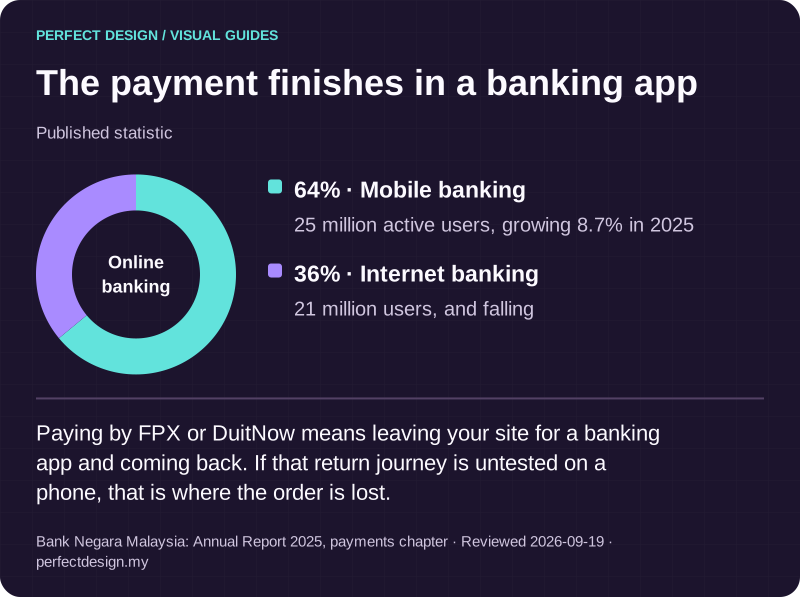
The payment finishes in a banking app
Published statistic. Paying by FPX or DuitNow means leaving your site for a banking app and coming back. If that return journey is untested on a phone, that is where the order is lost.
Source: Bank Negara Malaysia: Annual Report 2025, payments chapter. Reviewed .
Read the graphic as text
Online banking
- Mobile banking: 64%. 25 million active users, growing 8.7% in 2025
- Internet banking: 36%. 21 million users, and falling
What to verify before choosing an implementation partner
Most of the risk in a Shopify engagement is commercial rather than technical, so ask about ownership and continuity.
- Whose name is on the Shopify account, the domain and the payment provider account. It should be your business from day one.
- Whether the theme code is handed to you, and where it lives if the relationship ends.
- Which apps are proposed, what each costs a month, and which exist to cover a gap the build could close instead.
- How the catalogue is migrated and who checks the imported data before launch.
- Who is responsible after launch for theme updates, app changes and the checks in the table above.
Our position on ownership is fixed: everything belongs to your business, the accounts are opened in your name, and if you move to another provider it all goes with you. On evidence, we would rather say plainly that we have no Shopify store published yet than show an unrelated project and let you assume. To work through whether Shopify or a custom build fits what you sell, tell us about the store and you will get a straight recommendation, including the case where you do not need us.