




In this section8 sections
- 01Start with the problem, not the rebuild
- 02When a redesign is the wrong answer
- 03Decide what existing value must survive
- 04Choose the smallest useful scope
- 05Prototype the change before committing to it
- 06Release with a way back, then measure honestly
- 07An example, from concern to agreed scope
- 08Deciding on your own site
Start with the problem, not the rebuild
A redesign conversation should open with four things: the business problem, the audience affected, the journey where it shows up, and the evidence behind it. Only then is scope worth discussing, and the useful outcomes at that point are wider than a rebuild. A targeted repair. Clearer service content. A better enquiry path. A search investigation. Or a decision deferred until there is evidence worth acting on.
The sequence matters because a visual symptom rarely has a visual cause. A site can look dated and convert fine, or look excellent and hide the one thing buyers need. Enquiries can fall because a form stopped delivering, because an earlier migration lost its redirects, or because a competitor answered a question you never covered. None needs a redesign.
What we record in the first review
- The current website and the business problem, in one sentence
- The priority audience and the journey it affects
- The next action you want from a visitor
- Who owns the content, and the tools already in use
- Any constraint, and whatever evidence of friction exists
What is known and what still needs investigating stay in separate columns.

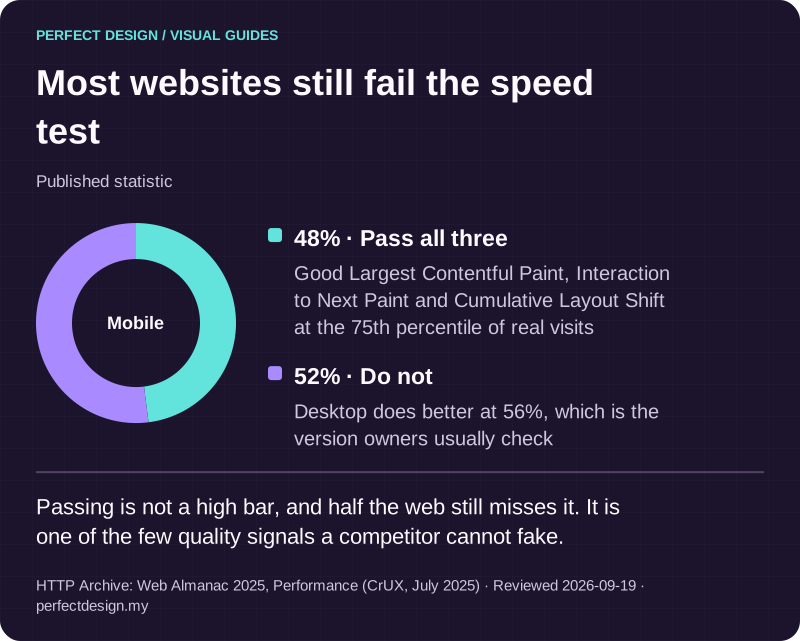
Most websites still fail the speed test
Published statistic. Passing is not a high bar, and half the web still misses it. It is one of the few quality signals a competitor cannot fake.
Source: HTTP Archive: Web Almanac 2025, Performance (CrUX, July 2025). Reviewed .
Read the graphic as text
Mobile
- Pass all three: 48%. Good Largest Contentful Paint, Interaction to Next Paint and Cumulative Layout Shift at the 75th percentile of real visits
- Do not: 52%. Desktop does better at 56%, which is the version owners usually check
When a redesign is the wrong answer
Four situations come up often enough to name. The problem is local, sitting in one page or one form, and rebuilding forty pages to fix one is expensive theatre. The content is the problem, so specific writing and real proof would do more than any new layout. The platform is sound and only the presentation is tired, which is a refresh. Or the problem is discovery, with causes in indexing, structure or competition rather than design.
A redesign earns its place when journeys or information structure are genuinely unclear, when ownership of content has broken down, when the platform blocks necessary work, or when several of those overlap. That is a judgement made on an audit, not in a sales conversation. We would rather tell you the smaller job is right and be believed on the larger one later.

The platform decides more than the theme
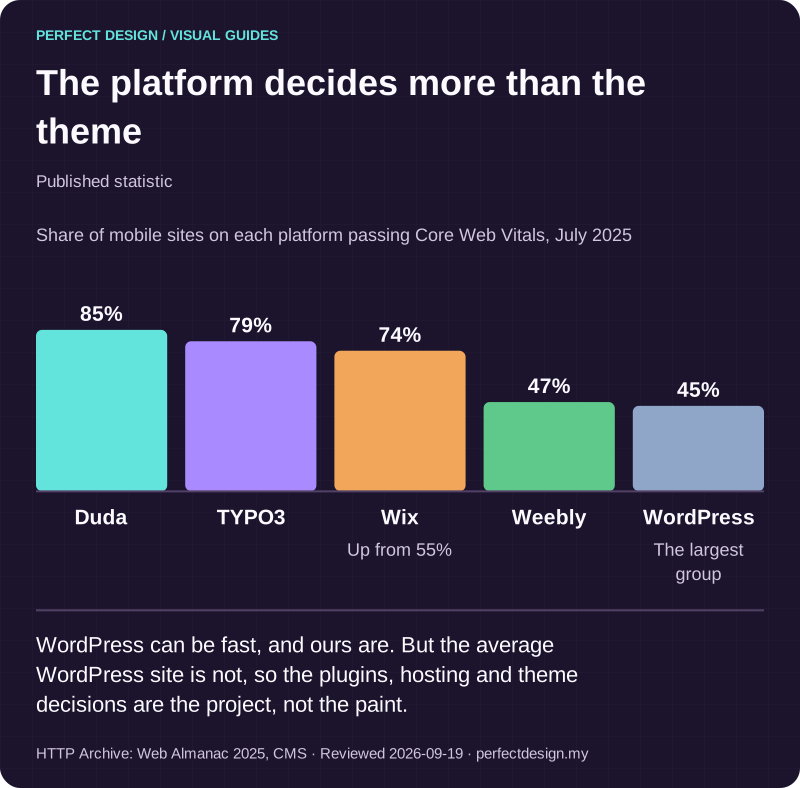
Published statistic. WordPress can be fast, and ours are. But the average WordPress site is not, so the plugins, hosting and theme decisions are the project, not the paint.
Source: HTTP Archive: Web Almanac 2025, CMS. Reviewed .
Read the graphic as text
- Duda: 85%.
- TYPO3: 79%.
- Wix: 74%. Up from 55%
- Weebly: 47%.
- WordPress: 45%. The largest group
Chart scale: Share of mobile sites on each platform passing Core Web Vitals, July 2025.
Decide what existing value must survive
An existing site usually carries value nobody has written down: pages that still answer a real question, content that took months to approve, media you paid for, an enquiry journey people complete, and destinations other websites still point at. Each needs a decision before scope is agreed: keep it because it still serves the task, or record why it is being replaced, merged or retired.
The moment URLs change, a second dependency appears. Google's site-move documentation is scoped guidance for exactly this, not a complete SEO plan. It recommends mapping old URLs to new ones, server-side permanent redirects such as 301 where technically possible, short chains, updated internal links and canonicals, a new sitemap, redirects tested before the move, monitoring afterwards, and keeping those redirects generally for at least a year.
Inventory the URLs before you agree the scope
The prerequisite is a list: every current destination with its purpose, owner, dependencies and proposed disposition. Build it from the sitemap, analytics, server logs and the content system rather than memory, and include images, video and downloads, the ones usually forgotten. Unresolved ownership stays an open decision, not a quiet deletion. Our technical SEO audit checklist covers the crawl and index side.

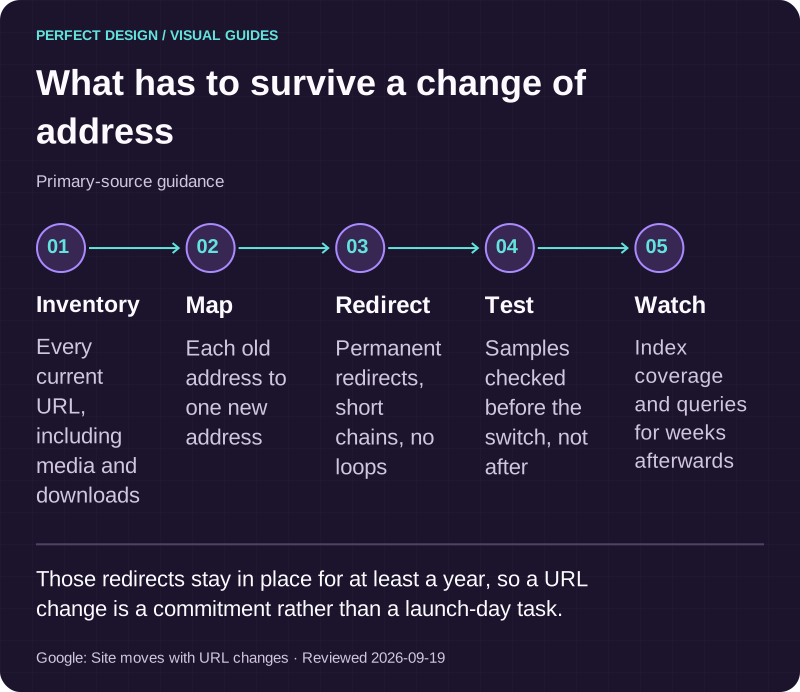
What has to survive a change of address
Primary-source guidance. Those redirects stay in place for at least a year, so a URL change is a commitment rather than a launch-day task.
Source: Google: Site moves with URL changes. Reviewed .
Read the graphic as text
- Inventory. Every current URL, including media and downloads
- Map. Each old address to one new address
- Redirect. Permanent redirects, short chains, no loops
- Test. Samples checked before the switch, not after
- Watch. Index coverage and queries for weeks afterwards
Choose the smallest useful scope
Treat the options as a sequence, not a menu. Preserve the structure that works. Improve selected pages when the problem is local. Redesign the information structure when journeys or ownership are unclear. Change platform only when the current one blocks necessary work. Remediate content when the issue is meaning, proof or freshness. Most projects need two of those, not five.
Development and search work are different responsibilities, and the handover matters most around URLs. Agree who owns the redirect map, who verifies it and what is being measured before a URL-changing rebuild goes live. Agreeing it afterwards is how visibility gets lost.
What can be separated into stages
Content cleanup, journey changes, the visual system, a platform change and the URL migration can often run as separate stages where dependencies allow. Sequencing is not universal. Tie each stage to a decision, an owner and the evidence that would let you accept it.

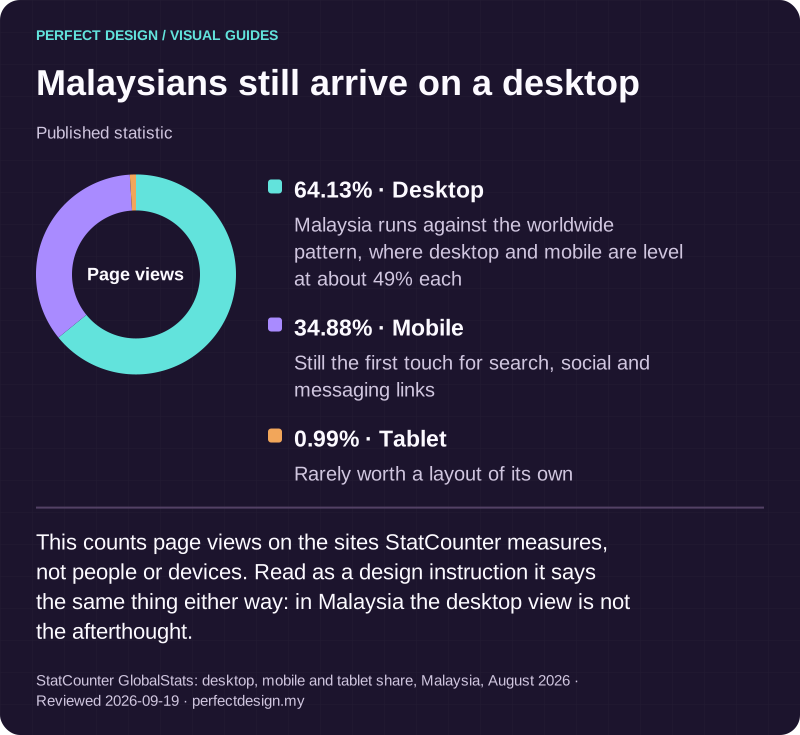
Malaysians still arrive on a desktop
Published statistic. This counts page views on the sites StatCounter measures, not people or devices. Read as a design instruction it says the same thing either way: in Malaysia the desktop view is not the afterthought.
Source: StatCounter GlobalStats: desktop, mobile and tablet share, Malaysia, August 2026. Reviewed .
Read the graphic as text
Page views
- Desktop: 64.13%. Malaysia runs against the worldwide pattern, where desktop and mobile are level at about 49% each
- Mobile: 34.88%. Still the first touch for search, social and messaging links
- Tablet: 0.99%. Rarely worth a layout of its own
Prototype the change before committing to it
You get a working prototype of the real journey on a live link before the build is committed, so the scope is judged from the thing itself. The review then runs in order: content and configuration, the journey end to end, responsive behaviour at the sizes your visitors use, functional checks on forms and sign-in, and accessibility. Planned redirects should be testable before release.
On accessibility, the W3C's Web Accessibility Initiative treats the work as initiated, planned, implemented and sustained: assign responsibility, evaluate early and regularly, monitor afterwards and take in user feedback. That is guidance about process, not a certification, and no launch checklist produces one.
Acceptance evidence before launch
Reviewed page journeys, content approved by its owner, checks at representative screen sizes, keyboard and form checks, redirect samples where URLs change, and a recorded rollback decision. These are checks to run and observations to collect, not results to claim in advance.
Release with a way back, then measure honestly
A release needs four things agreed before the switch: who is accountable, what the readiness decision rests on, which critical journeys and URL signals get checked immediately, and what triggers a recovery. Name the person authorised to choose correction or rollback.
Google's documentation for URL-changing moves says to test redirects before launch, then watch index coverage and query reports, server logs and analytics afterwards. It says to expect temporary fluctuation in ranking during a move, and that medium-sized sites can take a few weeks or more before new URLs replace the old ones in results. Take a baseline before the switch and record what changed and when.
After release
Watch the working journeys, the status responses, the redirect behaviour, the search and analytics signals and anything users report. Record what you change and when. Then decide whether the evidence calls for a correction or the rollback, while the agreed trigger is still fresh.

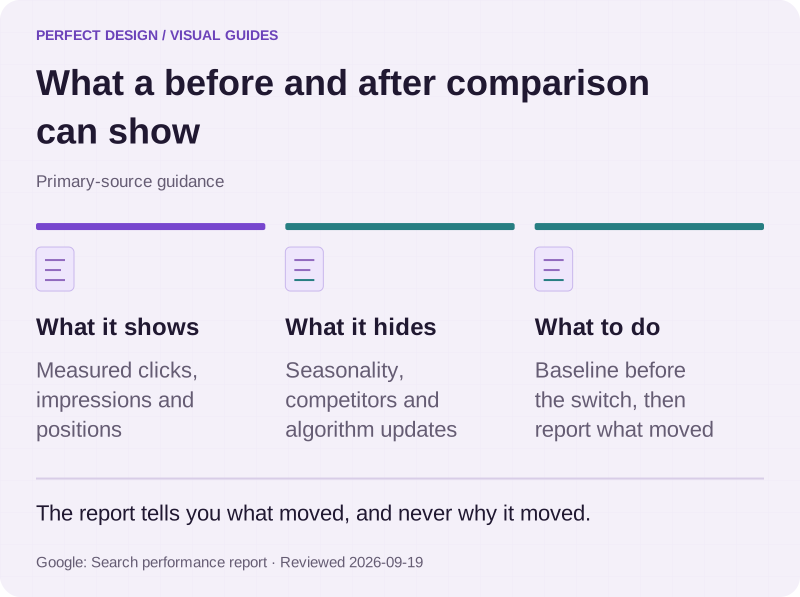
What a before and after comparison can show
Primary-source guidance. The report tells you what moved, and never why it moved.
Source: Google: Search performance report. Reviewed .
Read the graphic as text
- What it shows. Measured clicks, impressions and positions
- What it hides. Seasonality, competitors and algorithm updates
- What to do. Baseline before the switch, then report what moved
An example, from concern to agreed scope
The workflow below is a made-up example rather than a client: a business-to-business service company with existing service pages and an enquiry form, whose proposed redesign aims to make the services clearer while preserving the URLs that still work. It claims no traffic or lead result, and its actors, sequence, release gate and recovery trigger are assumptions to agree.
Decide what to retain
- Assumed actor
- Content owner
- Proposed response
- Inventory existing pages, take keep, rewrite or merge decisions, and map any replacement URL
- Exception
- Duplicate or unsupported content stays unresolved until an owner decides
- Acceptance evidence to collect
- The inventory, a rationale per decision and the proposed URL mapping
Test the proposed version
- Assumed actor
- Designer and developer with content owner
- Proposed response
- Check content, navigation, enquiry behaviour and planned redirects in an appropriate preview
- Exception
- A failed form, missing content or a wrong destination blocks the release
- Acceptance evidence to collect
- Preview observations and unresolved defects, without asserting tests passed
Review an agreed release
- Assumed actor
- Developer with site owner
- Proposed response
- Compare the deployed version against the approved page and URL map, then check the enquiry path
- Exception
- A broken critical path triggers the agreed correction or rollback, where recovery exists
- Acceptance evidence to collect
- Response, canonical, redirect and form observations plus the decision record
| Workflow step | Assumed actor | Proposed response | Exception | Acceptance evidence to collect |
|---|---|---|---|---|
| Decide what to retain | Content owner | Inventory existing pages, take keep, rewrite or merge decisions, and map any replacement URL | Duplicate or unsupported content stays unresolved until an owner decides | The inventory, a rationale per decision and the proposed URL mapping |
| Test the proposed version | Designer and developer with content owner | Check content, navigation, enquiry behaviour and planned redirects in an appropriate preview | A failed form, missing content or a wrong destination blocks the release | Preview observations and unresolved defects, without asserting tests passed |
| Review an agreed release | Developer with site owner | Compare the deployed version against the approved page and URL map, then check the enquiry path | A broken critical path triggers the agreed correction or rollback, where recovery exists | Response, canonical, redirect and form observations plus the decision record |
How to read the workflow
Each row names an actor, the response expected, the exception that stops the step and the evidence to collect. That shape keeps a redesign tied to decisions and acceptance instead of an unbounded list of improvements.
Deciding on your own site
Four prompts settle most of it. What is the problem, in one sentence. What existing value has to survive. What is the smallest change that could resolve it. What evidence would let you accept the launch. Answer those with the current site, the affected journey and the owners in front of you. The honest answer may be a targeted improvement, a search investigation or a deferred decision.
Our own work sits on both sides of the line. Sentrix Auto is client work. PITC Training, also a client, was a rebuild in which every course moved into a structured database, which is a migration before it is a redesign. Tournamy, a sports events client, left a WordPress shop for a new platform with its past events, paid orders and old links carried across. Orialis Group is a concept prototype, and shows the corporate shape a larger rebuild can aim at.
Send the address and what is going wrong through the contact page. We will tell you what we would look at first, and whether you need a redesign at all.