


perfectdesign.

After launch

Website maintenance and support

Keeping a working website working is a smaller job than most proposals suggest, and a more specific one. The question is not how many hours you get. It is what is watched, what is tested, who is responsible and where the boundary sits.

In short

Compare support arrangements on five things: how complex the site really is, what it depends on to stay up, what monitoring and recovery evidence exists, who is responsible for each part, and which changes are included. Routine care keeps a working site working. Redesigns, search work, new features and large content projects are separate pieces of work, and a scope that blurs that line will disappoint somebody within a few months.

Written for a business owner or operations lead with a live website deciding what ongoing support should cover · 7 min read

What ongoing care covers, and what it does not

Support is easiest to compare on five questions: how complex the site really is, what it depends on, what monitoring and recovery evidence exists, who is responsible for each part, and which changes are included. A monthly figure tells you almost nothing on its own.

The second thing to settle is what care is not. Redesigns, search programmes, new features and large content projects carry their own scope and price. An arrangement that quietly absorbs them gets rationed later.

The workflow below uses a made-up example rather than a client: a service business with a public enquiry form whose messages are delivered by an external email service. Nothing in it is a confirmed contract, platform version, service level, backup or completed test. The site owner approves content and holds renewal access. The support lead performs the agreed checks.

An assumed maintenance workflow for an illustrative service-business website
Workflow stepAssumed actorProposed responseExceptionAcceptance evidence to collect
Review dependencies and accessSite owner with support leadInventory the domain, hosting, form delivery and renewal owners, recording every gapAn unknown credential or unowned renewal becomes an agreed action, not a resolved itemA dated dependency and owner inventory that preserves the unknowns
Prepare an updateSupport leadReview the change, pick a test environment and verify backup and restore evidence before an agreed releaseMissing recovery evidence or a failed enquiry check pauses the releaseVersion notes, backup scope and test observations, recorded without assuming a result
Investigate a broken enquirySupport lead with site ownerCheck the affected path and the external delivery dependency, then agree a correction or a recoveryLost access or uncertain backup scope escalates rather than producing a restoration promiseIncident times, affected-path observations and a recovery decision

Read the rows as a comparison tool. Each names who acts, what would stop the step and what you should see afterwards. Ask any provider for those three things per activity. A proposal that only describes the middle column has not said who is accountable for it.

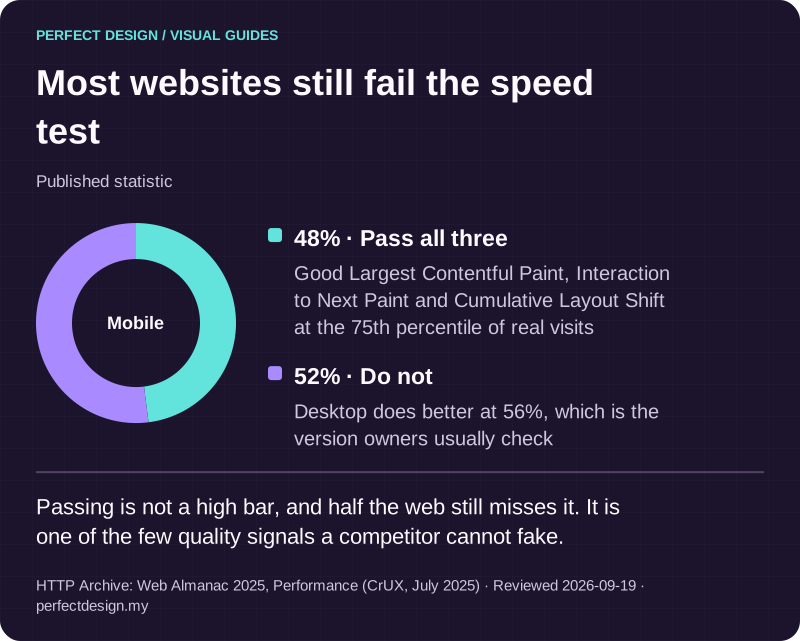
Most websites still fail the speed test. Passing is not a high bar, and half the web still misses it. It is one of the few quality signals a competitor cannot fake. A full text version follows.

Most websites still fail the speed test

Published statistic. Passing is not a high bar, and half the web still misses it. It is one of the few quality signals a competitor cannot fake.

Source: HTTP Archive: Web Almanac 2025, Performance (CrUX, July 2025). Reviewed .

Read the graphic as text

Mobile

  • Pass all three: 48%. Good Largest Contentful Paint, Interaction to Next Paint and Cumulative Layout Shift at the 75th percentile of real visits
  • Do not: 52%. Desktop does better at 56%, which is the version owners usually check
Download this infographic (SVG)

What gets monitored

Map the site and its dependencies first

Monitoring is only as good as the inventory beneath it. Before scope is agreed, write down the platform and version, the hosting, the domain and DNS, how enquiry messages are delivered, every integration, who holds each renewal and where access is missing. Then ask three things about backups: what is actually backed up, where the evidence is recorded, and how a restore would be tested rather than assumed.

Match the signals to the risk, not to a checklist

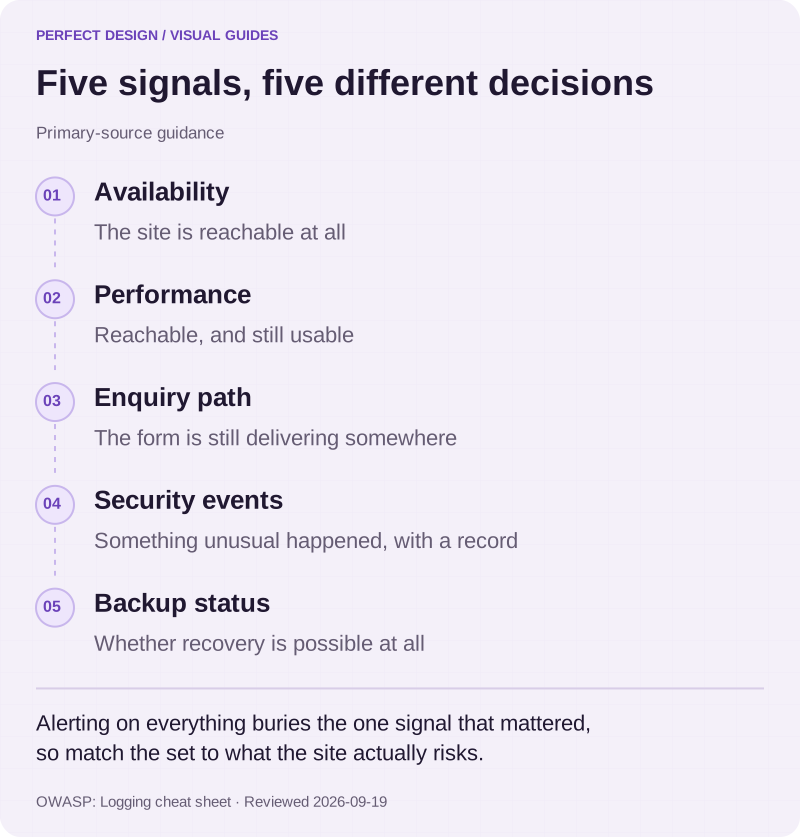
Group monitoring by the decision each signal supports. Availability says the site is reachable, performance says it is usable, an enquiry-path check says the form is still delivering, security events say something unusual happened, and backup status says whether recovery is possible at all. A brochure page and a live enquiry form do not need the same set.

OWASP's logging guidance helps here, with the caveat that it is general application-security advice rather than a monitoring design for your site. It says monitoring, alerting and reporting should be set during requirements and design and be proportionate to the information security risks, and warns that a blind checklist approach produces so much alarm noise that real problems go undetected.

Keep four things apart when reading a proposal: a signal detected, an alert reaching a named person, someone investigating it, and a business-level promise about uptime or recovery. The first three can be scoped. The fourth is a commitment, and belongs in writing only if someone agreed to it.

Five signals, five different decisions. Alerting on everything buries the one signal that mattered, so match the set to what the site actually risks. A full text version follows.

Five signals, five different decisions

Primary-source guidance. Alerting on everything buries the one signal that mattered, so match the set to what the site actually risks.

Source: OWASP: Logging cheat sheet. Reviewed .

Read the graphic as text
  • Availability. The site is reachable at all
  • Performance. Reachable, and still usable
  • Enquiry path. The form is still delivering somewhere
  • Security events. Something unusual happened, with a record
  • Backup status. Whether recovery is possible at all
Download this infographic (SVG)

How updates are tested

The control around a single update

The control to look for is ordinary. Review the change, assess compatibility with the plugins, themes, integrations and custom code in use, apply it somewhere that is not the live site, confirm the backup position first, check the critical path afterwards, and record what was observed. Two conditions should pause all of it: recovery evidence nobody can produce, and a failed check on a path the business depends on.

What the WordPress documentation actually says

WordPress is still the most common platform behind sites we are asked to take over, and its documentation is worth quoting rather than paraphrasing. It recommends backing up the website first, so that if there are any issues you can restore it. It describes two paths: a one-click update that works for most people, and a manual process for when that fails. It warns that the upgrade affects all files and folders in the main installation, and that modifications made directly to those files will be lost. Whether a one-click update can write files at all depends on file ownership on the server.

That is documented platform behaviour, not a description of anyone's support scope. Which of those steps a provider performs, and what they answer for when one goes wrong, belongs in the agreement.

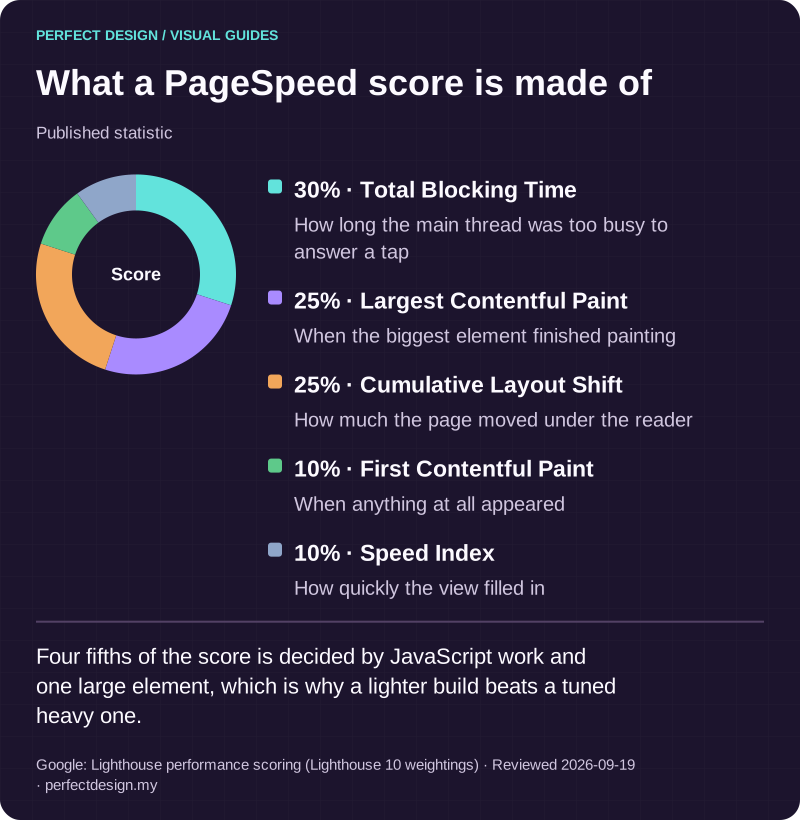
What a PageSpeed score is made of. Four fifths of the score is decided by JavaScript work and one large element, which is why a lighter build beats a tuned heavy one. A full text version follows.

What a PageSpeed score is made of

Published statistic. Four fifths of the score is decided by JavaScript work and one large element, which is why a lighter build beats a tuned heavy one.

Source: Google: Lighthouse performance scoring (Lighthouse 10 weightings). Reviewed .

Read the graphic as text

Score

  • Total Blocking Time: 30%. How long the main thread was too busy to answer a tap
  • Largest Contentful Paint: 25%. When the biggest element finished painting
  • Cumulative Layout Shift: 25%. How much the page moved under the reader
  • First Contentful Paint: 10%. When anything at all appeared
  • Speed Index: 10%. How quickly the view filled in
Download this infographic (SVG)

What happens after an outage or a compromise

The sequence, and the point where it escalates

An ordinary outage and a suspected compromise start the same way, then diverge. Identify the affected path, establish who has authority to act, preserve anything useful as evidence, then check what access and recovery evidence exists. Only then can you agree a correction, an investigation or a validated restore. Where access has been lost or the backup scope is uncertain, the honest response is escalation, not a promise to restore.

Logs are evidence, and evidence needs handling

During an investigation, the quality of your logs decides how much can be concluded. OWASP, again as general advice rather than a design for your site, says logs must record when, where, who and what for each event, with the action attempted and its result. It also treats logs as sensitive: passwords, keys, payment card data and session identifiers should be removed, masked, sanitised, hashed or encrypted, and access to log data should itself be recorded and monitored. It recommends testing that logging still works when something else fails.

So ask what is logged and who can read it before you need to know. And treat logs as context, not proof: they record what the system saw, which is not the same as establishing cause.

Which changes are included

Classify the request before anyone prices it

Most arguments about support are really arguments about classification. A useful scope names the categories in advance: routine care, content changes, new features, redesign work, search work and incident response. Anything touching an integration, permissions, a renewal or a journey the business depends on needs an impact review and an approval, whatever its technical size. Ask for the inclusions, the exclusions and the rule for a request that crosses between them.

Keep a record worth reading

The minimum useful record per request is short: affected area, risk, owner, approver, evidence requested, release state and follow-up decision. Routine approvals and incident escalations should not land in the same place. Compare who receives each record, because support nobody reports on is indistinguishable from support that is not running.

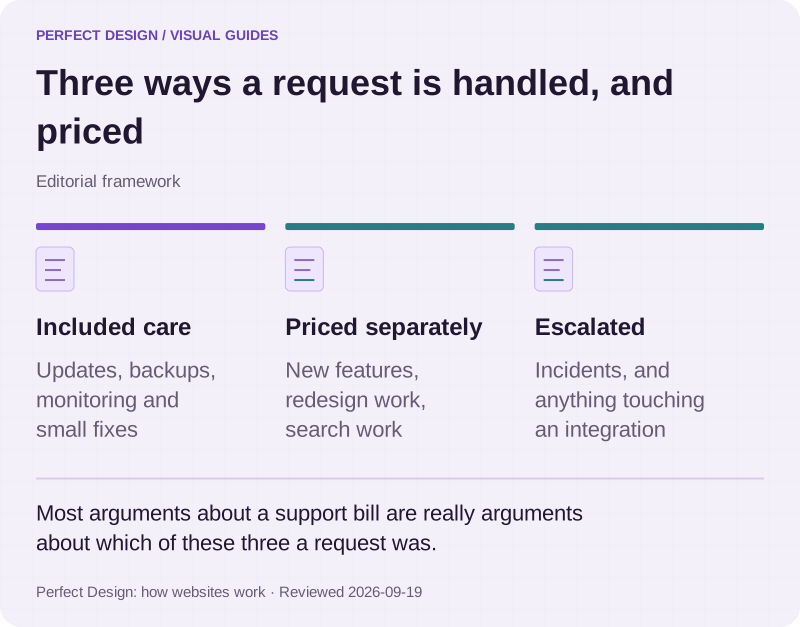
Three ways a request is handled, and priced. Most arguments about a support bill are really arguments about which of these three a request was. A full text version follows.

Three ways a request is handled, and priced

Editorial framework. Most arguments about a support bill are really arguments about which of these three a request was.

Basis: Perfect Design: how websites work. Reviewed .

Read the graphic as text
  • Included care. Updates, backups, monitoring and small fixes
  • Priced separately. New features, redesign work, search work
  • Escalated. Incidents, and anything touching an integration
Download this infographic (SVG)

What care costs with us

Ongoing care for a front-end website starts from RM 1,000 a year and covers hosting, SSL, domain renewal and maintenance. For a more complex website or a system with a real backend, ongoing care starts from RM 250 a month, with the plan confirmed against what was actually launched. Care is quoted with the project rather than bolted on afterwards.

We normally respond in under one working day and work to solve problems as fast as we can. Rather than a ladder of support tiers, cover is scoped to what your site actually runs, so you are not paying for a level that does not apply to you. If your operation needs a formal response commitment written in, raise it and we will scope it. Build prices sit on the pricing page.

Before you agree a support scope

Prepare these and the conversation gets short.

  • The website address and the problem you want to stop having
  • Who is affected when it happens
  • The platform and every external dependency you know of
  • Who holds access, and who holds each renewal
  • What the site has to do reliably
  • Any constraint, such as a budget cycle or a regulated requirement

Then ask for the scope in writing: monitoring, backup and restore evidence, update responsibilities, included changes, reporting, escalation and account ownership. Ownership is the one to check first. If nobody can say who controls the domain, the hosting and the email, settle that before signing with anyone, including us.

Two of our client engagements show why care is scoped against what was launched. Sentrix Auto runs a brand site with a dealer portal and warranty records behind it, so an update touches more than pages. PITC Training was rebuilt off an ageing WordPress site into a course platform wired to a CRM. Both are real client work.

Send the address and the problem through the contact page and we will tell you what access we would need before we could say anything useful.

What you get

What is actually delivered

01

Dependency and ownership inventory

Platform, hosting, domain, DNS, enquiry delivery, integrations and renewals, each with a named owner. Gaps are recorded as open actions rather than quietly closed.

02

An agreed monitoring set

Availability, performance, the enquiry path, security events and backup status, chosen against the risks that matter to your business instead of a default checklist.

03

Update control

Change review, compatibility assessment, a test environment that is not the live site, backup and restore evidence verified before release, and the critical path checked afterwards.

04

Backup and restore evidence

What is backed up, where the evidence is recorded, and a restore that has been tested rather than assumed.

05

Written inclusions and exclusions

Routine care separated from content work, new features, redesign and search work, with the rule for handling a request that crosses the line.

06

A record per request

Affected area, risk, owner, approval, evidence requested, release state and the follow-up decision, with routine approvals kept apart from escalations.

07

Escalation path

Who is told, who decides, and what happens when access is missing or the backup scope is uncertain. The answer there is escalation, not a restoration promise.

08

Renewal calendar

Domains, certificates, licences and subscriptions with dates and owners, so nothing lapses quietly on a weekend.

How it runs

Scoped from the site you actually have

Support proposals go wrong when they are written from a template instead of from an inventory. We start with what exists, including the parts nobody can currently prove.

  1. 01

    Inventory and access

    We go through the platform, hosting, domain, email and form delivery, integrations and renewals, and write down what nobody can currently produce evidence for.

  2. 02

    Agree the boundary

    What routine care covers, what is quoted separately, and how a request that crosses the line gets classified and approved before work starts.

  3. 03

    Set the checks

    Monitoring signals, backup and restore evidence and the update control, sized to the risks your business actually carries.

  4. 04

    Run the cycle

    Updates reviewed and tested before release, observations recorded, the critical path checked afterwards, renewals tracked ahead of their dates.

  5. 05

    Review with you

    What happened, what changed, what is outstanding, and whether the scope still matches the site after a year of it changing.

Proof

Work you can click through

Both are real client engagements, live on their own domains. They appear here because each is a site where ongoing care has to cover a system behind the pages, not only the pages.

Concept prototypes are labelled as prototypes everywhere they appear. They demonstrate what we can build, not work delivered for that named client. More client work is going live and will be added as it does.

How we work

The parts people ask about before they commit

Ongoing care

Quoted with the project, not bolted on

Ongoing care for a front-end website starts from RM 1,000 a year and covers hosting, SSL, domain renewal and maintenance. Care is quoted with the project, not bolted on afterwards.

Getting hold of us

Normally under one working day

We normally respond to a support request in under one working day, and we work to solve problems as fast as we can. That is how we normally work rather than a contractual guarantee, and responding is not the same as resolving. If your operation needs a formal response or resolution commitment, we can write one into your scope.

Ownership

Everything belongs to your business

You own everything we build for you: the code, the content, the domain, the hosting account and every third-party account opened for the project. There is no lock-in. If you move to another provider, everything goes with you and we help with the handover.

  • Source code, handed over in your own repository
  • Domain and DNS, registered to your business
  • Hosting and every service account, in your name
  • Analytics, search and ad accounts, with us as a manager you can remove
  • All content, media and data in the system

Questions

Asked about website maintenance

Straight answers to what people ask before they commit. Anything else, message us.

What does website maintenance cost?

Ongoing care for a front-end website starts from RM 1,000 a year and covers hosting, SSL, domain renewal and maintenance. For a more complex website or a system with a real backend it starts from RM 250 a month, with the plan confirmed against what was actually launched. Build prices are published on the pricing page.

How quickly do you respond when something breaks?

We normally respond in under one working day, and we work to solve the problem as fast as we can. That is how we actually operate rather than a contractual guarantee, and responding is not the same as resolving, since a broken plugin and a compromised server are different jobs. If your operation needs a formal response or resolution commitment, say so and we will write one into your scope as an explicit term.

Does maintenance include SEO or new pages?

No. Routine care keeps a working site working. Search visibility work is a separate programme with its own scope and measurement, and new pages or features are quoted as work. Keeping them separate is what stops a care fee turning into a queue nobody can price.

We did not build the site with you. Can you still maintain it?

Often, but the honest answer comes after an inventory rather than before it. We need to see the platform, the hosting, who holds access and renewals, what integrations exist and what backup evidence is available. If something important cannot be accessed or proved, that becomes an action to resolve, not an assumption to build a support fee on.

What happens if the site goes down or is compromised?

We identify the affected path, establish who has authority to act, preserve anything useful as evidence and check what access and recovery evidence exists, then agree a correction, an investigation or a restore with validation afterwards. Where access has been lost or the backup scope is uncertain, that escalates. Nobody can responsibly promise a recovery before knowing what can be recovered from.

Can we make content changes ourselves?

Yes, where we have built the page as editable content. The parts your team changes regularly are editable with the structure protected, so an edit cannot break the layout. The parts that rarely change stay fixed deliberately.

Who owns the hosting, the domain and the accounts?

You do. The domain, the hosting and every service account are in your business name and we work with access you can revoke. If you move to another provider, the accounts and the code go with you and we help with the handover.

Where to go next

Sources

Tell us what you need built

We will show you the closest thing we have already built, then scope the real version against your requirements.