

In this section9 sections
- 01Which work should the site actually show?
- 02When a portfolio site is the right shape
- 03What each project entry has to establish
- 04The case-study structure that persuades
- 05Permission, confidentiality and the register that saves you later
- 06Image quality and page weight are one decision
- 07Make enquiring easy wherever conviction happens
- 08Keeping it accurate after launch
- 09What to bring when you want it scoped
Which work should the site actually show?
Choose each project for the visitor you want to hear from. The test is short: does this piece resemble the problem, the audience and the kind of contribution your next good enquiry will involve? If it does, it earns a place. If it is there because it was fun, or recent, or because the gallery looked thin, it is spending attention rather than earning it.
Relevance beats volume, and it is not close. Someone comparing three possible partners will not read forty entries. They scan until something looks like their situation, open it, and decide whether you understood a problem shaped like theirs. Be precise about what each item is, too. Work delivered for a client, a concept prototype and a collaboration where you did one part of the job are different things, and a visitor who works out the difference later will discount everything else on the page.

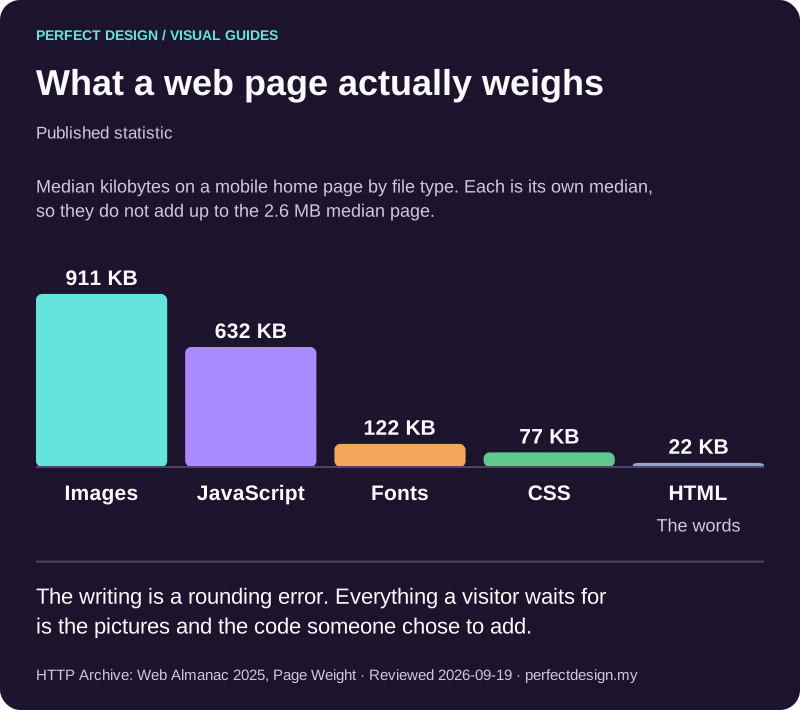
What a web page actually weighs
Published statistic. The writing is a rounding error. Everything a visitor waits for is the pictures and the code someone chose to add.
Source: HTTP Archive: Web Almanac 2025, Page Weight. Reviewed .
Read the graphic as text
- Images: 911 KB.
- JavaScript: 632 KB.
- Fonts: 122 KB.
- CSS: 77 KB.
- HTML: 22 KB. The words
Chart scale: Median kilobytes on a mobile home page by file type. Each is its own median, so they do not add up to the 2.6 MB median page..
When a portfolio site is the right shape
A portfolio-led site suits businesses where the work is the argument: studios, architects, photographers, interior and product designers and independent consultants. It is the wrong shape when the decision turns on capability, coverage or procurement rather than craft. If prospects need to understand a service catalogue, or several audiences each need their own destination, a business or corporate website is the better frame with selected work inside it, and our services overview sets out the other project types. The selection, permission and enquiry decisions below apply either way.

One picture decides how fast it feels
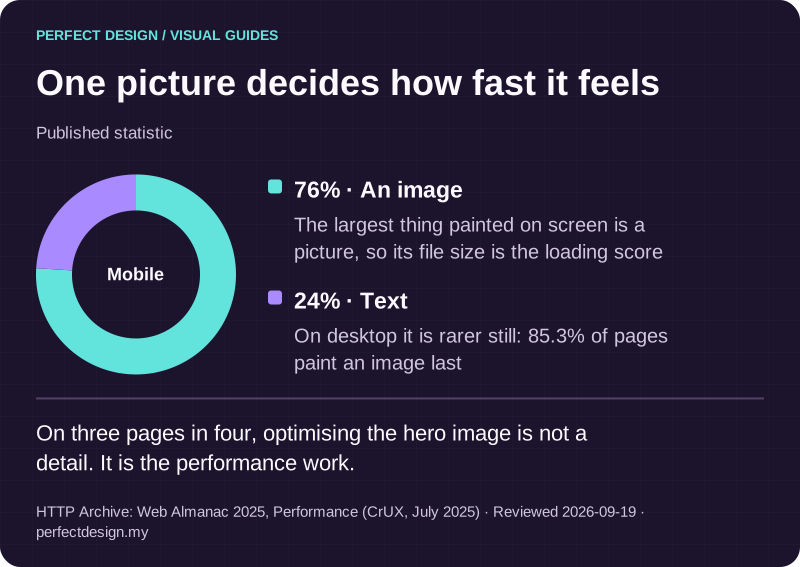
Published statistic. On three pages in four, optimising the hero image is not a detail. It is the performance work.
Source: HTTP Archive: Web Almanac 2025, Performance (CrUX, July 2025). Reviewed .
Read the graphic as text
Mobile
- An image: 76%. The largest thing painted on screen is a picture, so its file size is the loading score
- Text: 24%. On desktop it is rarer still: 85.3% of pages paint an image last
What each project entry has to establish
Before anything is designed, each candidate project needs five things settled: who it was for, what you actually contributed, what constrained it, which media and details you may publish, and what evidence you can stand behind. Entries that skip those read as a gallery. Entries that answer them read as proof.
Take an assumed example: an independent studio preparing three permission-cleared sample projects. The actors and policies below are planning assumptions rather than a description of anyone's business, and the last column lists evidence to collect during the project, not checks that have already passed.
Select a project
- Assumed actor
- Studio owner
- Proposed system response
- Record the intended buyer, the actual contribution made and the media permitted for publication
- Exception
- Permission is missing, so protected details stay unpublished and the entry is written generically
- Acceptance evidence to collect
- A rights and evidence register entry per project, with no approval assumed on behalf of the client
Publish the project story
- Assumed actor
- Editor
- Proposed system response
- Explain the problem, the contribution and any substantiated result, with accessible media at a sensible weight
- Exception
- A result was never measured, so it stays a qualitative description rather than a figure
- Acceptance evidence to collect
- Claim sources, alt text, and display checks at the screen sizes you support
Invite a relevant enquiry
- Assumed actor
- Prospective buyer
- Proposed system response
- Offer an enquiry route from the project itself, carrying the project reference into the message
- Exception
- The route a visitor wants does not exist yet, so the page gives clear context instead of a dead link
- Acceptance evidence to collect
- Live destination checks and a test enquiry that arrives, is acknowledged and is answered
| Workflow step | Assumed actor | Proposed system response | Exception | Acceptance evidence to collect |
|---|---|---|---|---|
| Select a project | Studio owner | Record the intended buyer, the actual contribution made and the media permitted for publication | Permission is missing, so protected details stay unpublished and the entry is written generically | A rights and evidence register entry per project, with no approval assumed on behalf of the client |
| Publish the project story | Editor | Explain the problem, the contribution and any substantiated result, with accessible media at a sensible weight | A result was never measured, so it stays a qualitative description rather than a figure | Claim sources, alt text, and display checks at the screen sizes you support |
| Invite a relevant enquiry | Prospective buyer | Offer an enquiry route from the project itself, carrying the project reference into the message | The route a visitor wants does not exist yet, so the page gives clear context instead of a dead link | Live destination checks and a test enquiry that arrives, is acknowledged and is answered |

What turns a gallery image into proof
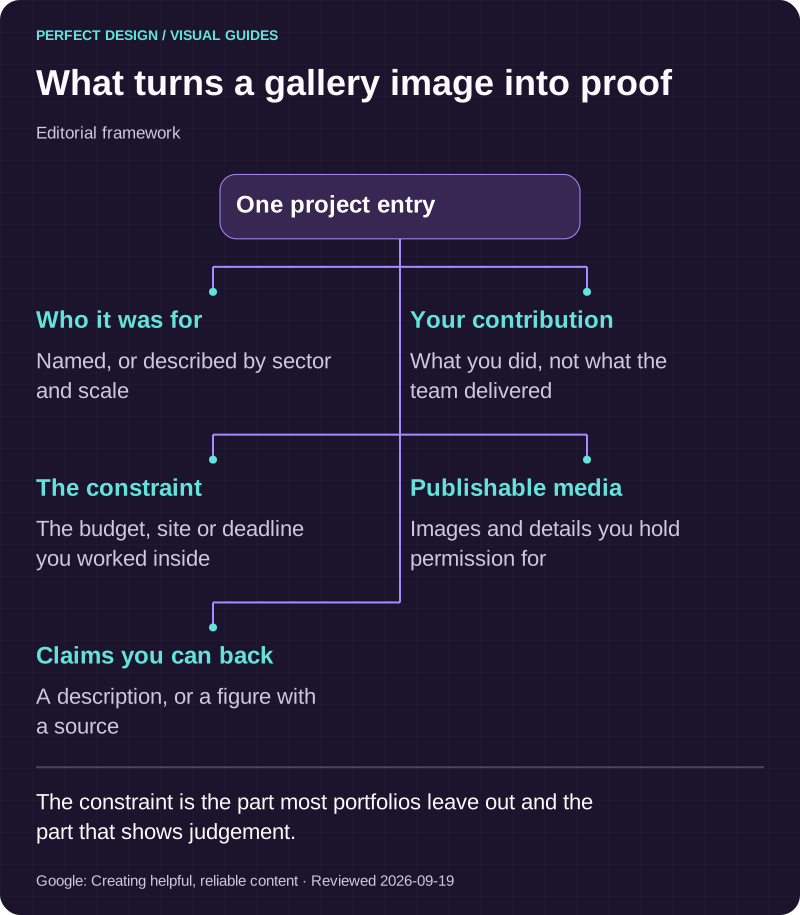
Editorial framework. The constraint is the part most portfolios leave out and the part that shows judgement.
Basis: Google: Creating helpful, reliable content. Reviewed .
Read the graphic as text
One project entry
- Who it was for. Named, or described by sector and scale
- Your contribution. What you did, not what the team delivered
- The constraint. The budget, site or deadline you worked inside
- Publishable media. Images and details you hold permission for
- Claims you can back. A description, or a figure with a source
The case-study structure that persuades
A project entry that works follows the same shape each time: the situation and the constraint, the decision you took and why, what was actually built or made, and what happened next as far as you can honestly report it. The constraint is the part most portfolios leave out and the part that demonstrates judgement. A difficult site, a fixed budget, a protected building, a launch date that could not move: that is where a reader recognises their own project.
Keep four things apart as you write. Your contribution, which you can show. What can be observed, such as the pages that exist. A qualitative description, such as a client saying enquiries became easier to handle. And a measured result, which needs a traceable source, the context it was measured in, and permission before it goes anywhere near a page. An unmeasured improvement stays a description; stretching it into a number is the fastest way to lose a sceptical reader.
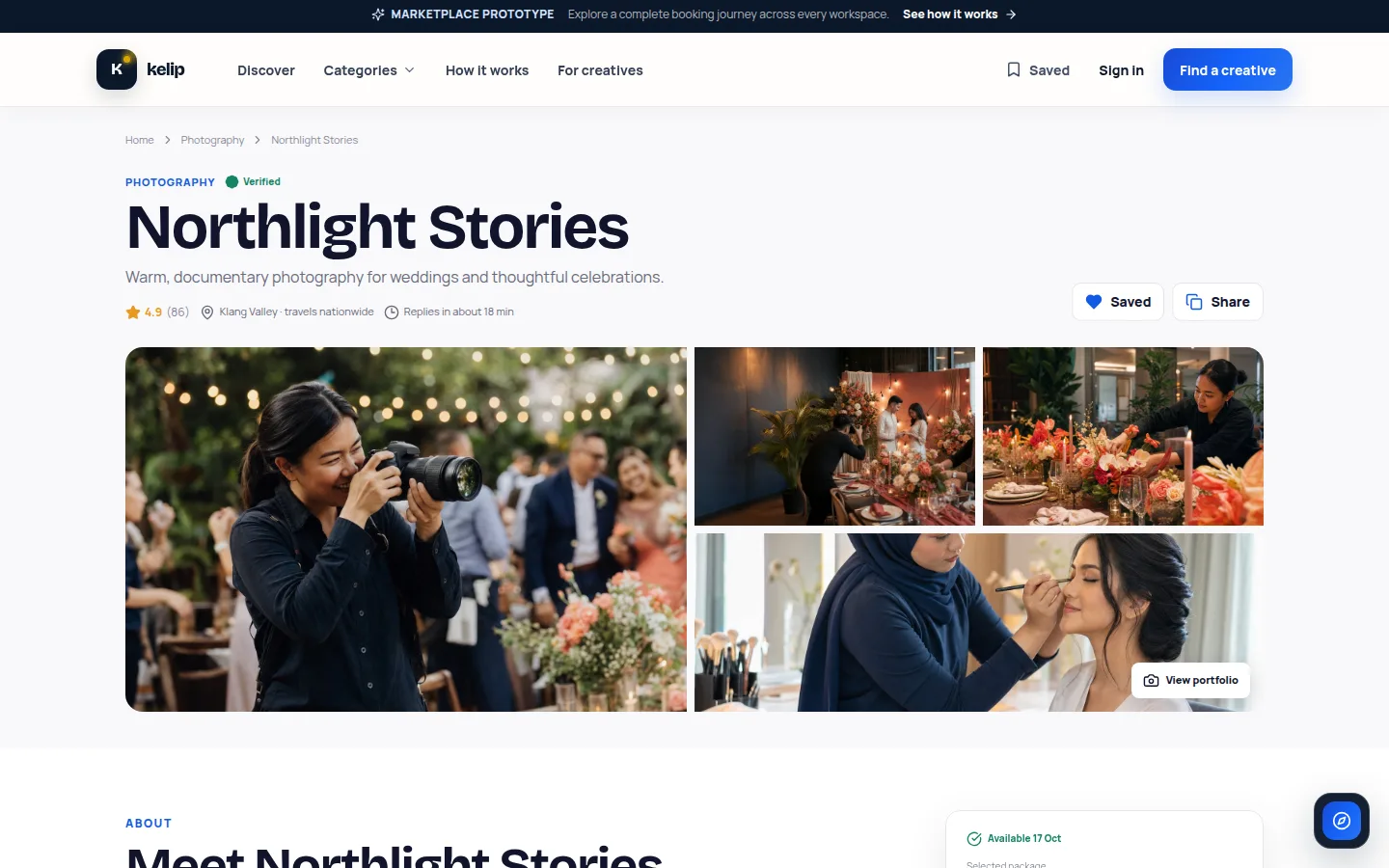
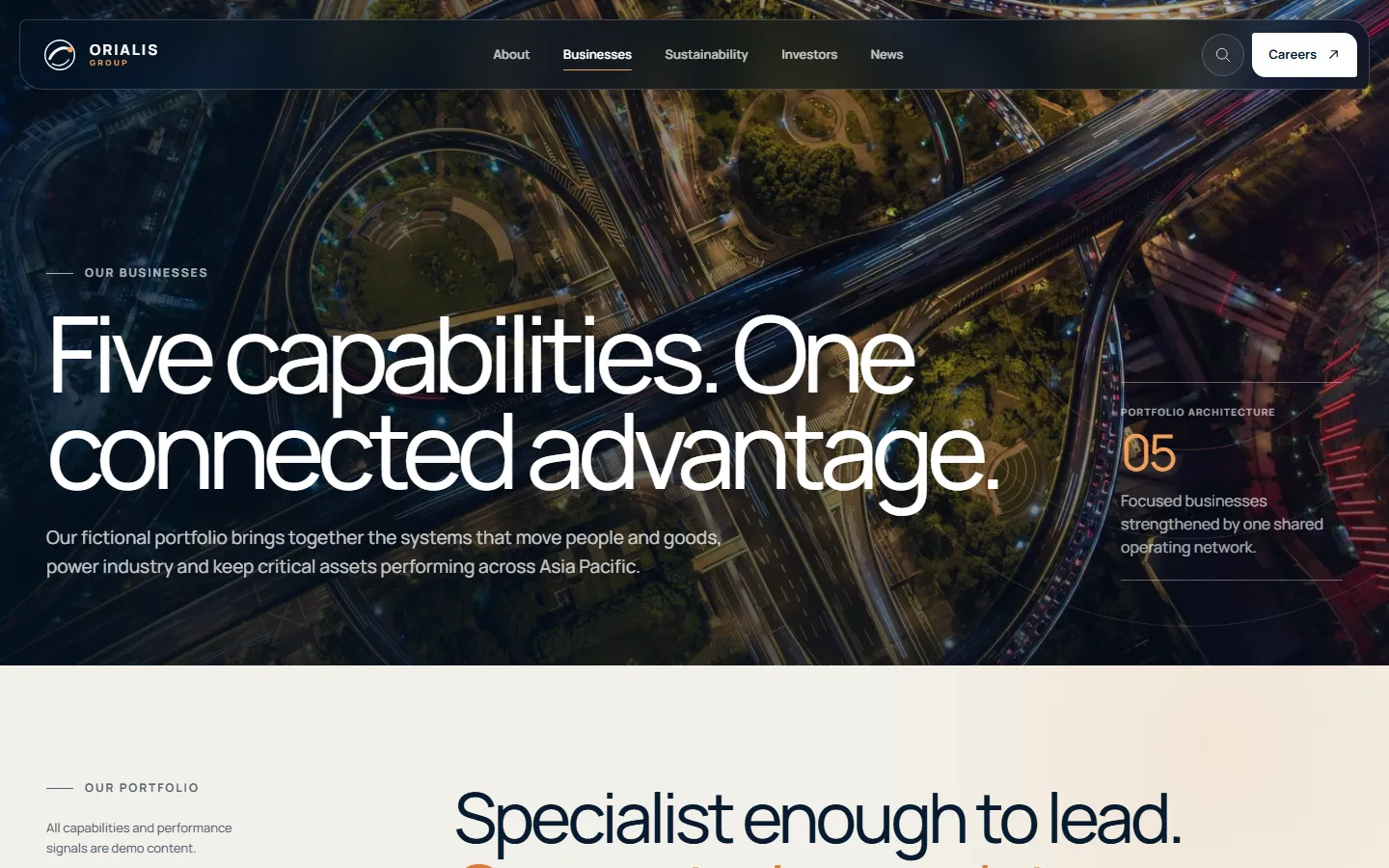
We hold our own work to that rule. Kelip is a concept prototype of a two-sided creative services marketplace, where creative professionals present their work and packages to be hired, and it is labelled a prototype everywhere it appears because it shows what we can build rather than a result delivered for a named client. Orialis Group is a concept prototype too, a corporate group site with a newsroom and an investor centre. If we applied a looser standard to our own evidence than we recommend for yours, you would be right to discount both.
Permission, confidentiality and the register that saves you later
Rights cover more than the pictures. They cover the client name, the logo, the location, the photographer's licence, any quote, any figure, and the parts of the work that are commercially sensitive. Plenty of good projects sit under an agreement that allows the images but not the name, or the name but not the numbers.
Write around partial permission instead of stretching it. A confidential project can be described by sector, scale and problem without identifying anyone, and that is honest. Wording that implies an approval nobody gave is not, and neither is a logo wall where half the logos are clients and half are companies you once did a small piece of work for. Record each decision as you go: the asset, its source, the permitted use, who granted it, when, and what would trigger a review. That register answers every awkward question later, including the one where a former client asks to be removed.
Image quality and page weight are one decision
A portfolio is the heaviest kind of site we build, because the images are the product. The instinct is to upload the full-resolution files and let the browser cope, and the result is a beautiful page that someone on a phone abandons before the first image resolves. The craft is keeping the work looking like the work while shipping a fraction of the bytes.
In practice that means several sizes of each image prepared in advance so a phone never downloads a desktop file, modern formats with fallbacks, anything below the first screen loaded only as the visitor scrolls, dimensions reserved so the layout does not jump, and video treated as an expensive choice rather than a default. Accessibility belongs in the same pass: alternative text that describes what matters about each image, and captions where a video carries meaning. Search engines do analyse images, but Google says it uses alt text together with computer vision and the rest of the page to understand them, so a project described only in pictures is much harder to find for what it shows. Our search visibility guide explains how that is measured.

One photo, several files, one stable layout
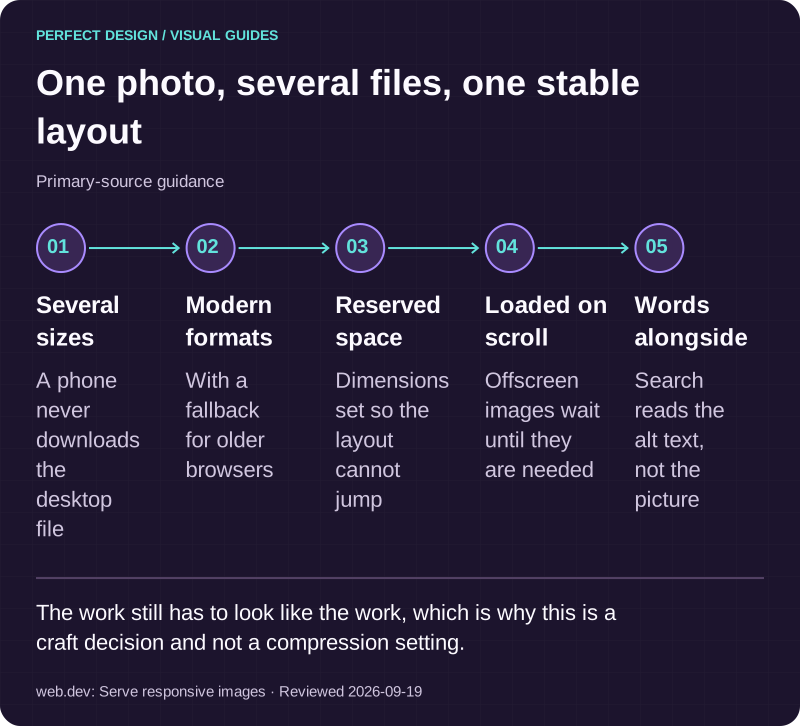
Primary-source guidance. The work still has to look like the work, which is why this is a craft decision and not a compression setting.
Source: web.dev: Serve responsive images. Reviewed .
Read the graphic as text
- Several sizes. A phone never downloads the desktop file
- Modern formats. With a fallback for older browsers
- Reserved space. Dimensions set so the layout cannot jump
- Loaded on scroll. Offscreen images wait until they are needed
- Words alongside. Search reads the alt text, not the picture
Make enquiring easy wherever conviction happens
The moment someone decides to contact you is almost never the contact page. It is the third project, halfway down, when they recognise their own problem. If the only route from there is back to the navigation, you have put a step between interest and action for no reason.
So every entry gets a way to start a conversation about that specific piece, and the message carries the reference with it. Ask for the situation, who it affects, the change they want, what they use now and any constraint worth knowing, and you can reply properly rather than with a request for more detail. A large collection also needs a way to narrow down, and filtering by sector, service or scale is worth building once the set is big enough to need it. Our catalogue and search page covers how we keep that fast as the collection grows.
Keeping it accurate after launch
A portfolio dates faster than any other kind of site, because it is a set of factual claims about real projects. Separate four jobs and name an owner for each: routine care of the environment, renewals and dependencies; content work such as adding a project or correcting a detail; new features such as filtering or a change of case-study format; and larger upgrades such as a rebuild. Adding work should not require us, so we build the entries as client-editable content with the structure protected, and website maintenance covers the rest. On accessibility, the W3C Web Accessibility Initiative treats the work as a continuing activity with assigned responsibility, monitoring, involvement from the people affected and repeated review, rather than a box ticked at launch.

Three in ten images say nothing
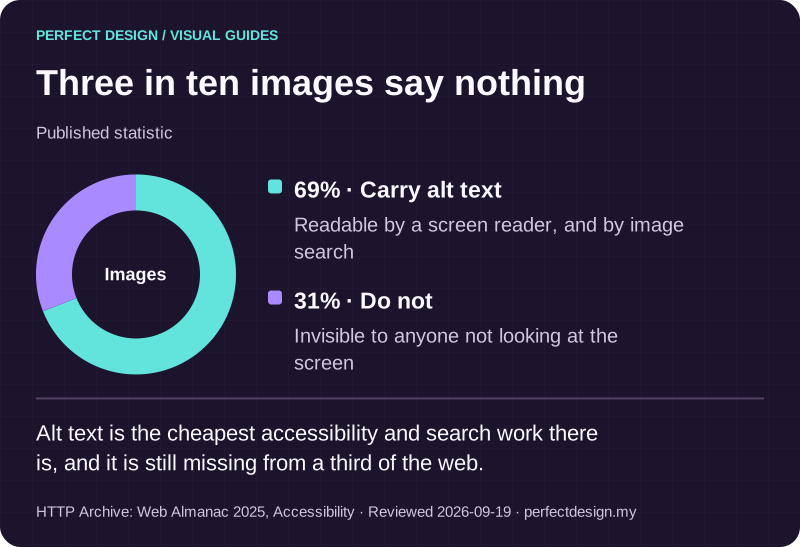
Published statistic. Alt text is the cheapest accessibility and search work there is, and it is still missing from a third of the web.
Source: HTTP Archive: Web Almanac 2025, Accessibility. Reviewed .
Read the graphic as text
Images
- Carry alt text: 69%. Readable by a screen reader, and by image search
- Do not: 31%. Invisible to anyone not looking at the screen
What to bring when you want it scoped
Bring the eight or ten projects you would like to show, whatever permission you already hold in writing, and the original image files. That is enough for us to say which pieces are doing work, which are diluting the set, what needs a permission conversation first, and where the honest gaps are. Or simply tell us about the project, and we will come back with what we would need confirmed before anything could be built.