

On this page8 sections
- 01Four stages, and the decision each one settles
- 02The parts you are actually buying
- 03Plan the pages before the layout
- 04Design for people and screens
- 05Builder, CMS or custom: decide by who edits and who maintains
- 06After launch: speed, updates and who holds the accounts
- 07What to do next
- 08Guides and checklists
Four stages, and the decision each one settles
Planning a website is four decisions taken in order, and each one closes a question the next one depends on. Understand settles what the site is for: who arrives, what they are trying to do, and what counts as a result. Plan settles which pages exist, what each must contain and who writes them. Design and build settles how those pages arrange themselves on a phone and on a desktop, and how they are made. Maintain settles who updates content, who applies technical updates, and whose name the domain and hosting accounts are in. Projects rarely fail inside one of these stages. They fail in the seam: a layout approved before the content existed, or a launch where nobody was named as the owner of the renewal.

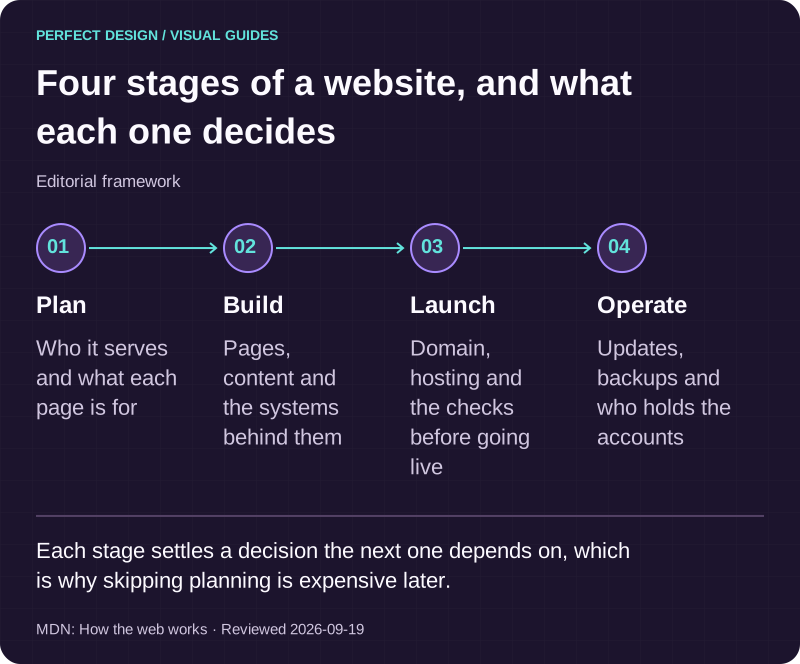
Four stages of a website, and what each one decides
Editorial framework. Each stage settles a decision the next one depends on, which is why skipping planning is expensive later.
Basis: MDN: How the web works. Reviewed .
Read the graphic as text
- Plan. Who it serves and what each page is for
- Build. Pages, content and the systems behind them
- Launch. Domain, hosting and the checks before going live
- Operate. Updates, backups and who holds the accounts
The parts you are actually buying
It helps to separate three things that are usually quoted as one. Design is the plan for what a visitor sees and how the page behaves: hierarchy, layout, typography, states, and the path from one task to the next. Development is the work of turning that plan into a working website and connecting it to whatever it needs, from a contact form to a payment provider. Infrastructure is the delivery chain that puts the result on a screen: a domain name, a server that hosts the files, and the protocol that carries the request. Where the line between design and development sits is a project convention rather than a universal rule, and in small teams the same person crosses it daily. What matters commercially is that all three appear in the scope, and that the fourth part, the content, has a named owner.
Browser, domain, DNS, hosting and HTTP
MDN describes the arrangement as clients and servers: clients are the internet-connected devices and the browser software on them, and servers are computers that store webpages, sites or apps. When you enter an address, the browser asks the Domain Name System for the address of the server the site lives on, sends an HTTP request there, and receives the site's files back as packets, which it assembles and displays. MDN also notes that a web server can mean the hardware, the software or both: a static server sends its hosted files as they are, while a dynamic server adds an application server and a database and updates the files before they are sent. That single distinction explains why some sites can be hosted almost anywhere for very little, and others carry a running system that has to be maintained.
HTML, CSS and JavaScript, and everything that is not code
MDN splits what a website is made of into two groups. Code means HTML, CSS and JavaScript, the languages the pages are written in. Assets are everything else that appears on the site: images, video, audio, documents and PDFs. The split is worth remembering when you commission work, because the two travel differently. Code is produced by whoever builds the site and should end up in a repository you can reach. Assets are usually already yours or licensed to you, and a site that depends on photographs nobody can find the originals of becomes expensive to change later. Ask for both at handover, not only the login to an editor.

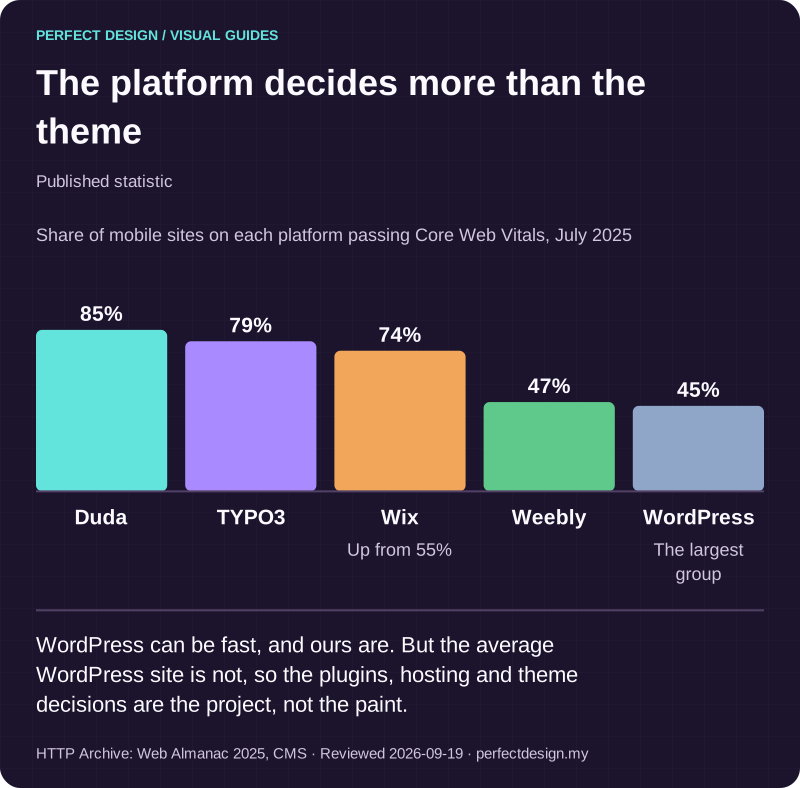
The platform decides more than the theme
Published statistic. WordPress can be fast, and ours are. But the average WordPress site is not, so the plugins, hosting and theme decisions are the project, not the paint.
Source: HTTP Archive: Web Almanac 2025, CMS. Reviewed .
Read the graphic as text
- Duda: 85%.
- TYPO3: 79%.
- Wix: 74%. Up from 55%
- Weebly: 47%.
- WordPress: 45%. The largest group
Chart scale: Share of mobile sites on each platform passing Core Web Vitals, July 2025.
Plan the pages before the layout
Start with the job the website must do. A business and corporate website explains an organisation and helps a buyer enquire. A portfolio website helps people judge individual projects and the work behind them. A content and publication website needs a repeatable structure for articles, authors, categories and editorial updates. These can share design components, but their page lists and routes through the content serve different decisions.
The useful order is content first, layout second. MDN's own beginner guidance starts a first website by answering what the site is about, what information is being presented, and only in high-level terms what it should look like, then sketching before building. For a service business those three questions become concrete: which audiences arrive, what decision each of them is trying to make, and what evidence that decision needs. A page earns its place when it completes one of those decisions. Pages that exist because a competitor has them compete with each other for the same visitor and leave nobody better informed. Navigation follows from the page list rather than preceding it: once every page has a purpose, the menu is the shortest honest description of them, and the links in the body text carry a reader from one decision to the next.
Understand
- The decision it settles
- What the site is for, and who acts on it
- What you should have in writing
- One sentence per audience naming the decision they arrive to make
- How it usually fails
- A page list copied from a competitor before anyone agreed the job
Plan
- The decision it settles
- Which pages exist, what each contains and who writes them
- What you should have in writing
- A page list with a purpose, an owner and the content inputs for each
- How it usually fails
- Design starts while half the content is still to be confirmed
Design and build
- The decision it settles
- How each page arranges its content on a small screen and a large one
- What you should have in writing
- A layout sketch per page template, reviewed on an actual phone
- How it usually fails
- Approval on a desktop mockup, with mobile treated as a squeeze
Maintain
- The decision it settles
- Who updates content, who applies updates and who holds the accounts
- What you should have in writing
- A named owner and a renewal date for the domain, hosting and the site
- How it usually fails
- Nobody notices a lapse until the domain or a certificate expires
| Stage | The decision it settles | What you should have in writing | How it usually fails |
|---|---|---|---|
| Understand | What the site is for, and who acts on it | One sentence per audience naming the decision they arrive to make | A page list copied from a competitor before anyone agreed the job |
| Plan | Which pages exist, what each contains and who writes them | A page list with a purpose, an owner and the content inputs for each | Design starts while half the content is still to be confirmed |
| Design and build | How each page arranges its content on a small screen and a large one | A layout sketch per page template, reviewed on an actual phone | Approval on a desktop mockup, with mobile treated as a squeeze |
| Maintain | Who updates content, who applies updates and who holds the accounts | A named owner and a renewal date for the domain, hosting and the site | Nobody notices a lapse until the domain or a certificate expires |
Design for people and screens
Hierarchy: making the next action obvious
Most of what people call design quality is comprehension. A visitor scanning a service page is deciding two things within seconds: is this for me, and what do I do next. Hierarchy answers the first by putting the defining sentence where the eye lands, grouping related information, and leaving enough space that the groups read as groups. It answers the second by making one action visually dominant on each page instead of offering five of equal weight. Decoration that competes with those two answers is a cost rather than a feature, and it is the easiest thing to cut in a review.
Responsive layout across screens
Responsive design is the expectation that one site adapts to the screen it is opened on. Google's web.dev course on the subject separates macro layouts, the arrangement of the page, from micro layouts, components built to work wherever they are placed, and treats media queries as the mechanism for adapting designs to different screen sizes. The practical test for a service page is whether the content carrying the decision stays readable and the action stays reachable as the width changes. Note the limit of the claim: a responsive layout describes expected behaviour across sizes. On its own it does not demonstrate speed, accessibility or a better conversion rate.
Accessibility is part of the design brief
web.dev's accessibility course frames the goal as designing and building so that people with disabilities can interact in a meaningful and equivalent way. In practice that becomes design decisions taken early: colour palettes with adequate contrast, information that is not carried by colour alone, interactive elements that look interactive, semantic structure and landmarks rather than anonymous containers, labelled form fields, and feedback that tells the visitor what just happened. Treat it as design guidance rather than a compliance verdict. Following it improves the site for everyone, including people on a bright street with one hand free, and it is not the same thing as a legal opinion or a certification.

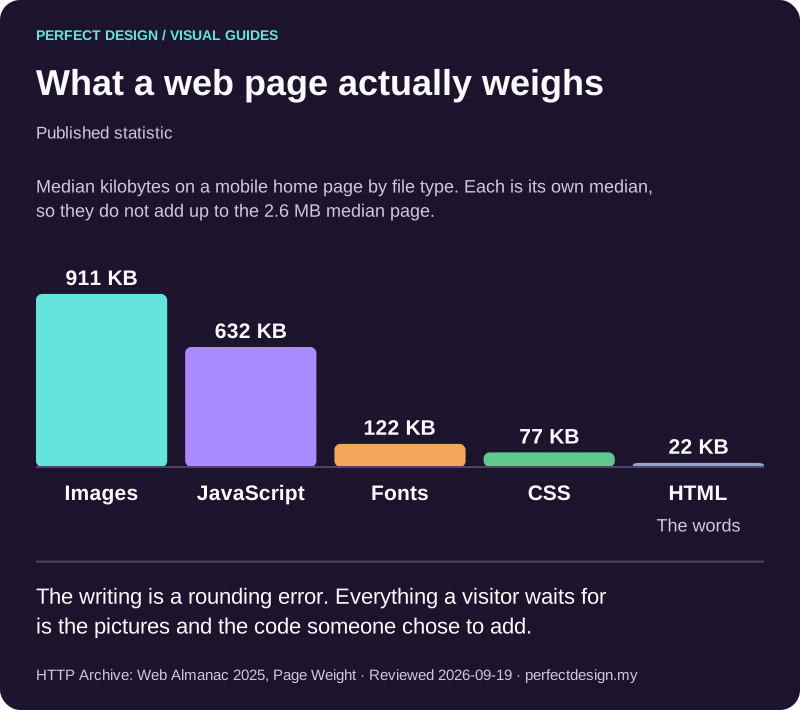
What a web page actually weighs
Published statistic. The writing is a rounding error. Everything a visitor waits for is the pictures and the code someone chose to add.
Source: HTTP Archive: Web Almanac 2025, Page Weight. Reviewed .
Read the graphic as text
- Images: 911 KB.
- JavaScript: 632 KB.
- Fonts: 122 KB.
- CSS: 77 KB.
- HTML: 22 KB. The words
Chart scale: Median kilobytes on a mobile home page by file type. Each is its own median, so they do not add up to the 2.6 MB median page..
Builder, CMS or custom: decide by who edits and who maintains
The platform question is usually asked as which product is best, and is better asked as four questions about your own operation. Who edits content, how often, and how technical are they? Who applies updates, and what happens when one of them breaks something? What must the site connect to now, and plausibly within two years? And what would leaving look like: can the content, the media and the domain move without a rebuild? A content management system exists to separate editable content from the delivery underneath it, so a non-technical person can publish without touching code. A hosted builder trades flexibility for a shorter setup. A custom build trades setup time for control over the parts a template will not bend. If the editing layer is the deciding factor, client-editable content sets out what that layer has to do; if you already have a site, the same questions become repair or replace, which is the subject of website redesign.

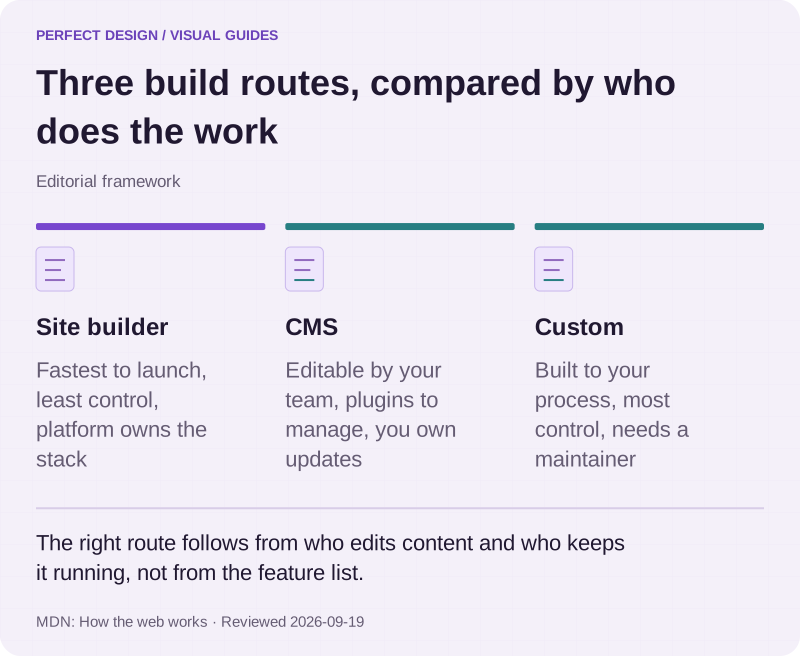
Three build routes, compared by who does the work
Editorial framework. The right route follows from who edits content and who keeps it running, not from the feature list.
Basis: MDN: How the web works. Reviewed .
Read the graphic as text
- Site builder. Fastest to launch, least control, platform owns the stack
- CMS. Editable by your team, plugins to manage, you own updates
- Custom. Built to your process, most control, needs a maintainer
After launch: speed, updates and who holds the accounts
A website is a running service, not a delivered object. Content goes out of date, platforms publish security updates, media accumulates and performance drifts as pages get heavier. That recurring work is what website maintenance covers, and it is the half of the job most plans leave implicit until something breaks.
Ownership is the other half of the launch conversation, and it is far easier to settle before the work starts. MDN puts the domain plainly: you cannot buy a domain name, you pay for the right to use it for one or more years, and your renewal has priority over other applications. Somebody therefore has to hold that registration in your business's name, with a reminder before it lapses. The same applies to the hosting account, the code repository, the analytics property and every third-party service the site depends on. A reasonable handover names each one, says whose account it is, and transfers administrative access rather than a single editor login.

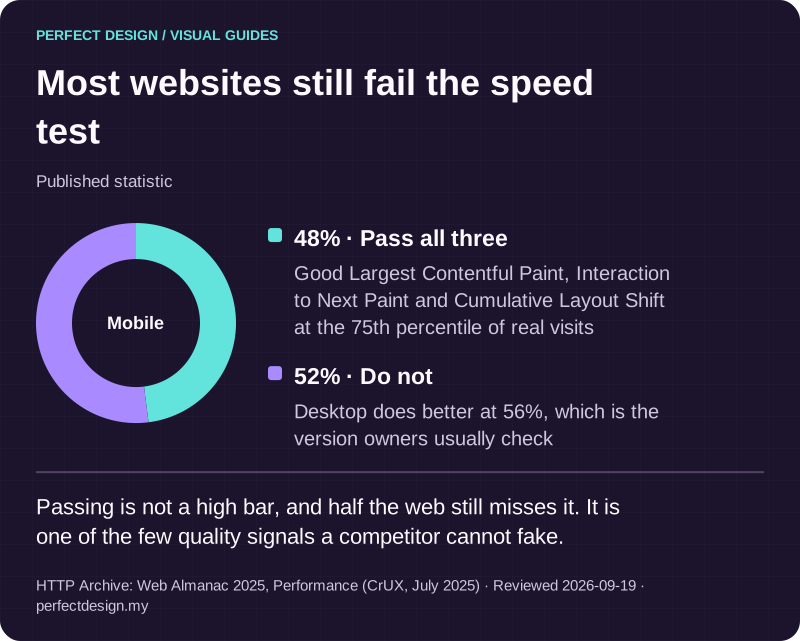
Most websites still fail the speed test
Published statistic. Passing is not a high bar, and half the web still misses it. It is one of the few quality signals a competitor cannot fake.
Source: HTTP Archive: Web Almanac 2025, Performance (CrUX, July 2025). Reviewed .
Read the graphic as text
Mobile
- Pass all three: 48%. Good Largest Contentful Paint, Interaction to Next Paint and Cumulative Layout Shift at the 75th percentile of real visits
- Do not: 52%. Desktop does better at 56%, which is the version owners usually check
What to do next
- Write one sentence for each audience your site serves, naming the decision they arrive to make. If two audiences produce the same sentence, you have one audience.
- List the pages you believe you need and strike any that cannot name a decision from step one. Give each survivor a content owner and a date.
- Open your current site on a phone and try to complete its main task one-handed. Note every point where you had to zoom, guess, or scroll past the answer.
- Write down who holds the domain registration, the hosting account, the code and the analytics property today, and when each renews. Any line you cannot answer is the first thing to fix.
Guides and checklists
Choose the task you need help with: understand the evidence, investigate a problem or check completed work.
Where to go next
- How search visibility works →
What has to be true before a finished site can be found in Google.
- Client-editable content →
What an editing layer has to do if your team is going to update the site itself.
- Website maintenance →
The recurring half of the job: updates, backups, renewals and content changes.
- Website redesign →
Where the starting point is an existing site and the question is repair or replace.
Rather have this handled?
Talk to us about business & corporate websites for your business, starting with the questions this guide helped you identify.
Sources and further reading
- MDN Web Docs - How the web works — read 19 September 2026
- MDN Web Docs - What is a web server? — read 19 September 2026
- MDN Web Docs - What is a domain name? — read 19 September 2026
- MDN Web Docs - What will your website look like? — read 19 September 2026
- web.dev - Learn Responsive Design — read 19 September 2026
- web.dev - Learn Accessibility — read 19 September 2026
- web.dev - Web Vitals — read 19 September 2026