

On this page5 sections
Which type matches the page entity?
Match the type to the one thing the page is about, then use the most specific supported type for it. A page about the company carries Organization; a branch page carries a LocalBusiness subtype such as Dentist, Store or LegalService; a page selling one product carries Product with an Offer; a post carries Article or BlogPosting; and any page with a visible breadcrumb trail can carry BreadcrumbList. A category page listing forty products has no single entity to describe, and Google says product rich results only support pages that focus on a single product or its variants.
Two vocabularies are involved. Schema.org is the shared dictionary: version 30.0 lists more than 800 types in a hierarchy. Google's structured data gallery is the far shorter list of features Google Search reads; it listed twenty-five when we read it in September 2026, including Article, Breadcrumb, Local Business, Organization, Product and Review snippet. Google says to treat its own documentation, not schema.org, as definitive for how Google behaves; a type outside the gallery is valid markup that Google has not promised to act on.
Home or About page
- Entity
- The company
- Schema type
- Organization (or a subtype such as OnlineStore)
- Required visible facts
- Name, logo, address, contact route, official profile links
- Google feature it may qualify for
- Logo and organisation details in results and the knowledge panel
- Common mistake
- Repeating it on every page; a sameAs profile that is not yours
Branch or location page
- Entity
- One physical premises
- Schema type
- A LocalBusiness subtype: Dentist, Store, LegalService, FoodEstablishment
- Required visible facts
- Name and full address; phone, hours and map position when shown
- Google feature it may qualify for
- Business details in the knowledge panel and local carousels
- Common mistake
- One block for several branches; hours that differ from the Business Profile
Product page
- Entity
- One product and its offer
- Schema type
- Product with Offer where the visitor can buy; Product with review, aggregateRating or offers where they cannot
- Required visible facts
- Name, image, a price above zero and its currency for a buyable product; otherwise name plus a visible review, rating or offer
- Google feature it may qualify for
- Merchant listing experiences, or a product snippet with rating, price or availability
- Common mistake
- Marking up a category page; a price that is not the one shown
Blog post or news item
- Entity
- One piece of writing
- Schema type
- Article, NewsArticle or BlogPosting
- Required visible facts
- Headline, author name, publication date, a representative image
- Google feature it may qualify for
- Better title, image and date presentation in results
- Common mistake
- Marking a service page or the home page as an Article
Any page below home
- Entity
- The page's place in the site
- Schema type
- BreadcrumbList
- Required visible facts
- A visible trail whose labels and links match the markup
- Google feature it may qualify for
- Navigation showing the page's position in the site hierarchy
- Common mistake
- A trail describing a hierarchy the site does not have
Testimonials page about your own business
- Entity
- Reviews you collected about yourself
- Schema type
- No Review or AggregateRating
- Required visible facts
- Not applicable
- Google feature it may qualify for
- None: pages with LocalBusiness or Organization markup are ineligible for stars when the business controls its own reviews
- Common mistake
- Copying Google reviews into markup to get stars
| Page type | Entity | Schema type | Required visible facts | Google feature it may qualify for | Common mistake |
|---|---|---|---|---|---|
| Home or About page | The company | Organization (or a subtype such as OnlineStore) | Name, logo, address, contact route, official profile links | Logo and organisation details in results and the knowledge panel | Repeating it on every page; a sameAs profile that is not yours |
| Branch or location page | One physical premises | A LocalBusiness subtype: Dentist, Store, LegalService, FoodEstablishment | Name and full address; phone, hours and map position when shown | Business details in the knowledge panel and local carousels | One block for several branches; hours that differ from the Business Profile |
| Product page | One product and its offer | Product with Offer where the visitor can buy; Product with review, aggregateRating or offers where they cannot | Name, image, a price above zero and its currency for a buyable product; otherwise name plus a visible review, rating or offer | Merchant listing experiences, or a product snippet with rating, price or availability | Marking up a category page; a price that is not the one shown |
| Blog post or news item | One piece of writing | Article, NewsArticle or BlogPosting | Headline, author name, publication date, a representative image | Better title, image and date presentation in results | Marking a service page or the home page as an Article |
| Any page below home | The page's place in the site | BreadcrumbList | A visible trail whose labels and links match the markup | Navigation showing the page's position in the site hierarchy | A trail describing a hierarchy the site does not have |
| Testimonials page about your own business | Reviews you collected about yourself | No Review or AggregateRating | Not applicable | None: pages with LocalBusiness or Organization markup are ineligible for stars when the business controls its own reviews | Copying Google reviews into markup to get stars |
Service pages are missing from the rich-result matrix on purpose: Service is a valid Schema.org type, but it has no dedicated feature in Google's gallery. It can describe the service accurately alongside BreadcrumbList without promising a special search appearance. Older proposals also still list features that are gone: Google's documentation updates page records that HowTo rich results were withdrawn in 2023, the sitelinks search box in 2024 and FAQ rich results in 2026, with their documentation removed.

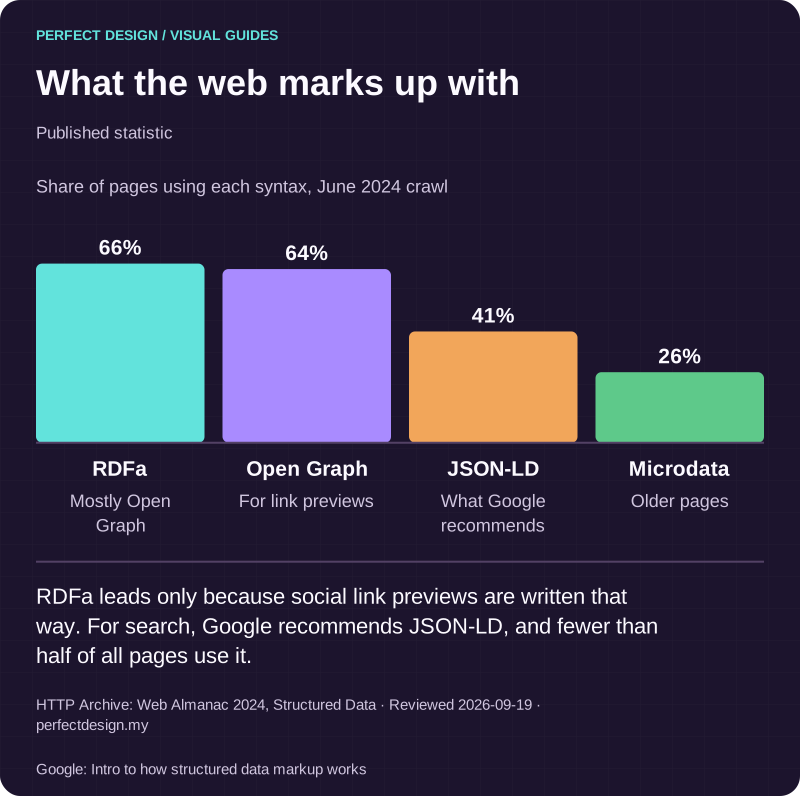
What the web marks up with
Published statistic. RDFa leads only because social link previews are written that way. For search, Google recommends JSON-LD, and fewer than half of all pages use it.
Source: HTTP Archive: Web Almanac 2024, Structured Data. Reviewed .
Also: Google: Intro to how structured data markup works.
Read the graphic as text
- RDFa: 66%. Mostly Open Graph
- Open Graph: 64%. For link previews
- JSON-LD: 41%. What Google recommends
- Microdata: 26%. Older pages
Chart scale: Share of pages using each syntax, June 2024 crawl.
Does the markup reflect visible facts?
It has to, or it should not be there. Google's general structured data guidelines say not to mark up content that is not visible to readers of the page, and its introduction adds that this holds even if the information is accurate. The test for every property: point to where a visitor can read the same fact on the rendered page. If there is nowhere, add the fact to the page or delete the property.
The guidelines rule out the opposite abuse too: no irrelevant or misleading content, no fake reviews, no impersonating a person or organisation. Reviews or ratings not by actual users can lead to a manual action, and Google's review snippet page adds that ratings must be sourced directly from users, not created, curated or compiled by editors. Certifications, awards and memberships sit in the same category: if the page does not show them in enough detail to be checked, the markup should not assert them.
Entity identifiers
Identifiers help Google tell your organisation apart from others with similar names. Google's Organization documentation says the website url helps it uniquely identify the organisation, that sameAs points to pages about it on other sites, and that identifiers such as iso6523Code and naics are used behind the scenes to disambiguate it; legalName, vatID, taxID, duns and leiCode are also listed, none required. For a Malaysian company, legalName is the registered name on the SSM record, ideally also in the footer. Malaysia uses SST rather than VAT, so vatID is usually blank, and a DUNS or LEI number exists only if the company obtained one; do not force the SSM registration number into a field meant for something else. An identifier is useful because someone could check it, so an invented one is worse than none. Consistency across the site, the Google Business Profile and directories is covered in the Business Profile foundations guide.
Annotated example: a branch page
A Dentist block for the hypothetical Petaling Jaya branch, property by property; every value must be traceable to something on the page.
@type
- Value in the markup
- Dentist
- Where the visitor sees it
- The page is about one clinic branch; Google asks for the most specific matching subtype
name
- Value in the markup
- The branch name as written in the heading
- Where the visitor sees it
- The H1 and page title
address
- Value in the markup
- PostalAddress: streetAddress, addressLocality, addressRegion, postalCode, addressCountry MY
- Where the visitor sees it
- The contact block, written the same way
telephone
- Value in the markup
- The branch number with the +60 country code
- Where the visitor sees it
- The contact block and click-to-call link
openingHoursSpecification
- Value in the markup
- dayOfWeek, opens and closes per day; a closed day is 00:00 for both in Google's format
- Where the visitor sees it
- The hours table on the page, which should also match the Business Profile
url
- Value in the markup
- The branch page's own address
- Where the visitor sees it
- The address bar; not the home page
aggregateRating, review
- Value in the markup
- Omitted
- Where the visitor sees it
- Google recommends these only for sites that capture reviews about other local businesses
| Property | Value in the markup | Where the visitor sees it |
|---|---|---|
| @type | Dentist | The page is about one clinic branch; Google asks for the most specific matching subtype |
| name | The branch name as written in the heading | The H1 and page title |
| address | PostalAddress: streetAddress, addressLocality, addressRegion, postalCode, addressCountry MY | The contact block, written the same way |
| telephone | The branch number with the +60 country code | The contact block and click-to-call link |
| openingHoursSpecification | dayOfWeek, opens and closes per day; a closed day is 00:00 for both in Google's format | The hours table on the page, which should also match the Business Profile |
| url | The branch page's own address | The address bar; not the home page |
| aggregateRating, review | Omitted | Google recommends these only for sites that capture reviews about other local businesses |
Annotated example: a breadcrumb trail
A BreadcrumbList for a treatment page whose visible trail reads Home, then Treatments, then Teeth whitening:
- itemListElement: one ListItem per crumb, in the order shown on the page.
- Position 1: name Home, item the home page URL, matching the first link in the visible trail.
- Position 2: name Treatments, item the treatments section URL. The label is the word the visitor sees, not a keyword-rich variant.
- Position 3: name Teeth whitening. Google says item is not required for the last crumb; if omitted, Google uses the URL of the page itself.
- Google allows more than one BreadcrumbList on a page; each must be a trail the visitor can actually follow.

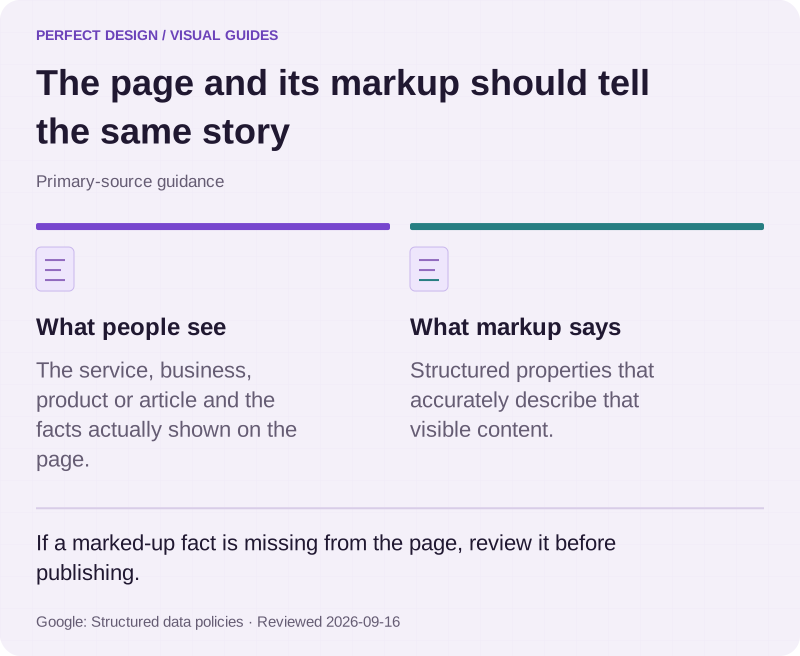
The page and its markup should tell the same story
Primary-source guidance. If a marked-up fact is missing from the page, review it before publishing.
Source: Google: Structured data policies. Reviewed .
Read the graphic as text
- What people see. The service, business, product or article and the facts actually shown on the page.
- What markup says. Structured properties that accurately describe that visible content.
What does validation prove?
Validation proves that the markup is syntactically correct, uses a type Google supports and has the properties Google requires. That is all, and it is worth having. The Rich Results Test takes a public URL or a pasted code snippet, renders the page as a smartphone or desktop crawler (smartphone by default), and reports which supported rich result types it found and whether each item is valid, valid with warnings or invalid. Google's feature pages say to fix critical errors; warnings usually point at a recommended property you could add. Only gallery types are tested, so a schema.org type outside it produces no items rather than a pass.
What the test does not prove matters more to a buyer. It is not an index check: a page can pass and still be missing from Google for a reason the test never looks at. It does not prove a rich result will appear: the tool's help page says Google does not guarantee that the page will appear exactly as shown, or that any of the views shown will be applied to the page's result. And it does not check that the marked-up facts match the visible page; that stays a human check.

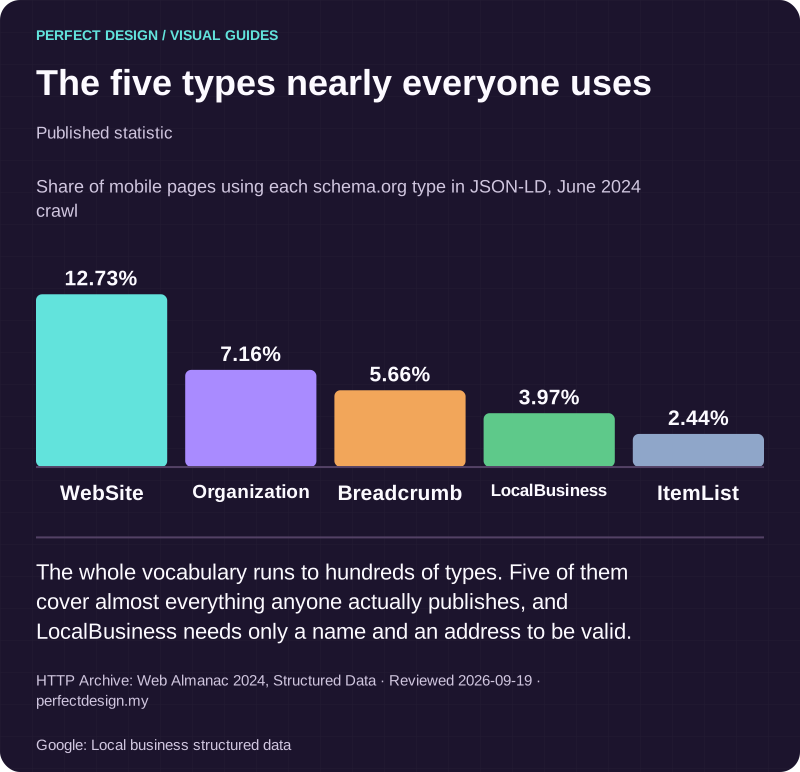
The five types nearly everyone uses
Published statistic. The whole vocabulary runs to hundreds of types. Five of them cover almost everything anyone actually publishes, and LocalBusiness needs only a name and an address to be valid.
Source: HTTP Archive: Web Almanac 2024, Structured Data. Reviewed .
Also: Google: Local business structured data.
Read the graphic as text
- WebSite: 12.73%.
- Organization: 7.16%.
- Breadcrumb: 5.66%.
- LocalBusiness: 3.97%.
- ItemList: 2.44%.
Chart scale: Share of mobile pages using each schema.org type in JSON-LD, June 2024 crawl.
What does eligibility not guarantee?
Eligibility guarantees nothing about display. Google's general guidelines say it does not guarantee that structured data will show up in search results even if the page is marked up correctly. The Rich Results Test help page gives the reason: Google tries to show the best result for a search request, based on the user's search history, location and many other variables. Eligibility is the entry condition; the decision to show a richer result is made per query and can change.
It does not guarantee a knowledge panel either. Google's Organization and LocalBusiness pages say the markup can help with which logo is shown and with business details in a knowledge panel, which is different from creating one. For a Malaysian storefront the local panel comes in practice from its Google Business Profile listing, which the markup must agree with; the local SEO checklist covers the profile side.
Nor is eligibility permanent. Features are withdrawn, as FAQ and HowTo were; markup that violates the guidelines can draw a manual action, which removes rich result eligibility for the page; and structured data cannot rescue a page Google cannot read, since the technical guidelines say not to block structured-data pages with robots.txt, noindex or other access controls. The technical SEO audit checklist covers those checks. None of this is a reason to skip structured data; it is a reason to treat it as an accurate description of the page, never as a promised result.

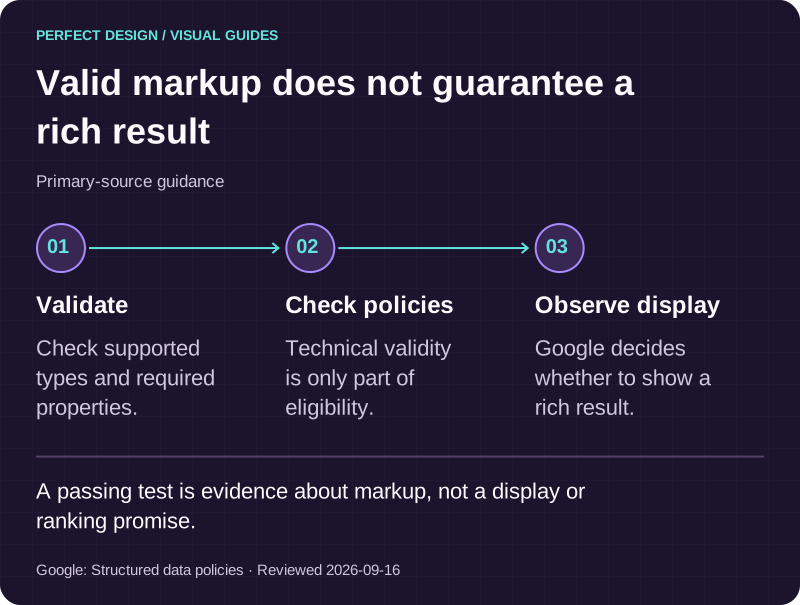
Valid markup does not guarantee a rich result
Primary-source guidance. A passing test is evidence about markup, not a display or ranking promise.
Source: Google: Structured data policies. Reviewed .
Read the graphic as text
- Validate. Check supported types and required properties.
- Check policies. Technical validity is only part of eligibility.
- Observe display. Google decides whether to show a rich result.
What to do next
- List every template on your site (home, about, location, product, post, category) and write down the one entity each is about. Templates with no single entity get BreadcrumbList at most.
- For each template, take the matching matrix row and confirm the required visible facts are on the page before anyone writes markup.
- Run one page per template through the Rich Results Test, fix critical errors and record the result with the date. After deployment, watch the rich result status reports in Search Console.
- Remove Review and AggregateRating markup about your own business: it is ineligible, and reviews not by actual users can draw a manual action.
Where to go next
- How search visibility works →
The parent page: where structured data sits in the chain from crawling to ranking.
- Google Business Profile foundations for Malaysia →
The profile facts your LocalBusiness markup has to agree with.
- Local SEO checklist for Malaysia →
Audit the location page, the profile and citations together.
- Technical SEO audit checklist →
The crawlability and indexing checks that markup depends on.
Rather have this handled?
Talk to us about technical seo for your business, starting with the questions this guide helped you identify.
Sources and further reading
- Google Search Central — Introduction to structured data markup in Google Search — read 15 September 2026
- Google Search Central — General structured data guidelines — read 15 September 2026
- Google Search Central — Structured data markup that Google Search supports (feature gallery) — read 15 September 2026
- Google Search Central — Organization (Organization) structured data — read 15 September 2026
- Google Search Central — Local business (LocalBusiness) structured data — read 15 September 2026
- Google Search Central — Breadcrumb (BreadcrumbList) structured data — read 15 September 2026
- Google Search Central — Introduction to Product structured data — read 15 September 2026
- Google Search Central — Merchant listing (Product, Offer) structured data — read 15 September 2026
- Google Search Central — Product snippet (Product, Review, Offer) structured data — read 15 September 2026
- Google Search Central — Article (Article, NewsArticle, BlogPosting) structured data — read 15 September 2026
- Google Search Central — Review snippet (Review, AggregateRating) structured data — read 15 September 2026
- Google Search Central — Latest documentation updates (changelog) — read 15 September 2026
- Google — Rich Results Test (tool) — read 15 September 2026
- Search Console Help — Rich Results Test — read 15 September 2026
- Schema.org — Organization of Schemas — read 15 September 2026
- Schema.org — LocalBusiness type — read 15 September 2026