
Concept prototypeFitness studio booking and membership app
Cadence
Class booking, memberships and a member community for a two-studio fitness brand, with a front desk, coach tools and a manager’s view of who might leave.
- Connected roles
- 5
- Studios
- 2
- Class types
- 4
The brief
Boutique studios run bookings, memberships and cover on separate apps and spreadsheets. Members cannot see the rules until they are charged, and owners find out someone has left only when the payment stops.
What we built
A website with a live timetable and an intro offer, a member app for booking a bike or reformer, plans and progress, a community with moderation, a front desk for check-in and walk-ins, coach cover and leave, and a manager’s dashboard with retention.
- Built for
- Fitness, yoga, pilates and dance studios, and gyms that sell classes and memberships.
- Pages and screens (18)
- Home, Timetable, Classes, Pricing, Studios, Coaches, Intro checkout, Member app, Booking, Plans, Progress, Community, Front desk, Coach, Manager, Retention, Moderation, Booking rules
Walkthrough film · 2:41
Cadence in under three minutes
Cadence is a concept booking system for a boutique fitness studio. The film follows one evening: a late cancellation under rules members see before they book, a waitlist that fills the class, rules the owner can change, members who may leave, and cover for a coach sorted in the app. Sample data, built by Perfect Design.
Captions are on screen. The transcript is below the chapters.
Chapters
Read the transcript
0:00Introduction
So if you run a fitness studio, you probably want three things. You want rules your members can see before they book. You want every class full, even when people cancel. And you want new members who stay, right?
But right now, a member says they never saw the rule, so you waive the fee on WhatsApp. Someone cancels late, and the bike stays empty while others wait. A regular stops coming, and it's easy to miss. And when a coach can't teach, you're rushing to find cover.
So let me show you how one system handles each of those.
This is Cadence. It's a demo system we built at Perfect Design, for a boutique fitness group with two studios in Kuala Lumpur.
0:40The rules, before anyone books
The website shows the rules before anyone books. Cancel free until 12 hours before. After that, the class counts as used, and inside two hours, there's a 35 ringgit fee.
Let's say Maya can't make her ride at seven forty-five tonight. When she taps cancel, the app shows exactly what happens before she confirms.
It's her first late cancel in 30 days, so it's waived and doesn't use up her class.
1:08Full classes stay full
Tonight's ride is full, with people waiting. The second she cancels, the first person in line gets her bike.
That person gets a notice in the app straight away, with an hour to cancel free if they can't come. Your front desk sees it on the class list. Up to two hours before class, nobody on your team has to do a thing.
1:28Your rules, your numbers
The numbers are yours to change. Change the free cancel time from 12 hours to 8, and the rules on your website change at once.
1:36Members who may leave
Your screen also lists the members who may leave, and why. For each one, it suggests what to do next.
People who tried your three-class intro but never joined are here too, with what to offer them.
Now, let's say Maya wants to end her membership. The app offers a freeze first. It also shows her last day, and what's still due, before she confirms.
1:57Cover, sorted in the app
When one of your coaches can't teach, they ask for cover in the app. It only goes to coaches who are certified and free.
Another coach takes it, and your manager approves the swap. Everyone with a booking gets a notice about the change.
2:11Wrapping up
So that's your rules out in the open, your waitlist filling the gaps, and a list of who may leave, all in one system.
We build it around your own classes, prices and rules. It usually takes three to four weeks. And the system and every record in it are yours, so you're never stuck with us.
And the best part is, we'll build you a free working prototype first, before you pay anything. All you have to do is message Perfect Design on WhatsApp.
Inside the build
Every part, and what it does
A closer look at what was actually built — screen by screen, so you can judge the depth for yourself.
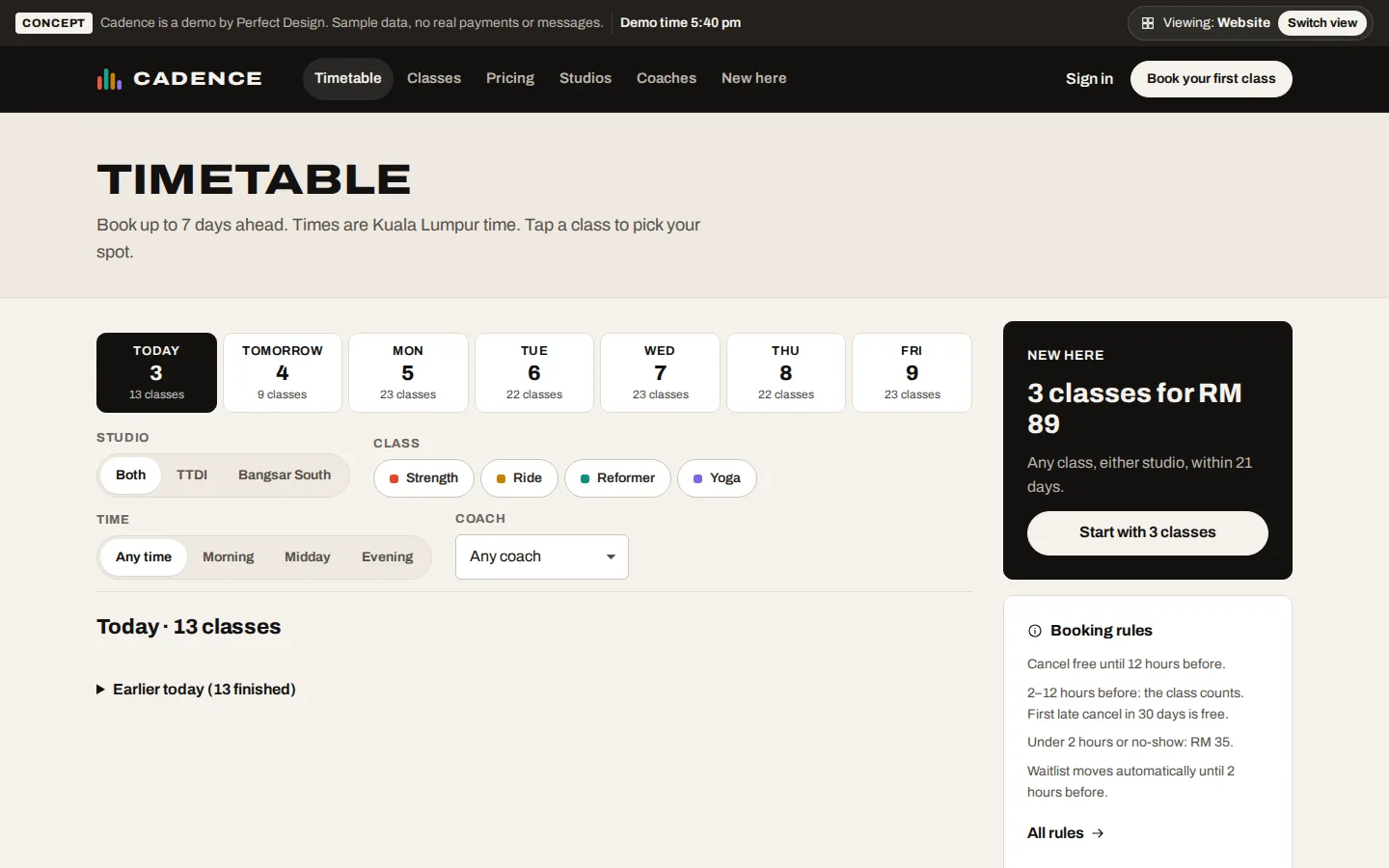
Timetable
Seven days of classes at both studios, filtered by studio, class type, time and coach.
- Book up to 7 days ahead
- Spots left and waitlists shown
- Intro offer with its terms
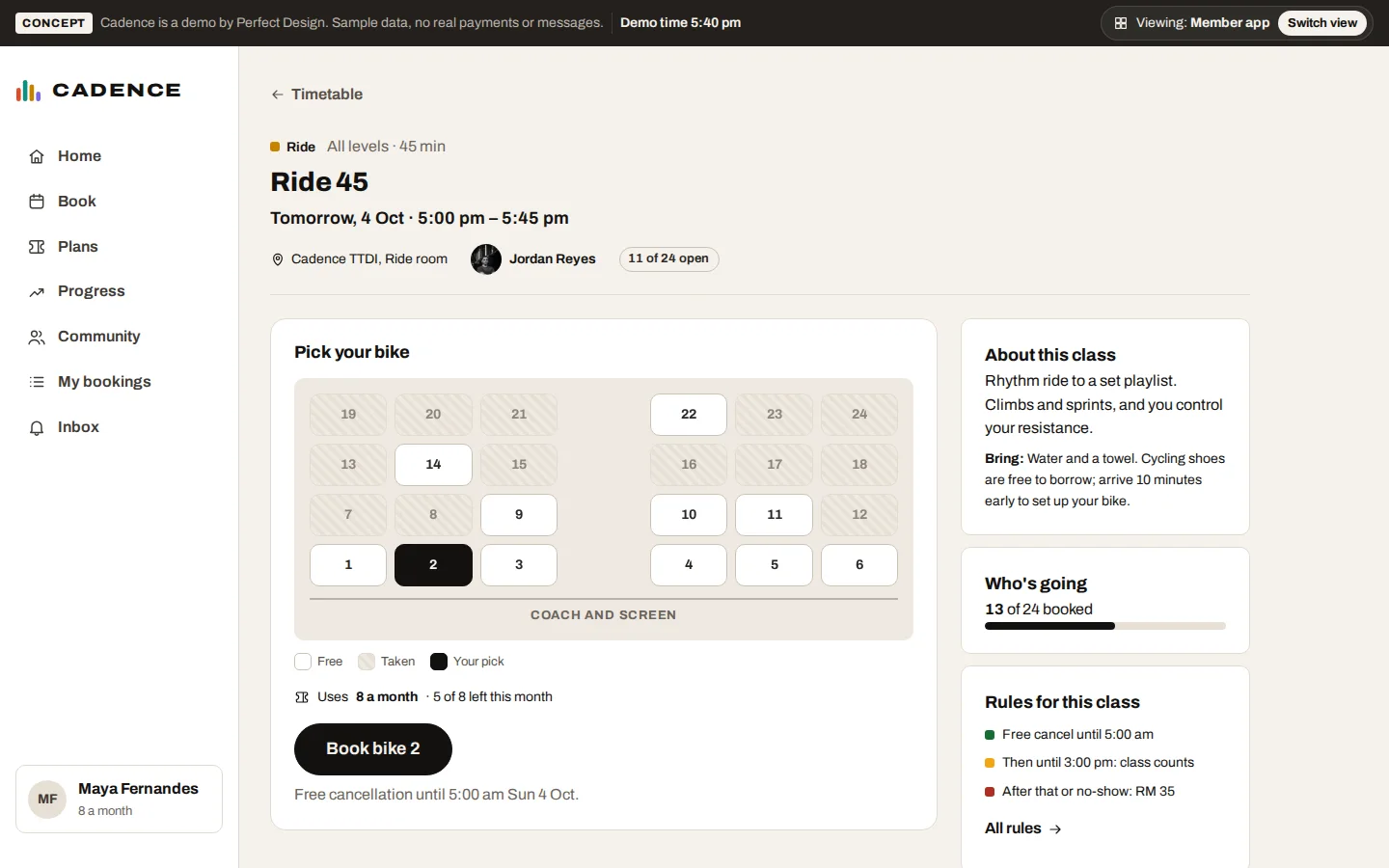
Book a bike or reformer
Members pick their spot on a map of the room, see which plan pays for the class and when free cancellation ends.
- Choose your own spot
- Plan balance shown
- Free cancellation until 12 hours before
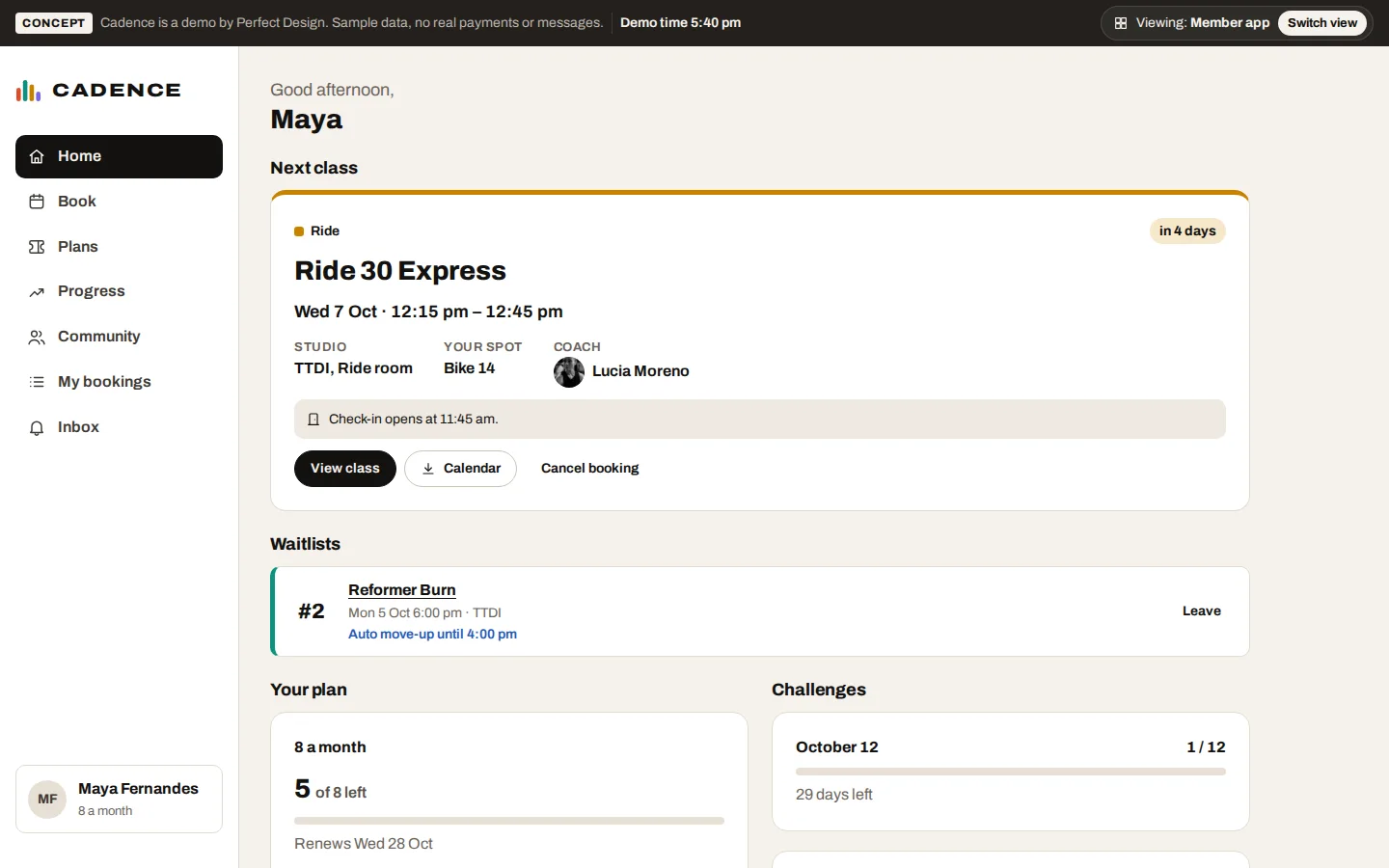
Member app
The next class as a ticket with check-in, classes left this month and challenges.
- Next class and spot
- Classes left on the plan
- Challenge progress
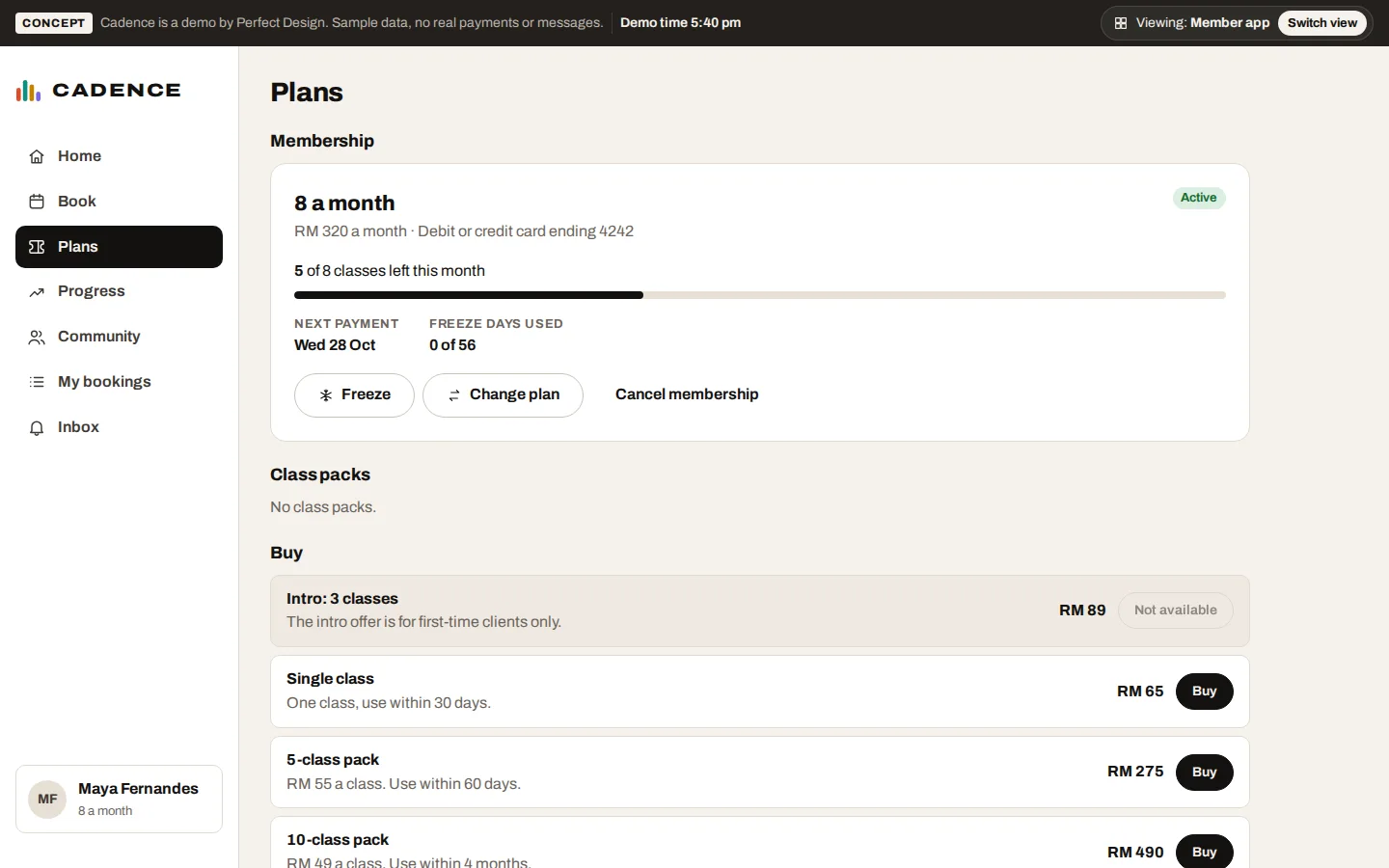
Plans: freeze, change, cancel
Members manage their own membership. Freezing moves the renewal date, and cancelling shows the last day before it is confirmed.
- Freeze up to 56 days a year
- 30 days’ notice, shown up front
- Packs and memberships to buy
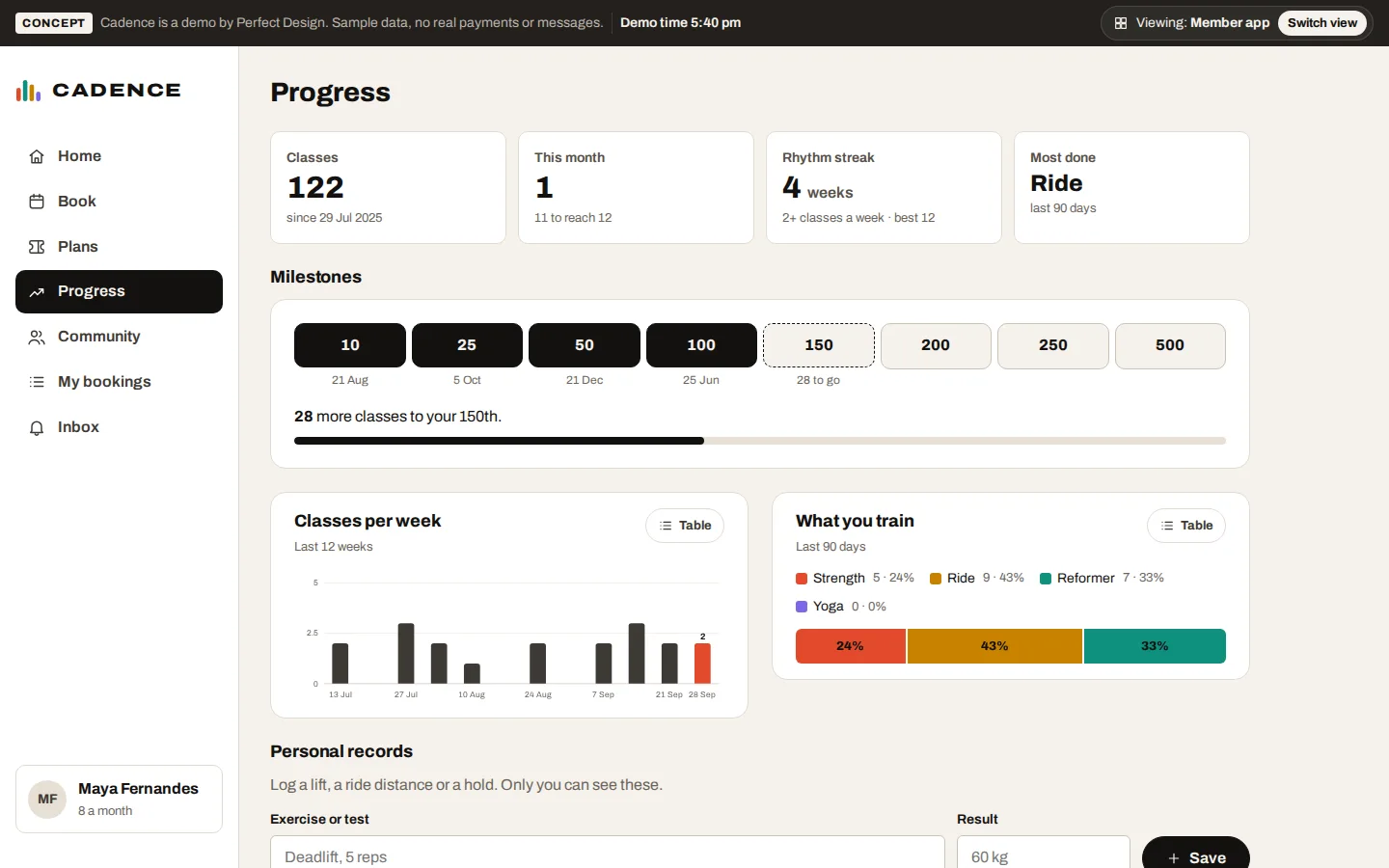
Progress
Classes taken, a weekly streak, milestones and personal records, with every chart also available as a table.
- Milestones with dates
- Weekly streak
- Personal records
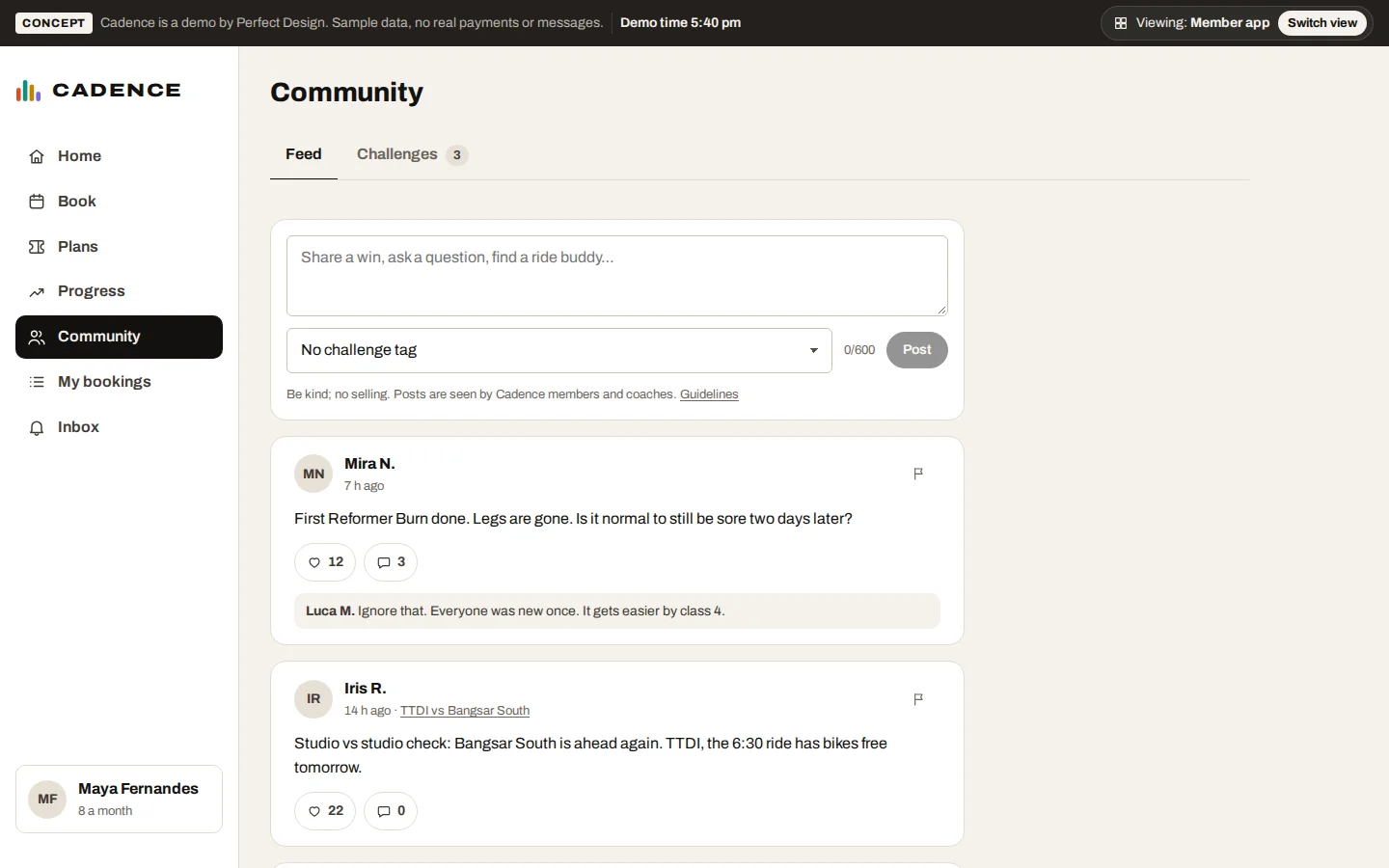
Community
Members and coaches post, comment and join challenges. Anyone can report or block, and a post with three reports is hidden until it is reviewed.
- Posts and challenges
- Report and block
- Hidden after three reports
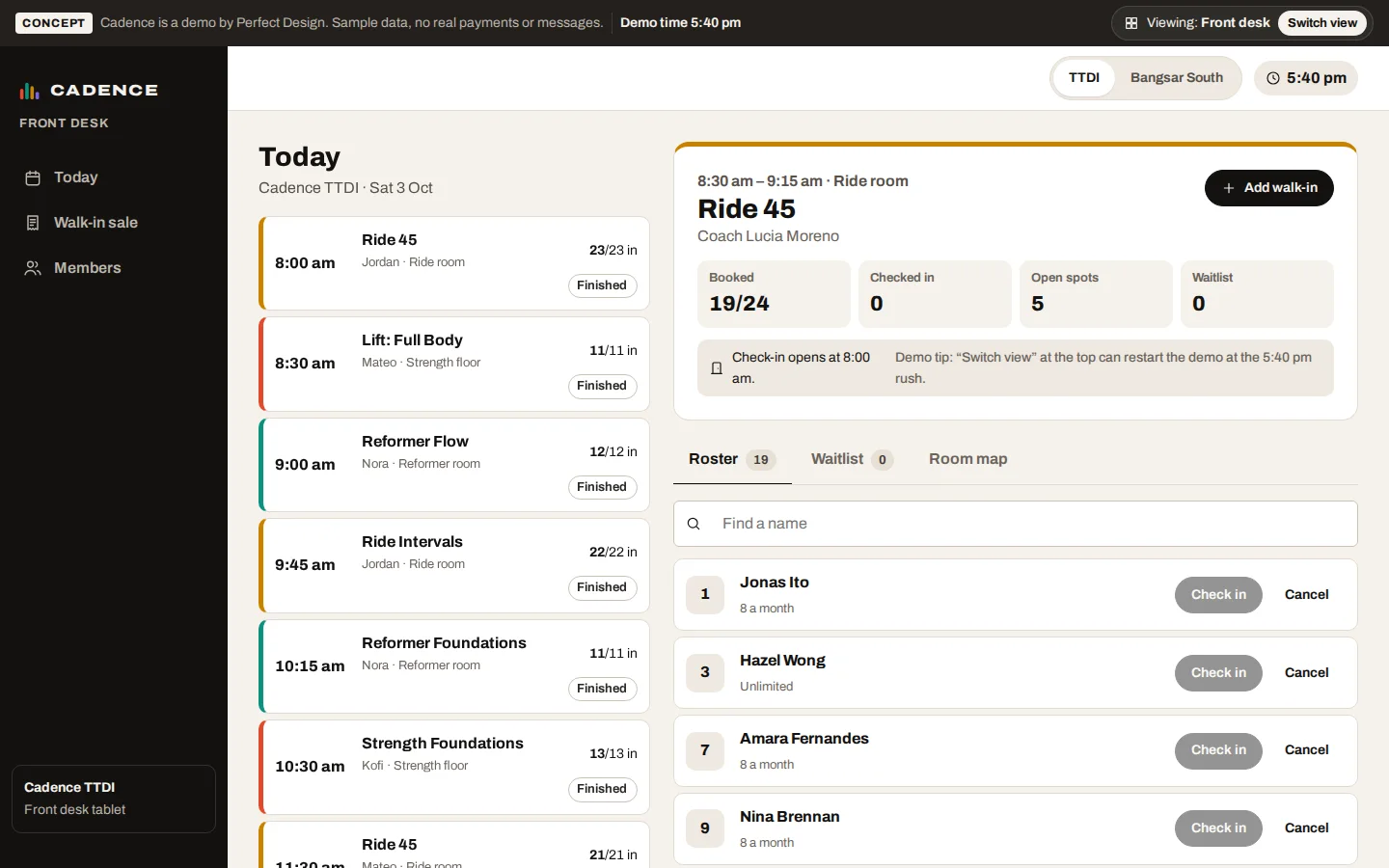
Front desk check-in
Today’s classes with a live roster. Staff check people in, promote the waitlist and sell to walk-ins.
- One-tap check-in
- First-class and injury notes
- Walk-in sale books the class
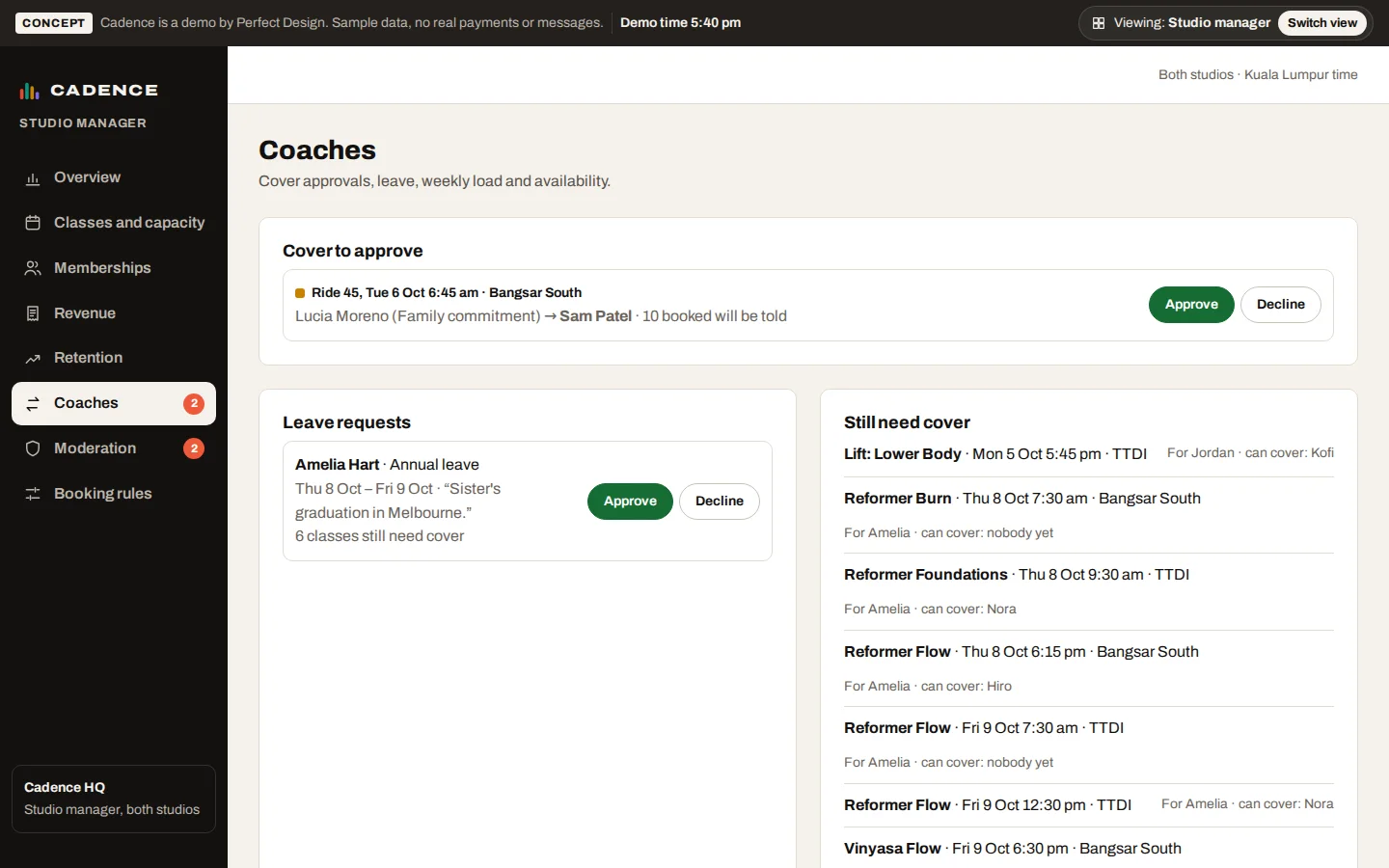
Coach cover and leave
Cover requests go only to coaches who can teach the class. The manager approves cover and leave, and booked members are told.
- Qualified, free coaches only
- Leave shows which classes need cover
- Members told of the change
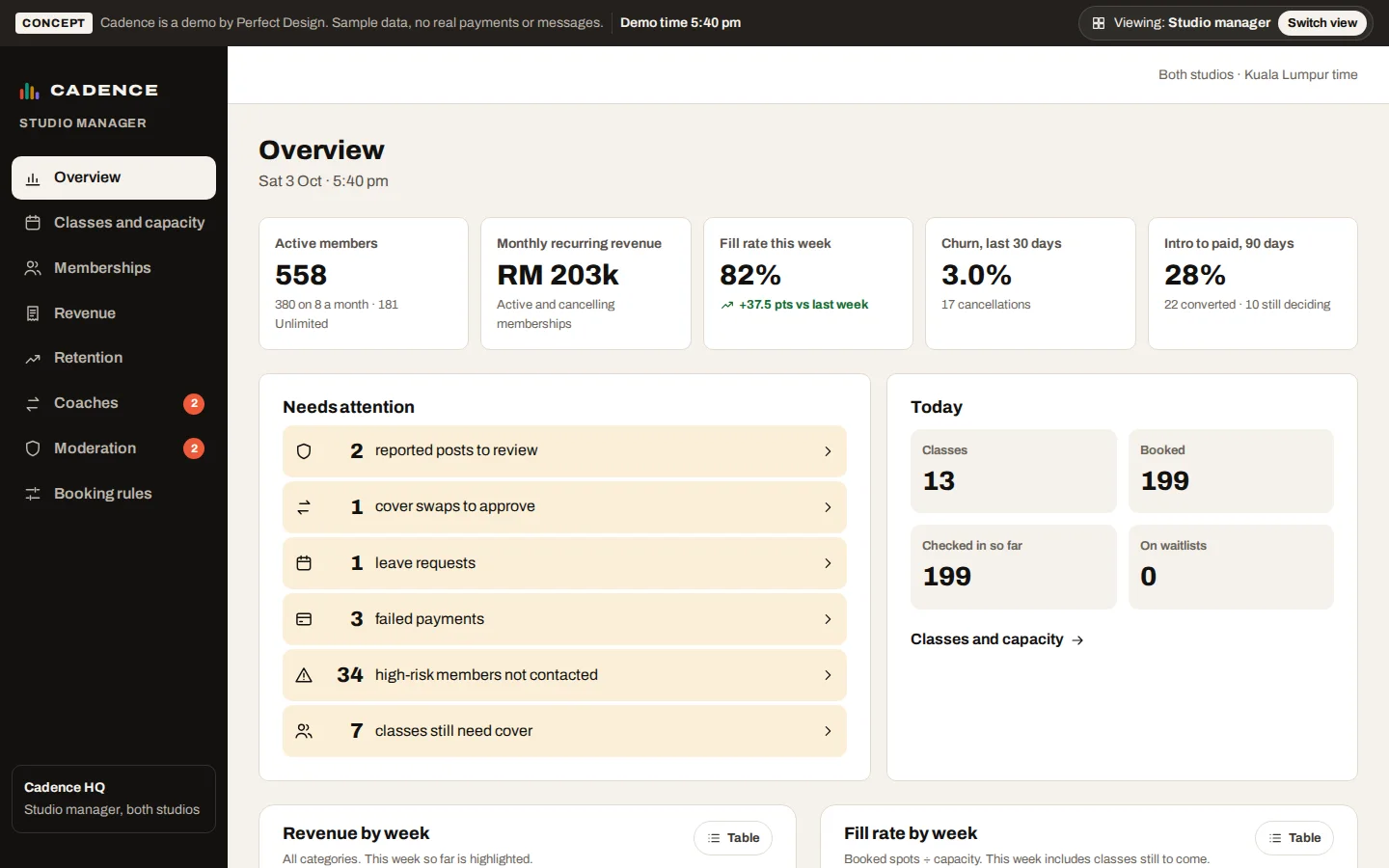
Manager overview
Active members, monthly recurring revenue, fill rate, churn and intro-to-paid, with a list of what needs attention.
- The numbers owners ask about
- Revenue and fill rate by week
- What needs attention
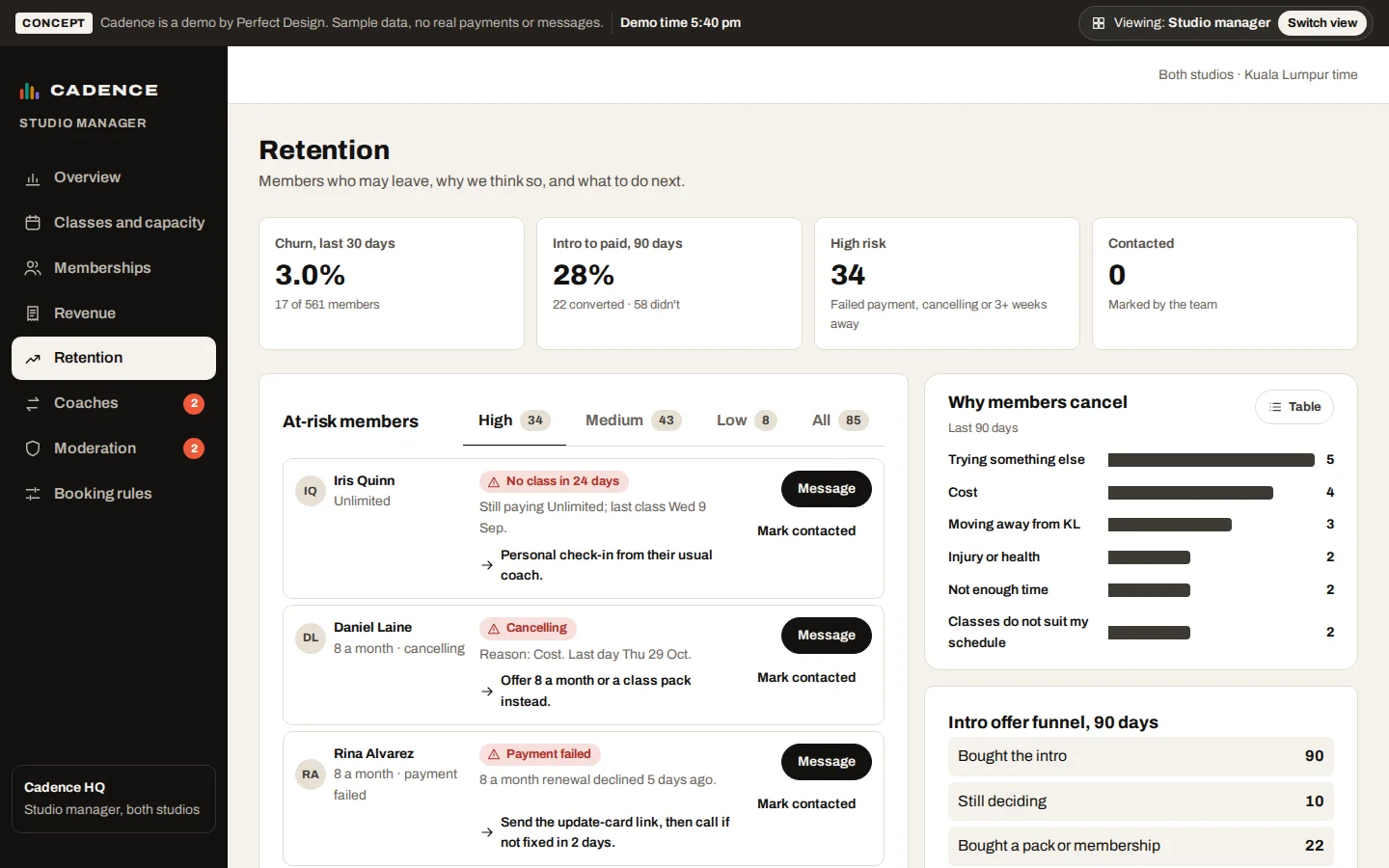
Retention
Members who may leave, the reason the system thinks so, and a suggested next step for each.
- At-risk members ranked
- Why members cancel
- Intro offer funnel
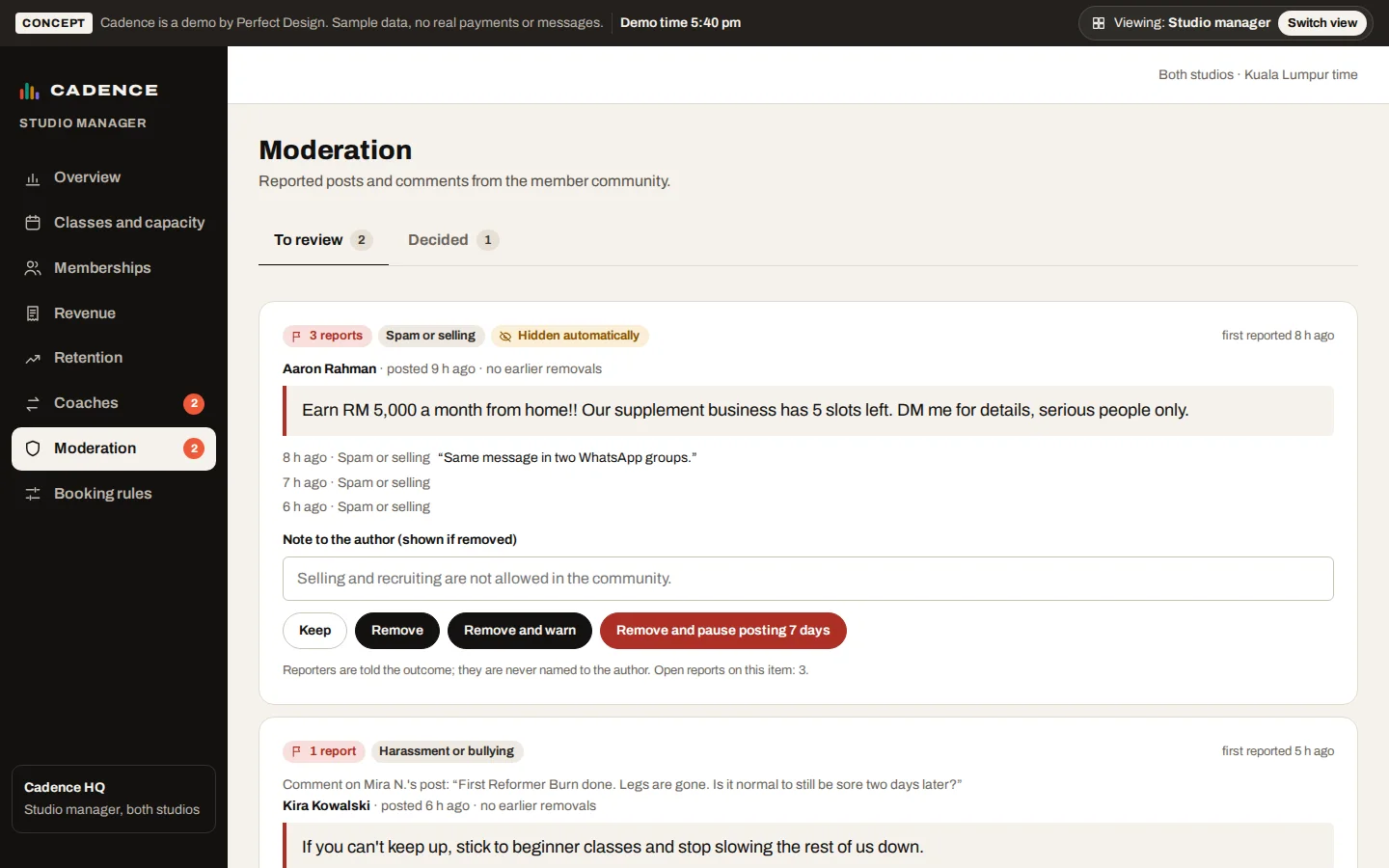
Moderation
Reported posts with the reasons and notes. Keep, remove, warn or pause posting, and both sides are told the outcome.
- Reasons and reporter notes
- Keep, remove, warn or pause
- Outcome sent to both sides
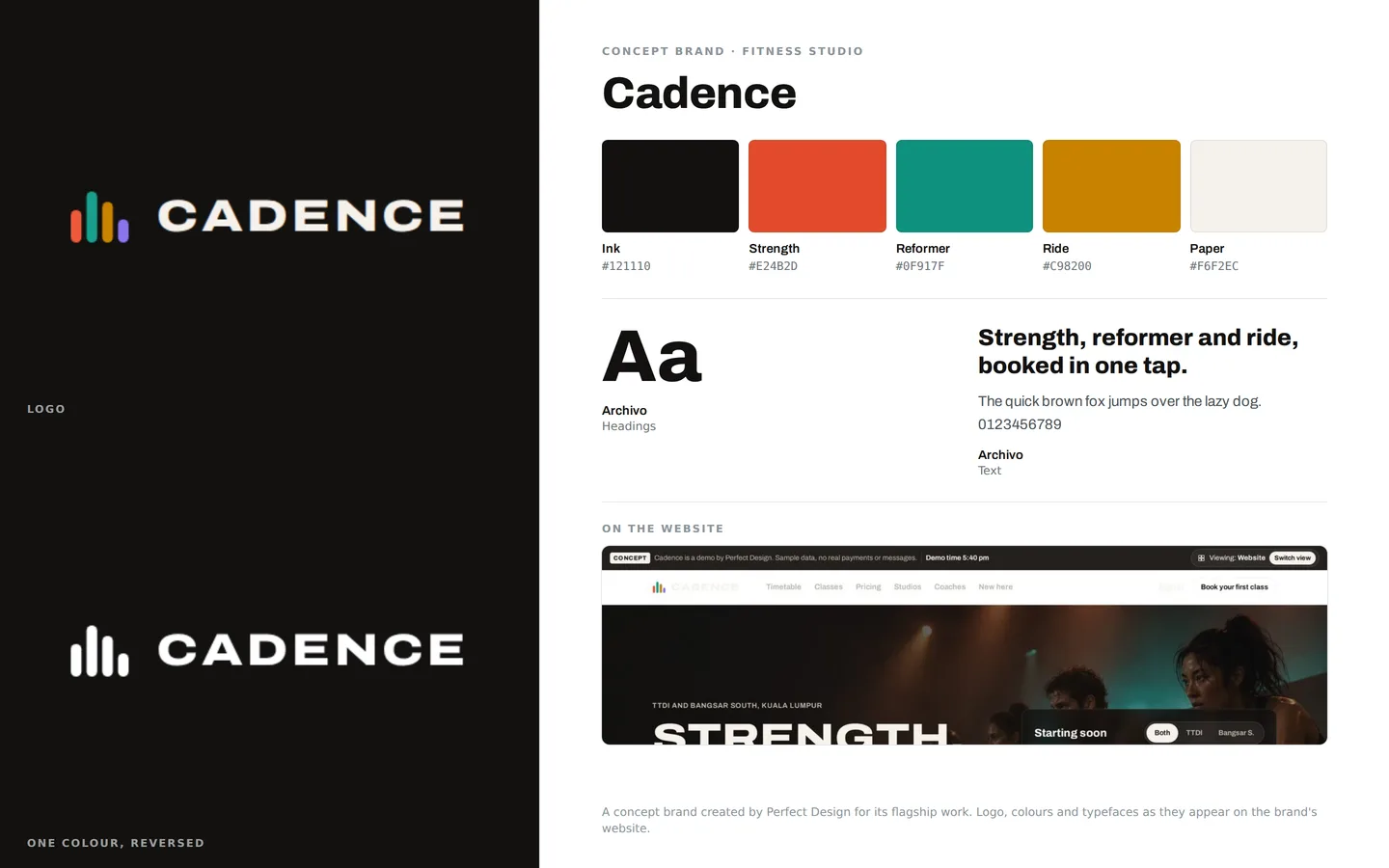
Brand identity
A fitness studio’s bold brand: a mark of coloured bars on ink, a colour for each class type, set in Archivo.
- Logo and one-colour version
- A colour per class type
- Archivo throughout
Click through it yourself
Every screen above is interactive. No sign-up, nothing to install.
Behind the build
Researched first, then built
Before designing anything, we studied 12 sites: boutique studios in the US, the UK, Malaysia, Singapore and Hong Kong, and four studio booking platforms. Nothing was copied. Each finding below changed a decision.
Studied (12)
- Barry’s
- SoulCycle
- [solidcore]
- Psycle
- CorePower Yoga
- 1Rebel
- FLYPROJECT (Malaysia and Singapore)
- PURE (Hong Kong and Singapore)
- Mindbody
- Mariana Tek
- Glofox
- ClassPass
What we saw
What Cadence does
What we saw
Several studios make you choose a studio before they show any class.
What Cadence does
The live timetable is on the home page, with a studio switch and filters.
What we saw
Studios lead with a first-timer offer, and the best put its terms beside the price.
What Cadence does
One intro offer, 3 classes for RM 89 within 21 days, with the terms in the same place.
What we saw
Long price lists rarely show what one class costs.
What Cadence does
Seven products, each showing the cost per class and when it expires.
What we saw
The fairest studios publish clear late-cancel rules and waive the first one.
What Cadence does
Members see the exact outcome before they cancel, and the first late cancel in 30 days is waived.
What we saw
Booking platforms sell picking your bike or reformer as a core feature.
What Cadence does
Room maps for bikes, reformers and strength stations.
What we saw
Studios buy coach cover as a separate add-on app.
What Cadence does
Cover is built in, offered only to coaches qualified and free to teach.
What we saw
Studio software centres the manager on churn, trial conversion and fill rate.
What Cadence does
A manager overview with those three numbers, and a list of members who may leave.
Rules it follows
The business rules, built in
The prototype enforces each of these, so you can test them yourself.
Booking
- Booking opens 7 days ahead
- Unlimited covers up to 2 classes a day, and 8 a month covers 8 a cycle
- Members cannot book overlapping classes
Cancelling
- Free until 12 hours before class
- From 2 to 12 hours, the class counts (Unlimited: RM 20), and the first late cancel in 30 days is waived
- Under 2 hours, or a no-show: RM 35
Waitlist
- Up to 8 people, charged nothing while waiting
- Moves up automatically until 2 hours before class
- Anyone moved up inside 12 hours gets 60 minutes to cancel free
Plans
- Intro 3 classes for RM 89, single class RM 65, and packs of 5, 10 and 20
- 8 a month for RM 320, Unlimited for RM 499
- Freeze for 7 to 56 days a year, and cancel with 30 days’ notice
Community
- Three reports hide a post until a manager reviews it
- The manager can keep, remove, warn or pause posting
Connected roles
One action, every screen
Every role works on the same records, so one person’s action shows up for the others.
- 1
A booking appears on the front desk and coach rosters.
- 2
A cancellation moves the waitlist up.
- 3
A reported post lands in the manager’s moderation queue.
- 4
A cover request goes to qualified coaches, and approving it tells every booked member.
- 5
A coach’s leave opens cover requests for the classes it affects.
- 6
Changes to the booking rules apply across the app at once.
Services it proves
Where Cadence is our example
Each of these service pages uses a part of Cadence to show the work. Open one to see what we would build for you.
- Booking appsShows: Book a bike or reformerBooking a class and picking an exact bike or reformer, with the plan that pays and when free cancellation ends.
- Community appsShows: CommunityA studio’s member community: posts, comments and challenges, with report and block, and posts hidden after three reports.
- Fitness and wellness appsShows: ProgressProgress counted from classes attended: milestones, a weekly streak and personal records that only the member can see.
- Subscription commerceShows: Plans: freeze, change, cancelA membership the member manages: freeze days used, the next payment, change plan and cancel with the notice period shown.
- Membership systemsShows: RetentionMembers who may leave, why the system thinks so and a suggested next step, beside churn and the intro-offer funnel.
- HR systemsShows: Coach cover and leaveCover and leave for a fitness studio’s coaches: cover goes only to coaches qualified and free to teach, and the manager approves both.
- Fitness & wellnessShows: Book a bike or reformerA fitness studio: timetable, bike and reformer booking, plans members manage themselves, a member app, front-desk check-in and coach cover.
Core systems
What this build is made of
These are systems we build repeatedly — each links to every other project that contains it, so you can compare implementations before deciding what you need.
Industry: Fitness & wellness
Unique to this build
Built specifically for this project rather than assembled from the shelf.
Pick your spot
Members choose a bike, reformer or station when they book.
Fair cancel rules
The outcome is shown before cancelling, and the waitlist moves up on its own.
Retention watch
Members who may leave, why, and what to do next.

Want a build like this for your business?
Tell us what you have in mind and we'll put together a functional prototype of your project — free.