
Lintel Design & Build
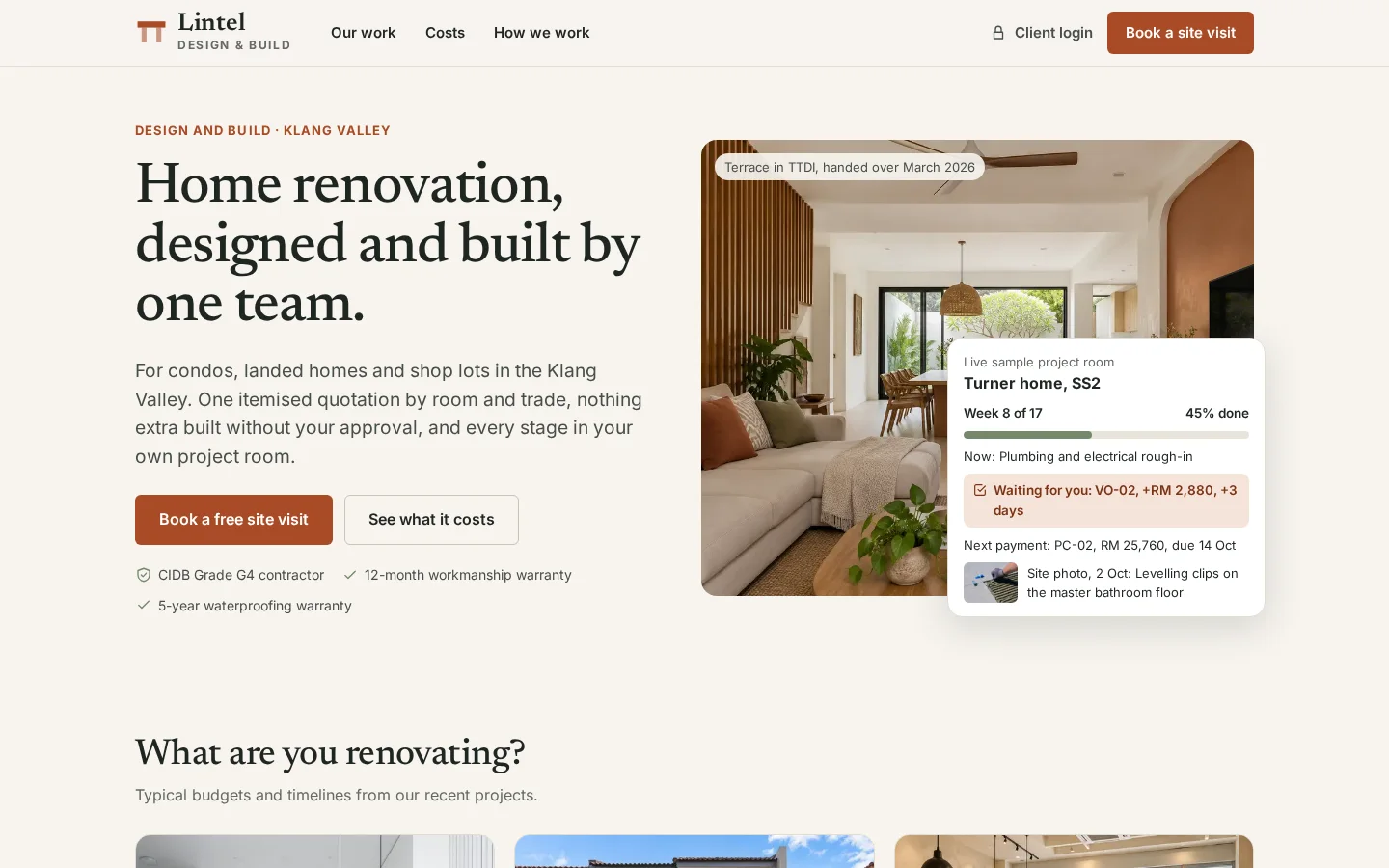
A renovation firm’s website, client project room and back office in one: priced quotations, variations approved before work starts, progress claims with retention and defects pinned on the floor plan.
The brief
Renovation complaints in Malaysia are mostly about broken contracts and poor work. Most firm websites show photos with no prices, and the quotation, the extra work and the payments end up in chat threads and spreadsheets.
What we shipped
A website with priced projects and a cost guide, a project room where clients accept the quotation, approve variations and claims and report defects, a studio for quotations and variations, a site app for daily logs, and an office for claims, payments and retention.
Built for: Renovation, interior design-and-build and fit-out firms, and contractors who bill by progress claim.
Inside the build
Every part, and what it does
A closer look at what was actually built — screen by screen, so you can judge the depth for yourself.
Cost guide
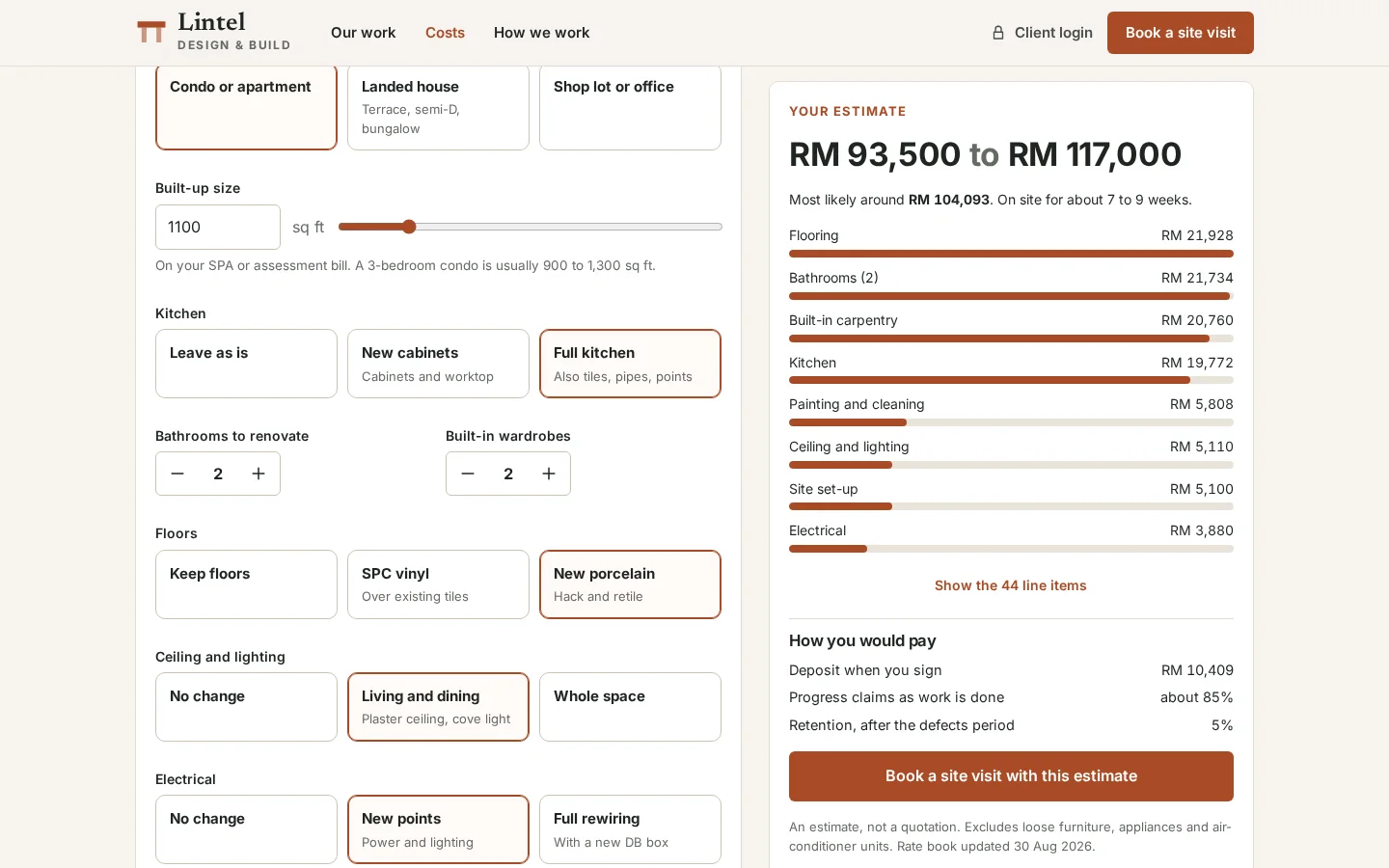
Prospects price their own renovation from the firm’s rate book: property type, size, kitchen, bathrooms, floors, ceiling and wiring. The estimate shows a range, where the money goes and how payment works.
- Priced from the live rate book
- Range, breakdown and weeks on site
- Estimate carried into the booking
Client project room
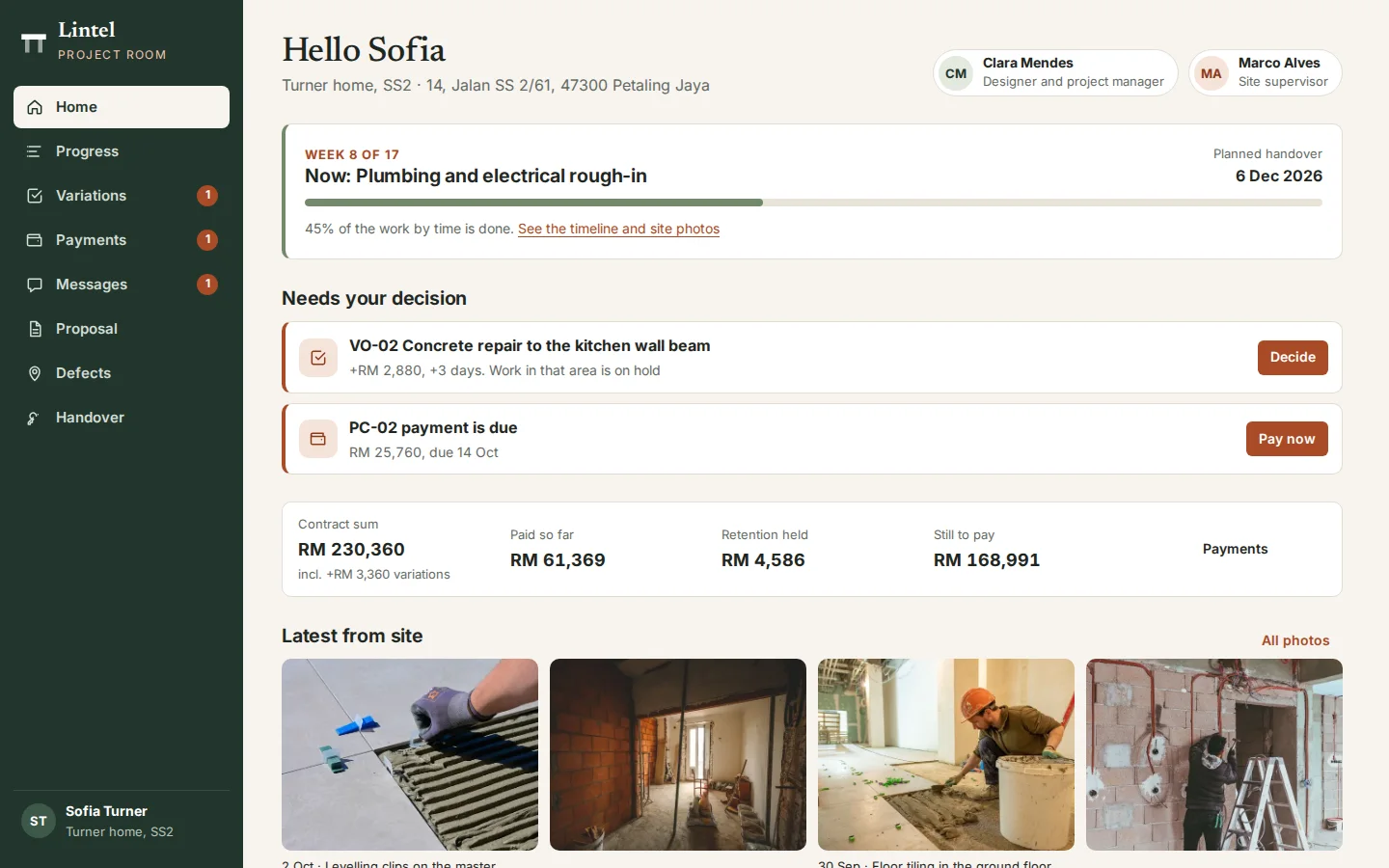
Each client has one place for the project: the stage and week, what needs their decision, the contract sum, what is paid, retention held and the latest site photos.
- Decisions waiting, with the amount and days
- Contract sum, paid and still to pay
- Site photos the team chose to share
Proposal and quotation
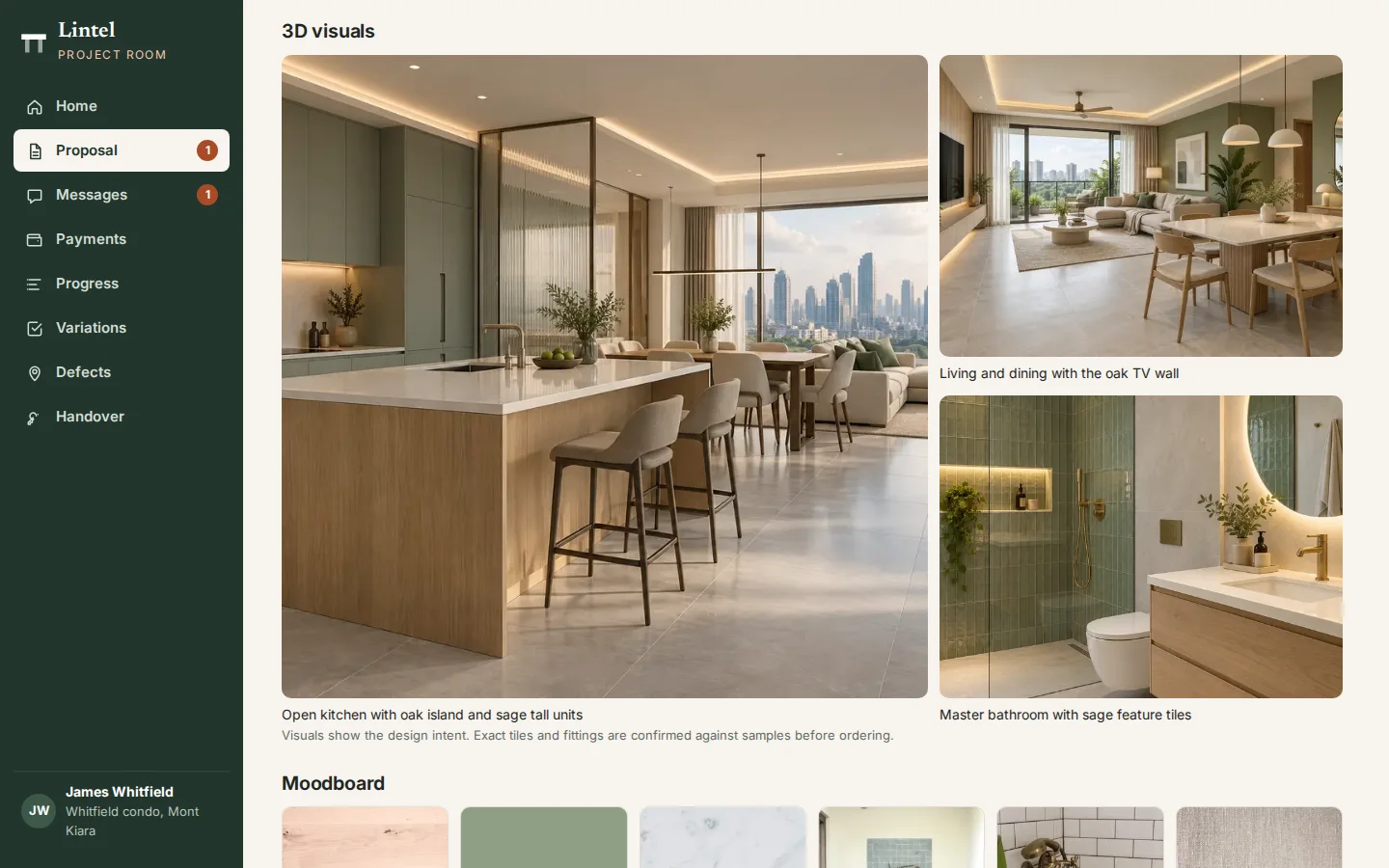
3D visuals, a moodboard and a quotation itemised by area and trade. The client accepts with a typed name, which locks the quotation and raises the 10% deposit.
- Visuals and moodboard with the quote
- Itemised by area and trade
- Typed-name acceptance locks the price
Variation approval
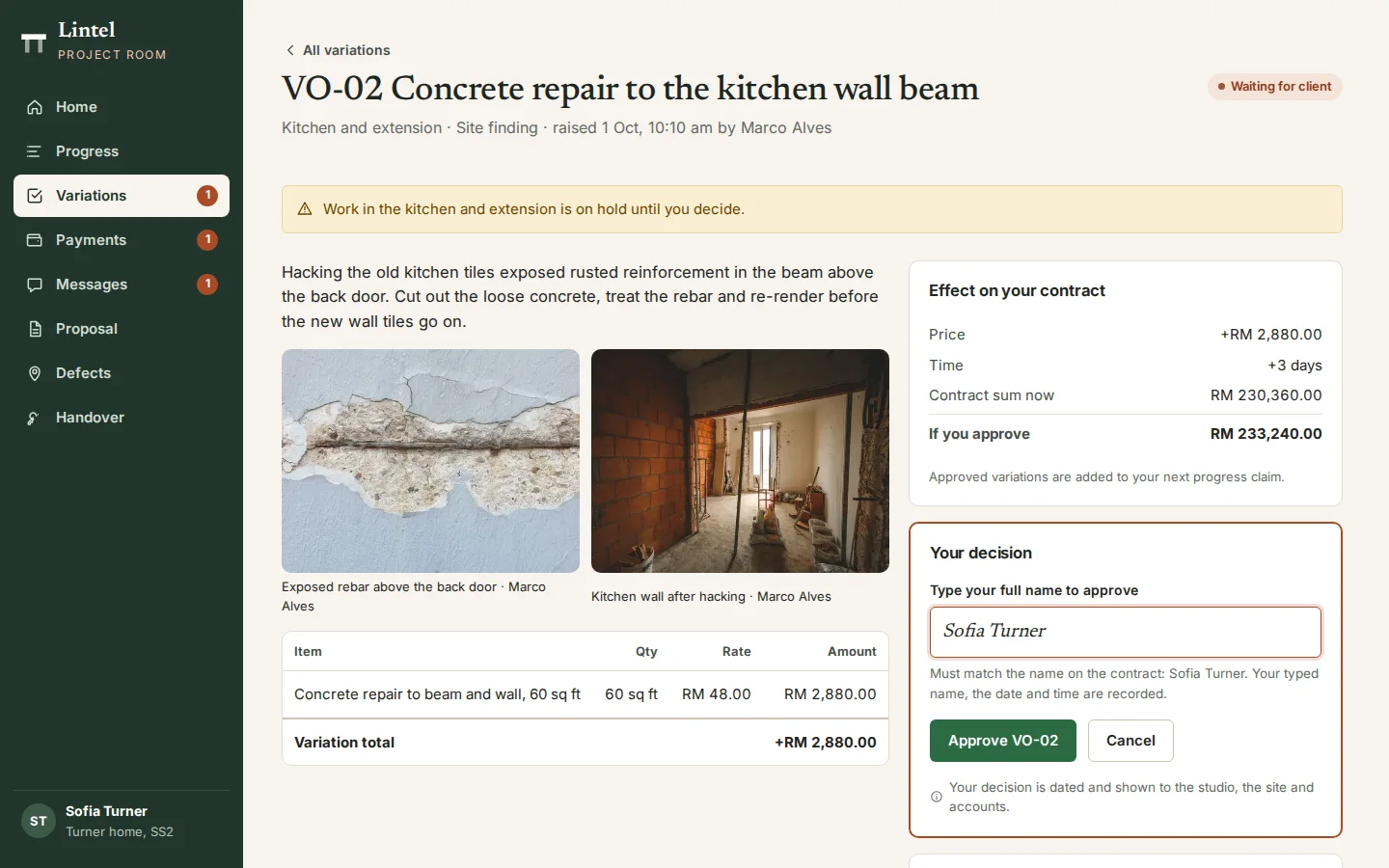
Extra work found on site arrives with photos, the price, the extra days and the new contract sum. Work in that area waits until the client approves with a typed name or rejects it with a reason.
- Photos from site
- Price and extra days before approval
- Added to the next progress claim
Progress claims
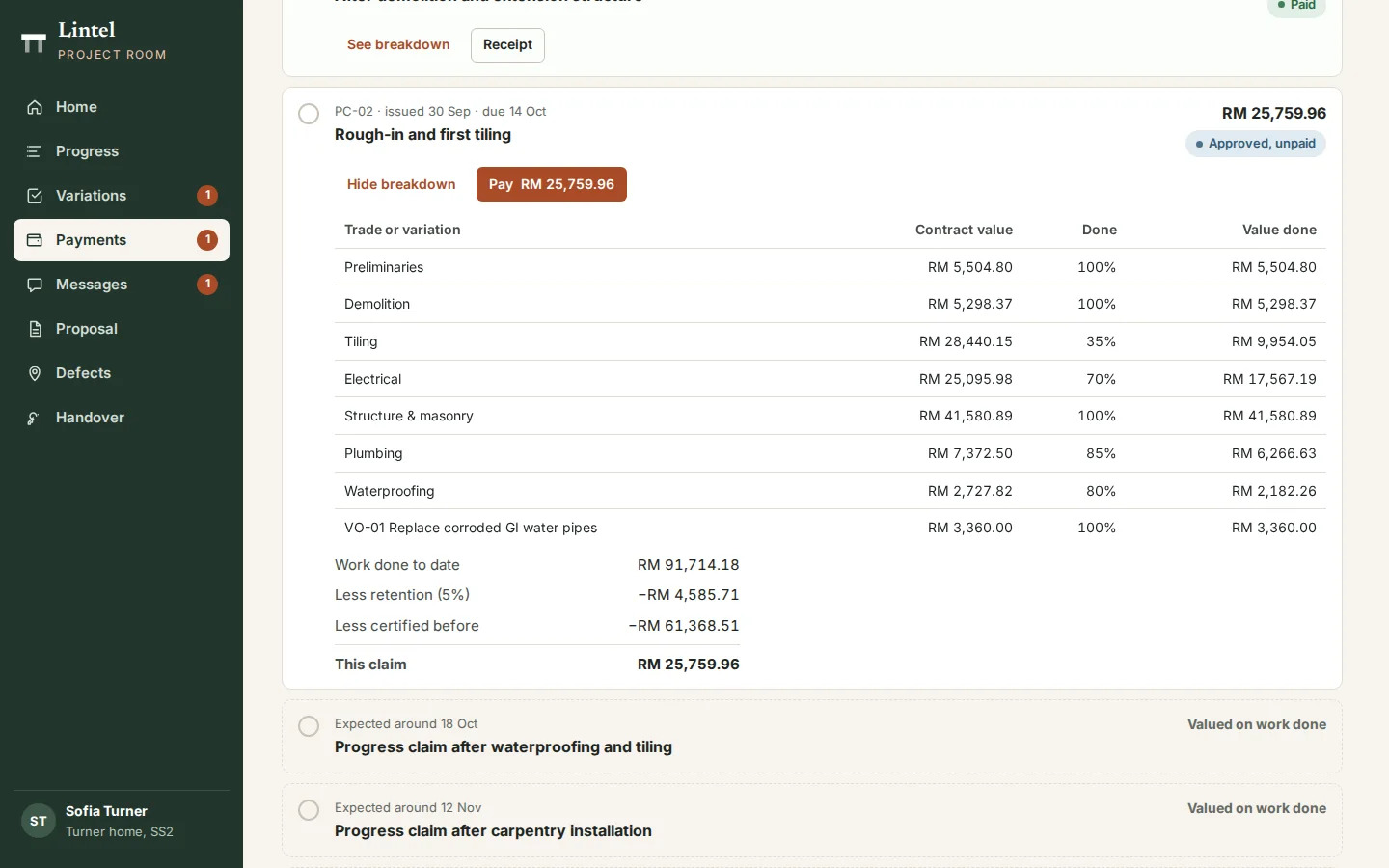
Each claim shows the value of work done by trade, less 5% retention and what was claimed before. The client approves or queries it and pays online (demo).
- Valued by trade and variation
- Retention and earlier claims shown
- Approve, query or pay
Defects on the floor plan
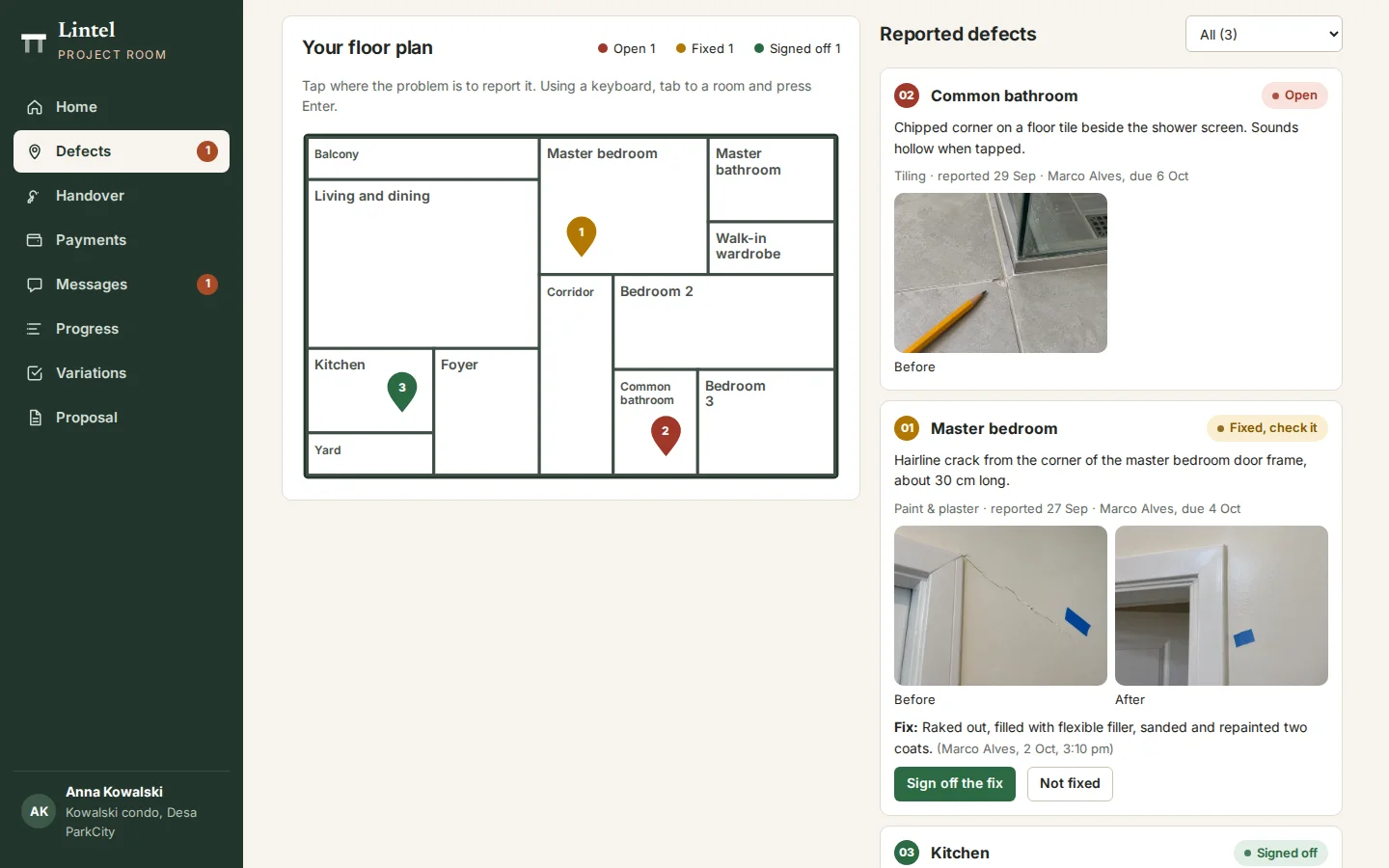
After handover the client taps the room on their floor plan to report a problem with a photo. The site supervisor fixes it with before and after photos, and the client signs off the fix.
- Pinned to the room
- Due in 7 days, 2 if urgent
- Client signs off each fix
Projects board
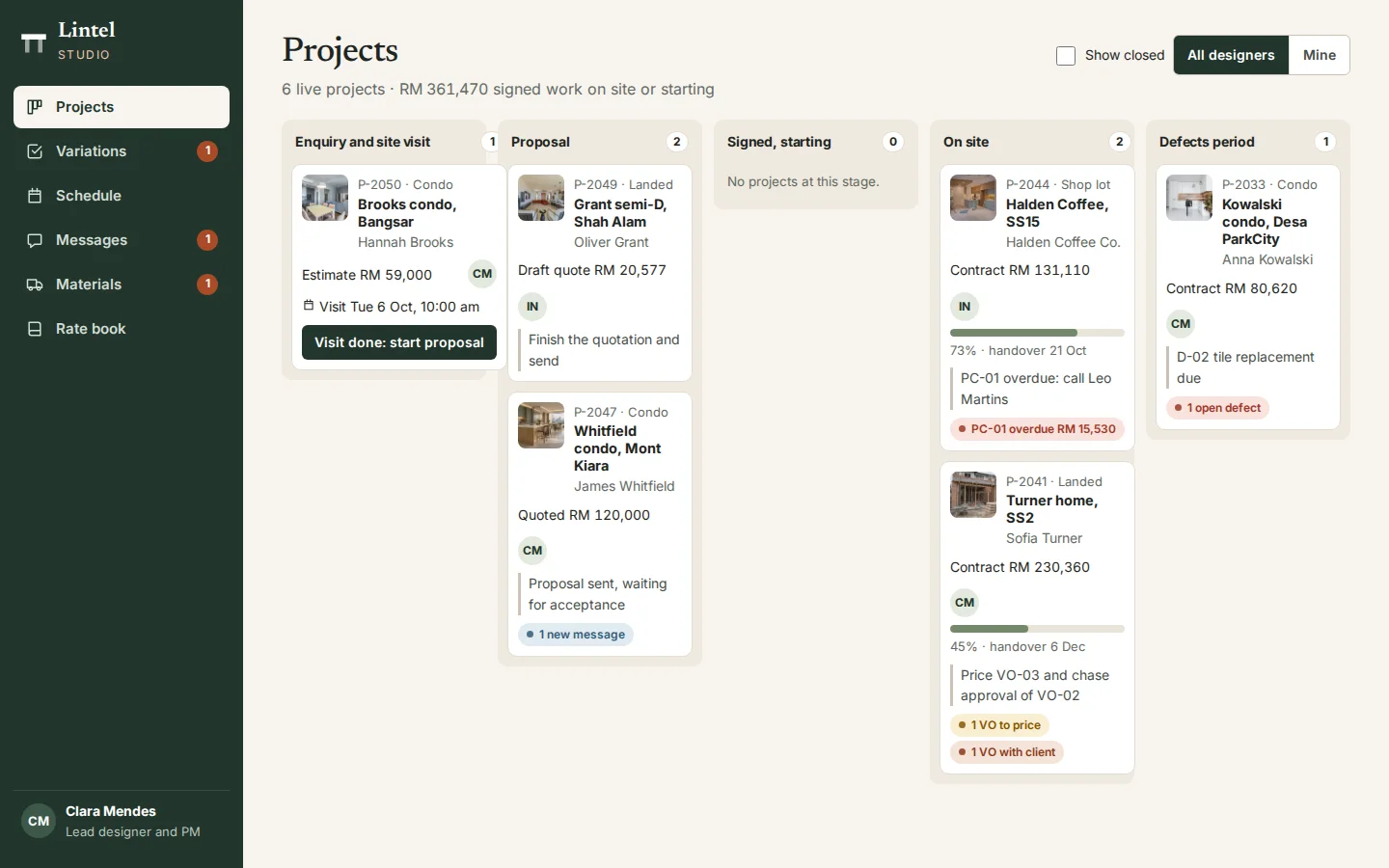
Every project by stage, from enquiry and site visit to the defects period, with the next action, overdue claims and variations waiting shown on each card.
- Enquiry to defects period
- Next action on every card
- Overdue claims and open variations flagged
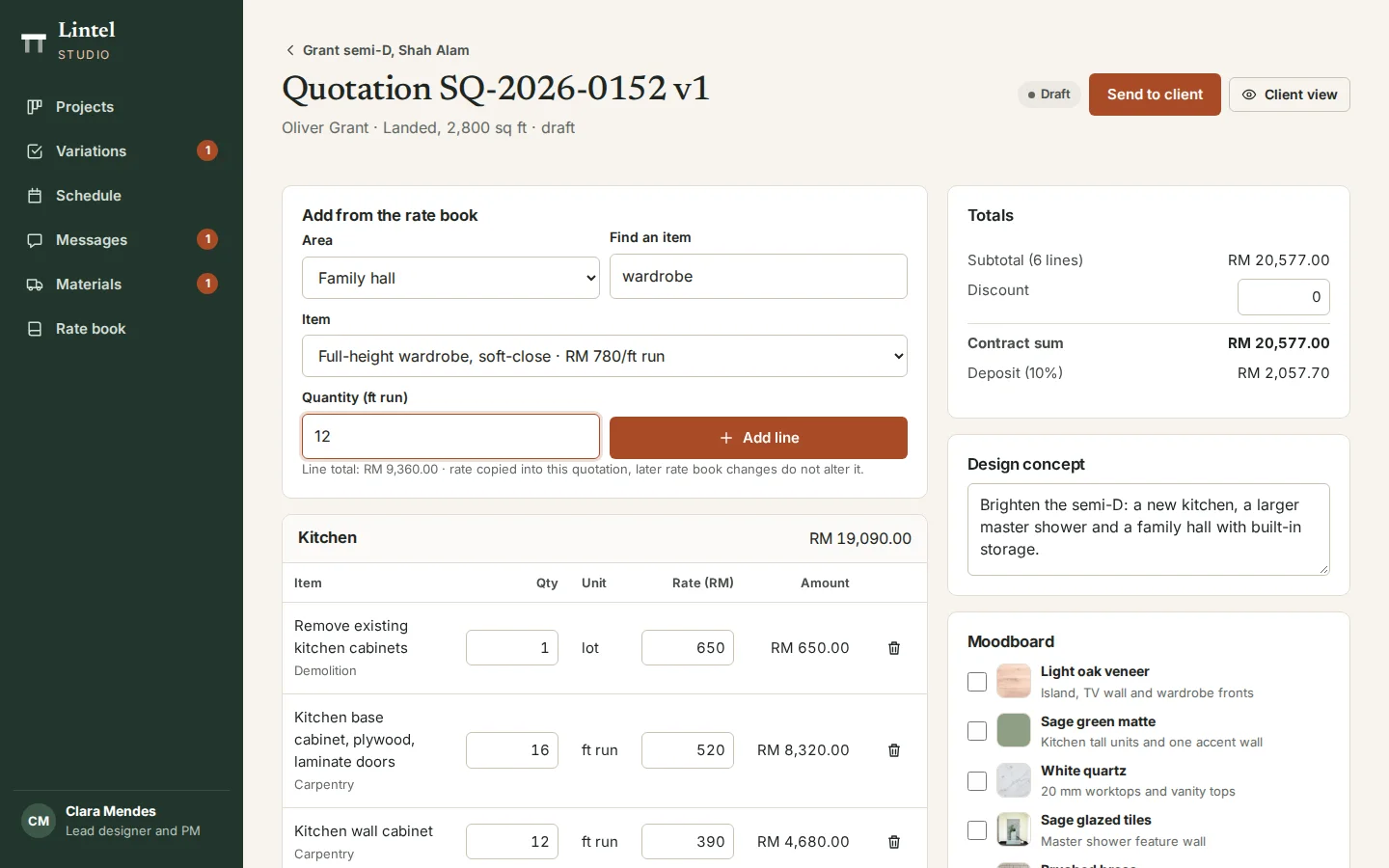
Quotation builder
Designers build the quotation room by room from the rate book. Each line keeps the rate it was quoted at, revisions go out as versions of one number, and the deposit is worked out as they go.
- Lines from the rate book
- Rates fixed once quoted
- Versions under one number
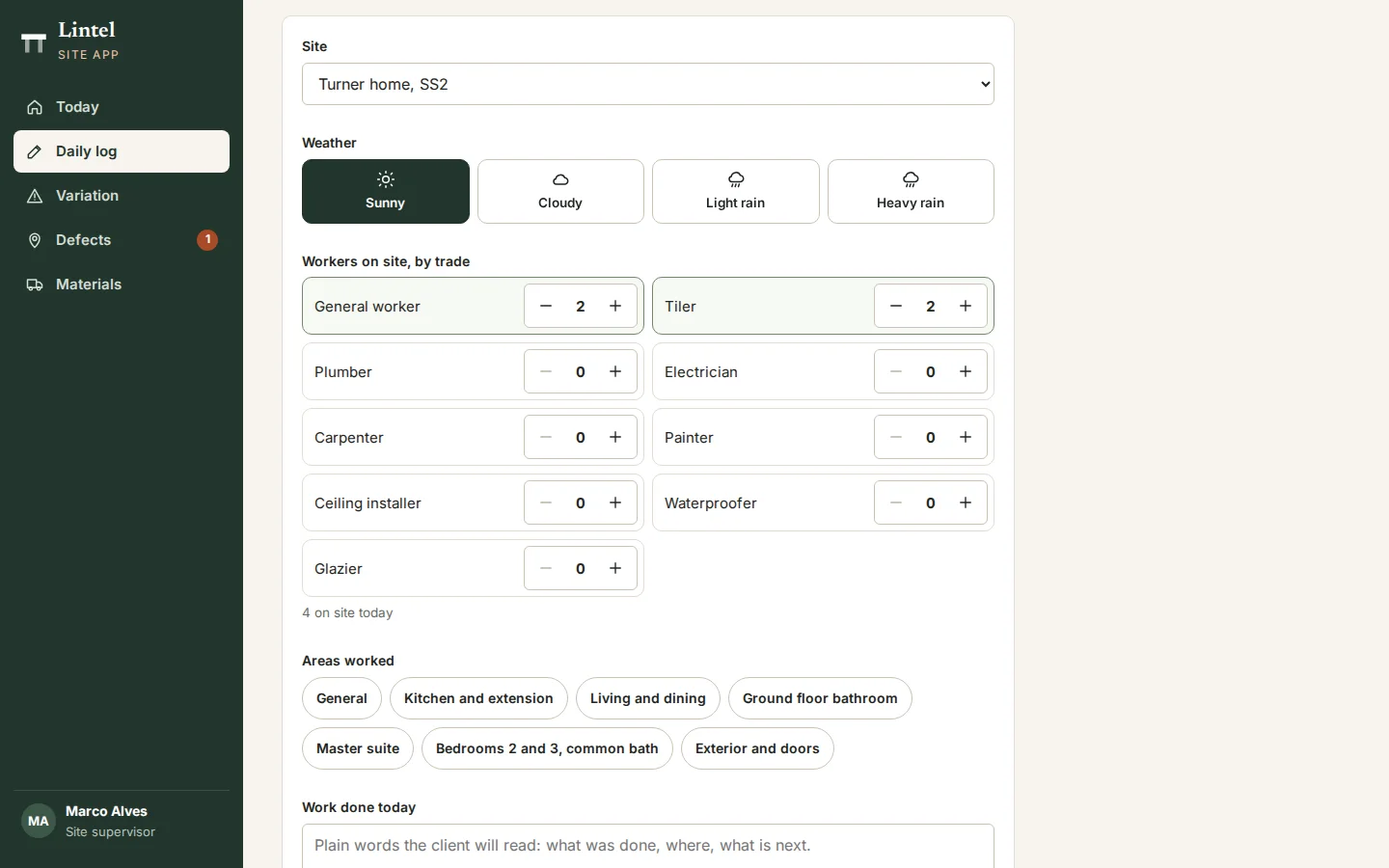
Site app: daily log
The site supervisor records the day on a phone: weather, crew by trade, areas worked, progress and photos. Photos marked for the client appear in their progress feed.
- One log per site per day
- Crew by trade and weather
- Chosen photos shared with the client
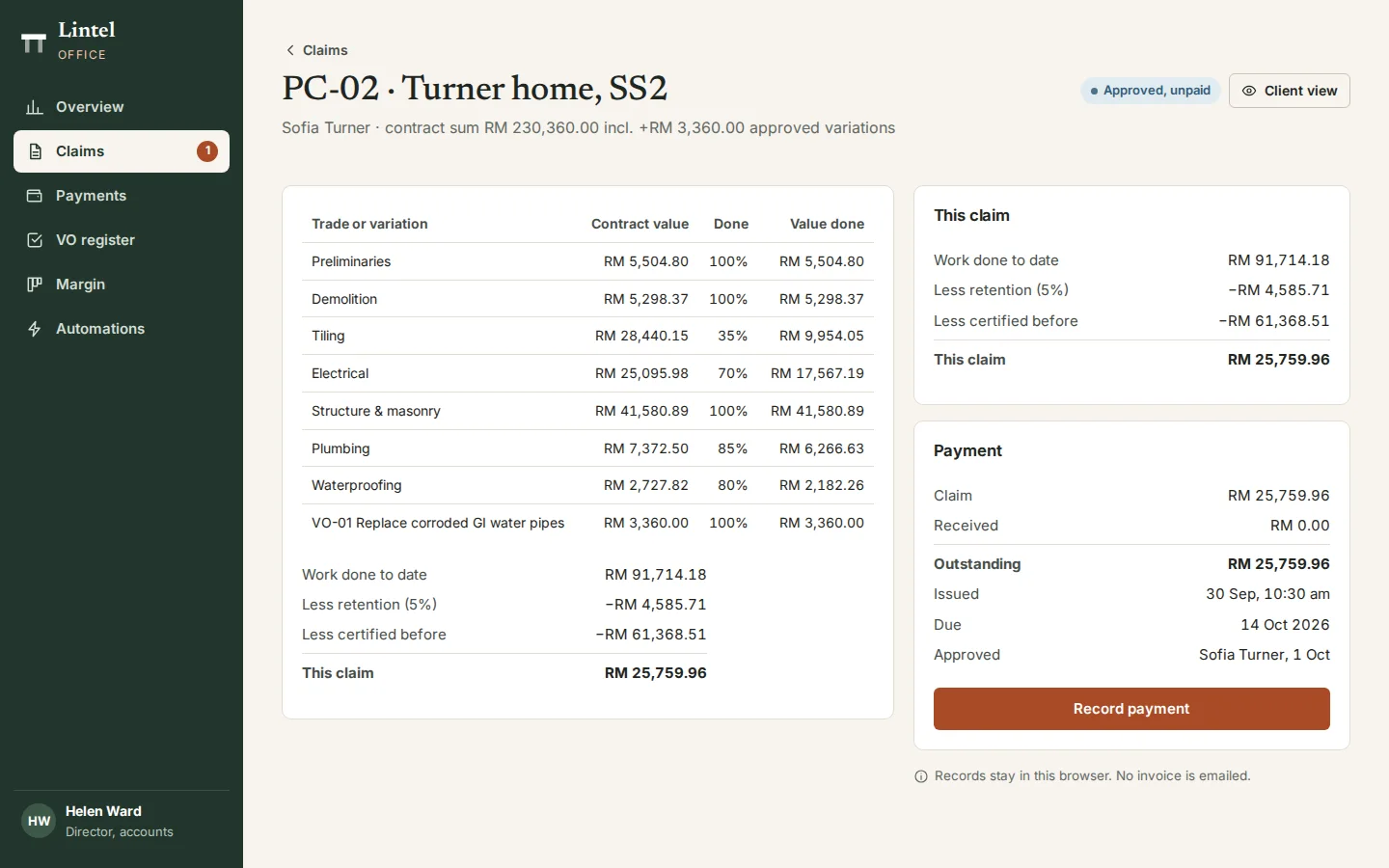
Claims and payments
Accounts see each claim’s valuation, when the client approved it and what is still outstanding, and record payments against it. A payment can never be more than what is owed.
- Valuation, retention and this claim
- Client approval recorded
- Payments up to the amount outstanding
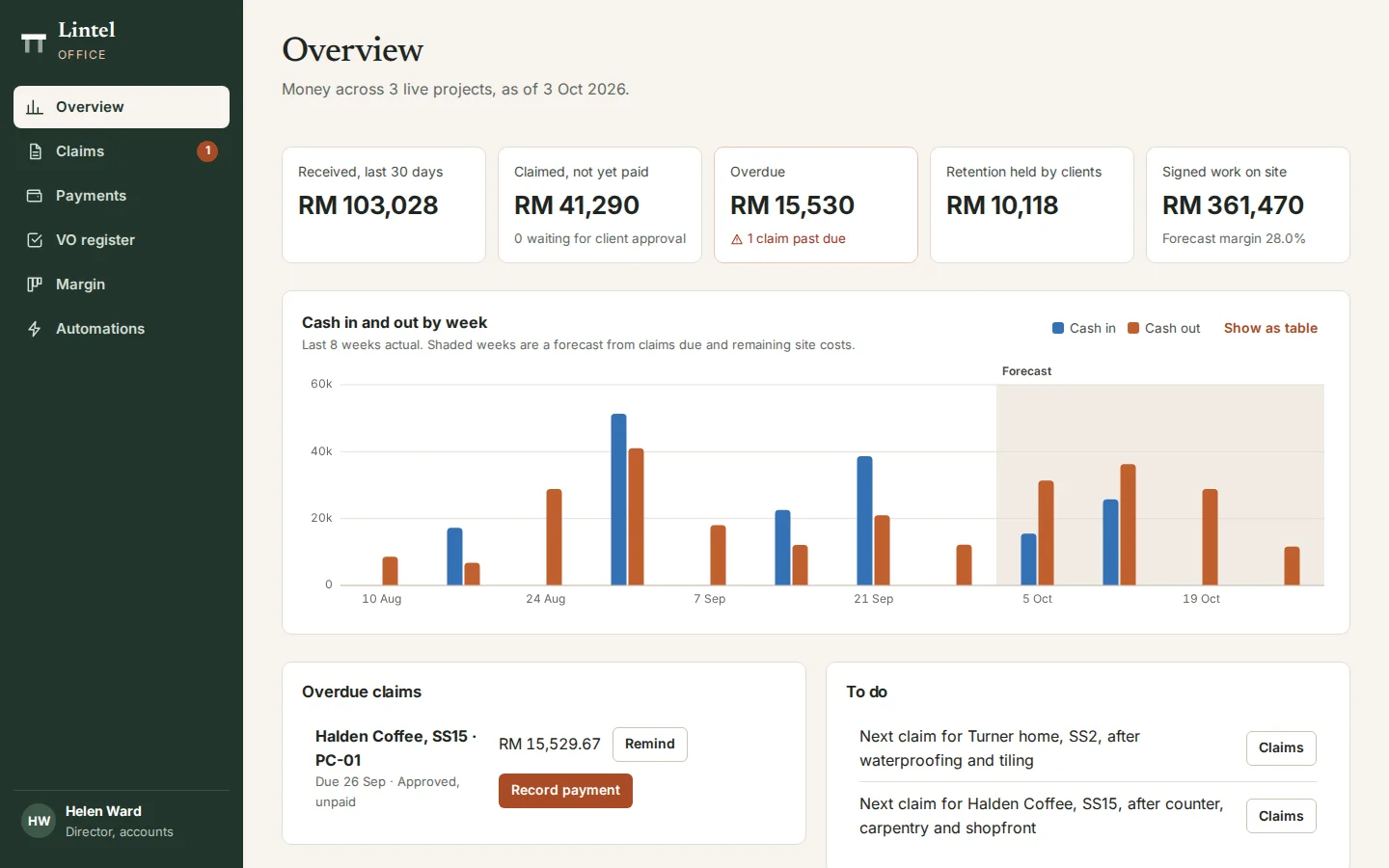
Cash flow and retention
Money across live projects: received, claimed but unpaid, overdue and retention held, with cash in and out by week and a forecast from the claims due.
- Overdue claims with a reminder
- Retention held by clients
- Eight weeks actual, then a forecast
Click through it yourself
Every screen above is interactive. No sign-up, nothing to install.
Behind the build
Researched first, then built
Before designing anything, we studied 12 sites: four Malaysian design-and-build firms, two renovation marketplaces, two renovation companies abroad and four project software products from the US and Australia. Nothing was copied. Each finding below changed a decision.
Studied (12)
- IQI Concept
- Surface R
- Think Interior
- RK Interior Studio
- Qanvast
- Recommend.my
- Livspace
- Block Renovation
- Houzz Pro
- Buildertrend
- Programa
- Procore
What we saw
What Lintel Design & Build does
What we saw
Malaysian firm sites show named projects with no price, size or duration.
What Lintel Design & Build does
Every project shows its contract value, size and weeks on site, with filters by property type, budget and scope.
What we saw
Marketplaces tag projects by budget and offer cost calculators.
What Lintel Design & Build does
A cost guide priced from the firm’s own rate book, with a range, a breakdown and the payment schedule.
What we saw
Complaints to CIDB are mostly about broken contracts, poor work and unregistered contractors.
What Lintel Design & Build does
The CIDB grade, warranties and payment schedule on the public site, and quotations accepted with a typed name.
What we saw
US client portals approve change orders in a dashboard.
What Lintel Design & Build does
Variations raised from site with photos, priced with their extra days, and approved or rejected with a reason.
What we saw
None of the products we studied shows progress claims with retention.
What Lintel Design & Build does
Claims valued by trade, less 5% retention and earlier claims, approved by the client and paid against.
What we saw
Defect lists are plain lists.
What Lintel Design & Build does
Defects pinned on the client’s floor plan, fixed with before and after photos and signed off by the client.
What we saw
Pop-ups and app prompts cover the first screen on mobile.
What Lintel Design & Build does
No pop-ups, and bottom tabs in the project room and the site app.
Rules it follows
The business rules, built in
The prototype enforces each of these, so you can test them yourself.
Contract
- Accepted with a typed name that must match the contract
- An accepted quotation is locked
- A 10% deposit is raised on acceptance, due in 7 days
Variations
- Nothing is built until the client approves
- Each needs a price and the extra days, and photos when raised from site
- Rejecting one needs a reason
Claims
- Work done to date, less 5% retention, less earlier claims
- One draft claim per project, due 14 days after issue
- A payment cannot be more than what is outstanding
Site records
- One daily log per site per day
- Variation work can be logged only once approved
- Only photos marked for the client reach the project room
Defects and retention
- Defects are due in 7 days, 2 if urgent, and close with an after photo
- The defects period runs for six months
- Retention is released only when it ends and every defect is signed off
Connected roles
One action, every screen
Every role works on the same records, so one person’s action shows up for the others.
- 1
A site visit booked from the cost guide puts an enquiry on the studio board and opens a project room.
- 2
A quotation sent by the studio appears in the client’s project room.
- 3
Accepting it locks the price, starts the timeline, assigns the site supervisor and raises the deposit.
- 4
A variation raised on site goes to the studio to price, then to the client; approval changes the contract sum, the handover date and the next claim.
- 5
Site photos marked for the client appear in their progress feed, and the stage moves on their timeline.
- 6
A defect the client pins goes to the supervisor with a due date, and retention stays held until it is signed off.
- 7
A payment recorded by accounts updates the client’s payment milestones.
- 8
A rate changed in the rate book changes the public cost guide straight away.
Services it proves
Where Lintel Design & Build is our example
Each of these service pages uses a part of Lintel Design & Build to show the work. Open one to see what we would build for you.
- Field service & operations appsShows: Site app: daily logThe site supervisor’s phone: a daily log with the weather, crew by trade, areas worked and photos. Photos marked for the client reach their project room.
- Custom softwareShows: Claims and paymentsProgress claims for a renovation firm: work done by trade, less 5% retention and earlier claims, with each payment recorded against its claim.
- Workflow automationShows: Variation approvalExtra work found on site waits for the client’s approval. Once approved, it changes the contract sum, the handover date and the next progress claim.
- Quotation systemsShows: Quotation builderA renovation quotation built room by room from the rate book. Each line keeps the rate it was quoted at, and revisions go out as versions of one number.
Core systems
What this build is made of
These are systems we build repeatedly — each links to every other project that contains it, so you can compare implementations before deciding what you need.
Unique to this build
Built specifically for this project rather than assembled from the shelf.
Retention to release
Every claim holds back 5%, and it is released only after the defects period, once every defect is signed off.
Variations with a time cost
Each variation carries its price and extra days, and approval moves the contract sum and the handover date.
Defects on the plan
Clients pin problems to a room; each fix needs an after photo and the client’s sign-off.


Want a build like this for your business?
Tell us what you have in mind and we'll put together a functional prototype of your project — free.