
Aplomb Accounting
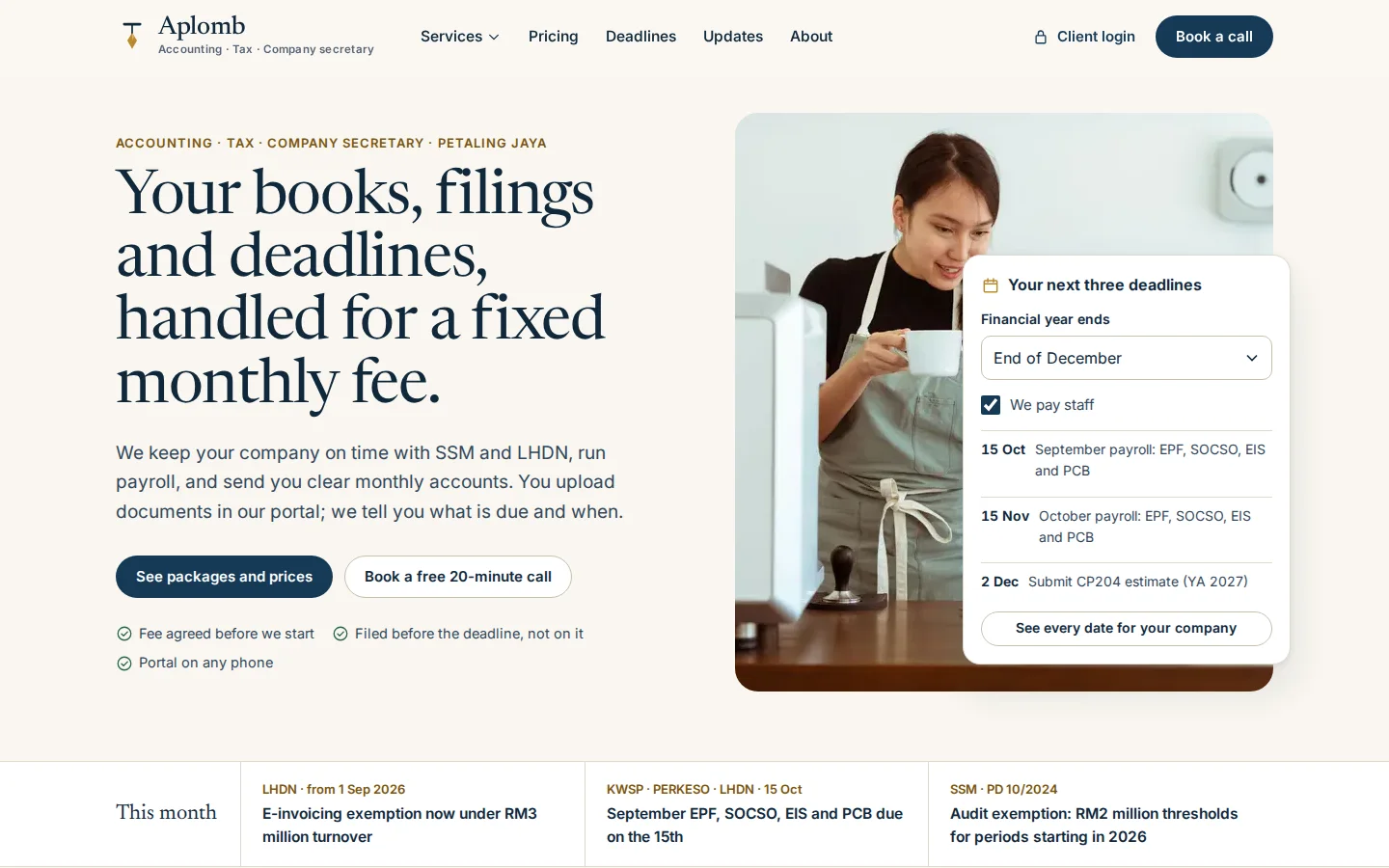
An accounting, tax and company-secretarial firm’s website with a fee estimator and a deadline lookup, a client portal for documents, questions and approvals, and the practice system its staff and partners run on.
The brief
Accounting firms chase documents on WhatsApp and email, track deadlines in spreadsheets, and send engagement letters and approvals as PDFs. Their websites show plan cards and a contact form; few let a prospect work out a fee or see their own filing dates.
What we shipped
A firm website with fixed fees, a fee estimator, a deadline lookup and consultation booking; a client portal with onboarding and identity checks, a monthly document checklist, transaction questions, a compliance calendar, approvals and billing; a staff job board; and a partner view of sign-offs, deadline risk, identity checks, workload and revenue.
Built for: Accounting, tax and company-secretarial firms serving SMEs, and any professional firm that chases documents and deadlines for its clients.
Inside the build
Every part, and what it does
A closer look at what was actually built — screen by screen, so you can judge the depth for yourself.
Fee estimator
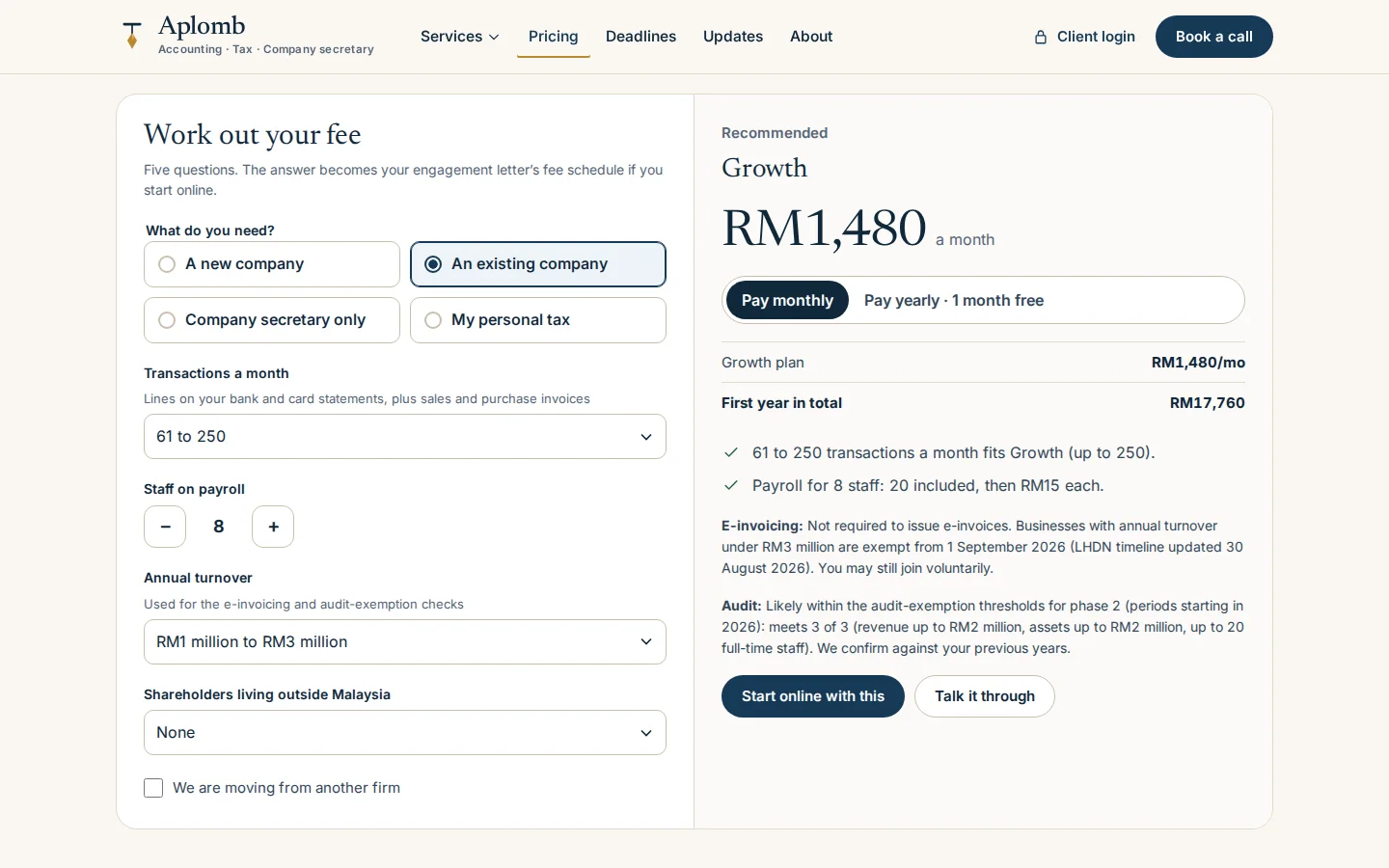
Five questions recommend a plan and a monthly fee in ringgit, with the first-year total and the client’s e-invoicing and audit-exemption position.
- Plan set by transactions, staff and turnover
- Monthly, or yearly with one month free
- The estimate carries into the engagement letter
Deadline lookup
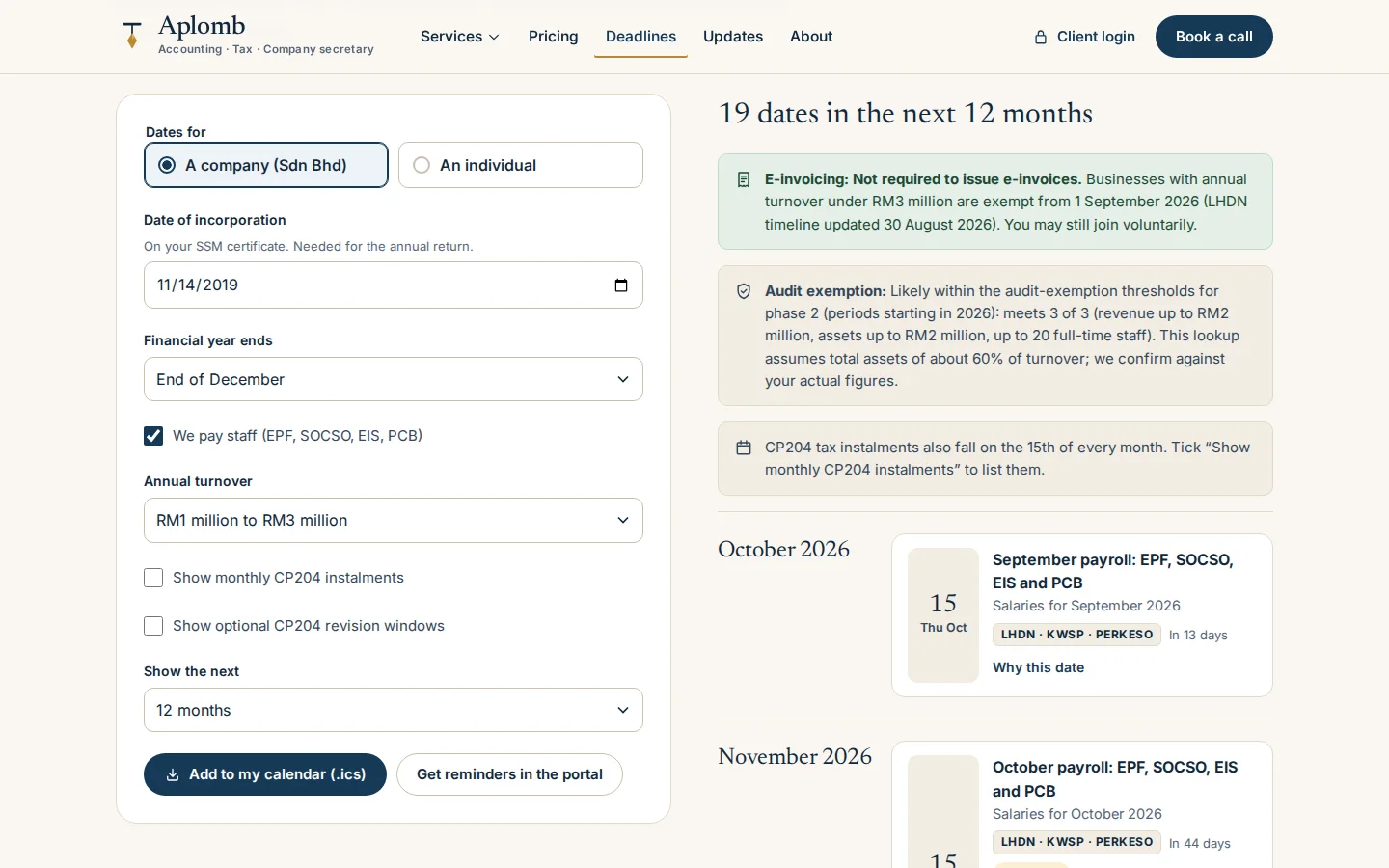
Enter the incorporation date and year end to see every SSM, LHDN and payroll date for the next 12 months, each with the rule behind it.
- Annual return, accounts, Form C, CP204 and payroll
- E-invoicing and audit-exemption status
- Download to a calendar

Consultation booking
A four-step booking that offers only free times in office hours, skipping weekends and Selangor public holidays.
- Topic and meeting format first
- Taken or too-soon times disabled
- The booking lands on the staff list
Client portal
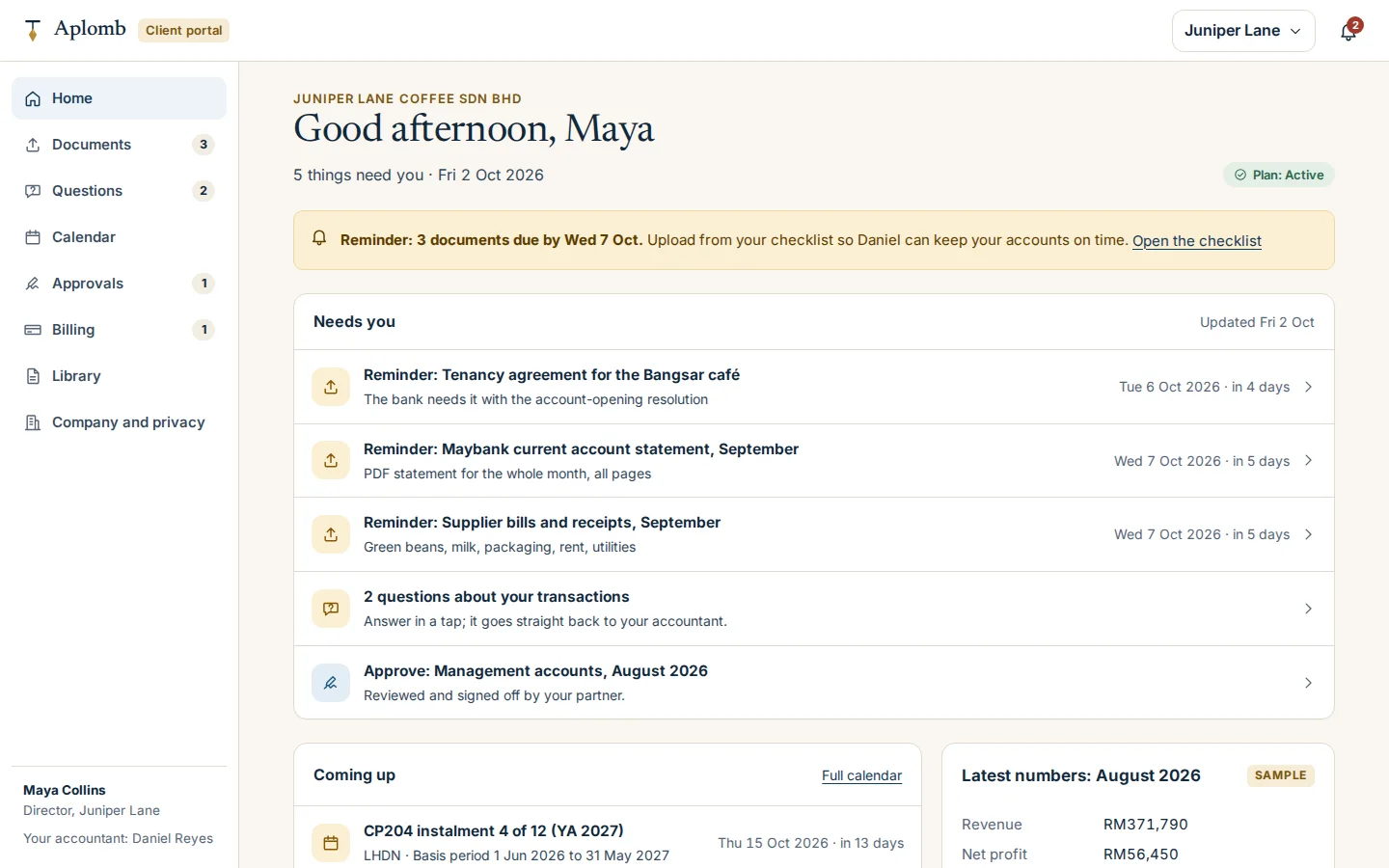
A director sees what the firm needs from them, what is due next and the latest figures, designed for a phone first.
- Reminders before documents are late
- Uploads, questions and approvals in one list
- Coming deadlines and sample figures
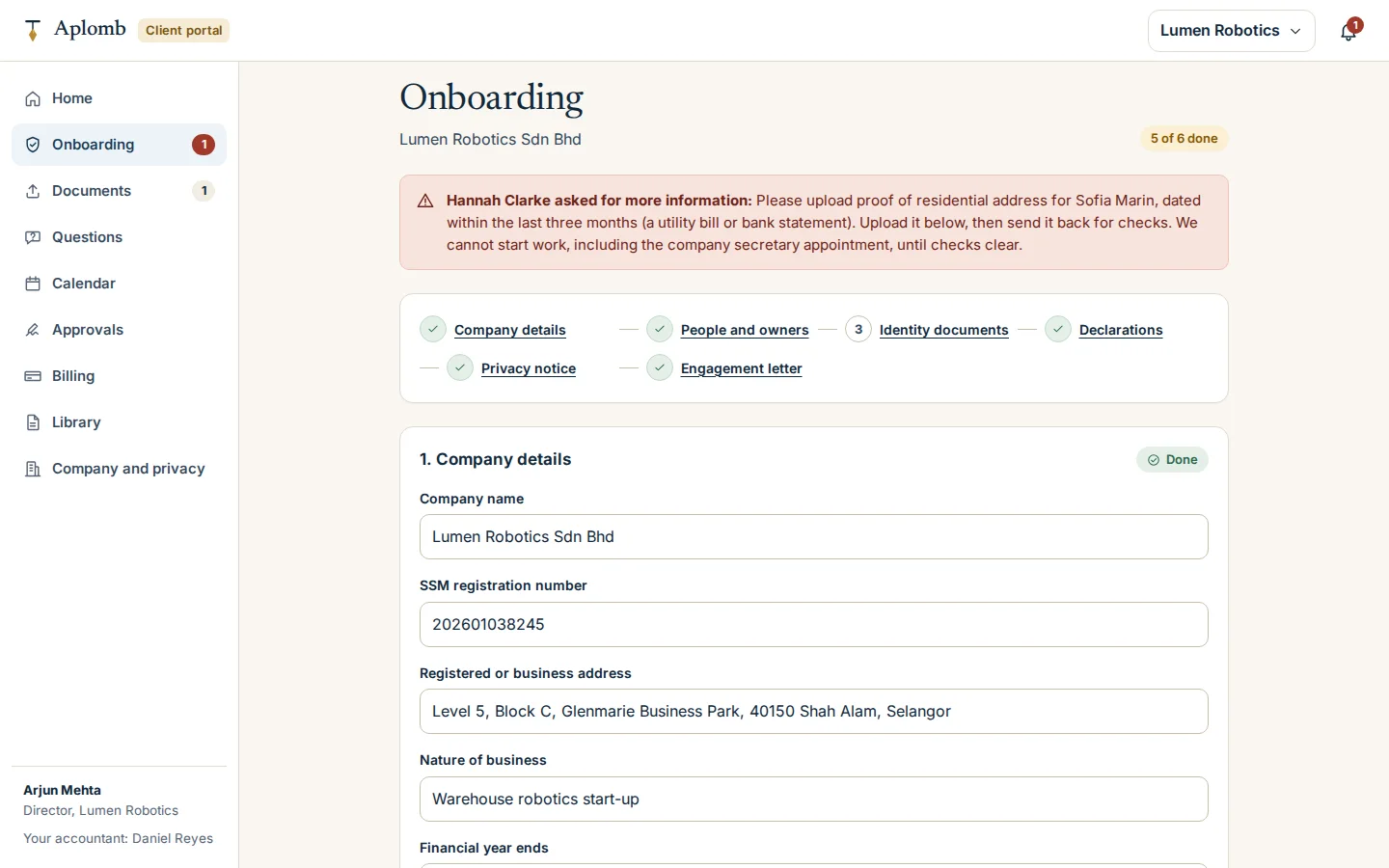
Onboarding with identity checks
Company details, people and owners, identity documents, declarations, the privacy notice and the engagement letter, with exactly what the partner still needs.
- Beneficial owners by SSM criteria
- The partner’s request shown in place
- No work starts until checks clear
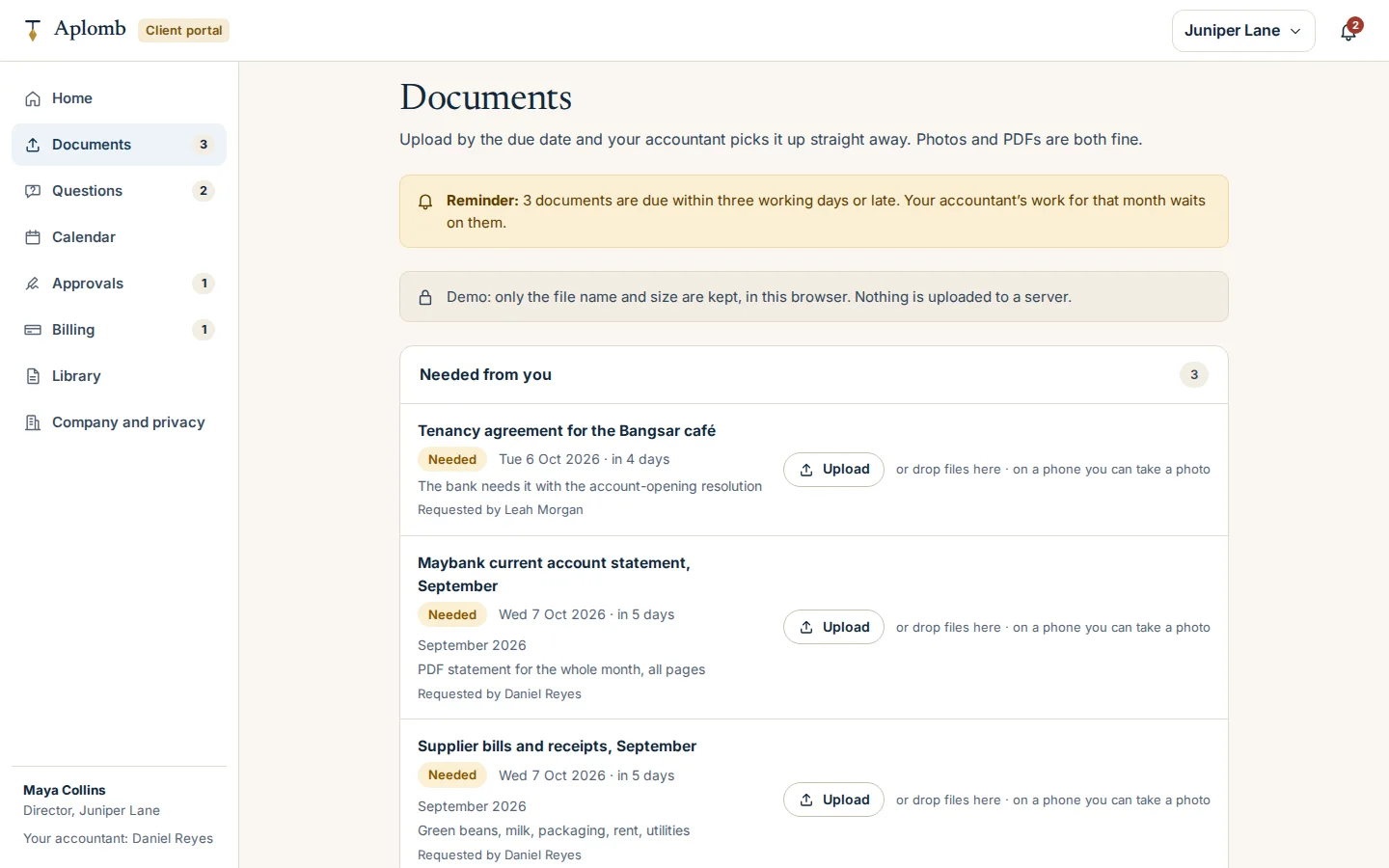
Monthly document checklist
Each statement and bill has a due date and the name of who asked for it, and each upload moves the accountant’s job forward.
- Due dates with reminders
- Upload, or take a photo on a phone
- The last upload makes the job ready to start
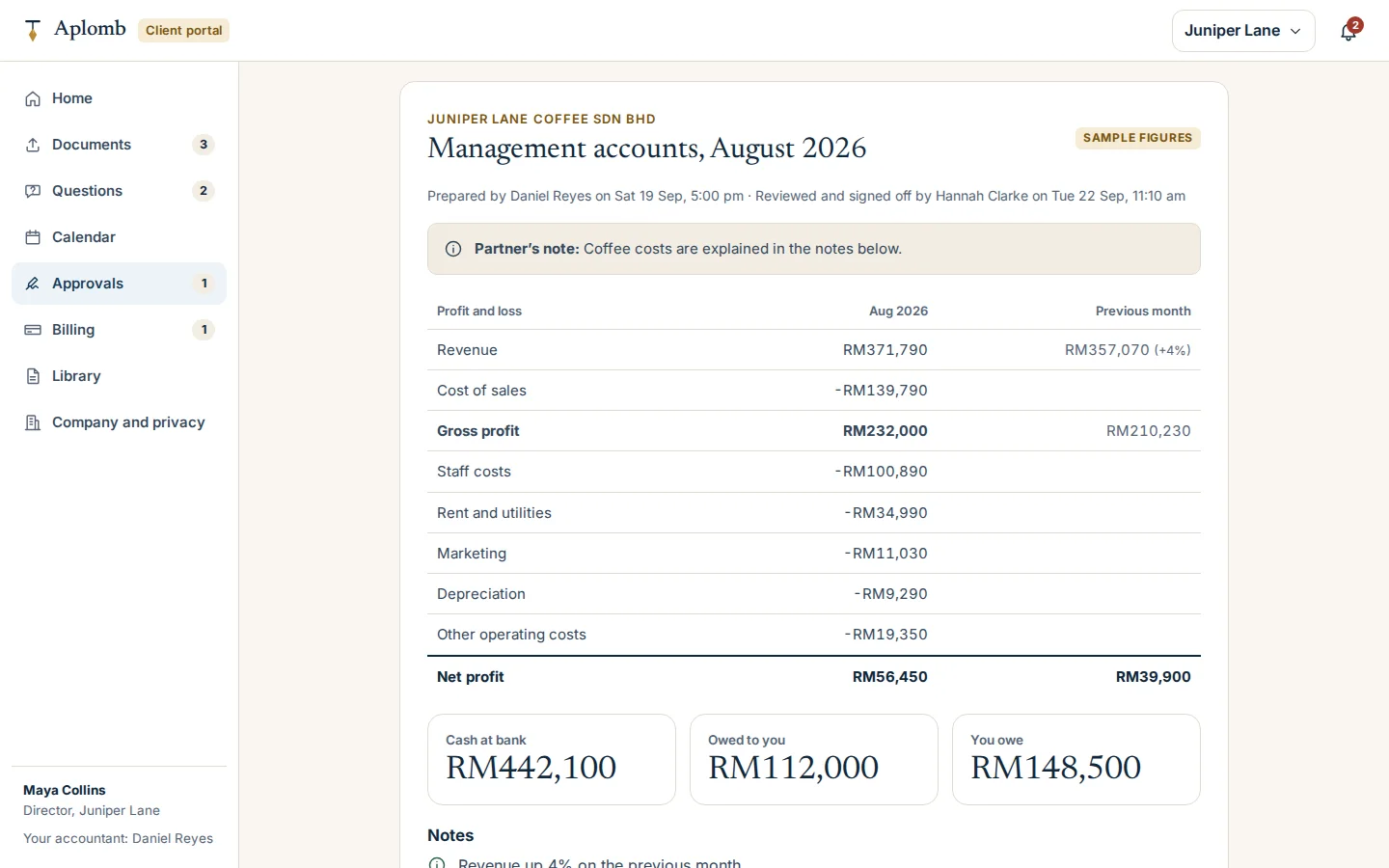
Approve management accounts
Accounts prepared by staff and signed off by the partner reach the director to approve, with the partner’s note.
- Profit and loss against last month
- Who prepared and who reviewed it
- Approval files it and closes the month
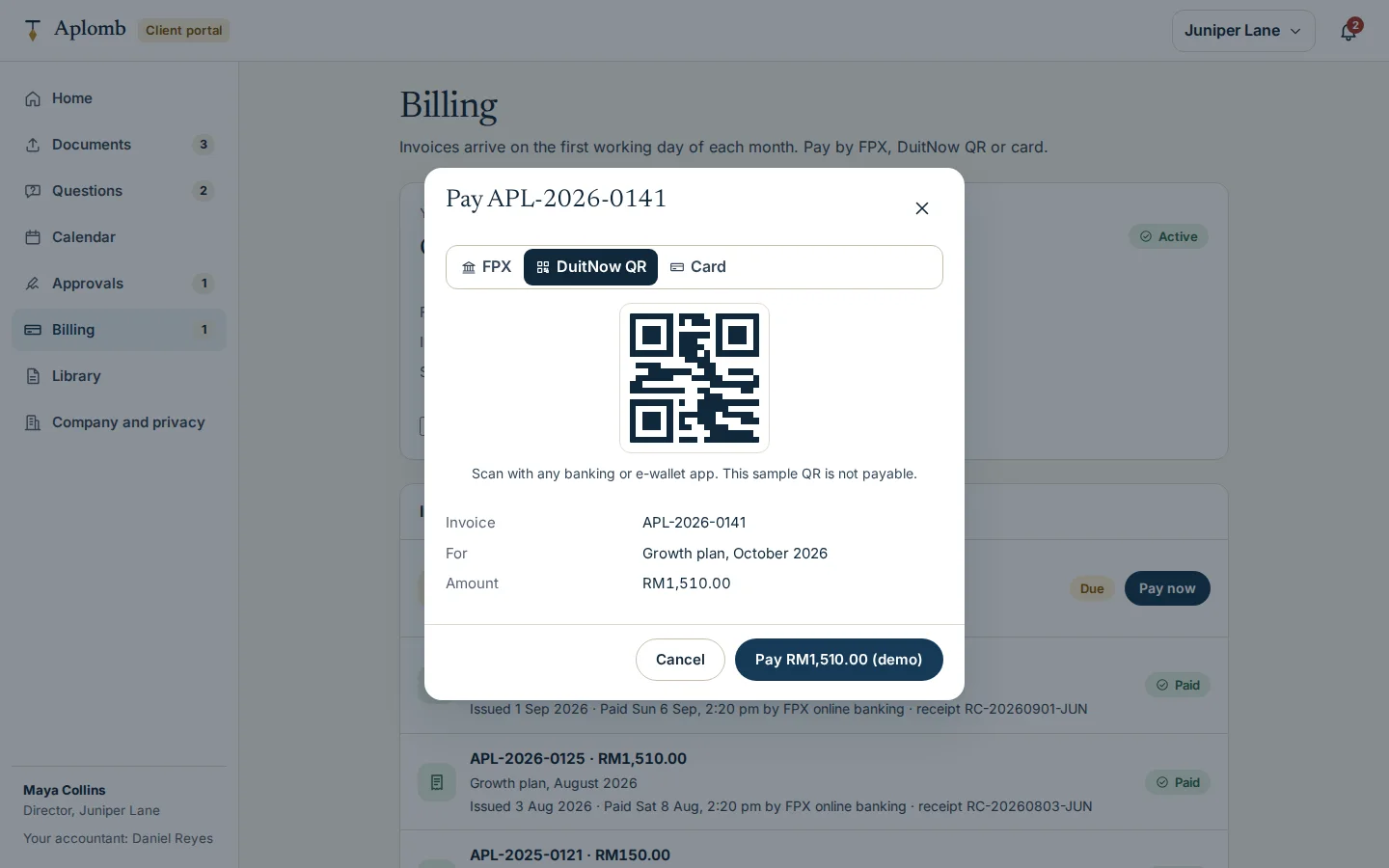
Invoices and plan payments
The director pays an invoice by FPX, DuitNow QR or card in a labelled demo, and the firm’s billing updates.
- Nothing is charged in the demo
- Receipts and payment history
- Plan status and auto-debit
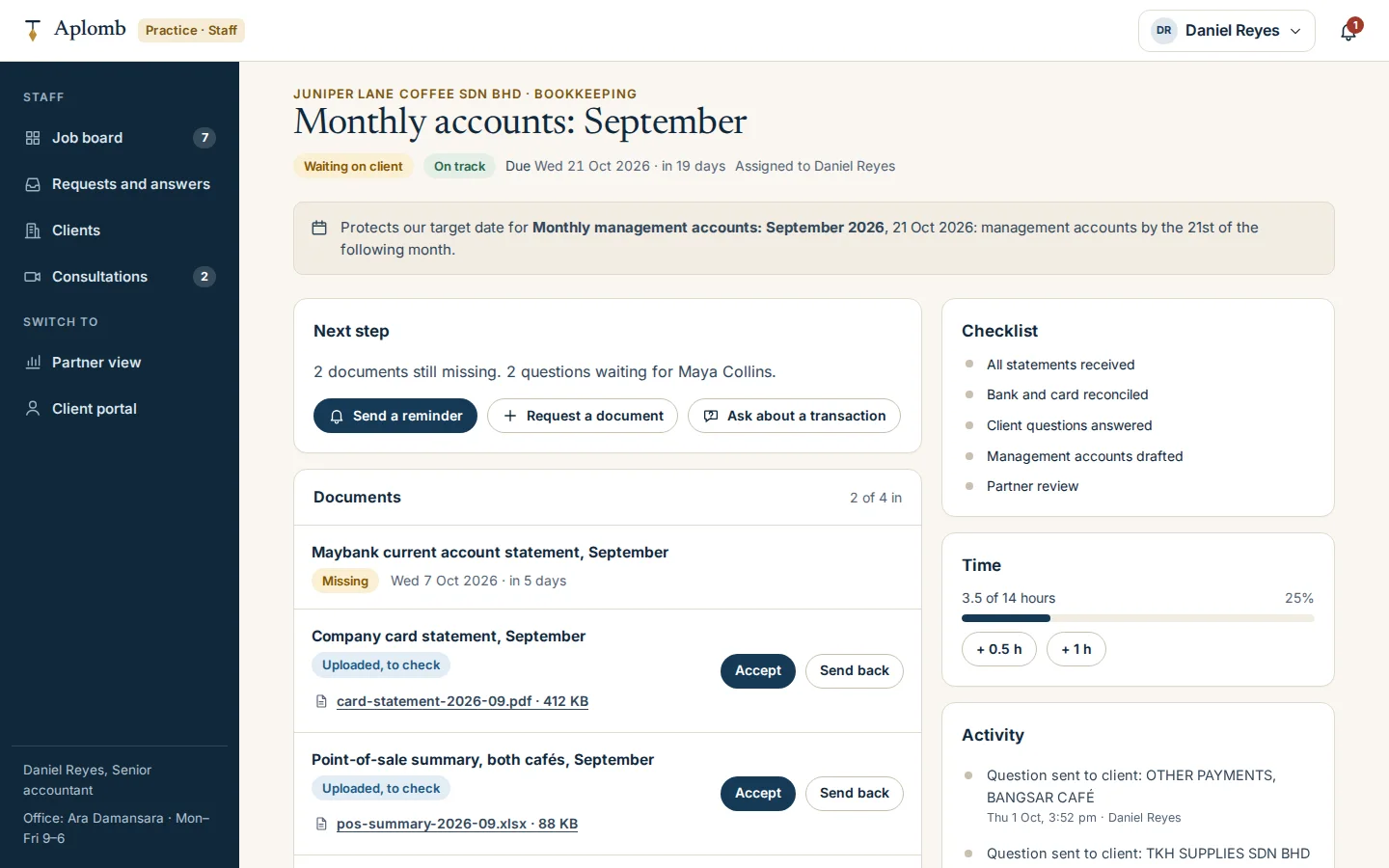
Staff job page
Documents in or missing and questions about specific transactions, worked through to the partner’s review.
- Remind, request a document or ask a question
- Accept or send back each upload
- Checklist, time against budget and activity
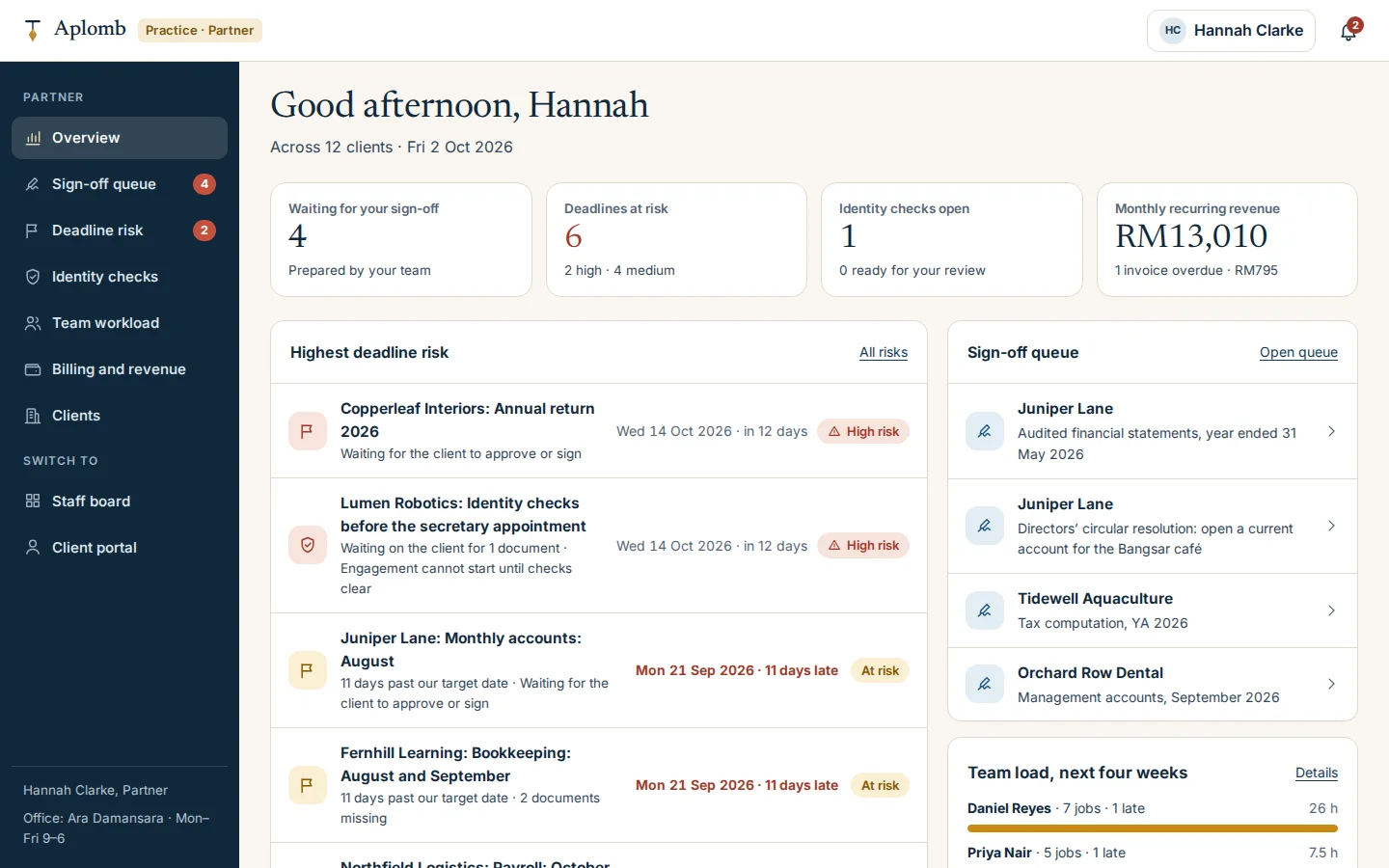
Partner overview
Across all clients: the sign-off queue, deadlines at risk and why, open identity checks, workload and monthly recurring revenue.
- Each risk shown with its reason
- Sign-off queue
- Four-week workload and recurring revenue
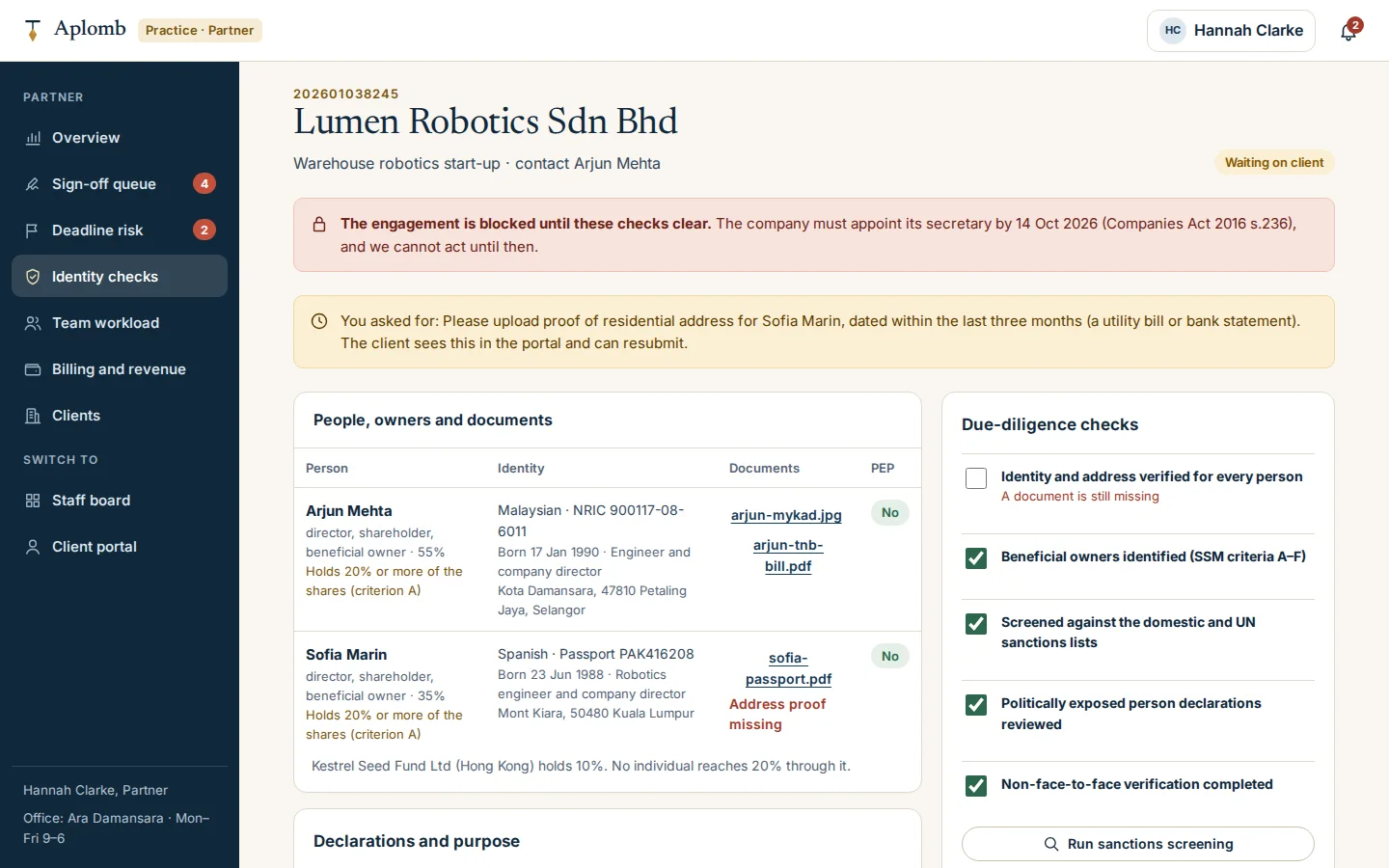
Identity and ownership checks
The partner reviews people and owners, runs the screening checks, sets the risk rating, then clears the engagement or asks for more.
- People, owners and documents in one table
- Checklist from SSM’s anti-money-laundering guideline
- Records kept for seven years
Click through it yourself
Every screen above is interactive. No sign-up, nothing to install.
Behind the build
Researched first, then built
Before designing anything, we studied 14 sites and products: seven Malaysian firms and tools, three digital-first firms in Singapore, the UK and the US, and four practice-management products. Nothing was copied. Each finding below changed a decision.
Studied (14)
- Crowe Malaysia
- Baker Tilly Malaysia
- BoardRoom
- 3E Accounting
- MISHU
- FastLane
- Bukku
- Sleek
- Osome
- Pilot
- TaxDome
- Karbon
- Ignition
- Canopy practice software
What we saw
What Aplomb Accounting does
What we saw
Fees appear as plan cards, and only Pilot lets a visitor work out a price.
What Aplomb Accounting does
A fee estimator that recommends a plan and carries its answer into the engagement letter.
What we saw
Deadline calendars exist only as articles and PDFs.
What Aplomb Accounting does
An interactive lookup: incorporation date and year end in, every date out, each with the rule behind it and a calendar download.
What we saw
Identity checks get one line of copy.
What Aplomb Accounting does
Onboarding that collects the SSM due-diligence details and stays locked until a partner clears the checks.
What we saw
Client portals list tasks and uploads.
What Aplomb Accounting does
Each upload moves the matching job forward on the staff board.
What we saw
Questions about transactions go through chat or an AI assistant.
What Aplomb Accounting does
Questions on a specific statement line, answered in the portal and returned to the job.
What we saw
Approvals and e-signatures are listed as features.
What Aplomb Accounting does
Staff prepare, the partner signs off and the client approves or signs. The document is filed and the calendar updated.
What we saw
Trust rests on size, ratings and awards.
What Aplomb Accounting does
Service standards, the rule behind every date and sample credentials, in line with MIA’s ban on exaggerated claims.
Feature checklist
74 of the 88 features the leading sites offer
We listed every feature we found across the 14 sites and products above. Aplomb Accounting has 74 of them; the 14 left out are listed with the reason.
Prices and packages11
- Published package prices
- “From” prices per service
- What each plan includes
- Plan comparison table
- Plan recommended by volume and turnover
- Fee estimator
- Monthly or yearly billing
- Add-ons priced per unit
- Government fees shown separately
- Fixed fees agreed up front
- Shareholders abroad handled in onboarding
Getting started9
- Free consultation booking
- Times from real office hours
- Start online from the estimate
- WhatsApp contact
- Entry points by business stage
- How a month runs
- Guided tour
- Free tools: deadline lookup and fee estimator
- Deadline reminder sign-up
Trust5
- Licence and registration numbers
- Named team with roles
- Data protection and security
- Privacy notice in English and Bahasa Malaysia
- Office address and hours
Content7
- Dated tax and compliance updates with sources
- “This month” topic strip
- FAQs
- The rule behind every deadline
- Interactive deadline lookup
- E-invoicing readiness
- Switching from another firm
Client portal: onboarding and documents11
- Client portal designed for phones
- Online onboarding
- Identity and anti-money-laundering checks
- Beneficial owners by SSM criteria
- Engagement letter signed online
- E-signatures on resolutions and approvals
- Document uploads
- Document requests with reminders
- Questionnaires
- Phone camera uploads
- Document library with seven-year retention
Client portal: questions, approvals and billing10
- Questions on specific transactions
- Message threads per request
- Compliance calendar
- Deliverables to approve or sign
- Management accounts
- Invoices and online payment
- Recurring billing with auto-debit
- Notifications and reminders
- Phone-first web portal in place of an app
- Two-step sign-in
Practice system11
- Job board by stage and deadline
- Recurring monthly jobs
- Deadline risk across clients
- Workload by staff member
- Partner review and sign-off
- Time against budget
- Firm billing and recurring revenue
- Client records
- Proposals with pricing
- Identity-check review queue
- Firm analytics
Services offered10
- Company incorporation
- Company secretarial
- Bookkeeping and management accounts
- Payroll
- Corporate and personal tax
- Audit coordination
- Registered office address
- Help opening a bank account
- E-invoicing implementation
- FPX and DuitNow for the firm’s fees
Left out, and why
- Testimonials, ratings, case studies, client logos, awards and size claims (6): a concept firm would have to invent them, and the MIA By-Laws bar exaggerated claims. Service standards and labelled examples stand in.
- Documents by WhatsApp, live chat and email triage (3): none keeps an audit trail, so uploads and questions stay in the portal, tied to the job.
- An AI assistant: fixed rules raise the reminders and risk flags instead.
- Live bank and accounting feeds: not possible in a demo, so statements are uploaded.
- Events and webinars: there are no real events to list.
- Nominee directors, and work passes, licences and grants (2): outside this firm’s scope.
Design research
How the leading sites look, and what we took
We measured the fonts, colours and layouts of all 14 sites and products, then applied what the best of them share in an original design.
Across the leading sites
In Aplomb Accounting
Across the leading sites
A neutral sans-serif for all running text, on all 14 sites.
In Aplomb Accounting
Inter for text and the interface, with aligned figures for every amount and date.
Across the leading sites
The firms known for client experience set headlines in a contemporary serif at a regular weight.
In Aplomb Accounting
Newsreader for headlines and large figures such as fees, never for interface labels.
Across the leading sites
Large, light headlines, with body text at 16 to 18 px.
In Aplomb Accounting
Headlines at 56 px on desktop and 38 px on phones, and body text at 17 px on the website.
Across the leading sites
Navy as the trust colour (9 of 14), with one warm accent, on a warm off-white page.
In Aplomb Accounting
Ink navy with brass from the plumb-bob logo as the single accent, on a warm paper background.
Across the leading sites
Pill-shaped main buttons (9 of 14).
In Aplomb Accounting
Pill buttons on the website, and squarer controls inside the portal and practice system.
Across the leading sites
Documentary photos of owners at work, not skylines or handshakes.
In Aplomb Accounting
Photos of Malaysian small-business settings, each used once per view, with typographic panels for notices.
Across the leading sites
Product cards laid over a photo to show the app.
In Aplomb Accounting
A photo paired with a working deadline card on the home page, instead of a static screenshot.
Across the leading sites
Prices as plan cards with what is included, add-ons and a monthly or yearly switch.
In Aplomb Accounting
All of that on the pricing page, plus an estimator that carries its answer into onboarding.
Rules it follows
The business rules, built in
The prototype enforces each of these, so you can test them yourself.
Company law (SSM)
- Annual return within 30 days of each incorporation anniversary
- Accounts circulated within 6 months of the year end and lodged within 30 days after
- Company secretary appointed within 30 days of incorporation
Tax (LHDN)
- Form C within 7 months of the year end, plus a 1-month e-filing grace
- CP204 estimate 30 days before the basis period, with revisions in months 6, 9 and 11
- No e-invoicing needed below RM3 million turnover from 1 September 2026
Payroll and personal tax
- EPF, SOCSO, EIS and PCB by the 15th of the next month
- EA forms by the end of February, Form E by 31 March
- Form BE by 30 April and Form B by 30 June
Anti-money laundering
- No work until due diligence is complete
- Beneficial owners with 20 % or control verified, with sanctions and politically-exposed-person checks
- Records kept for 7 years
Audit, privacy and advertising
- Audit exemption when 2 of 3 thresholds are met: RM2 million revenue, RM2 million assets, 20 staff
- Privacy notice in English and Bahasa Malaysia, with recorded consent
- No testimonials, ratings or comparisons, under the MIA By-Laws
Connected roles
One action, every screen
Every role works on the same records, so one person’s action shows up for the others.
- 1
A prospect books a consultation, and it appears on the staff consultations list.
- 2
A new client’s identity checks are incomplete, so their checklist stays locked. When the partner clears the checks, the checklist opens and the first jobs and invoice appear.
- 3
A deadline nears without documents, and the client gets a reminder while the partner sees a high-risk flag with the reason.
- 4
The client uploads the month’s statements, and the job moves to “Ready to start” on the staff board.
- 5
Staff ask about a transaction, and it appears in the client’s portal. The answer returns to the job.
- 6
The partner signs off a deliverable and the client approves or signs it, which files it and updates the calendar. Approved financial statements also set the SSM lodgement date and create a job for the secretary.
- 7
The client pays an invoice, and the partner’s billing shows it collected. An overdue plan returns to Active.
Services it proves
Where Aplomb Accounting is our example
Each of these service pages uses a part of Aplomb Accounting to show the work. Open one to see what we would build for you.
- Workflow automationShows: Monthly document checklistThe client’s last upload moves the accountant’s job to “Ready to start”. A deliverable the partner signs off goes to the client to approve, which files it and updates the calendar.
- Quotation systemsShows: Fee estimatorA fee estimator for an accounting firm: five questions recommend a plan and a monthly fee, and the answer becomes the fee schedule in the engagement letter.
Core systems
What this build is made of
These are systems we build repeatedly — each links to every other project that contains it, so you can compare implementations before deciding what you need.
Unique to this build
Built specifically for this project rather than assembled from the shelf.
Deadline engine
Every SSM, LHDN and payroll date worked out from the incorporation date and year end, with the rule behind each one.
Due-diligence gate
Identity and beneficial-ownership checks keep an engagement locked until a partner clears them, and the records are kept for seven years.
Prepare, sign off, approve
Staff prepare, the partner signs off and the client approves or signs, and filing it updates the compliance calendar.


Want a build like this for your business?
Tell us what you have in mind and we'll put together a functional prototype of your project — free.