
Starfruit Childcare & Preschool
A three-centre childcare and preschool group’s website with a places finder and tour booking, a parent app for the child’s day, a teacher app for the room, and the office and owner systems behind them.
The brief
Parents choosing childcare want to know about places, fees and safety, but most Malaysian centres hide their fees, book tours through a contact form and show no availability. Once a child starts, the day is reported on paper or WhatsApp, ratios are checked by eye, and the waitlist lives in a notebook.
What we shipped
A website with a places finder, a real fees table and calculator, tour slots and a waitlist; a parent app for phones with the child’s day, pick-up, absences, forms, learning and fees; a teacher app for tablets with the room register, live ratio, quick logs and consent-checked photos; a centre office with a waitlist board, enrolments, fees and a roster checked against ratios; and a group report for the owner.
Built for: Childcare centres and preschools, from one centre to a group, and the parents and carers who use them every day.
Inside the build
Every part, and what it does
A closer look at what was actually built — screen by screen, so you can judge the depth for yourself.
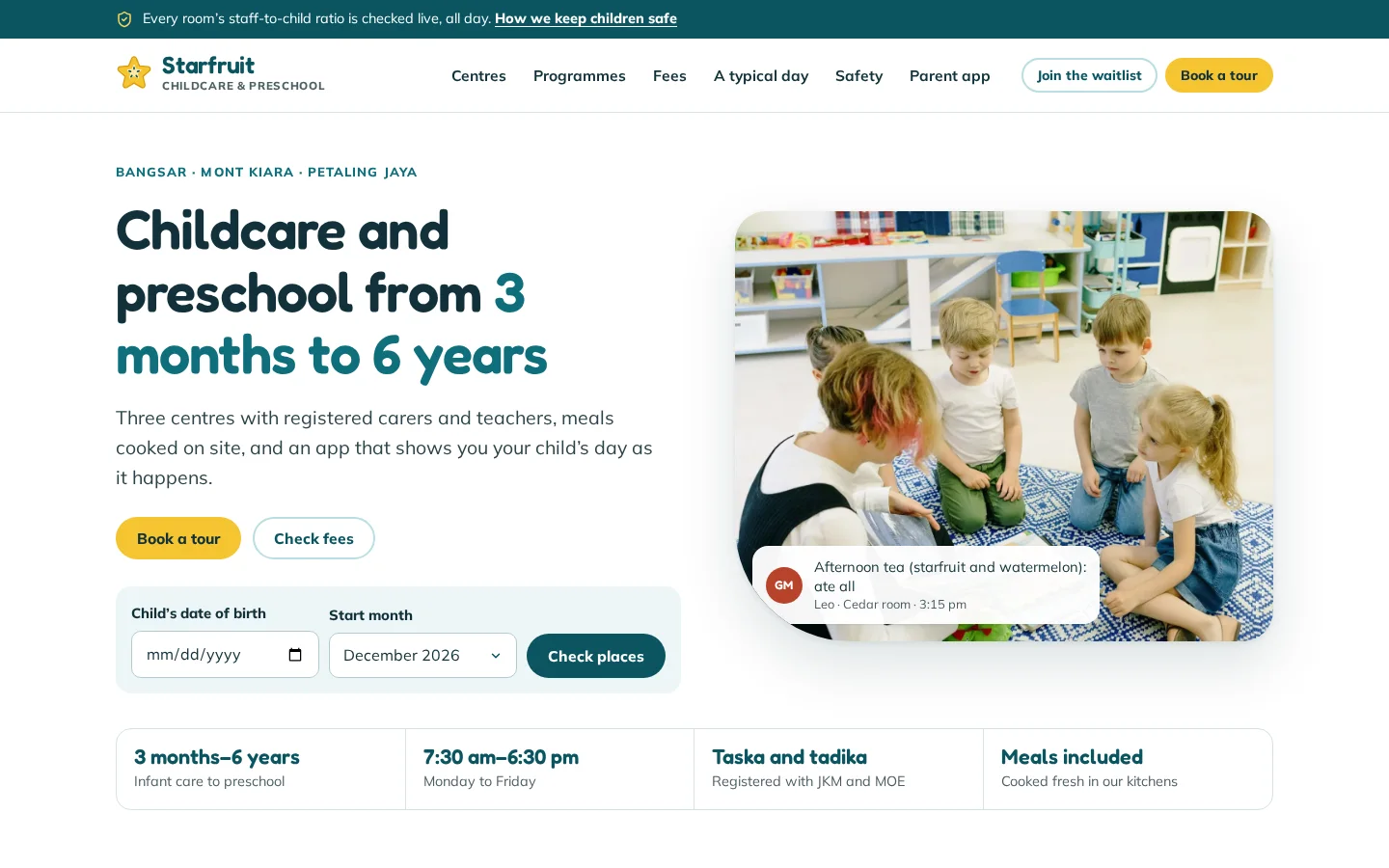
Home page with a places finder
The website opens with a check for free places by the child’s date of birth and start month, not just a contact form.
- Places by age group and start month
- “Book a tour” always in the header
- A safety strip on every page
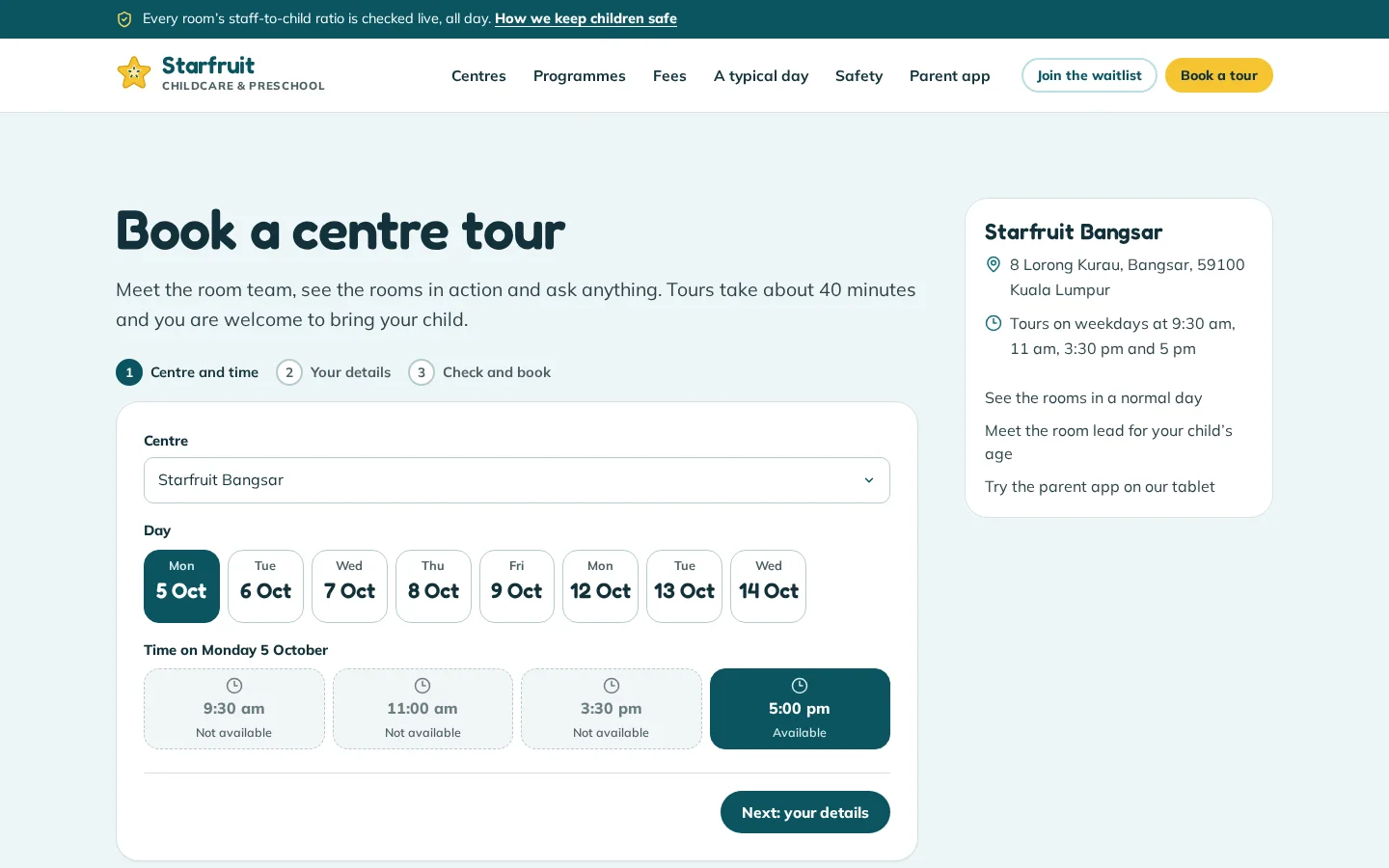
Centre tour booking
Parents pick a real tour slot at their chosen centre, and the booking reaches the office’s tour agenda at once.
- Weekday slots for each centre
- Taken and past slots greyed out
- A calendar file after booking
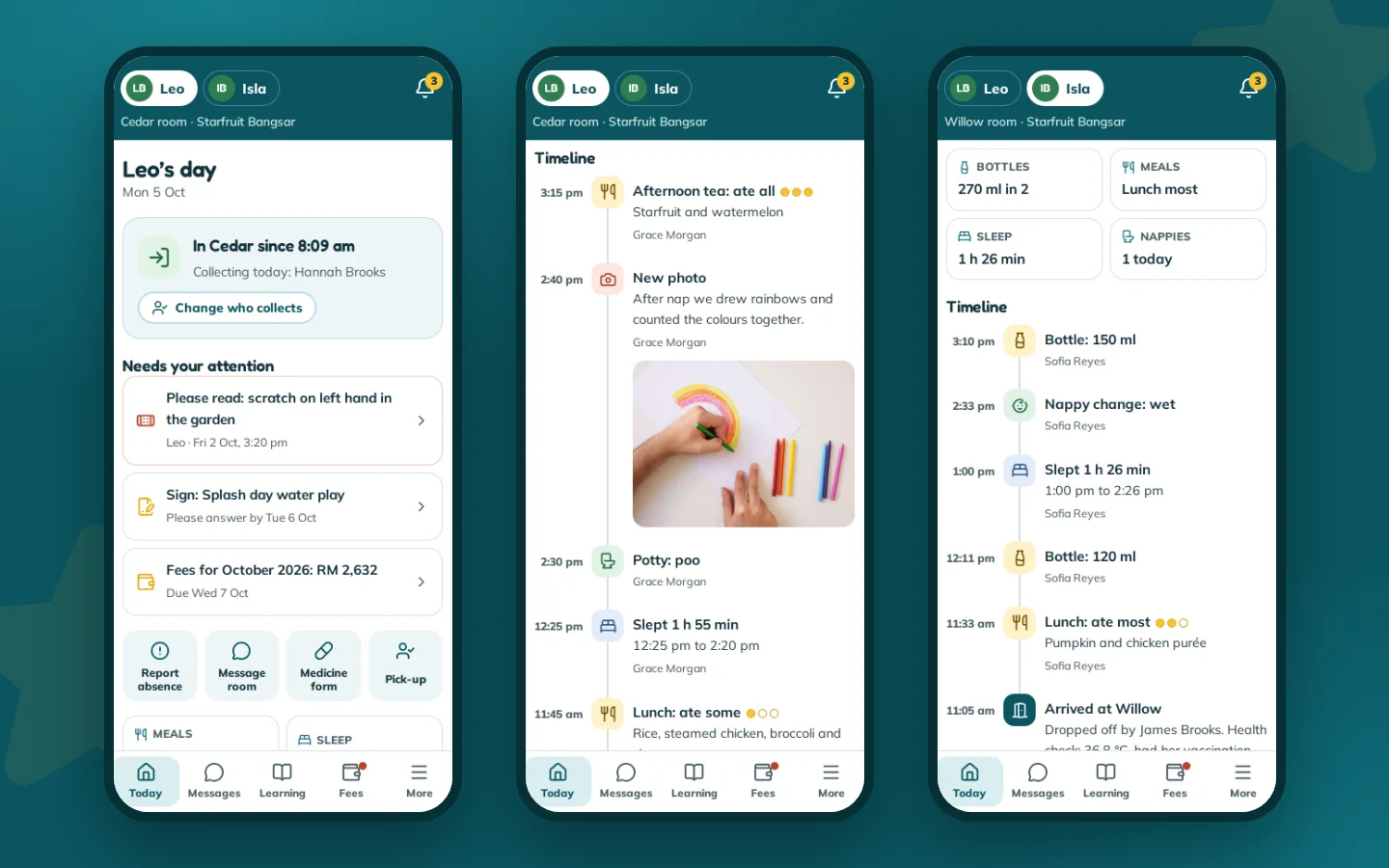
Today in the parent app
The child’s day on a phone: arrival, meals and how much was eaten, naps, nappies, photos and who is collecting.
- What needs the parent’s attention first
- A timeline for each child
- Updates as the room logs them
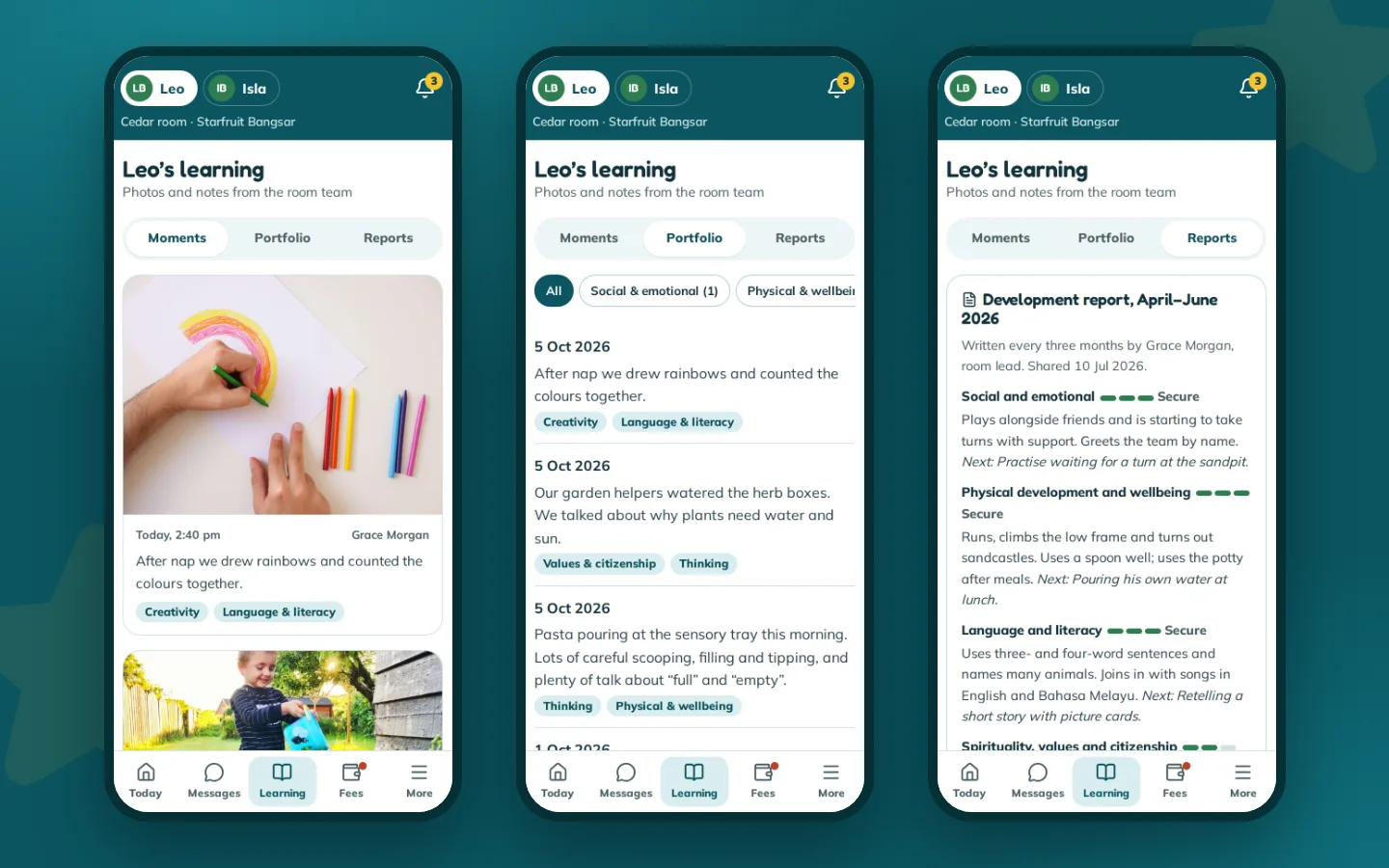
Learning and portfolio
Photos and notes from the room team, sorted by learning area, with a termly report and next steps.
- Only posts the child is tagged in
- Portfolio by six learning areas
- A report every term
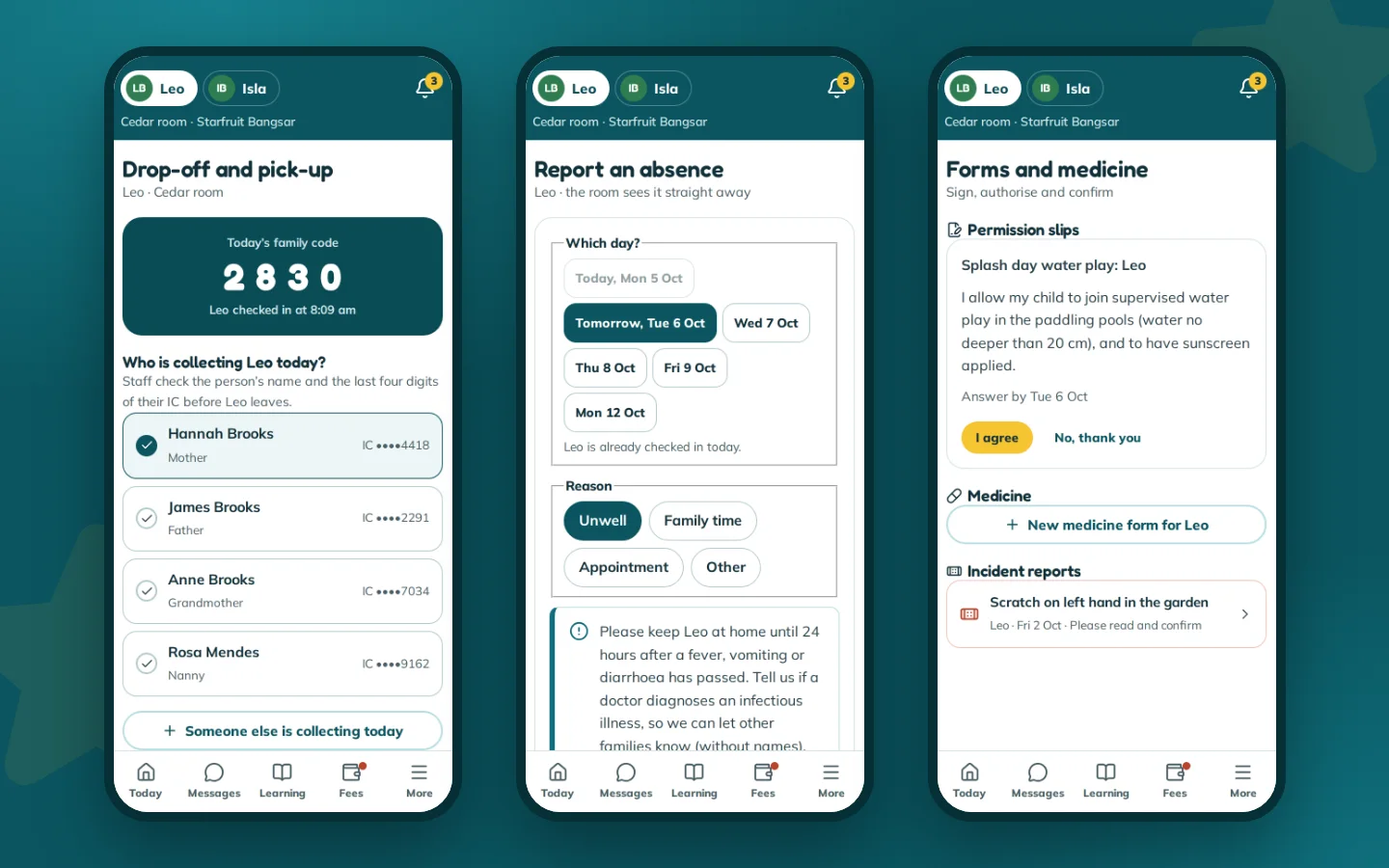
Pick-up, absences and forms
Parents control who collects, report the days their child is away, and sign permission slips and medicine forms.
- Collectors checked by the last four IC digits
- Absences reach the room at once
- Medicine only against a signed form
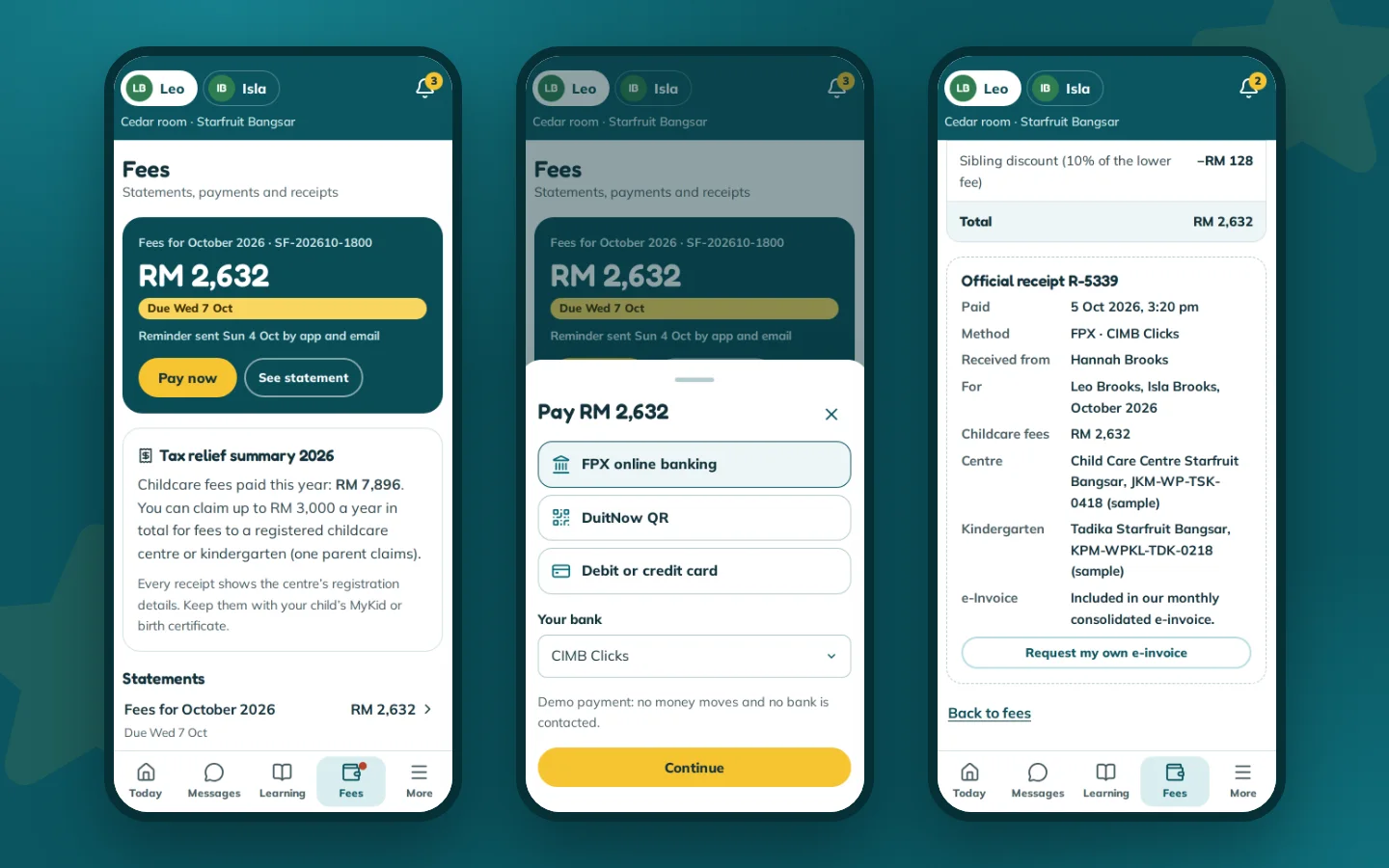
Fees and receipts
Monthly statements paid in the app, with receipts that carry what parents need to claim tax relief.
- FPX, DuitNow QR or card (demo)
- The year’s fees towards the RM 3,000 relief
- An individual e-invoice on request
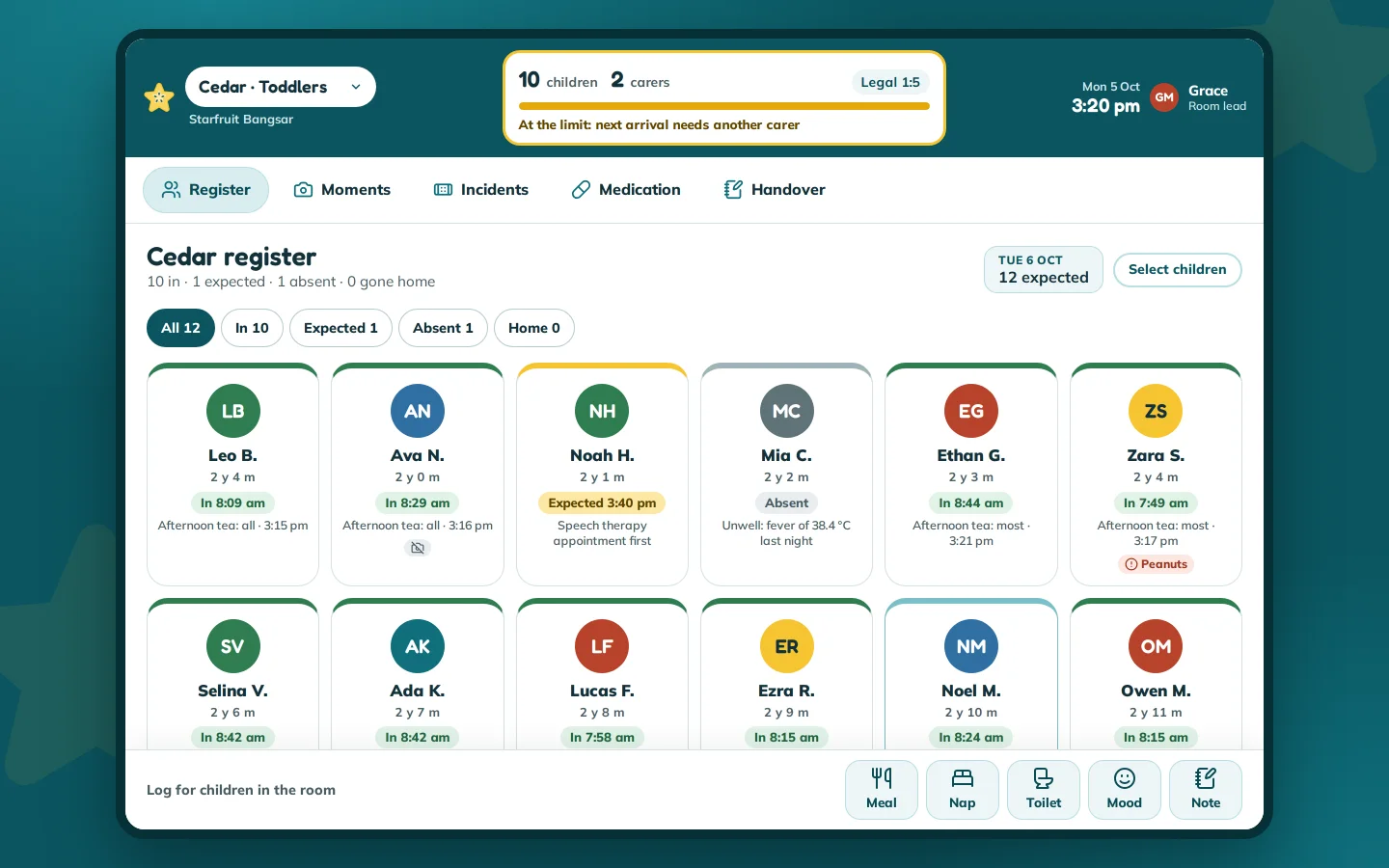
Room register and ratio
A tablet grid of children to tap in and out, with the room’s live ratio in the top bar.
- “At the limit” before a ratio is broken
- Allergies, medicine and consent flags
- Quick logs within thumb reach
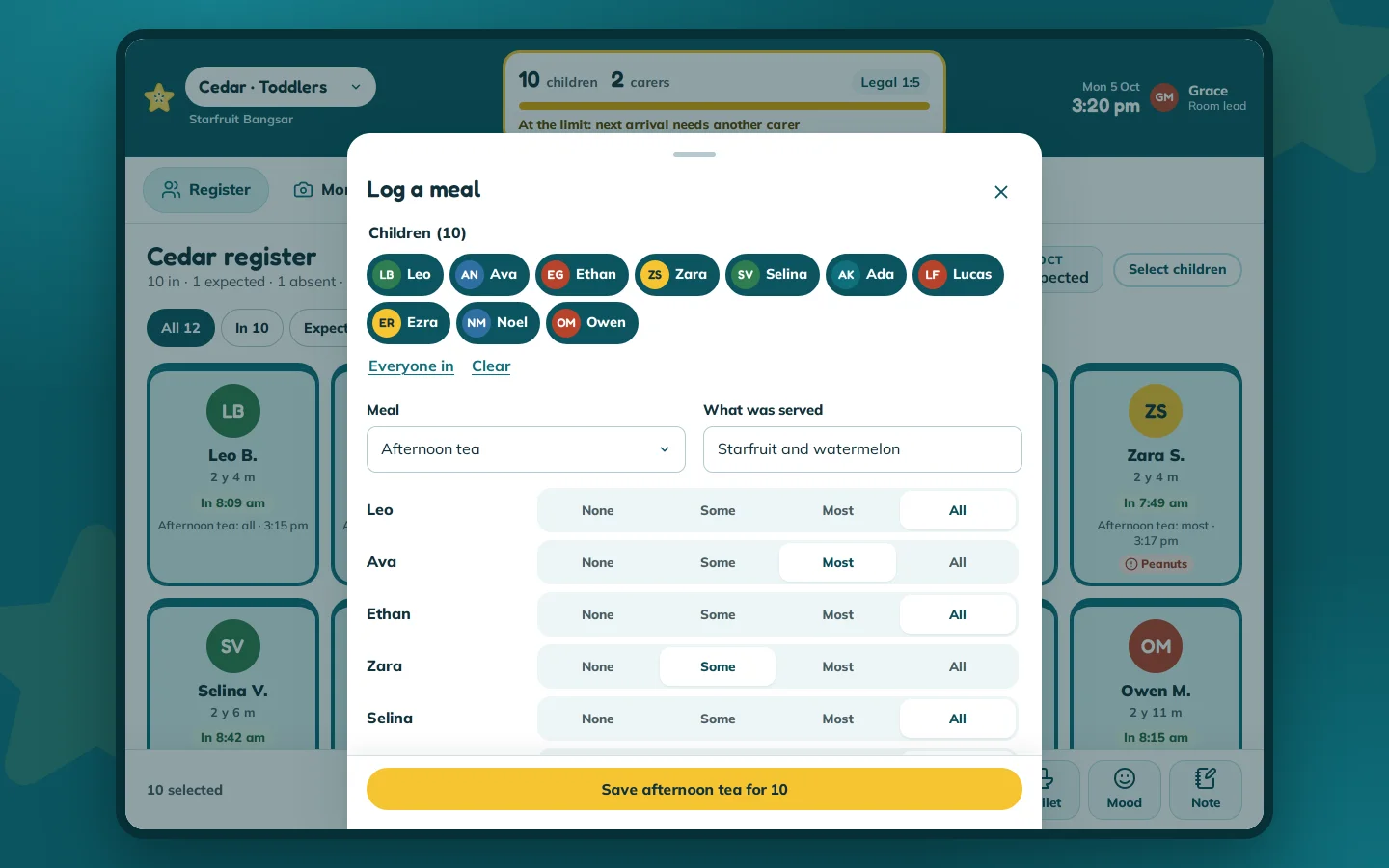
Quick logs for the room
One meal log covers the whole room, with how much each child ate, saved with one tap.
- Children picked by tapping
- None, some, most or all for each child
- Made for one hand on a tablet
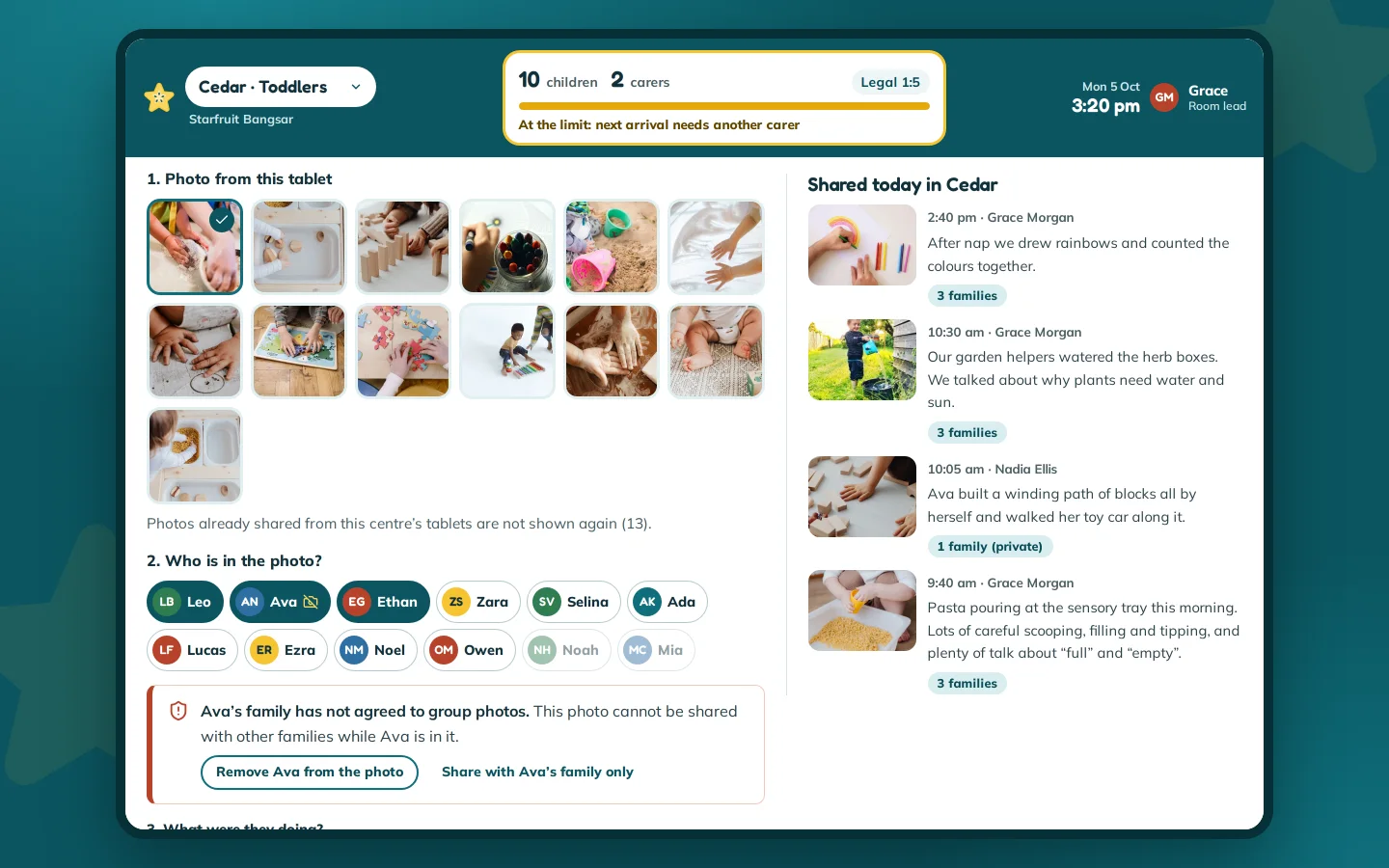
Photos with consent checks
The teacher app stops a group photo that includes a child whose family has not agreed to group photos.
- A warning as soon as the child is tagged
- Remove the child or share privately
- Today’s posts beside the form
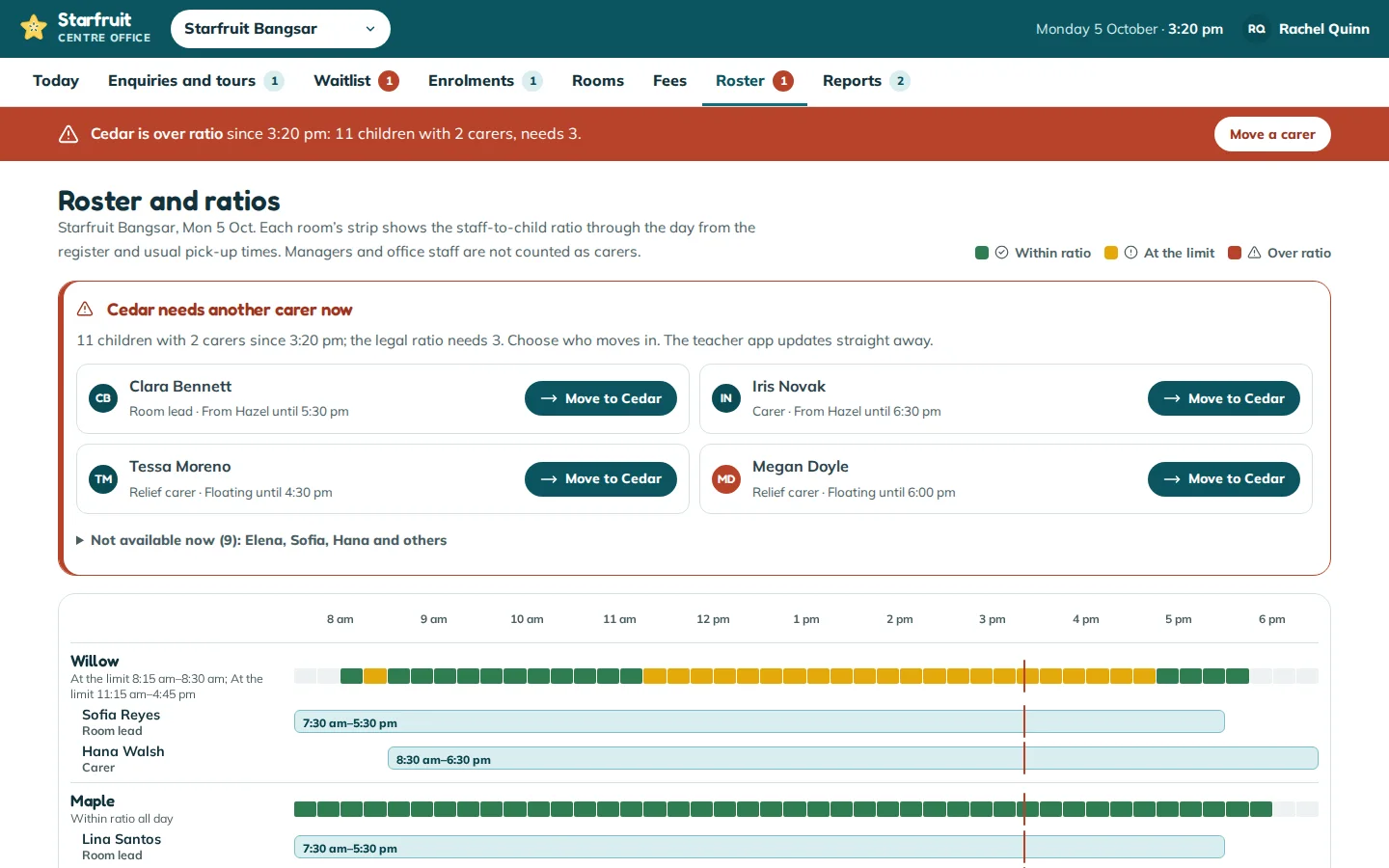
Roster and ratios
An over-ratio alert the office fixes by moving a carer, with each room’s ratio through the day against the shifts.
- Only carers who can move are offered
- Managers never count as carers
- The alert clears in both apps
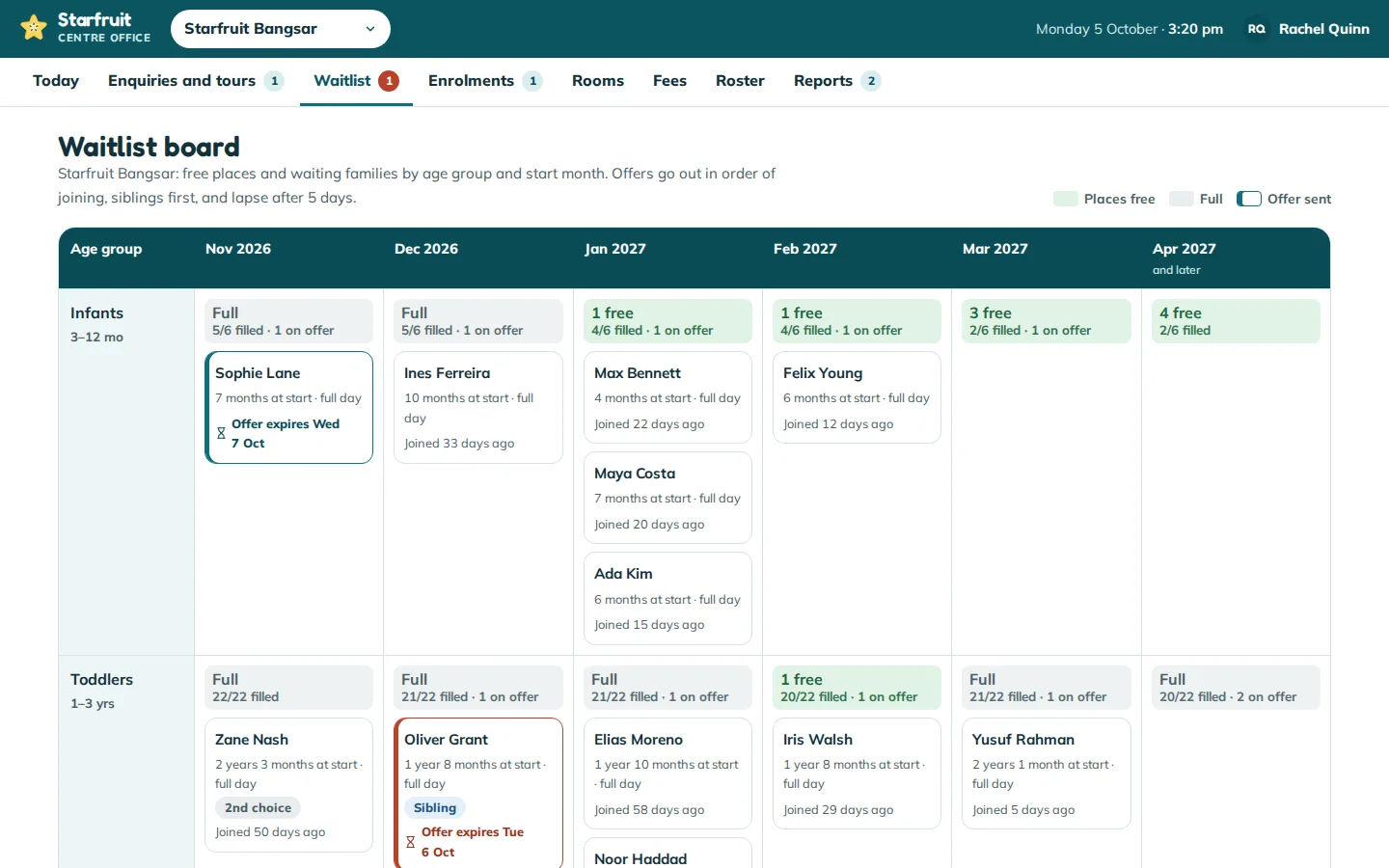
Waitlist board
Waiting families by age group and start month, with free places and offers that hold a place.
- Offers lapse after five days
- Siblings and second choices tagged
- Ordered by the date families joined
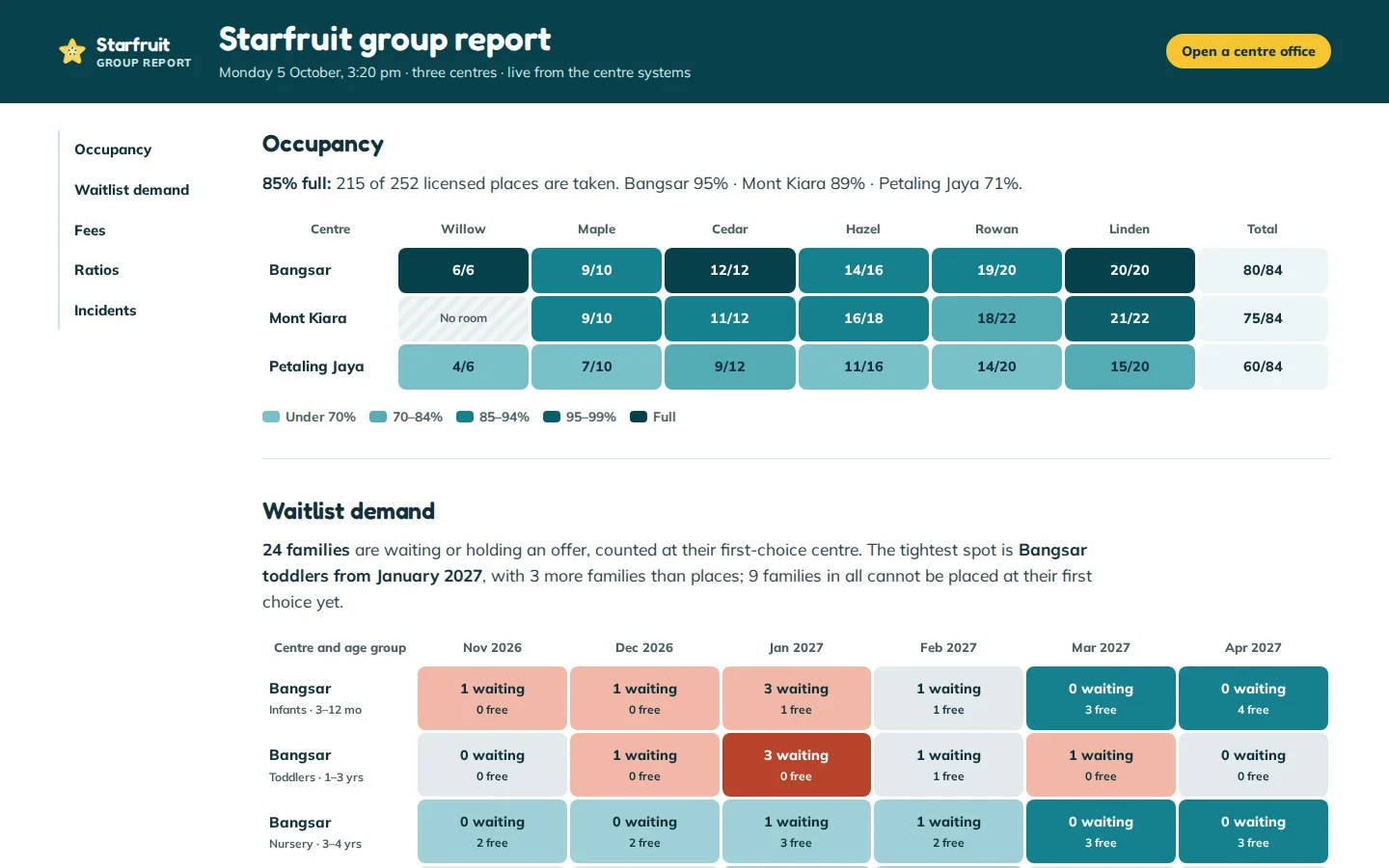
Group report
Every centre on one page: occupancy by room, waitlist demand against free places, collections, ratio alerts and incidents.
- Occupancy by room and centre
- Demand by age group and month
- Ratio alerts and incidents kept on record
Click through it yourself
Every screen above is interactive. No sign-up, nothing to install.
Behind the build
Researched first, then built
Before designing anything, we studied 14 sites and products: five Malaysian preschool and childcare chains, three international providers and six childcare apps and management products. Nothing was copied. Each finding below changed a decision.
Studied (14)
- The Children’s House
- Brainy Bunch
- Q-dees
- MindChamps Malaysia
- Genius Aulad
- Bright Horizons
- Busy Bees
- Goodstart Early Learning
- LittleLives
- brightwheel
- Famly
- Storypark
- Procare
- Lillio
What we saw
What Starfruit Childcare & Preschool does
What we saw
Malaysian chains hide their fees, or post them as a picture of a table.
What Starfruit Childcare & Preschool does
A real fees table with a calculator, a sibling discount and a note on tax relief.
What we saw
Tour booking is a contact form with no times.
What Starfruit Childcare & Preschool does
Real tour slots for each centre, a review step and a calendar file, landing in the office’s agenda.
What we saw
No provider shows whether it has places.
What Starfruit Childcare & Preschool does
A places finder by date of birth and start month, and an office waitlist board with offers that lapse.
What we saw
Providers sell their parent app with phone mock-ups.
What Starfruit Childcare & Preschool does
The parent app itself, installable from the browser and linked from the website.
What we saw
Childcare apps share meals and photos, while ratios, rosters and occupancy sit in separate products.
What Starfruit Childcare & Preschool does
One system: a tablet check-in updates the ratio and alerts the office, a roster move clears it, and the group report keeps the record.
What we saw
Safety pages list promises without detail.
What Starfruit Childcare & Preschool does
Each safety practice with its legal source, enforced in the apps.
What we saw
Photo sharing is every app’s headline, yet none shows how consent is handled.
What Starfruit Childcare & Preschool does
Consent set per child by the parents, a teacher app that blocks posts that break it, and families who never see a child without consent.
Feature checklist
46 of the 63 features the leading sites offer
We listed every feature we found across the 14 sites and products above. Starfruit Childcare & Preschool has 46 of them, and 2 more in part; the 15 left out are listed with the reason.
Finding a centre6
- Centre finder
- Centre pages with map and contact
- Tour booking
- Tour times to choose from
- The child’s date of birth on enquiries
- Places shown to parents
Fees and trust7
- Fees published
- Fee calculator
- Tax relief explained
- Health and safety page
- Safety strip on every page
- Frequently asked questions
- Registration numbers shown
Programmes5
- Programmes by age
- A typical day
- Meals and menus
- Curriculum and teaching approach
- Parent app shown on the website
A child’s day8
- Daily timeline
- How much each child ate
- Naps
- Nappies and toilet
- Mood
- Bottles and fluids
- Check-in and check-out times
- Health check on arrival
Photos and learning3
- Photos with children tagged
- Observations by learning area
- Progress reports
Families and the room8
- Authorised collectors
- Absences reported in the app
- Messages with the room
- Announcements
- Events calendar
- Forms and permission slips
- Medicine forms and doses given
- Incident reports
Fees and the office9
- Fee statements paid in the app
- Automatic billing and reminders
- Receipts
- Live staff-to-child ratios
- Staff rota
- Occupancy and capacity planning
- Waitlist and admissions
- Online enrolment
- Management reports
Built in part
- A WhatsApp chat box: WhatsApp is the reminder channel and an enquiry source, without a floating box over the page.
- A check-in kiosk with a code: the app’s pick-up pass shows a family code, and staff check the collector against the list.
Left out, and why
- Reviews: a concept brand has none, and we do not invent them.
- Pop-ups on arrival: they hide the page on phones.
- Franchise, careers and a blog (3): outside the parent and staff journeys.
- A language switch: English, with Malay terms where parents use them, such as taska and tadika.
- Video: photos prove the flow; video adds storage without a new journey.
- Surveys, growth measurements and scheduled posts (3): none adds a journey this build proves.
- Staff timecards: payroll sits outside this product; the rota records shifts.
- Lesson planning and a home-learning library (2): teaching content tools of their own, outside the brief.
- Wider family access: one family account in the demo; the collectors list covers pick-up.
- Offline use: it needs a sync server; the apps install with an app shell.
Design research
How the leading sites look, and what we took
We measured the fonts, colours and layouts of the sites and apps we studied, then applied what most of them share in an original design, on the website, in both apps and on every office screen.
Across the leading sites
In Starfruit Childcare & Preschool
Across the leading sites
Rounded, heavy display faces for headings with a plain body face at 16 to 21 px.
In Starfruit Childcare & Preschool
Fredoka for headings and Mulish for text at 16 to 18 px, the same in the apps and the office.
Across the leading sites
White pages, one saturated brand colour and a warm yellow or orange button with dark text, on cool tints.
In Starfruit Childcare & Preschool
Lagoon teal with starfruit gold buttons and dark text, on white and cool lagoon tints. No cream anywhere.
Across the leading sites
Real photos of children busy with activities, and phone mock-ups for the apps.
In Starfruit Childcare & Preschool
Licensed photos of activities, hands and rooms, and the real apps instead of mock-ups.
Across the leading sites
“Book a tour” always in the header, a location search in the hero and a safety strip above the header.
In Starfruit Childcare & Preschool
The same header action, a places finder in the hero and a safety strip on every page.
Across the leading sites
Programmes led by the age range, and fees as tables, calculators or not at all.
In Starfruit Childcare & Preschool
Programmes by age band, and a fees table with a calculator.
Across the leading sites
Childcare apps show the day as a timeline of icons and times, with photo cards and large quick-action tiles.
In Starfruit Childcare & Preschool
A timeline with photo cards and quick-action tiles in the parent app, and quick logs in a dock in the teacher app.
Across the leading sites
Centre software dresses its screens in its own colours, not the centre’s.
In Starfruit Childcare & Preschool
The teacher app, office and group report in Starfruit’s own lagoon, gold, coral and leaf, laid out as a register, a board, a roster timeline and a report.
Rules it follows
The business rules, built in
The prototype enforces each of these, so you can test them yourself.
Ratios and staffing
- Social Welfare Department ratios by age: 1:3 under one year, 1:5 from one to three, 1:10 from three to four
- Only carers on shift in the room count; managers and office staff never do
- A preschool teacher cannot cover a childcare room
Arrival, pick-up and health
- A health check recorded at check-in
- Children leave only with a listed collector, checked by name and the last four IC digits
- Medicine given only against a parent’s form, with a second staff member’s check
Consent and safeguarding
- No group photo includes a child without consent
- Families see only the posts their child is tagged in
- Incidents need the parent’s acknowledgement; safeguarding concerns go to the manager only
Places and admissions
- Places counted by age group and start month, and open offers hold a place
- Offers lapse after five days, with a reminder two days before
- Preschool classes grouped by school year
Fees
- Statements on the 25th, due on the 7th, with automatic reminders
- A 10 % sibling discount on the lower fee
- Receipts carry the registered names and numbers for tax relief
Connected roles
One action, every screen
Every role works on the same records, so one person’s action shows up for the others.
- 1
A parent books a tour or joins the waitlist, and the office sees the tour in its agenda and the family on the board under the right age group and month.
- 2
A parent accepts an offer and pays the deposit, and the office gets the enrolment with its document checklist. The child is placed in a room from the start date and the fees are set up.
- 3
A parent reports an absence, and the teacher’s register marks the child absent and the expected numbers drop.
- 4
A teacher checks a child in, and the parent sees the arrival and health check. If the room goes over ratio, the office is alerted, moves a carer, and the alert clears in both apps.
- 5
A teacher logs a meal or posts a photo, and the family’s timeline and portfolio update, while a child without consent never appears in shared photos.
- 6
A teacher files an incident, and the parent must confirm it. The office shows the report as waiting until they do.
- 7
A parent pays fees in the app, and the office’s fees run shows it paid and the owner’s collections figure goes up.
Services it proves
Where Starfruit Childcare & Preschool is our example
Each of these service pages uses a part of Starfruit Childcare & Preschool to show the work. Open one to see what we would build for you.
- Mobile appsShows: Today in the parent appA parent app on the phone: the child’s day as it happens, with meals, naps, photos and who is collecting, fed by the teacher app in the room.
- Android appsShows: Room register and ratioA tablet app for carers: tap children in and out, with the room’s staff-to-child ratio live in the top bar.
- iOS appsShows: Fees and receiptsFees paid in the app by FPX, DuitNow QR or card, with a receipt that carries what parents need for tax relief.
- Cross-platform appsShows: Pick-up, absences and formsOne codebase for phone, tablet and desktop: the parent’s pick-up pass, absences and forms reach the teacher’s tablet at once.
- Learning & training appsShows: Learning and portfolioA preschool child’s learning in the parent app: moments from the room, a portfolio by learning area and a report every term.
- Field service & operations appsShows: Quick logs for the roomA carer’s tablet: one meal log covers the whole room, with how much each child ate, saved with one tap.
Core systems
What this build is made of
These are systems we build repeatedly — each links to every other project that contains it, so you can compare implementations before deciding what you need.
Unique to this build
Built specifically for this project rather than assembled from the shelf.
Live ratios
Every check-in updates the room’s staff-to-child ratio, and an over-ratio room alerts the office until a carer is moved.
Photo consent
A child whose family has not agreed is kept out of shared photos, and the teacher app stops the post before it goes.
Places and offers
Places counted by age group and start month, with offers that hold a place and lapse on time.

Want a build like this for your business?
Tell us what you have in mind and we'll put together a functional prototype of your project — free.