perfectdesign.
Our Work

Live client projectBrand store + order studio

Solsuka

The online store of Solsuka, a Malaysian deodorant and sunscreen stick brand: shoppers choose by scent, build their own set and join the waitlist for pre-orders, and the team has its own Studio for orders, labels and stock.

solsuka.com
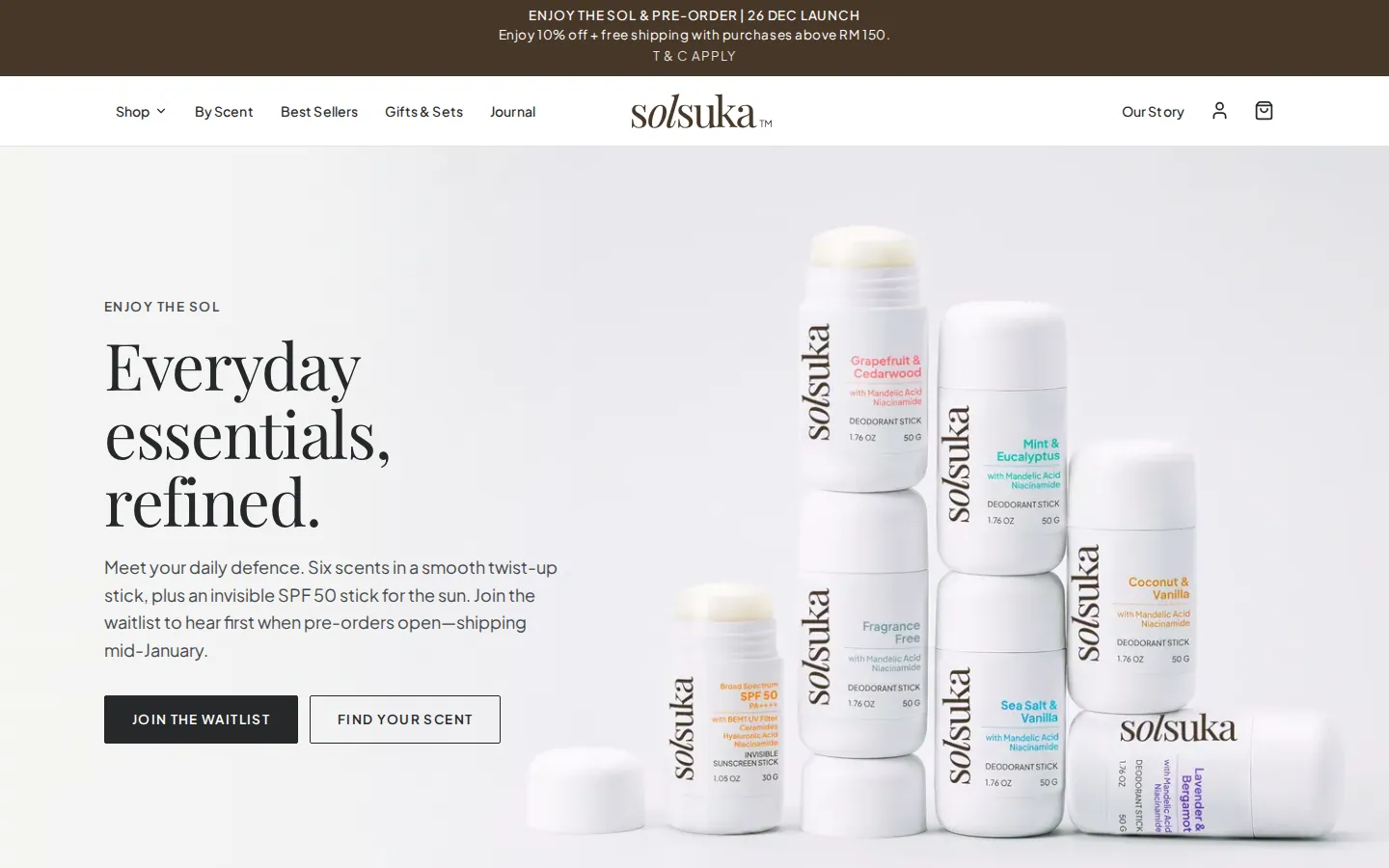
Solsuka home page: Everyday essentials, refined, beside stacked deodorant sticks, with Join the waitlist and Find your scent
Scents, each with its own page
6
Products and sets in the shop
11
Ways to buy a set
3

The brief

Bottanika Sdn Bhd needed an online store for Solsuka, its own range of deodorant and sunscreen sticks made in Malaysia. Shoppers had to choose by scent and buy sets at a better price, the shop had to take pre-orders for a launch whose stock arrives after it opens, and the team needed one place to approve, pack and ship orders without a separate system.

What we built

The Solsuka shop on solsuka.com: pages for every product, scent and set, a set builder, a journal, member accounts and a checkout, with the Studio behind it for orders, courier labels, stock, customers and exports. It went live on 10 November 2026 as a waitlist that turns into pre-orders on the day they open.

Client
Bottanika Sdn Bhd, for its brand Solsuka
Based in
Mantin, Negeri Sembilan, Malaysia
Engagement
September 2026 to now
Our role
Design, build and launch
Built for
Solsuka’s shoppers in Malaysia and Singapore, and the team that runs the shop.
Pages and screens (14)
Home, Shop and categories, Shop by scent, Scent pages, Product pages, Gifts and sets, Build your own set, Journal, Our story, FAQ and policies, Contact, Member accounts, Checkout, The Studio

01The shop

A shop in Solsuka’s own look, built around the scents.

Solsuka makes deodorant sticks in six scents and an invisible SPF 50 sunscreen stick, formulated in Malaysia. We designed the shop around the brand’s own photography and logo, with plenty of white space and a colour for each scent that marks it across the shop.

Shoppers browse by category, from best sellers and deodorant to sun protection, body balm, and gifts and sets, and narrow any list by scent. Every product page switches scent and size in place and shows the photos, the scent notes, the key ingredients and how to use the stick, with what delivery costs stated before checkout.

Each page asks what is on the shelf once it has opened, so a card shows waitlist, pre-order, low stock or sold out as it is, while the pages themselves stay fast.

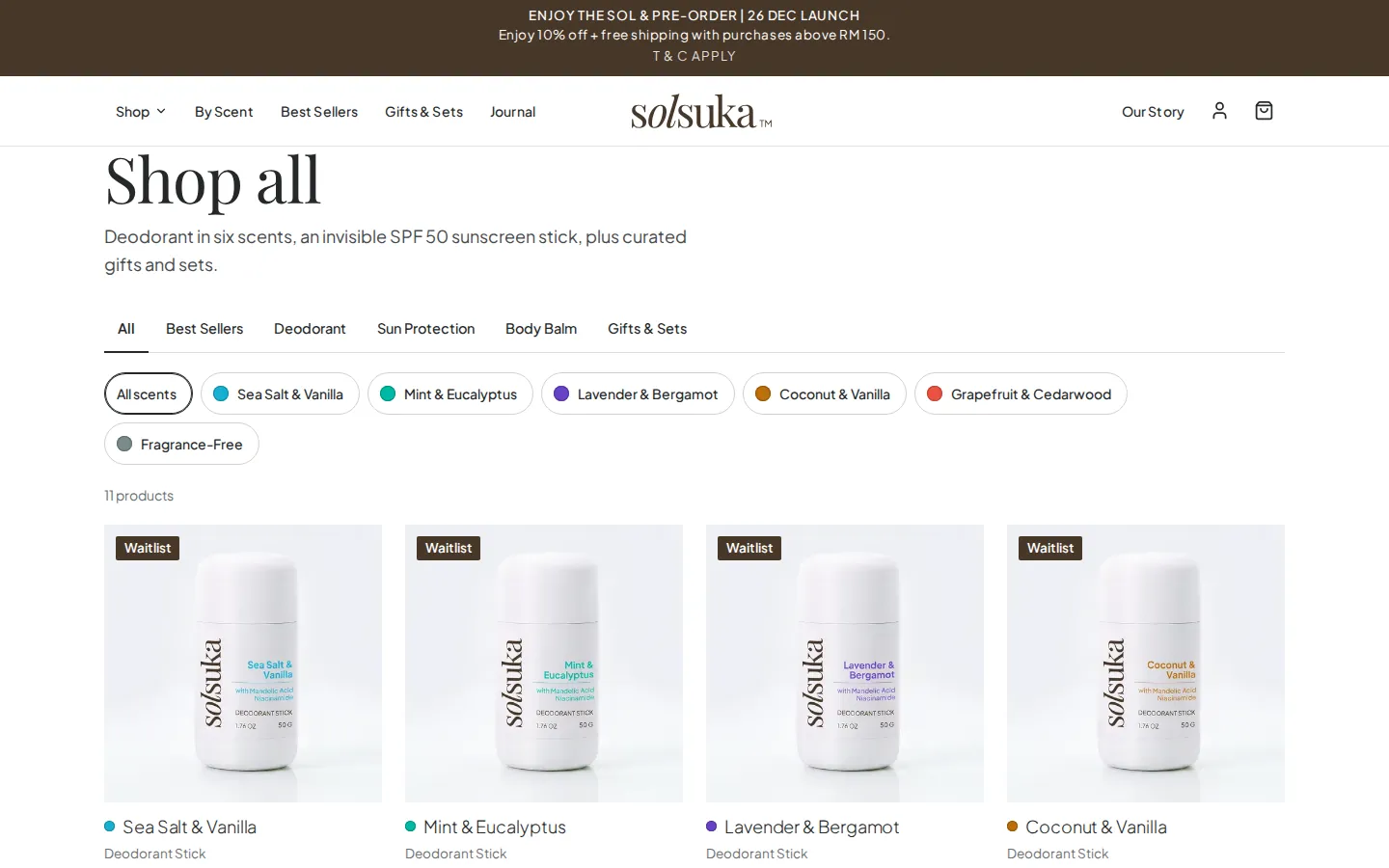
Solsuka Shop all: category tabs and scent filters above deodorant sticks, each with sizes, a price and a Waitlist label
Shop all: categories and scents filter the same list.
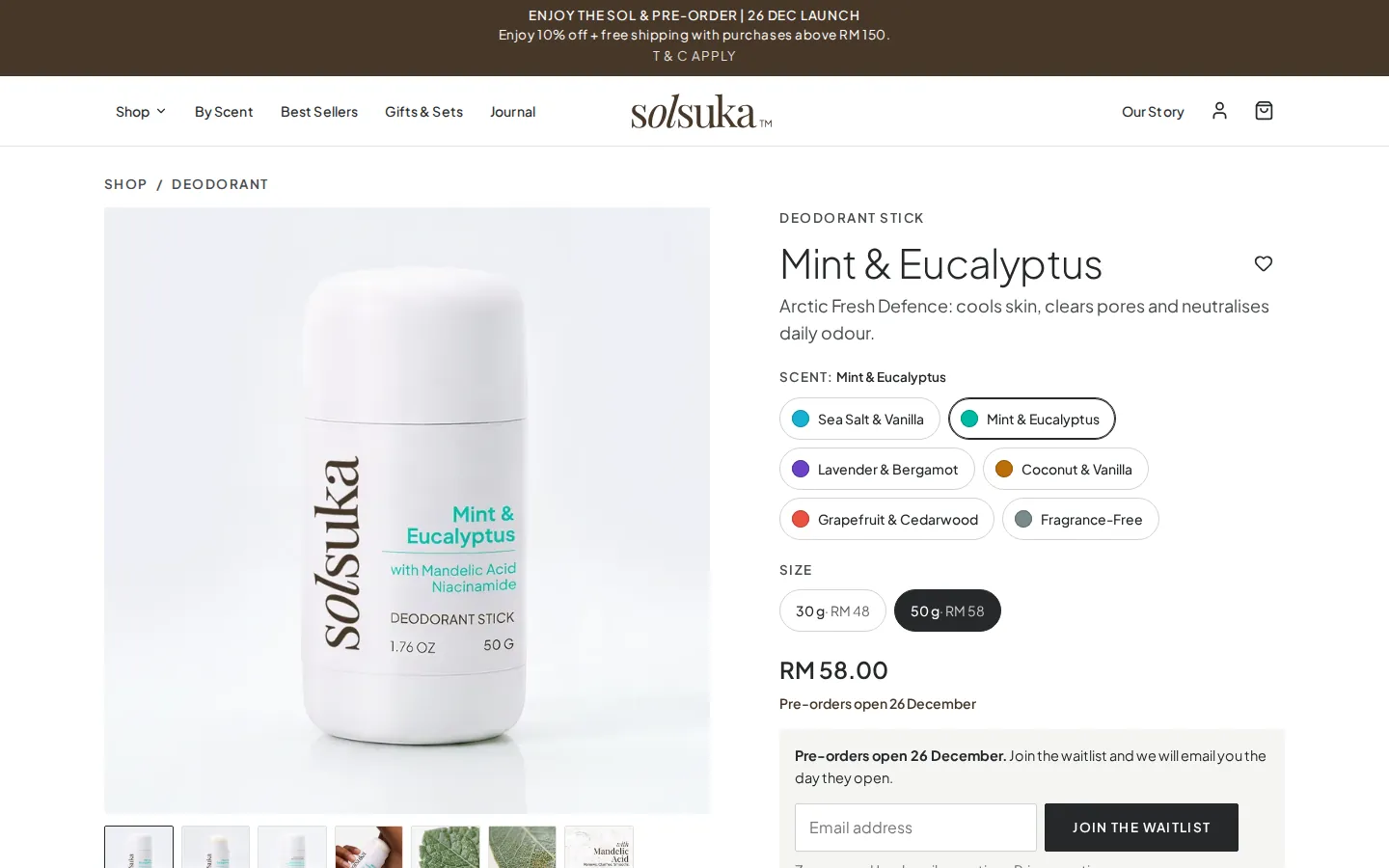
Solsuka Mint & Eucalyptus deodorant page: scent and size choices, the price and a waitlist form until pre-orders open
A product page, with the waitlist standing in for the bag until pre-orders open.

02Shopping by scent

Six scents, each with a page of its own.

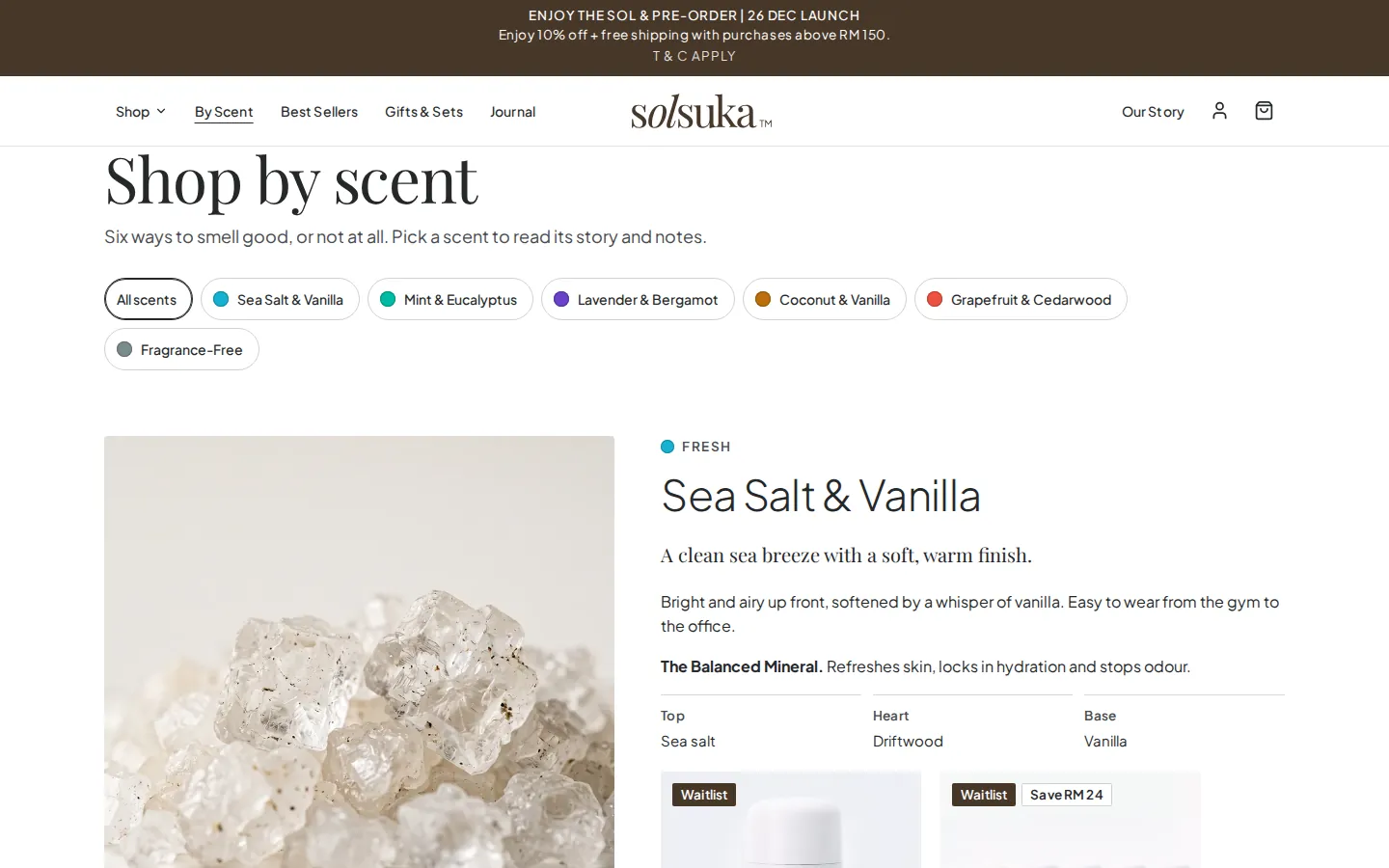
Scent is how shoppers tell the sticks apart, so the shop is organised that way too. Shop by scent lays out all six, each with its story, its top, heart and base notes, and the products that carry it, and every scent has its own page for people who arrive from search or a shared link.

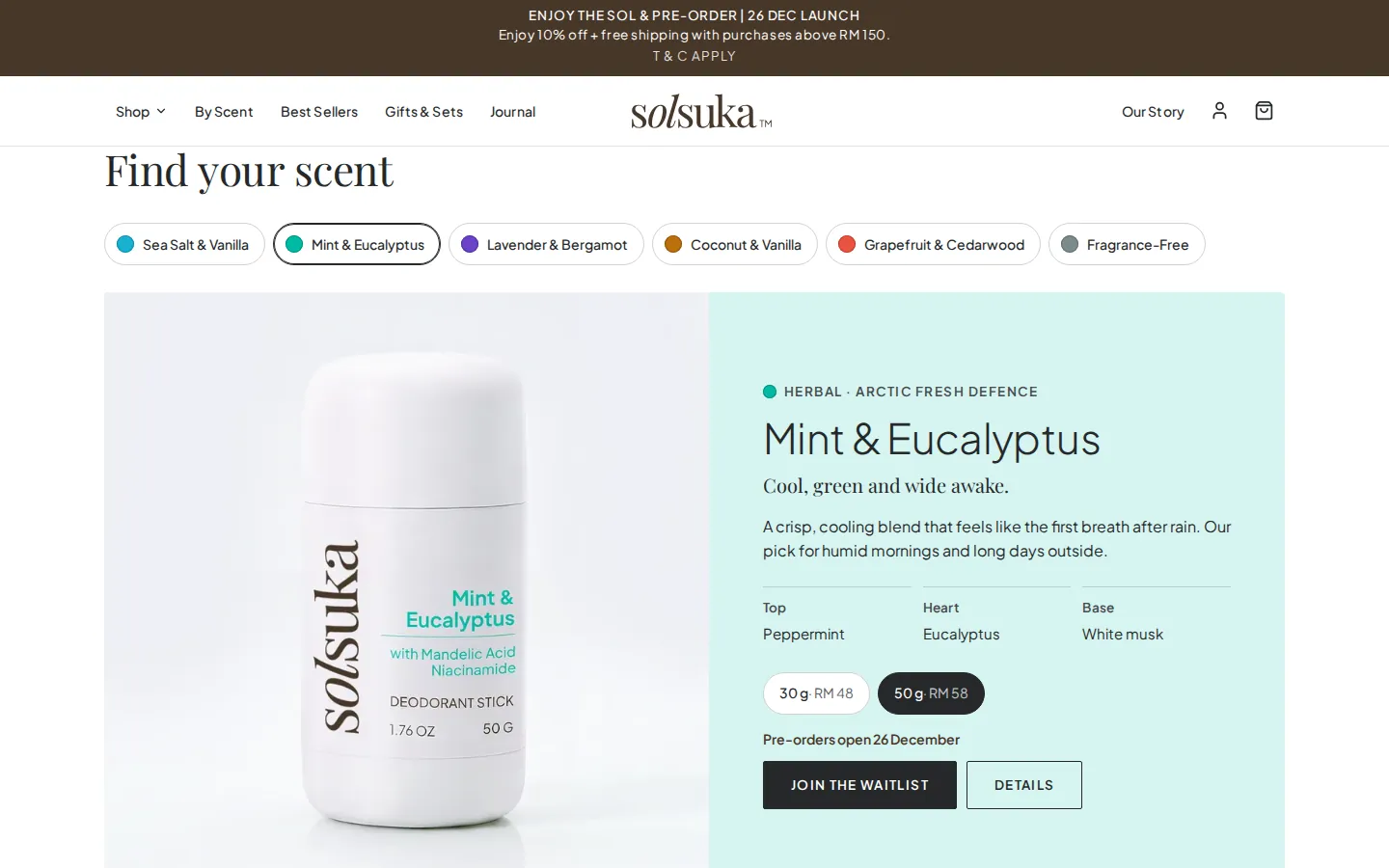
On the home page, a scent finder shows one scent at a time: its notes, its sizes and prices, and the way to the product. The same scent chips filter the shop and switch the scent on a product page, so a shopper can compare without starting again.

Solsuka Shop by scent: six scent filters, then Sea Salt & Vanilla with its story and its top, heart and base notes
Shop by scent: each scent with its story and notes.
Solsuka home page scent finder with Mint & Eucalyptus chosen: its notes, two sizes with prices and Join the waitlist
The home page’s scent finder, with one scent chosen.

03Sets

Sets at a better price, ready-made or built by the shopper.

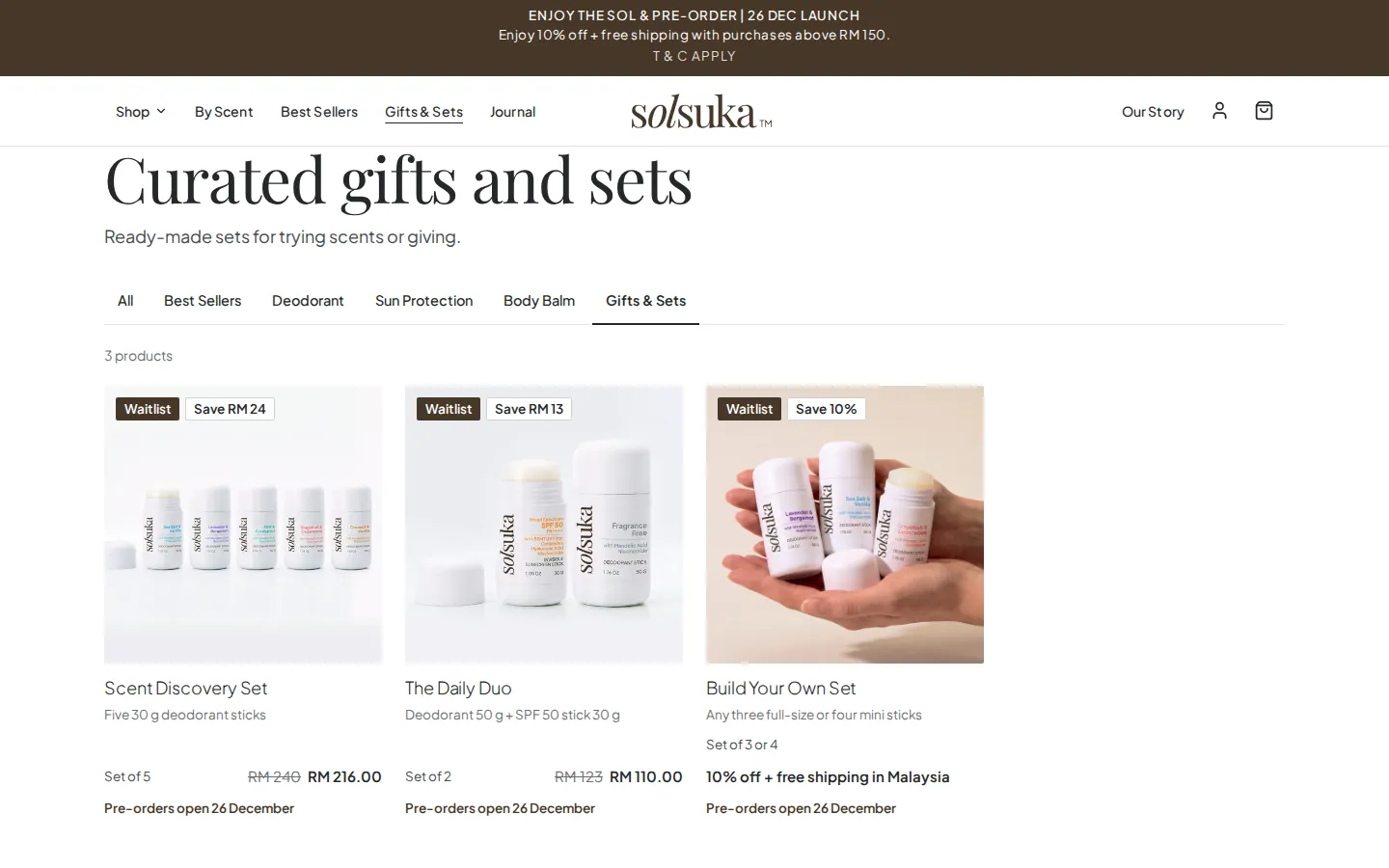
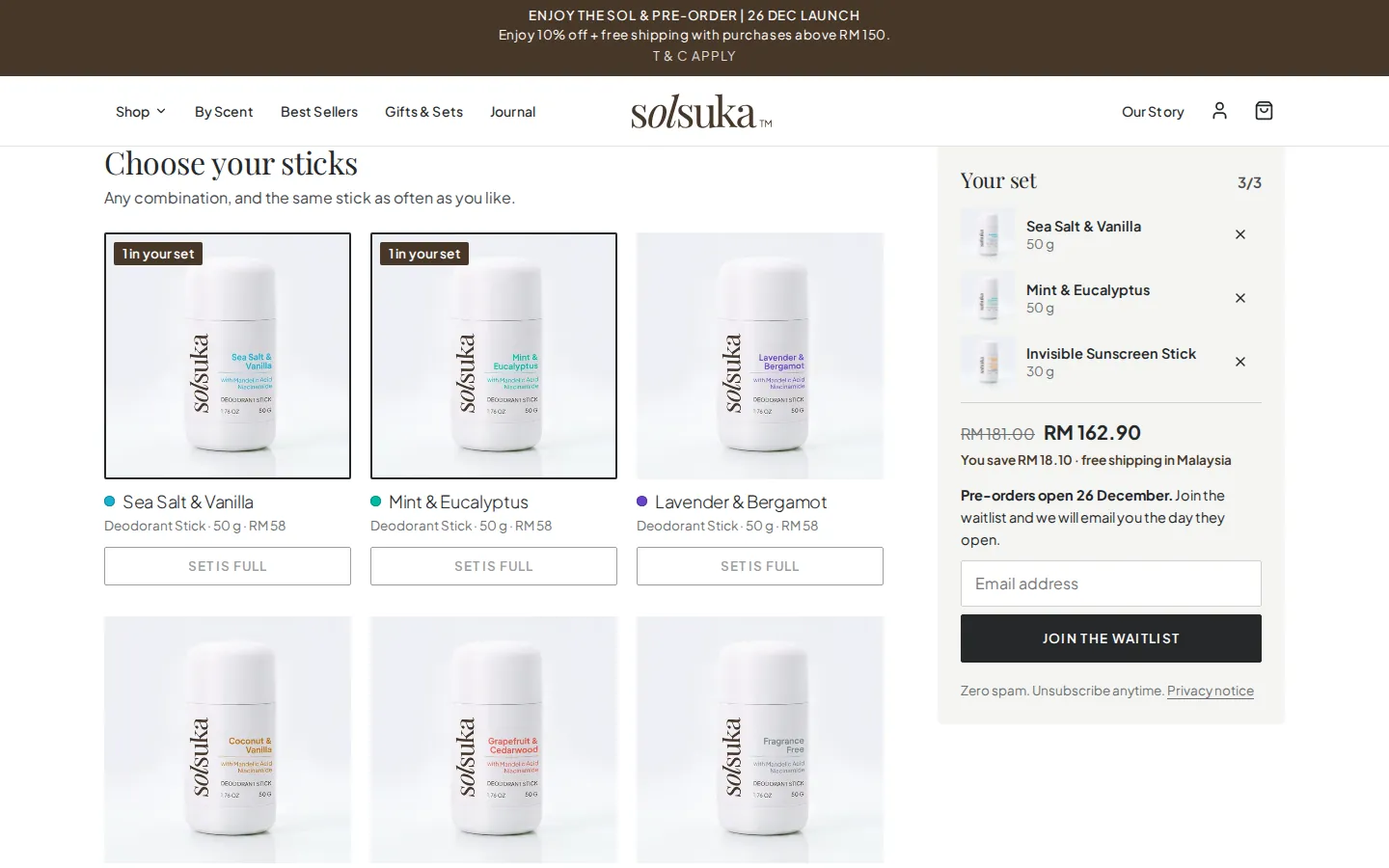
Two ready-made sets carry their saving on the card: a discovery set of five scents in the small size, and a daily pair of deodorant and sunscreen. Beside them, the set builder lets a shopper pick any three full-size sticks or four minis, in any mix and the same stick as often as they like.

The set’s price, the saving and free delivery in Malaysia appear as the picks are made, and the whole set goes into the bag as one line. A set waits as a pre-order while any of its sticks does, and a stick that has sold out cannot be picked.

Solsuka gifts and sets: Scent Discovery Set, The Daily Duo and Build Your Own Set, each with its saving
Ready-made sets, each with its saving, beside the set builder.
Solsuka Build your own set with three sticks chosen: the set’s price, the saving and free shipping in Malaysia
A set of three chosen: its price, the saving and free delivery in Malaysia.

04Waitlist and pre-orders

A waitlist now, and pre-orders that open by themselves.

Until pre-orders open, every buy button on the shop becomes Join the waitlist. A shopper leaves an email address from a product, a set or the home page and gets a confirmation from Solsuka’s own address straight away. The team sees who has joined, and the products asked for most, in the Studio.

At midnight, Malaysia time, on the opening date, the shop opens by itself, and everyone on the list receives one email naming what they asked for, with a link to each. The Studio shows when that email goes and how far it has got.

Each size has its own number of pre-order places, and an order can hold only a few of each size, so the launch stock goes round. When a delivery arrives, the team receives it in the Studio, and it fills the waiting pre-orders, oldest first, before the rest goes on sale.

  1. Joined

    Shoppers leave an email address from any product, set or page.

  2. Opened

    At midnight on the day, the shop opens and emails everyone on the list.

  3. Filled

    Each delivery fills the waiting pre-orders, oldest first.

05Checkout and accounts

A checkout that never oversells, and accounts without a saved address.

Checkout works out every price on the server, never from the browser: sizes, sets, delivery to West Malaysia, East Malaysia or Singapore, and the spend-and-save offer, which applies itself once the bag reaches its amount and gives way to any code the shopper enters. The items are held while the shopper pays through HitPay, so two people cannot both buy the last one.

A payment that arrives after its hold has run out is still honoured while the stock is there; if the stock has gone, the order is flagged for the team to refund, never oversold. The confirmation page and email follow the payment, and every order has a private page showing its progress.

Shoppers can check out as guests or sign up. A member’s profile holds a name, email, phone, town and state, but never an address, which is asked for at checkout, order by order. Members see their orders with progress and tracking, keep saved products and favourite scents, and check out with their details filled in.

Checkout opens with the pre-orders. Until then the shop takes no orders, only waitlist sign-ups.

06The Studio

The team’s side of the shop: orders, labels and stock in one place.

Each person on the team signs in to the Studio with their own login, as the owner or as the packing team. Orders sit in tabs by what they need next, with the order that has waited longest first: approve it, print its courier label and packing slip, then mark it shipped with the courier and tracking number, which emails the shopper and shows on their order page. Only the owner can cancel or refund.

Labels are 100 × 150 mm with the order’s barcode, drawn in the browser for many orders at once, and a courier upload file lists every parcel waiting to be packed. In Products and stock, the owner sets each size’s shelf count, pre-order places and low-stock level, receives deliveries and corrects counts, and every change is recorded with who made it.

The owner also sees every paying customer with their town, orders and spend, downloads products, orders and customers as spreadsheets or the whole shop as a backup, makes the team’s logins and discount codes, and reads contact messages and waitlist sign-ups in the inbox.

Screens from the Studio are not shown on this page, because they hold Solsuka’s customers, orders and sign-ups.

07Journal and search

Content Solsuka writes, on pages search engines can read.

Solsuka’s team writes the Journal: guides to scents, switching and sun care, set with headings and lists, each ending with a way into the shop. Our story, the FAQ and the policy pages complete the shop, and the contact form reaches the team’s email and the Studio’s inbox.

Every page has its own title, description and sharing picture, the home page tells search engines the shop’s name and the company behind it, and product pages carry each size’s price and availability as structured data. A sitemap lists every public page, and the shop has a full set of icons for browsers and phones.
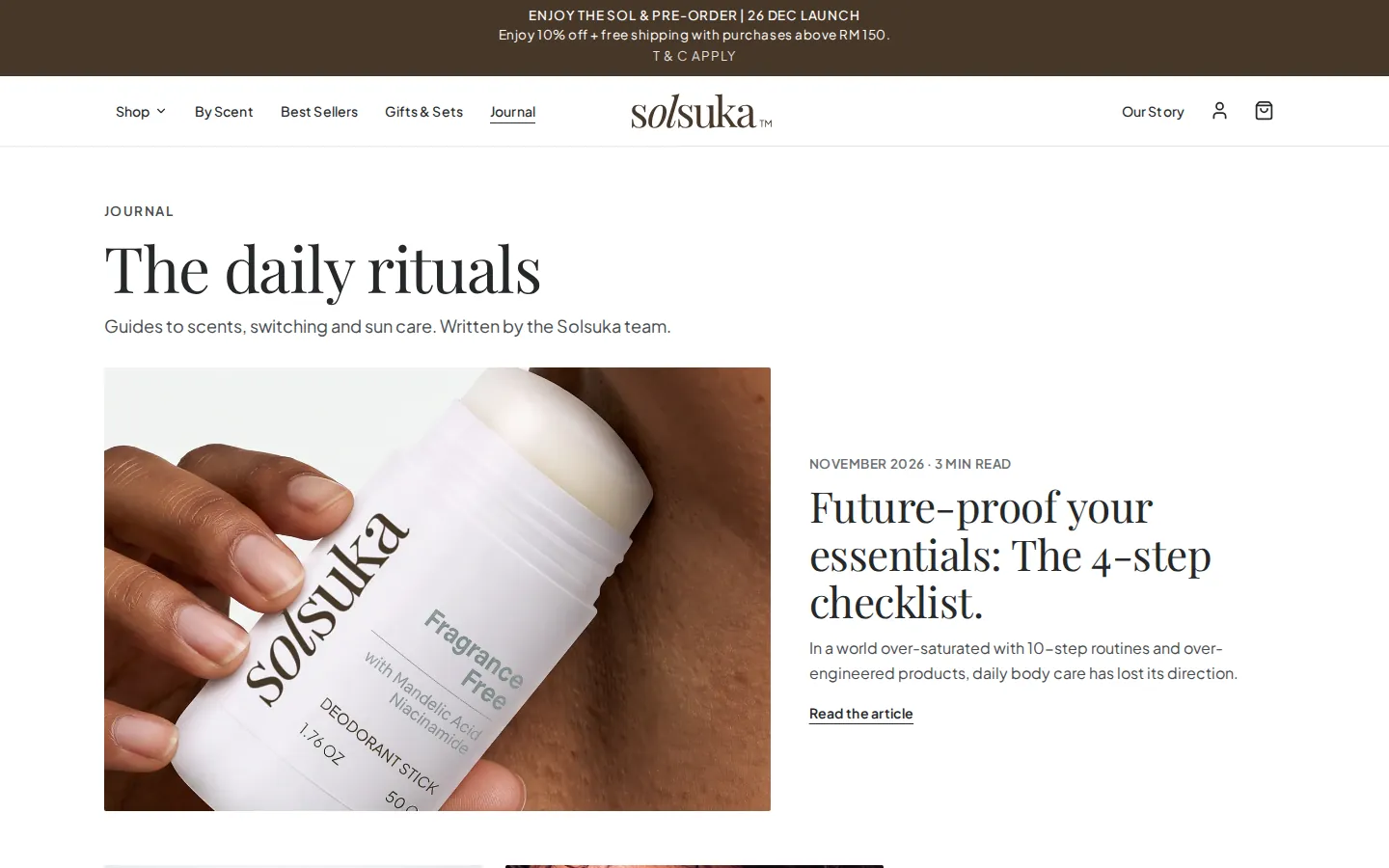
Solsuka Journal: The daily rituals, with a featured article on a four-step checklist for everyday essentials
The Journal, written by Solsuka’s team.

08Behind the shop

Fast pages, and changes tested before they go live.

The shop is built with Next.js and runs on Cloudflare, in the client’s own account, with its database at the edge. Pages are built once and served from the edge, then ask for live stock after they load, so they stay quick without showing stale availability.

Emails go out from Solsuka’s own address: waitlist confirmations, order confirmations, shipping and cancellation notices, and the opening email. Every change is tried first on a private copy of the shop with a database of its own, so test orders never reach the live shop, and a set of automated checks runs against solsuka.com after each release.

Everything we built

Everything in the shop, by who uses it.

The chapters above tell the story. This is the full list. Checkout and the order screens open with the pre-orders.

Shoppers12

  • A shop in Solsuka’s own look, built mobile-first
  • Categories: best sellers, deodorant, sun protection, body balm, sets
  • Scent filters on every list
  • A page for each of six scents, with notes
  • A scent finder on the home page
  • Product pages with photos, ingredients and how to use
  • Delivery costs shown before checkout
  • Ready-made sets with their saving shown
  • Build your own set: three full-size or four minis
  • Live stock: pre-order, low stock and sold out
  • Reviews with Read more
  • Contact form, WhatsApp and social links

Waitlist and pre-orders8

  • Join the waitlist on every buy button
  • A confirmation email on joining
  • Notify me for a product still to come
  • The shop opens itself at midnight on the day
  • One email to everyone on the list when it opens
  • Pre-order places for each size
  • A cap on each size in an order
  • Deliveries fill pre-orders, oldest first

Checkout and accounts12

  • Prices worked out on the server
  • Items held while the shopper pays
  • Delivery by zone: West and East Malaysia, Singapore
  • Spend-and-save offer and discount codes
  • Payment through HitPay
  • Late payments honoured or refunded, never oversold
  • Confirmation page and email, and a private order page
  • Guest checkout
  • Member sign-up and sign-in
  • A profile without a saved address
  • Orders with progress and tracking
  • Saved products and favourite scents

The Studio13

  • Own login for each person: owner or packing
  • Orders by stage, longest-waiting first
  • Approve, print and mark shipped
  • 100 × 150 mm labels with a barcode, and packing slips
  • A courier upload file for parcels to pack
  • Shipping email with courier and tracking
  • Cancel and refund, for the owner
  • Shelf counts, pre-order places and low-stock levels
  • A record of every stock change
  • Customers with their orders and spend
  • Spreadsheet exports and a full backup
  • Team logins and discount codes
  • Inbox for messages and waitlist sign-ups

Content and search6

  • Journal articles with a way into the shop
  • Our story, FAQ and policy pages
  • A title, description and sharing picture for every page
  • Product data for search engines, by size
  • The shop’s name and company for search engines
  • Sitemap and a full icon set

Behind the shop5

  • Next.js on Cloudflare, in the client’s own account
  • Pages served from the edge, stock read live
  • Emails from Solsuka’s own address
  • A private copy for testing every change
  • Automated checks on the live shop after each release

From brief to production · 2026

The delivery, and what it leaves the team with.

  1. September 2026

    Prototype

    A working prototype of the shop and its Studio, which the client approved as the design.

  2. October 2026

    Build and review rounds

    The shop on Next.js and Cloudflare with the client’s photography, then checkout, member accounts and the Studio. Four review rounds with the client’s team added sets, reviews, full ingredient lists and delivery to Singapore.

  3. November 2026

    Live as a waitlist

    solsuka.com went live on 10 November as a waitlist, with emails from Solsuka’s own address, a description and sharing picture for every page, and a full icon set.

A launch that starts with a list

Until pre-orders open, every product and set takes an email address instead of an order, and everyone on the list is told the moment they can buy.

Pre-orders that fill themselves

Stock that arrives goes to the oldest waiting pre-orders first, so nobody is skipped and nothing is sold twice.

One place for the team

Orders, labels, stock, customers and sign-ups are all in the Studio, with an owner’s view and a packing view.

Status at 16 November 2026: solsuka.com is live as a waitlist, and pre-orders open on 26 December 2026, as the shop announces. Checkout, member orders and the Studio’s order screens are built for the opening. Every picture on this page is the live public shop; the Studio is described but not shown, because it holds Solsuka’s customers and orders.

For your next project

Ecommerce websites

Online stores with a checkout in ringgit and the order handling behind it.

Retail and ecommerce

Brand stores, sets and subscriptions, with packing and couriers behind them.

Admin dashboards

The team’s side of a system: orders, stock, customers and exports in one place.

Core systems

What this build is made of

These are systems we build repeatedly — each links to every other project that contains it, so you can compare implementations before deciding what you need.

Industry: Retail & ecommerce

Unique to this build

Built specifically for this project rather than assembled from the shelf.

  • Set builder

    Any three full-size sticks or four minis, in any mix, priced as a set with the saving shown as the shopper picks.

  • A waitlist that opens itself

    Buy buttons collect email addresses until pre-orders open; on the day, the shop opens at midnight and emails everyone what they asked for.

  • Pre-orders filled on arrival

    Each size has its own pre-order places, and every delivery fills the waiting pre-orders oldest first before the rest goes on sale.

  • Courier labels from the Studio

    100 × 150 mm labels with the order’s barcode, and packing slips, printed for every approved order.

Want something built to this standard?

Tell us what you have in mind and we'll put together a functional prototype of your project — free.

Get a quote